
Trying to decide whether VigilKids offers the WhatsApp safety insights your family actually needs? This VigilKids WhatsApp tracker review brings its features, setup, Android and iPhone support, pricing, and important limits together in one place—so you do not have to piece together answers from several guides.
Below, we explain each feature in practical terms: what parents may see on a child’s connected device, how the dashboard organizes available activity, and where results can vary. VigilKids is designed for transparent parental supervision on a device you own or are authorized to manage, not unauthorized monitoring of another adult’s WhatsApp account.
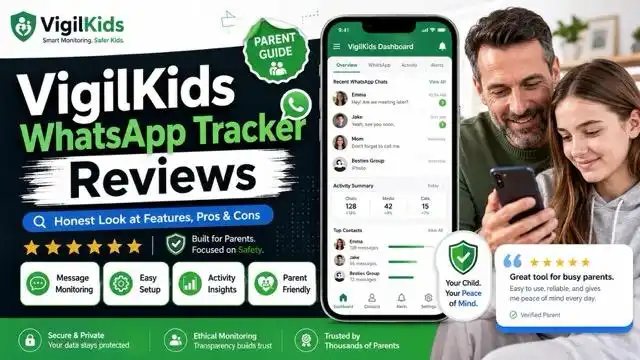
VigilKids WhatsApp Tracker at a Glance
Verdict: The VigilKids WhatsApp tracker is built for parents who want more context than a basic screen-time report can provide. Its strongest advantage is the range of supported WhatsApp insights it can organize in one dashboard, including available chats, contacts, calls, media, activity patterns, keyword alerts, and on-screen context. What appears depends on the child’s device, operating system, connection method, permissions, app version, and plan.
- Best for: Parents who want detailed, transparent WhatsApp safety monitoring on a child’s device.
- Not ideal for: Anyone seeking secret access to an adult’s account or guaranteed access to every private message.
- Platforms: VigilKids now offers Android and iPhone/iPad monitoring options, but setup and available features can differ by platform.
- Setup: Android requires one-time access to the supervised device, a pairing code, and the permissions needed for selected features.
- Price: Plans and promotional rates can change; check the VigilKids pricing page for current terms.
What Is VigilKids?
Quick answer: VigilKids is a parental control and monitoring app that helps authorized parents review supported WhatsApp activity, device use, safety alerts, and location information from a family dashboard. It does not trace a WhatsApp account from only a phone number or bypass WhatsApp encryption.
Key WhatsApp and Monitoring Capabilities
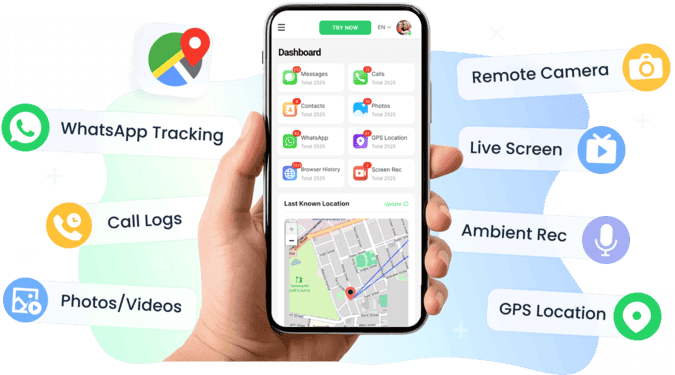
- Chats and media: Review supported WhatsApp conversations, photos, videos, voice notes, and files captured after setup.
- Calls and contacts: Check available voice or video call activity and identify unfamiliar contact numbers.
- Safety alerts: Use keyword alerts and available media-risk signals to focus on activity that may need context.
- Screen context: Use supported screenshots or screen recording on compatible Android devices when the required permissions are enabled.
- Device context: Combine WhatsApp insights with supported location, app-use, browser, and screen-time information.
Setup and Practical Reality
- Initial setup: Android requires one-time authorized access to the child’s device, installation, pairing, and approved permissions.
- Platform support: Android and iPhone/iPad use different connection methods and may not provide identical WhatsApp features.
- Main limit: VigilKids cannot retrieve activity that was never captured before installation or permission setup.
- Responsible use: Use it only on a child’s device you own or are legally authorized to manage, with disclosure where required.
If you are still comparing brands, start with our broader guide to the best WhatsApp tracker apps for parents. This page focuses specifically on how VigilKids works and what families should understand before choosing it.
VigilKids WhatsApp Monitoring Features Explained
VigilKids approaches WhatsApp monitoring from the parent–child relationship, not an investigator–target relationship. The goal is to help you identify meaningful safety signals without treating every ordinary conversation as a problem. For a broader family framework, see our guide to transparent WhatsApp parental monitoring.
The eight capabilities below explain what makes VigilKids different from an online-status checker or a simple chat export. They also clarify where device permissions and platform support affect the information available.
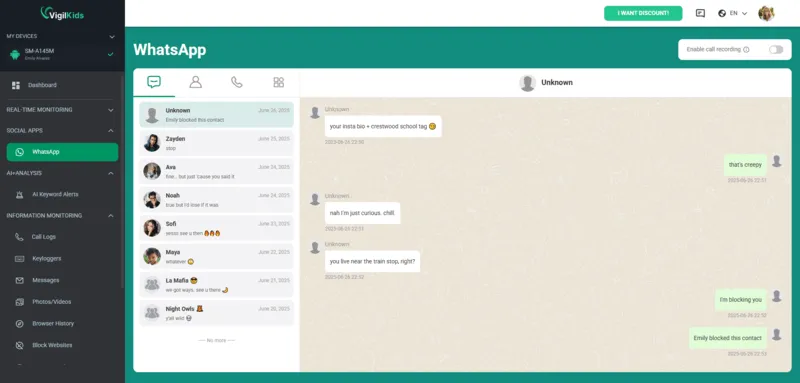
Review Supported WhatsApp Chats in One Dashboard
VigilKids helps parents monitor WhatsApp messages by organizing supported conversations from the child’s connected device. Depending on the platform and permissions, the dashboard may show message text, group activity, contact details, and timestamps in a chronological view.
Why it stands out: Search and date filters help you narrow a large message history to a particular contact, time period, or concerning phrase. That makes the dashboard more useful for reviewing a specific safety concern than scrolling through every routine conversation. Messages that were never captured before setup cannot be retrieved later.
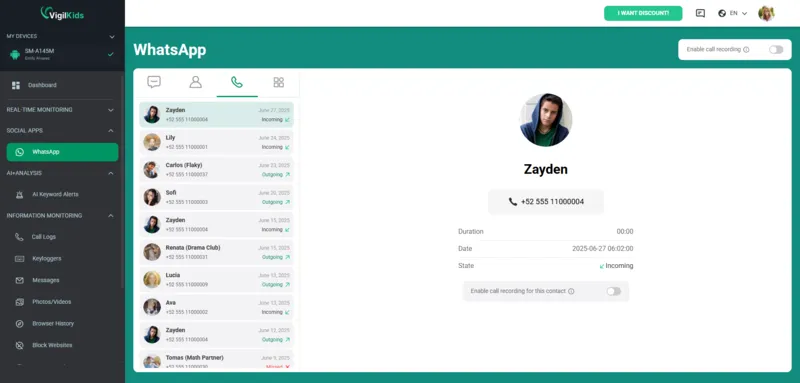
Check WhatsApp Voice and Video Call Activity
Supported WhatsApp call tracking can help parents review incoming and outgoing call activity, including available contact details, timestamps, call type, and duration. This provides useful context when a child frequently communicates with someone by voice or video instead of text.
Why it stands out: Chat and call context appear in the same family dashboard, making unusual communication patterns easier to spot. Call-log visibility does not mean that every call can be listened to or recorded. Learn more about the limits and uses of tracking WhatsApp call activity.
Review Shared Photos, Videos, Voice Notes, and Files
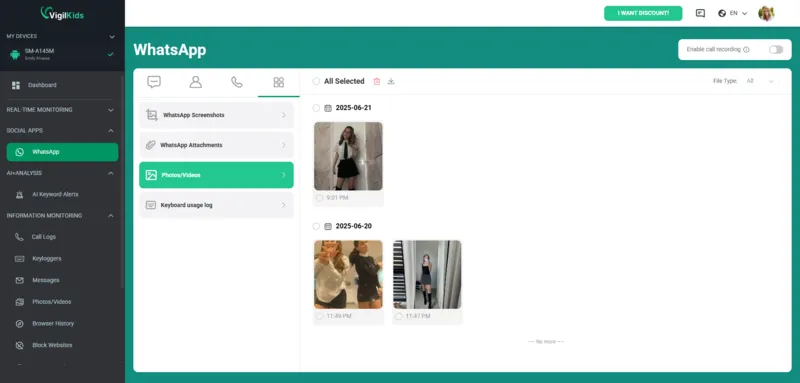
Where supported, VigilKids can organize WhatsApp photos, videos, voice notes, documents, and other shared files by time and conversation. This lets parents review available media in context instead of opening each chat separately.
Why it stands out: Media review and risk alerts can draw attention to content that may deserve a calm follow-up conversation. Availability for disappearing or View Once media is not guaranteed; it depends on whether supported screen activity was captured while the content was displayed.
Spot Unknown WhatsApp Contacts and Phone Numbers
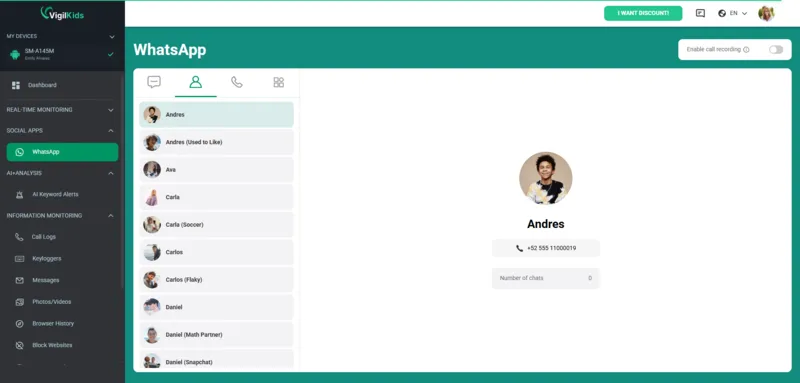
The dashboard can help parents distinguish familiar contacts from phone numbers that are not saved on the child’s device. Seeing repeated activity from an unfamiliar number may provide a useful reason to ask who the person is and how the conversation began.
Why it stands out: Contact and activity context is easier to review from one place than by opening conversations individually. Before drawing conclusions from an unfamiliar number, it also helps to understand when WhatsApp displays a phone number and why a legitimate contact may not be saved yet.
Understand WhatsApp Usage and Activity Patterns
VigilKids can organize available WhatsApp activity into a timeline, helping parents notice patterns such as repeated late-night use or an unusual increase in activity. This is often enough to start a conversation without reading every message.
Why it stands out: The dashboard connects usage patterns with other available context instead of relying only on WhatsApp’s public Last Seen label. For help interpreting that label, read what Last Seen on WhatsApp actually means.
Keep Supported Deleted-Message Context
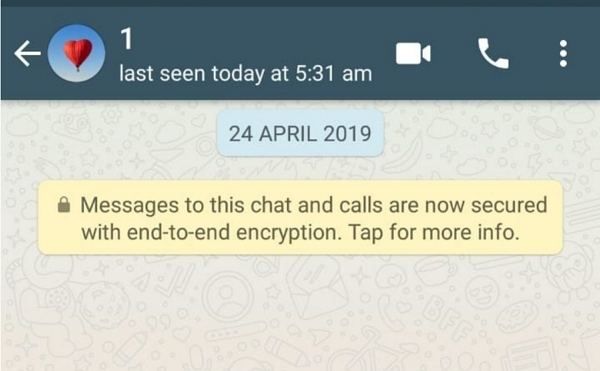
If a supported message was captured on the connected device before it was removed, that copy may remain available in the VigilKids dashboard after the sender or child deletes it in WhatsApp. This can preserve context in situations involving bullying, threats, or repeated risky contact.
Important limit: VigilKids does not recover messages that were deleted before installation, connection, or the required permission setup. For backup-based options and native recovery limits, see how to recover deleted WhatsApp messages.
Focus on Potential Risks with Keyword Alerts
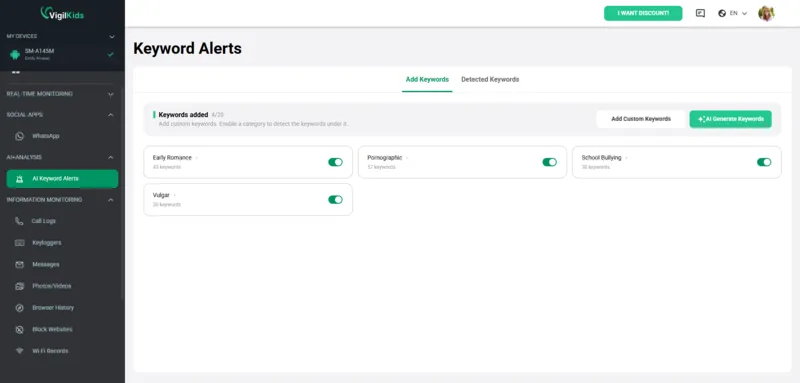
Keyword alerts can highlight supported activity containing terms connected with bullying, self-harm, drugs, sexual content, meeting an unfamiliar person, or another family-specific concern. Parents can add relevant names or phrases rather than reviewing every ordinary conversation.
Why it stands out: Custom alerts make monitoring more focused and easier to manage. An alert is a prompt to review context and talk with your child—not proof that harm occurred or that a message has only one meaning.
Add On-Screen Context with Screenshots and Screen Recording
On supported Android devices and with the necessary permissions, VigilKids can provide screenshots or screen recordings that add visual context to an alert. Parents may use an on-demand capture or an available scheduled option when a defined safety concern needs clarification.
Why it stands out: On-screen context may cover activity that a text-only export misses. However, capture is not guaranteed for every app state, View Once item, disappearing message, device version, or permission configuration. WhatsApp explains that View Once media is designed to disappear after it is opened, so do not treat any monitoring tool as a guaranteed recovery method.
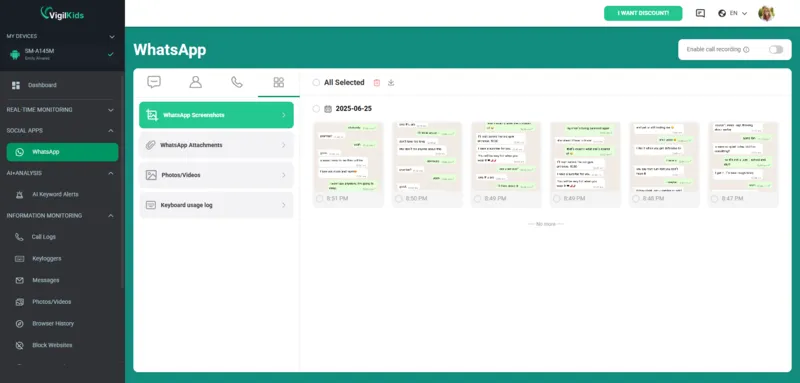
Three practical ways parents may use on-screen context:
- Review an alert: Check available screen context when a keyword notification needs clarification.
- Watch a defined time window: Use supported scheduled captures during an agreed safety period instead of monitoring continuously.
- Preserve relevant context: Keep available evidence when a conversation involves a credible safety concern.
How the VigilKids WhatsApp Tracker Works
WhatsApp end-to-end encryption protects messages while they travel between participants and keeps WhatsApp itself from reading their contents. VigilKids does not decrypt WhatsApp traffic or access WhatsApp servers. Instead, its available parental-monitoring features depend on information made accessible on an authorized, connected device after setup and permission approval.
That distinction matters: VigilKids cannot look backward and recover activity that was never captured, and the dashboard may not show identical information on every Android phone or iPhone. Sync status, operating-system restrictions, WhatsApp updates, connectivity, selected permissions, and the active plan can all affect results.
How to Set Up VigilKids for WhatsApp Monitoring
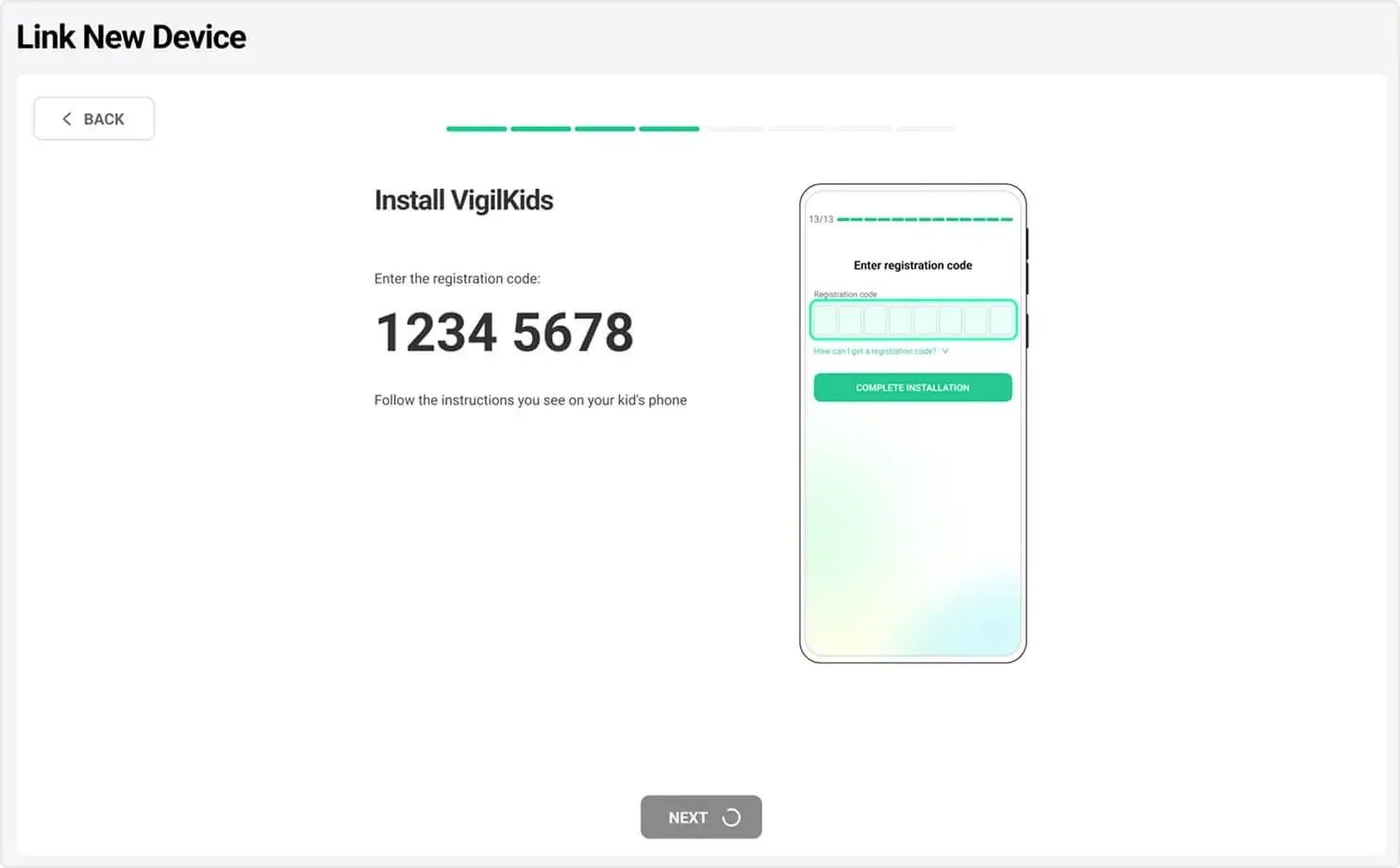
Android setup requires one-time physical access to the child’s parent-managed phone. The exact screens can vary by manufacturer, so use this overview to understand the flow and follow the current VigilKids Android setup guide for the latest device-specific instructions.
- Step 1. Create the parent account. Sign in to VigilKids, choose the appropriate plan or preview the demo, and generate the pairing code in the parent dashboard.
- Step 2. Connect the child’s Android device. With authorization and one-time device access, install VigilKids Assistant, review the requested permissions, and enter the pairing code.
- Step 3. Verify the dashboard. Confirm that the device is online and that the permissions required for the WhatsApp features you intend to use are enabled. Initial data may take time to sync.
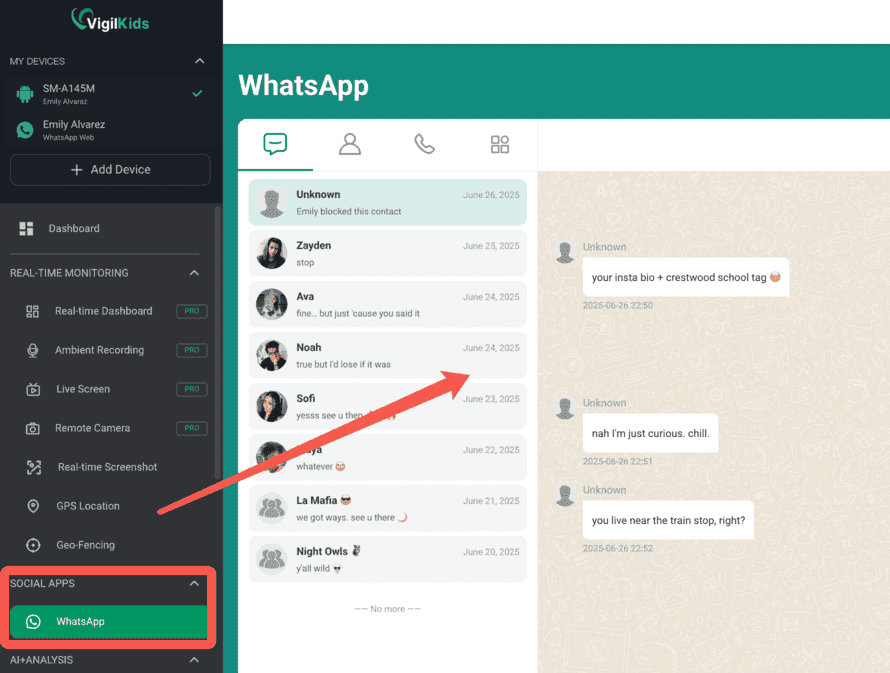
Using iPhone or iPad? VigilKids now supports an iOS monitoring option as well as Android. Follow the VigilKids iOS setup guide because its connection flow and available features differ from the Android steps above.
System Requirements and Compatibility
The detailed requirements below cover the Android connection method used for the WhatsApp tracking features explained in this review. VigilKids also offers an iOS option, but its setup flow and available features may differ.
What you need:
- Target device: Android 10 or later (Android 13 and 14 fully supported).
- WhatsApp version: any current version, including WhatsApp Business.
- Storage: ~50 MB on the child’s device.
- Parent device: any browser on any OS — Windows, macOS, Linux, iOS, Android, even a Chromebook.
- Internet: the child’s device needs occasional internet for sync (data caches locally when offline).
What Parents Are Saying
We collected feedback from VigilKids users who specifically rely on the WhatsApp tracking features. Names have been changed; situations are real.
"My older daughter was being pressured by a classmate to send View Once photos. I never would have known if VigilKids hadn't captured the screen as the messages came in. We had the conversation that night. Two months later she told me she was glad I caught it — her exact words were 'I didn't know how to say no without the monitoring as backup.'"
—— Sarah M., mother of two (13 & 16) · 6 months as a user · ⭐⭐⭐⭐⭐
"The keyword alerts were the feature that sold me. I'm not reading every message my kid sends, that's not the relationship I want. But when 'meet up after school' appears in a chat with an unknown number, I want to know. Setup took about 6 minutes, which honestly surprised me — I was expecting hours of fiddling."
—— James K., father of a 14-year-old son · 3 months as a user · ⭐⭐⭐⭐⭐
"What I love is the multi-parent dashboard — my husband and I both have access from our phones. Before VigilKids we were forwarding screenshots to each other constantly. The unknown number tracking caught an adult posing as a kid in a gaming group chat. Honestly I dropped a star because the iOS dashboard could use polish, but on Android it's been flawless."
—— Priya R., mother of an 11-year-old · 1 year as a user · ⭐⭐⭐⭐
"I tried two free 'WhatsApp tracker apps' before VigilKids. One didn't work at all after the first Android update. The other started showing pop-up ads on my kid's phone, which gave the whole game away. VigilKids has been stable through three Android updates now. The deleted-message recovery alone has surfaced two situations I needed to know about. Worth every cent."
—— David L., father of two teens · 8 months as a user · ⭐⭐⭐⭐⭐
VigilKids WhatsApp Tracker: Pros and Cons
After three months of day-to-day use and conversations with longer-term users, here is the concise balance sheet.
Messages, calls, media, contacts, and supported deleted content
Live screenshots and screen recording for on-screen context
AI image detection for potentially explicit photos
Custom keyword alerts for focused monitoring
Quick setup with no root required
Multi-parent access from a browser dashboard
Designed for transparent family monitoring
Free demo covering the dashboard experience
Designed to remain compatible across supported Android updates
Requires brief physical access to the child’s Android phone for setup
Cannot recover messages deleted before VigilKids was installed
VigilKids Pricing and Value
VigilKids offers a free demo that covers the full WhatsApp tracker feature set — including live screenshots, screen recording, AI image detection, and keyword alerts. This lets you validate that everything works on your child’s specific Android device before committing to a subscription. After the trial, plans are tiered by duration, with monthly, quarterly, and annual options. Annual plans typically work out to the cost of one streaming service per month — modest for what you get, especially compared to the cost of a single therapy session if something goes undetected. Current pricing is on the VigilKids pricing page.
Is Using a WhatsApp Tracker Legal?
Legality of a WhatsApp tracker depends on whose device is being monitored and whether they know.
- Your own device: always legal.
- Your minor child’s device (under 18): generally legal across the US, UK, EU, Canada, and Australia when you’re the legal guardian. FTC COPPA guidance covers what’s allowed with minors’ data. Disclosure to the child is best practice and required in some jurisdictions.
- Company-owned employee devices: legal in most regions when monitoring is disclosed in the acceptable-use policy and employment contract.
VigilKids is designed for transparent family monitoring within the second category. We don’t support stalkerware use cases. If you believe a tracker has been installed on your device without consent, the Coalition Against Stalkerware publishes detection and removal guidance.
Final Verdict: Is the VigilKids WhatsApp Tracker Worth It?
Yes — for Android families who want deeper visibility into WhatsApp activity. VigilKids stands out with features like live screen recording, AI image detection, keyword alerts, and monitoring for deleted or View Once content. It doesn’t just show usage stats; it helps parents understand what’s actually happening in chats. While families needing only basic screen-time controls may prefer simpler tools, VigilKids is one of the most complete WhatsApp tracker apps available in 2026, and the free trial makes it easy to test on your child’s device before subscribing.
VigilKids WhatsApp Tracker FAQs
How can I track my child’s WhatsApp activity?
Start with WhatsApp privacy settings and clear family rules. If additional supervision is justified, install VigilKids on a child’s device you own or are authorized to manage, complete the required setup and permissions, and review supported chats, contacts, calls, media, and alerts from the parent dashboard.
Is there a tracker that can track WhatsApp usage?
Yes. A parental monitoring app may show supported WhatsApp usage and device-based activity after authorized setup. An online-status tracker is different: it usually shows only availability patterns and cannot provide reliable access to private chats.
How can I see my child’s WhatsApp messages on my phone?
After the child’s supported device is connected with the required authorization and permissions, you can open the VigilKids dashboard from your phone’s browser and review available WhatsApp information. What appears varies by Android or iPhone setup, device version, permissions, connectivity, and plan.
Can parents monitor WhatsApp messages?
Parents may be able to monitor supported activity on a minor child’s device they own or are legally authorized to supervise. Device ownership, the child’s age, local law, disclosure, consent, platform rules, and the type of data collected can all affect what is permitted.
Can I link my son’s WhatsApp to my phone?
WhatsApp Linked Devices can connect an account to another authorized device, but the linked session remains visible in WhatsApp settings. For ongoing parental safety context, use a transparent monitoring setup only when you have the authority to manage the child’s device.
Can someone see my WhatsApp chat without me knowing?
Unauthorized access is possible through an unknown linked device, stolen verification code, exposed backup, or monitoring software installed without permission. Check WhatsApp’s Linked Devices list, account alerts, installed apps, and powerful device permissions if you suspect access.
Does VigilKids work on Android and iPhone?
VigilKids offers Android and iPhone/iPad monitoring options, but setup methods and available WhatsApp features can differ. Confirm current compatibility, connection requirements, and plan coverage before purchasing.
Start Using VigilKids Today
Five-minute setup, free trial covering the full feature set, and a transparent monitoring model your child will know about. If WhatsApp is the messaging app where the conversations you most worry about are happening, this is the tool built to address that.
Track WhatsApp Activity Transparently
Every message, every call, every photo — plus live screenshots and screen recording to see exactly what’s on screen. VigilKids gives parents complete WhatsApp visibility while keeping the child informed about monitoring.
Sources
WhatsApp: About end-to-end encryption
WhatsApp: About View Once media
Coalition Against Stalkerware: Safety resources
Research checked August 31, 2026. Product features can vary by device, operating system, WhatsApp version, region, permissions, connection method, and subscription plan.
Hot Topics for WhatsApp Monitoring

Hack WhatsApp Safely: 7 Best WhatsApp Monitoring Apps in 2026
Looking for a safe way to monitor WhatsApp? Compare 7 authorized parental monitoring apps, their best uses, limits, and setup needs for 2026.
Does WhatsApp Have Parental Controls? Full 2026 Guide
hatsApp has no built-in parental controls. Learn how to set up safe monitoring in 2026 using WhatsApp's privacy settings, family rules, and the right app.

How to Find Someone on WhatsApp (2026 Guide)
Learn how to find someone on WhatsApp without a phone number and how to locate contacts. Discover Vigilkids for safe parental monitoring.