
A WhatsApp user asked:
Does “Last Seen” mean someone was using the app—or looking at this chat?
What does Last Seen mean on WhatsApp? One small timestamp can start a much bigger story in your head: they were active at 10:42, so why did they not reply? Before treating it as a clue about a message or conversation, it helps to know exactly what WhatsApp records—and what it leaves out.
This guide separates fact from assumption, fixes common visibility problems, and shows when Last Seen is not enough context.
What Does Last Seen Mean on WhatsApp?
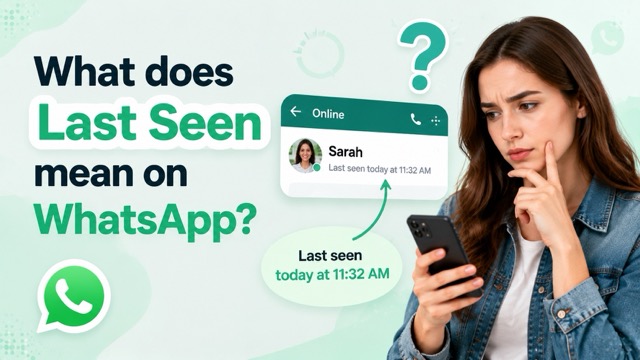
Last Seen shows the last time someone was active on the WhatsApp app — not specifically in your chat.
This means they could have been reading other conversations, checking status updates, or simply opening the app briefly.
The Online status is different. It only appears when someone is actively using WhatsApp at that exact moment.
- Last Seen = the last time they used WhatsApp
- Online = they are using WhatsApp right now
Also, Last Seen is not a read receipt. Even if it's recent, it doesn't mean they've opened your message. Only blue ticks confirm that.
Message ticks answer a different question from Last Seen. See what one tick on WhatsApp means when you need to distinguish sent, delivered, and read messages.
Why Can’t I See Someone’s Last Seen on WhatsApp?
If Last Seen is not showing on WhatsApp, the cause is usually privacy, contact visibility, blocking, or a temporary technical issue.
Privacy Settings Hide the Timestamp
The contact may share Last Seen with contacts only, exclude selected people, or share it with nobody. Your own setting matters too: WhatsApp generally limits your ability to see other people’s Last Seen when you do not share yours.
You Are Not in Their Contacts
A “My Contacts” setting only includes phone numbers saved by that person. Visibility may also be limited when you have not previously messaged or called each other.
One of You Blocked the Other
A missing Last Seen can be one sign of blocking, but it is not proof by itself. Profile visibility and message delivery have other explanations too. See what else changes when you block someone on WhatsApp.
WhatsApp Has a Connection or App Issue
An outdated app, weak connection, linked-device delay, or short service disruption can stop the timestamp from loading correctly.
Do not assume you were blocked based on Last Seen alone. Profile details can also be hidden by privacy settings, and message delivery may be delayed for ordinary network reasons.
How to See and Change Your Last Seen Settings
You can manage who sees your WhatsApp Last Seen status from Settings > Privacy > Last Seen & Online. The steps vary slightly depending on your device:
- iPhone: Open WhatsApp, tap Settings, then go to Privacy > Last Seen & Online.
- Android: Open WhatsApp, tap the three-dot menu, select Settings, then go to Privacy > Last Seen & Online.
- WhatsApp Web or Desktop: Open Settings > Privacy > Last Seen & Online. If the option is not available, update your settings from the WhatsApp mobile app linked to your account.
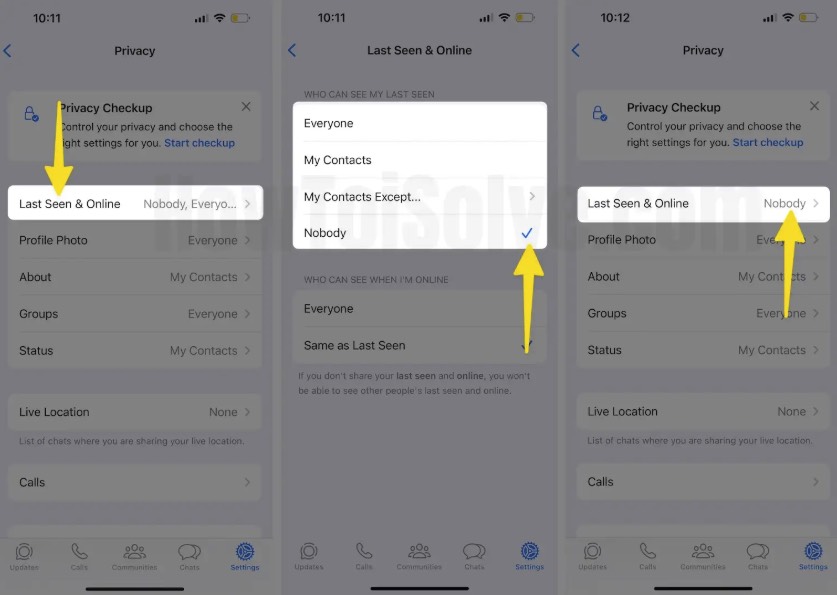
WhatsApp provides several Last Seen visibility options:
- Everyone — allows your Last Seen status to be visible according to WhatsApp’s current privacy rules.
- My Contacts — shows your Last Seen status only to people saved in your contacts.
- My Contacts Except — hides your Last Seen status from selected contacts.
- Nobody — hides your Last Seen status from everyone.
For your online status, use the Who can see when I’m online option. You can choose Everyone or Same as last seen, which applies the same visibility rules to your Online status.
If you are trying to keep your timestamp from changing, make sure you understand how WhatsApp Last Seen works first. Our guide on freezing Last Seen on WhatsApp explains the limitations and privacy considerations.
How VigilKids Helps You Understand WhatsApp Activity
Last Seen can show when a WhatsApp account was recently active, but it does not explain what happened during that activity, such as whether messages, media, or files were exchanged.
The product is useful for parents and guardians managing a family device, as well as other people who own or are legally authorized to manage the monitored device. It is not a way to reveal a contact’s private Last Seen or access a WhatsApp account by entering a phone number.

What VigilKids Can Do
- Chats and media: Review supported messages, voice notes, photos, videos, and files from one dashboard.
- Contacts and calls: Check supported contact details and WhatsApp call activity.
- Alerts that add context: Use keyword and supported media alerts as part of a transparent WhatsApp monitoring setup.
Start in 3 Simple Steps
- Step 1. Create a VigilKids account and choose the plan that fits your device.
- Step 2. Follow the setup guide on a device you own or are authorized to manage, then grant the required permissions.
- Step 3. Open the online dashboard and review the WhatsApp information supported by your device and plan.
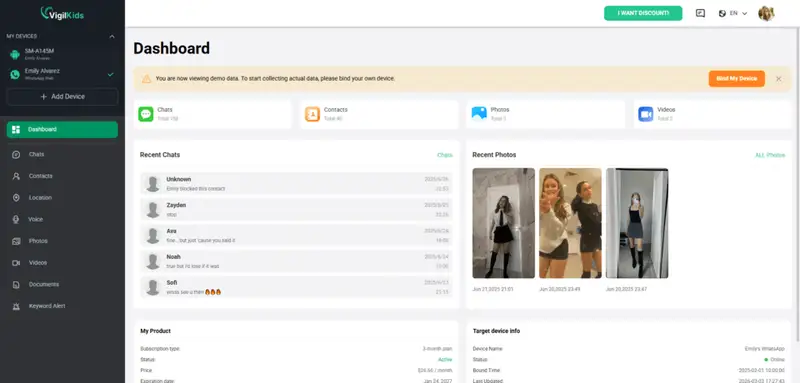
Available WhatsApp information depends on the device, operating system, permissions, app version, and plan. Use VigilKids only on a device you own or are legally authorized to manage, and follow applicable notice and consent requirements.
Need a broader comparison before choosing a tool? See our WhatsApp tracker comparison.
FAQs About WhatsApp Last Seen
Q1: Does “Last Seen” on WhatsApp mean they are looking at your conversation?
No. It means the account was active on WhatsApp, not that the person opened your chat. Blue ticks are the relevant read indicator when read receipts are enabled.
Q2: Can I see if someone is checking my Last Seen on WhatsApp?
No. WhatsApp does not provide a viewer list or notification for Last Seen. Be cautious with third-party apps that claim to identify viewers.
Q3: Can you tell if someone is talking to someone else on WhatsApp?
No. Last Seen and Online only show account activity. They do not identify a conversation, contact, or action inside WhatsApp.
Q4: Can you be blocked on WhatsApp and still see Last Seen?
A current Last Seen usually means that contact is still sharing the timestamp with you. However, visibility can change because of privacy settings, so no single status should be treated as definitive proof about blocking.
Q5: What does “Last Seen today” mean on WhatsApp?
It means the account was last active on WhatsApp earlier that day. It does not show which chat was opened or whether your message was read.
Conclusion
Last Seen on WhatsApp means the most recent time an account used the app—not that someone opened your conversation, read your message, or spoke to a particular contact. If the timestamp disappears, check privacy settings and connection issues before drawing conclusions.
When an authorized device needs more context than a timestamp can provide, explore VigilKids WhatsApp monitoring to review supported messages, media, contacts, calls, and alerts from one dashboard.
See More Than a Last Seen Timestamp
Connect a device you own or are authorized to manage, then review the WhatsApp information supported by your device, permissions, and plan.
Sources
Feature explanations were checked against WhatsApp’s official help pages. The Reddit discussion is included only to illustrate a common user question, not as factual authority.
- WhatsApp Help Center: About Last Seen and Online
- WhatsApp Help Center: How to Change Your Privacy Settings
- WhatsApp Help Center: Being Blocked by Someone
- Meta: WhatsApp Privacy Checkup and Online Privacy
- Reddit discussion: Does Last Seen refer to the app or one chat?
Research checked on July 29, 2026. WhatsApp and VigilKids features can vary by app version, device, operating system, region, permissions, and plan.
Hot Topics for WhatsApp Monitoring
How to Use the Same WhatsApp on Two Phones (2026 Guide)
Want WhatsApp on two phones? Learn the official way to use one account on multiple devices, plus safe, consent-based options for monitoring a child's WhatsApp.

Can You Use a Google Voice Number for WhatsApp in 2026? (Full Guide)
Can you use a Google Voice number for WhatsApp in 2026? Discover what still works, why verification fails, and the best alternatives like VigilKids.
How to Monitor WhatsApp Messages Without Target Phone
Learn how to monitor WhatsApp messages without the target phone using safe, legal methods like VigilKids. Real-time tracking, setup guide, and tips.