
You can monitor WhatsApp messages without the target phone in your hand after an authorized one-time setup, but no legitimate tool can remotely enter an account with zero access, consent, or verification. Parents managing a child’s device can use VigilKids or WhatsApp’s official linked-device feature; backups only recover earlier chats and are not live monitoring.
The right choice depends on whether you need ongoing updates, a one-time chat recovery, or an official record for a safety incident. This guide compares five realistic methods and explains the access each one requires. For a broader overview, see how to track WhatsApp on another phone responsibly.
Can You Monitor WhatsApp Without Having the Phone?
Yes, but only after the WhatsApp account or parent-managed device has been connected legitimately. A web dashboard or linked companion device can then show supported activity remotely, so you do not need to keep taking the phone back. Initial authorization normally requires brief access to the phone, an on-screen QR scan, and any biometric or account confirmation WhatsApp requests.
 Tips
Tips
No-access promise: not credible. A service claiming it can read encrypted WhatsApp chats using only a phone number is not using an official account-linking path.
One-time setup: realistic. After an authorized connection, supported updates can remain available remotely until the session is logged out, revoked, or otherwise disconnected.
Parents should decide what information is necessary before choosing a tool. If the goal is child safety rather than full conversation review, start with WhatsApp privacy settings and a transparent WhatsApp parental monitoring plan.

5 WhatsApp Monitoring Methods Compared
VigilKids and WhatsApp Linked Devices can provide ongoing access after authorization. Backup restoration, by contrast, produces a point-in-time copy rather than live monitoring. An already-open desktop session is convenient but fragile, while a legal request is an evidence route for serious incidents—not a consumer monitoring method.
| Method | Ongoing updates | Initial requirement | Best fit | Main limitation |
|---|---|---|---|---|
| VigilKids for WhatsApp | ✅ | Brief phone access + authorization | Parent-managed child account | Connection can be revoked or interrupted |
| Linked Devices | ✅ | QR scan + phone confirmation | Your own or consented account | Visible in WhatsApp settings |
| Cloud backup restore | ❌ | Same number, cloud account, and backup key if enabled | Account recovery or migration | Snapshot only; restore can overwrite current state |
| Existing web/desktop session | ✅ | Previously authorized session | Your own shared computer | Logout, revocation, or cleared data ends access |
| Formal legal request | ❌ | Law-enforcement or court process | Harassment, fraud, or abuse evidence | Not DIY; message content may be unavailable |
How to Monitor WhatsApp Messages Without Keeping the Phone
Choose one of the following methods based on who owns or manages the account, whether setup has already happened, and whether you need live updates or historical records. None of these methods authorizes access to another adult’s private account without permission.
1. Use VigilKids After One-Time Authorization
VigilKids for WhatsApp is the strongest fit for parents who need to review a child’s supported WhatsApp activity from a browser after a one-time connection. Its official setup guide requires brief physical access to authorize a WhatsApp Web connection; no app needs to be installed on the parent’s device.
After setup, the VigilKids dashboard can organize available chats, contacts, call history, shared photos, videos, documents, and keyword-matched conversations. The useful distinction is not “secret access without a phone,” but authorized setup once followed by remote dashboard review. Parents comparing wider phone oversight can also review apps for parents to track messages.
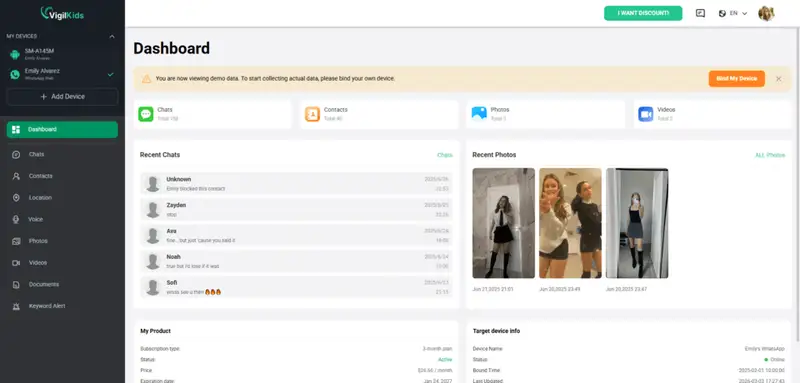
How to set up VigilKids for WhatsApp
- Step 1. Create a VigilKids account and choose the WhatsApp connection option.
- Step 2. On the parent-managed child phone, follow the dashboard instructions to authorize the WhatsApp Web connection.
- Step 3. Confirm that the expected chats and activity appear in the dashboard before returning the phone.
- Step 4. Review only the information needed for the agreed safety purpose and revisit the family rules periodically.
The connection depends on WhatsApp account authorization and connectivity. It may stop syncing if the linked session is revoked, the account changes, or WhatsApp requires a new verification step. Treat alerts and message excerpts as context for a family conversation, not automatic proof of wrongdoing.

VigilKids for WhatsApp
- View WhatsApp chats, contacts, voice and video call history from one web dashboard
- Review shared photos, videos, voice messages, documents, screenshots, and locations
- Use keyword-based conversation lists to find potentially risky messages faster
- Complete a one-time WhatsApp authorization, then review supported activity remotely
2. Use WhatsApp Linked Devices
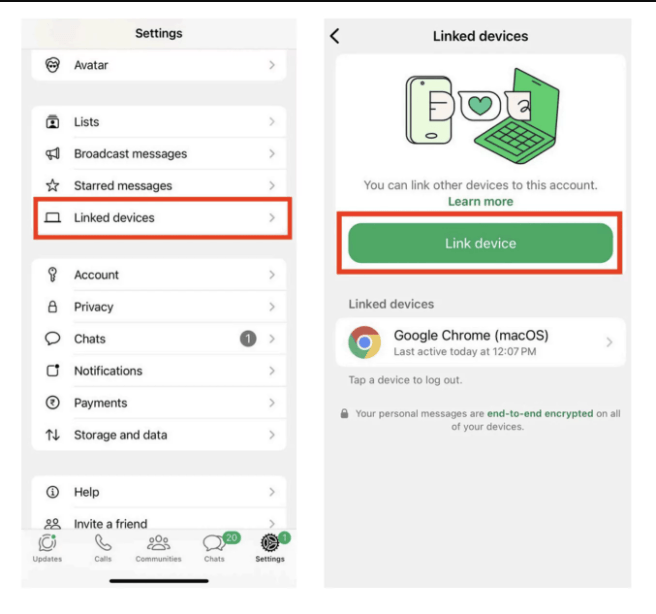
WhatsApp’s official multi-device system supports a primary phone plus up to four companion devices. The account owner must link a device by scanning a QR code and completing any phone authentication WhatsApp requires. Once linked, the companion device can connect independently and receive encrypted message updates.
- Step 1. Open WhatsApp on the account owner’s phone and go to Linked Devices.
- Step 2. Choose Link a Device and complete the phone’s biometric or passcode check if prompted.
- Step 3. Open WhatsApp Web or the official desktop app on the companion device and scan its QR code.
- Step 4. Review Linked Devices together and remove any device that is no longer needed.
- Official WhatsApp feature
- End-to-end encrypted companion sessions
- No third-party monitoring app required
- Every linked device is visible and removable
- New linking requires phone authorization
- Not a parental alert or risk-detection system
Linked Devices is appropriate for your own account or an account whose owner has agreed to the connection. It is not a safe way to clone a WhatsApp account without permission.
3. Restore an Authorized Cloud Backup
A WhatsApp backup can recover earlier chats when moving or restoring an account, but it does not provide a remote live feed. Android restoration generally requires the same phone number and Google account used for the backup; iPhone restoration similarly depends on the correct Apple account and number. If end-to-end encrypted backup is enabled, the password, passkey, or encryption key is also required.
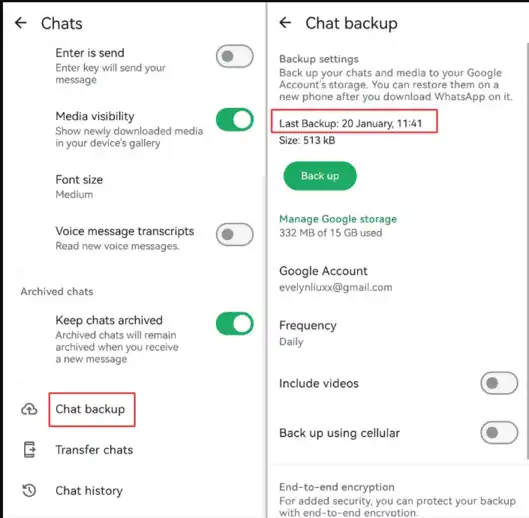
- Use backup restore for account recovery or a device migration, not continuous monitoring.
- Neither WhatsApp nor the cloud provider can unlock an end-to-end encrypted backup without the account’s recovery method.
- Restoring an old backup may omit newer messages, so confirm the backup date before proceeding.
If the real goal is retrieving a conversation that the account owner lost, follow a dedicated guide to recover deleted WhatsApp messages instead of treating backup restoration as surveillance.
4. Continue an Existing WhatsApp Web or Desktop Session
If WhatsApp Web or Desktop is already authorized on your own family computer, you can continue using that session without picking up the phone each time. This is a continuation of an earlier Linked Devices setup, not a separate way to bypass verification.
- The session remains listed under Linked Devices and can be logged out remotely.
- Clearing browser data, signing out, or a security check may require a new QR authorization.
- A shared computer should use separate operating-system profiles so other household members do not inherit account access.
For a clear explanation of what an authorized companion session can display, see how to view WhatsApp chats on another device. Do not reuse an abandoned session after the account owner withdraws permission.
5. Preserve Evidence and Use a Formal Legal Request
When WhatsApp is involved in credible threats, grooming, fraud, harassment, or abuse, preserve the evidence already available to you and contact the appropriate platform, school, safeguarding professional, or law-enforcement agency. A formal request is handled under applicable law and Meta’s process; it is not a tool that consumers can run themselves.
- Save dates, account identifiers, report numbers, and screenshots that you are lawfully able to access.
- Use WhatsApp’s in-app reporting tools when the account holder can report the conversation directly.
- Do not promise that a provider will return message content. End-to-end encryption limits what WhatsApp can read or disclose, while certain account or connection records may still exist.
This route is for safety response and evidence preservation, not everyday family monitoring. If a child may be in immediate danger, contact local emergency services rather than waiting for an app report.
Frequently Asked Questions
Can I monitor WhatsApp without ever touching the phone?
No legitimate method can create new access with zero verification. Ongoing remote review is possible after a one-time authorized setup, such as linking WhatsApp to VigilKids or an official companion device.
Can I read someone’s WhatsApp messages using only their phone number?
No. A phone number alone does not provide the device keys or account authorization needed to read end-to-end encrypted chats. Avoid sites that claim a number is enough.
Does WhatsApp notify the owner about linked devices?
Linked devices are visible in WhatsApp settings, including recent activity, and the account owner can log them out remotely. A new device also requires the phone’s authorization process.
Can a Google Drive or iCloud backup show live WhatsApp messages?
No. A backup is a stored snapshot used for restoration. It requires the matching account and phone number, plus the password, passkey, or key when end-to-end encrypted backup is enabled.
Can parents monitor a child’s WhatsApp legally?
Parents can often manage a minor child’s device, but local privacy laws and the child’s age still matter. Use transparent family rules, collect only what is necessary, and seek local legal advice for uncertain cases.
What should I do if WhatsApp messages show a real safety threat?
Preserve the evidence you can lawfully access, use WhatsApp’s reporting tools, and contact an appropriate safeguarding professional or law-enforcement agency. For immediate danger, contact local emergency services.
Conclusion
You cannot legitimately open a WhatsApp account remotely with only a number, but you can stop handling the phone repeatedly after an authorized one-time setup. Use Linked Devices for your own or consented account, backups for recovery, and formal reporting for serious incidents.
For ongoing parent-managed review, VigilKids for WhatsApp provides a web dashboard for supported chats, contacts, calls, media, and keyword-based conversation lists after authorization. Agree on the purpose first, verify the connection together, and review only what is necessary for the child’s safety.
Authoritative Sources
Hot Topics

Best WhatsApp Tracker 2026: 5 Apps Compared by Real Tests
We tested 5 best WhatsApp tracker apps in 2026 — VigilKids, mSpy, Eyezy, uMobix, Bark. Compare features, pricing, and find the right tracker for your family.
WhatsApp Parental Control Guide: Safer WhatsApp Use for Children
WhatsApp parental control explained: learn what parents can manage, how to set privacy settings, and safer ways to protect kids in 2026.
Does WhatsApp Show Your Phone Number? Who Can See It in 2026
Does WhatsApp show your phone number? See who can view it in chats, groups, Channels, and Business, plus what usernames change and how to protect your privacy.