
Best Parental Control for WhatsApp
Looking for a safe way to guide your teen's WhatsApp use? VigilKids lets parents stay informed with chat insights and media monitoring—always with transparency and the child's knowledge.
"My 12-year-old sends and deletes 50 WhatsApp messages a day. Half are gone before I can ask who he's talking to. WhatsApp has no parental controls. What actually works in 2026?"
—— Parent question on r/Parenting
WhatsApp is the most-used messaging app for teens worldwide — and it doesn't ship with a single built-in parental control. No screen time limit, no content filter, no parent dashboard. That gap leaves families with two real concerns: distraction (constant chatting eating into homework and sleep), and risk exposure (oversharing, strangers, disappearing media via View Once). The good news is parents aren't powerless.
In this guide, we'll walk through what a practical WhatsApp parental control setup looks like in 2026 — using WhatsApp's own settings, household rules, and the right monitoring app — without crossing the line into surveillance.
- Table Of Contents
- Part 1. Why Parents Consider WhatsApp Parental Control
- Part 2. What Parents Can Actually Do on WhatsApp
- Part 3. VigilKids: A Dedicated Parental Control App for WhatsApp

- FAQs About WhatsApp Parental Control
- Conclusion
Part 1. Why Parents Consider WhatsApp Parental Control
Most families looking into WhatsApp parental control are responding to one of three concrete worries — not abstract surveillance fears. Here's what actually drives the conversation:
The 3 worries that drive parents to look for WhatsApp controls:
- Distraction and lost sleep — WhatsApp is useful for homework groups, but constant chatting eats into study time and bedtime. Parents on Reddit describe kids glued to chats until 1 AM, and the next morning is predictably rough.
- Oversharing and stranger contact — teens post personal details or get added to group chats where "friend of a friend of a friend" is effectively a stranger with access to your child.
- View Once and disappearing media — the feature that auto-deletes photos and videos after viewing is the single biggest blind spot. Kids may send something they don't fully understand, and parents have zero retrospective visibility.
Part 2. What Parents Can Actually Do on WhatsApp
WhatsApp doesn't have a single "parental control switch," but that doesn't mean parents are powerless. By combining the app's built-in privacy tools with clear family rules — and, if necessary, a dedicated monitoring app — you can create a safer space for your child while still letting them use WhatsApp for school and friendships.
Use WhatsApp's Built-In Privacy Options
WhatsApp does include some settings parents can take advantage of, even though it's not a full parental control app. These small tweaks add a meaningful layer of safety — and they're free, available right now, no extra software needed.
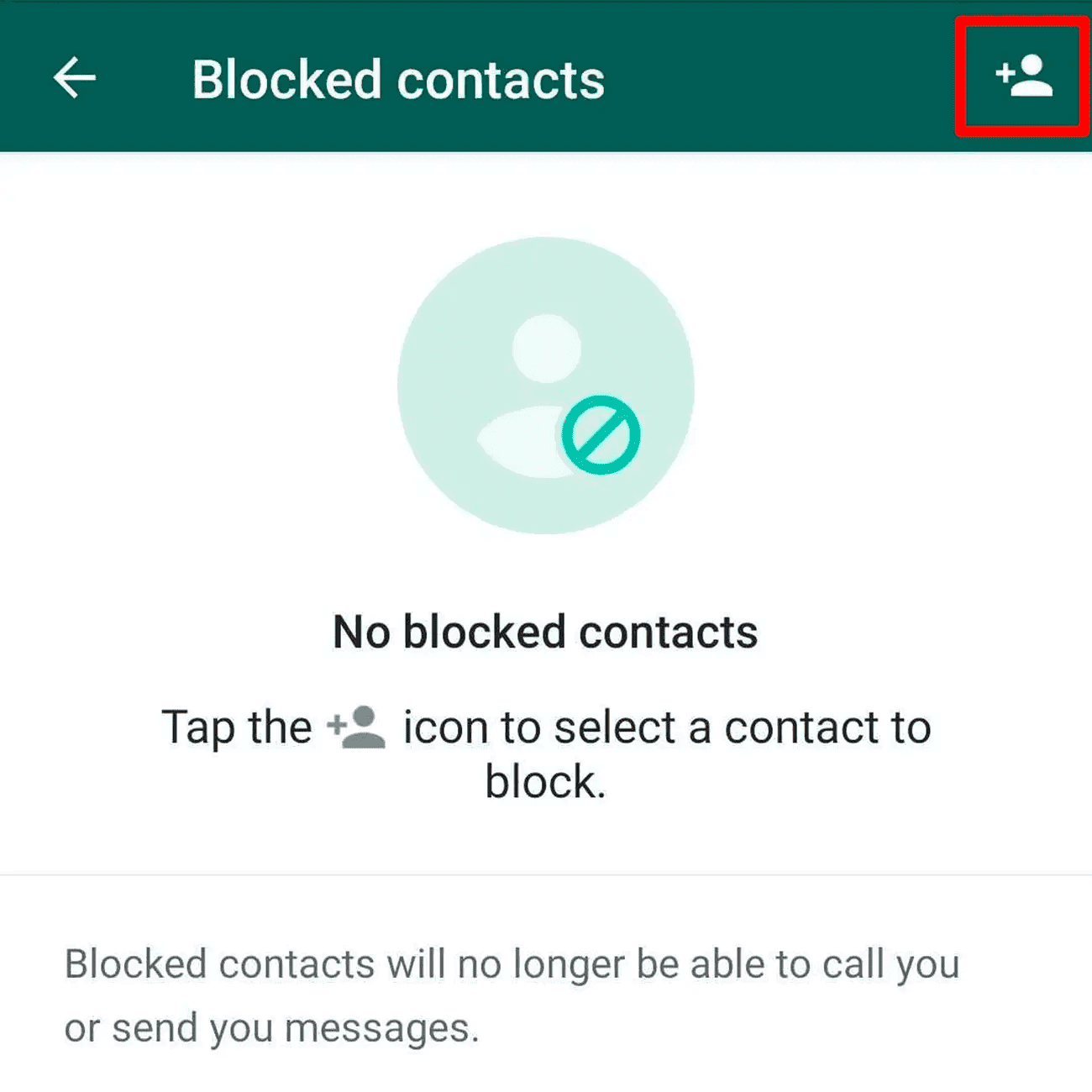
(1) Block Unwanted Contacts
Blocking prevents strangers or harmful contacts from reaching your child. Once blocked, that person can't call, message, or see your child's updates.
- Step 1. Open WhatsApp and tap the Settings icon (top-right corner).
- Step 2. Go to Account > Privacy.
- Step 3. Tap Blocked Contacts > Add New.
- Step 4. Select the contact you want to block.
(2) Report Suspicious Accounts
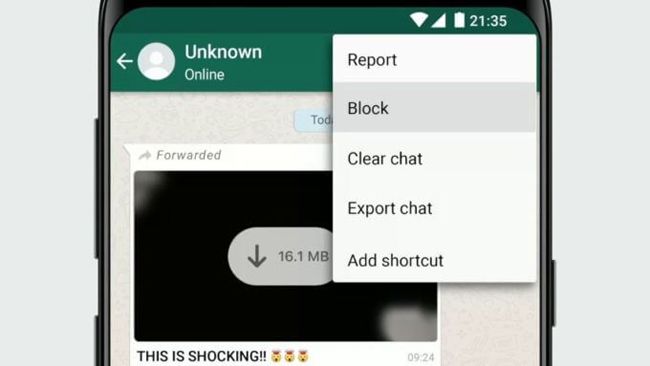
If someone is harassing your child or sending inappropriate content, you can report them. WhatsApp will review the last few messages and take action if they break the rules.
- Step 1. Open the chat with the contact.
- Step 2. Tap their name at the top.
- Step 3. Scroll down and select Report Contact.
- Step 4. Choose Report and Block for extra protection.
(3) Control Profile Visibility
Kids don't need everyone seeing their profile picture, status, or last seen. You can restrict this information to trusted contacts only.
- Step 1. Go to Settings > Account > Privacy.
- Step 2. Tap Profile Photo, About, or Last Seen & Online.
- Step 3. Choose who can see it: Everyone, My Contacts, My Contacts Except, or Nobody.
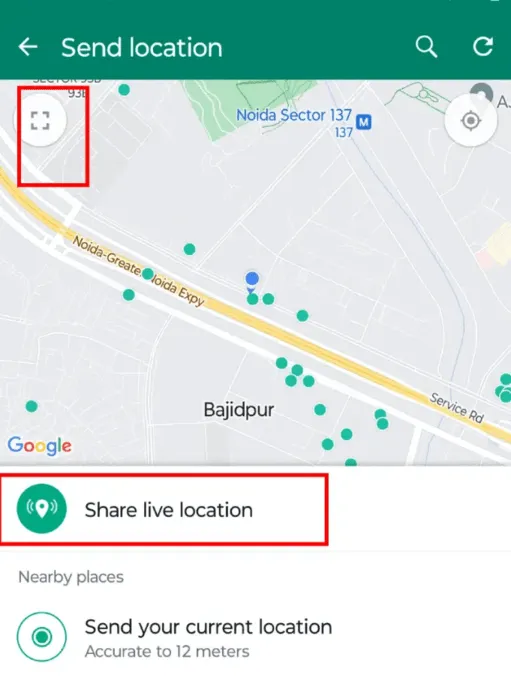
(4) Disable Live Location Sharing
Live location can reveal where your child is in real time. Unless absolutely necessary, it's safer to turn this off.
- Step 1. Go to Settings > Privacy.
- Step 2. Tap Live Location.
- Step 3. Select None or remove any shared contacts.
(5) Manage "Last Seen" and Online Status
Some kids feel pressured when others track how often they're online. Turning off Last Seen gives them privacy and reduces unwanted attention.
- Step 1. Go to Settings > Privacy.
- Step 2. Tap Last Seen & Online.
- Step 3. Choose who can see it: Everyone, My Contacts, My Contacts Except, or Nobody.
These built-in features are often overlooked, but they provide the foundation for safer WhatsApp use without installing anything extra.
Apply Household Rules and Routines
Technology alone isn't enough. Clear rules at home are often more effective than any app setting, because they shape habits rather than just blocking behavior.
- Time limits: Collect phones before bedtime so kids get proper rest and don't stay up chatting at 1 AM. Charging stations in shared rooms make this easier to enforce without conflict.
- Check installed apps periodically: Make it a habit to review what's on the device — not as a surprise inspection, but as a transparent family routine the child knows about in advance.
- Discuss risky features: Explain how View Once works and why it can be misused. Children need to understand that disappearing photos aren't truly safe — screenshots and recordings still exist.
- Agree on contact rules: Talk about who's okay to chat with, what to do when a stranger messages, and that it's always fine to come to a parent without fear of losing the phone.
These habits encourage kids to think twice before sending or sharing — which is more powerful long-term than any setting you can toggle.
Use a Dedicated WhatsApp Parental Control App
When built-in settings and household rules aren't enough — typically when there's a specific concern like bullying, predator contact, or risky media — a dedicated WhatsApp parental control app fills the gap. What these apps add over WhatsApp's own settings:
- Message visibility: See chats sent and received, including ones deleted before you'd otherwise notice.
- Time scheduling: Restrict WhatsApp to certain hours of the day automatically.
- Keyword alerts: Get notified if sensitive or dangerous terms appear in chats — without having to read everything.
- Media monitoring: Review shared photos, voice notes, and files for inappropriate content.
- AI-driven detection: Modern apps can flag explicit images or grooming language automatically.
For a transparent monitoring app that handles most of the gaps WhatsApp's own settings leave open — including capturing View Once content as it appears — see Part 3 below.
Part 3. VigilKids: A Dedicated Parental Control App for WhatsApp
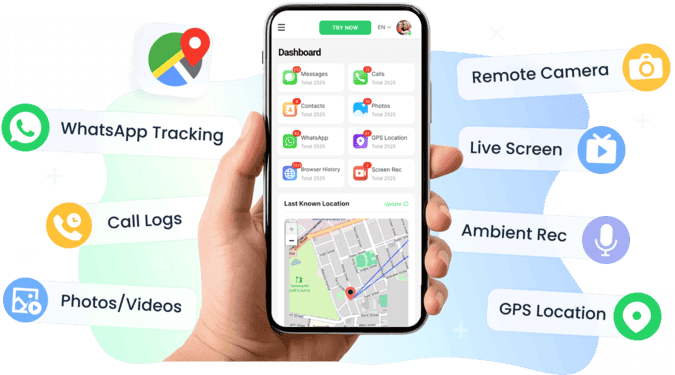
While WhatsApp's own settings are a good starting point, many parents want more visibility — especially when there's a specific concern they need to monitor. VigilKids is a parental control app for WhatsApp designed for transparent family monitoring: the child knows it's enabled, the parent gets actionable insight, and the dashboard pulls everything into one place instead of forcing you to check three apps to understand one afternoon.
Key Features for WhatsApp Monitoring
What VigilKids covers on WhatsApp:
- Message tracking — see sent and received messages, including deleted texts, so you know who your child is chatting with.
- Voice, photo, and file monitoring — review shared voice notes, images, and documents to spot inappropriate exchanges.
- Contacts and call history — check who your child is calling, with protective filters for unsafe connections.
- Keyword alerts — instant notifications if sensitive or dangerous terms appear in chats, without you reading every message.
- AI-powered image detection — automatically flags explicit or risky photos shared on WhatsApp, even in private chats.
- Screen recording and screenshots — capture live views of WhatsApp activity, including when View Once is used.
Reads messages and media that WhatsApp's encryption normally hides
Captures deleted messages and View Once content via screen recording
Transparent monitoring — built around consent, not secrecy
One dashboard for chats, calls, media, location, and keystrokes
Free trial covers the full feature set
Requires brief physical access to your child's Android device to set up
How to Set Up VigilKids for WhatsApp (3 Steps)
The full setup takes about 5 minutes — no rooting, no APK sideloading from sketchy sites, no technical background required.
- Step 1. Create your account: Sign up at VigilKids with Google or email, then log in to your parent dashboard.
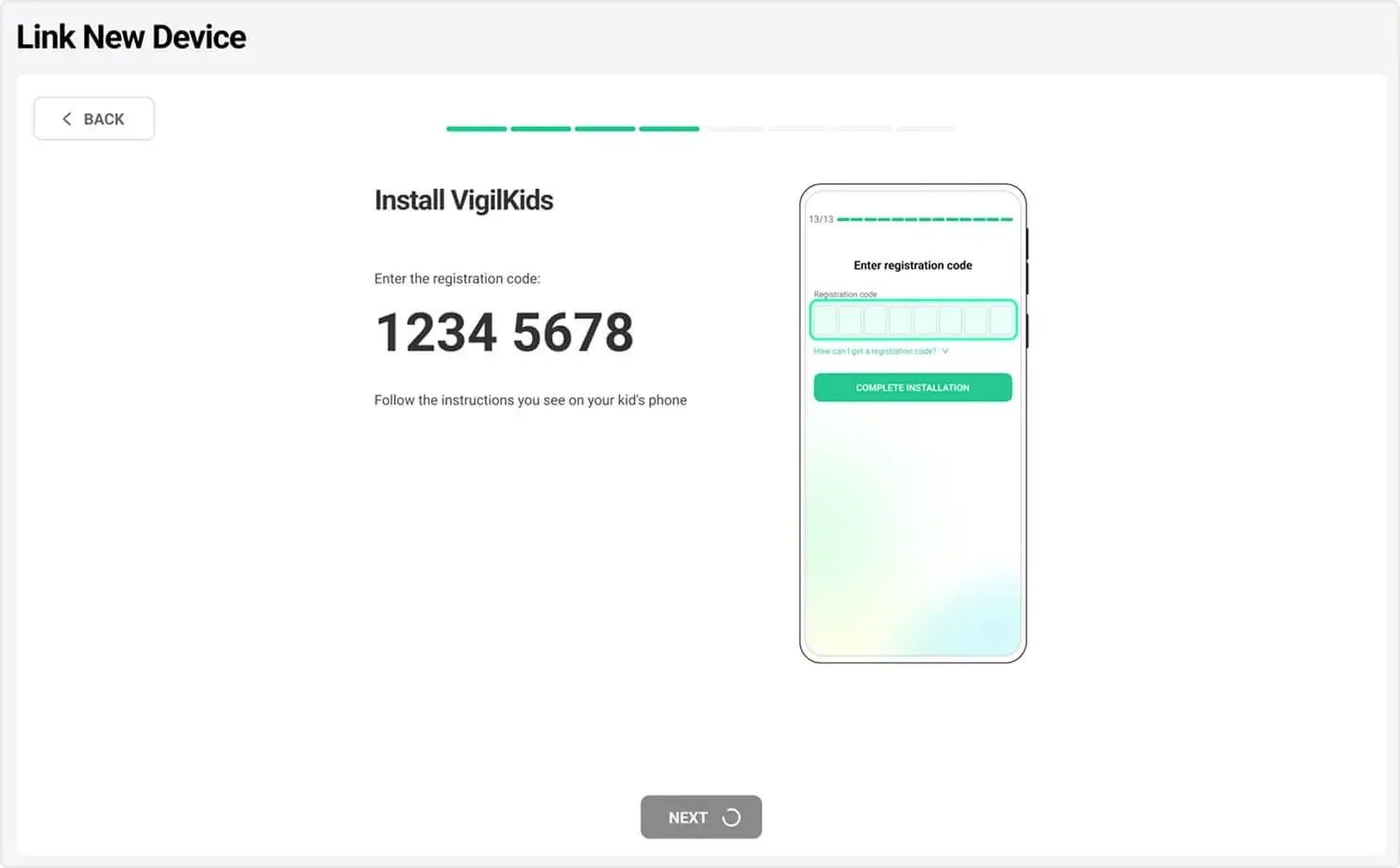
- Step 2. Connect your child's device: download the VigilKids Assistant app on the target Android phone, grant the required permissions, and enter the pairing code from your dashboard.
- Step 3. Start monitoring: return to your dashboard to view WhatsApp chats, calls, media, location, and app activity in real time.
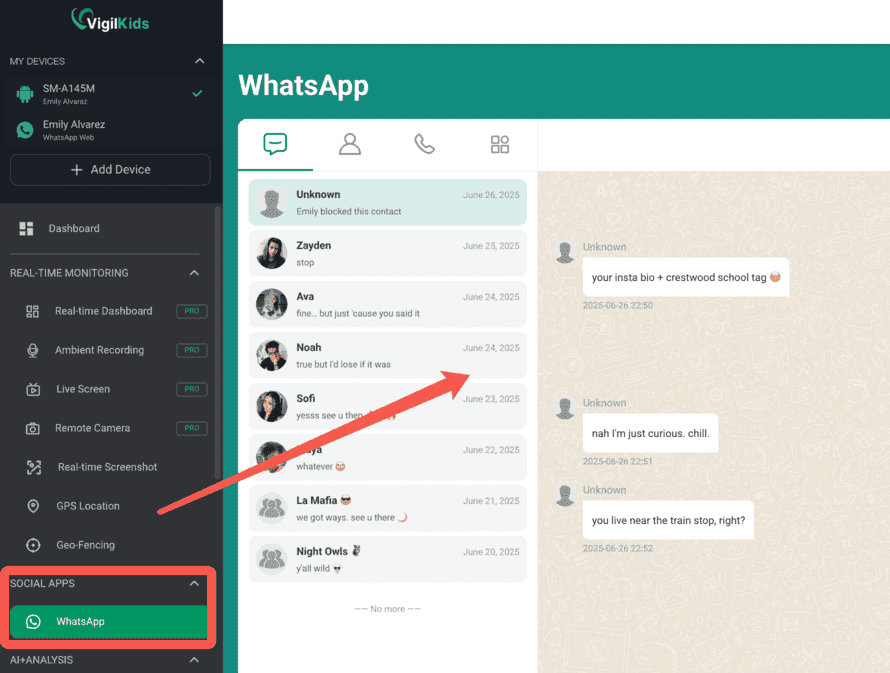
Unlike WhatsApp's basic privacy settings, VigilKids combines real-time monitoring, AI-powered detection, and customizable rules into one transparent parent dashboard. It helps you stay informed without cutting off your child's ability to use WhatsApp for school, friends, and healthy communication.
FAQs About WhatsApp Parental Control
Q1: Does WhatsApp have built-in parental controls?
No. WhatsApp ships with privacy settings (blocking, profile visibility, last seen) but no parental control features — no screen time limits, no content filters, no parent dashboard. For full parental control on WhatsApp, parents need to combine WhatsApp's privacy settings with household rules and, often, a dedicated monitoring app.
Q2: What's the minimum age for WhatsApp?
WhatsApp's Terms of Service require users to be at least 13 years old (16 in the EU, depending on jurisdiction). Many parenting and safety organizations recommend waiting longer — until 14–15 — before introducing messaging apps with disappearing media features like View Once.
Q3: Can I see my child's WhatsApp messages from my phone?
Not directly through WhatsApp itself — its end-to-end encryption is designed to prevent that. You'd either need to use your child's device (e.g., WhatsApp Web with their permission) or install a dedicated WhatsApp parental control app on the target device that reads messages locally before encryption applies. VigilKids' WhatsApp monitoring works this way.
Q4: Can WhatsApp parental controls bypass View Once?
Partially. No tool gives you retrospective access — once View Once media has been opened and dismissed, the content is gone. Some apps (including VigilKids) capture the screen the moment View Once content appears, which catches the content live. But the only complete safeguard is a conversation with your child about why sending or receiving View Once content is risky.
Q5: Is using a WhatsApp parental control app legal?
Generally yes for your minor child's device, when you're the legal guardian — in the US, UK, EU, Canada, and Australia. Disclosure to the child is best practice and legally safer in some jurisdictions. Using monitoring tools on a spouse's or any other adult's device without consent is illegal in most regions.
Conclusion
WhatsApp parental controls aren't magic — and they shouldn't be. The most effective approach blends three layers: WhatsApp's built-in privacy settings, family rules that shape habits, and (when needed) a dedicated parental control app like VigilKids for transparent visibility. Tools help, but trust and conversation are what actually keep kids safe long-term. Start with what's free, add monitoring when there's a real concern, and always pair technology with talking — that's the combination that works.
Hot Topics for WhatsApp Monitoring

How to Recover Deleted WhatsApp Messages Easily
Learn how to recover deleted WhatsApp messages on iPhone and Android using backups, tools, and apps like VigilKids to view deleted chats easily.
7 Ways to See WhatsApp Status Updates Without Being Seen
Learn how to see hidden status on WhatsApp and check updates without being seen. Discover 7 discreet methods, from native settings to parental control tools.
Does WhatsApp Notify Screenshots of Chat? 2026 Guide
Does WhatsApp notify screenshots of chat? Learn the truth, how screenshots work, privacy risks, and how to protect kids with VigilKids.