Before You Begin
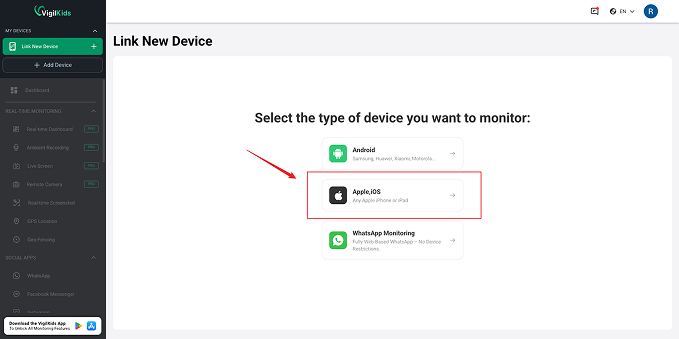
Connect an authorized iPhone through iCloud and review supported data from your VigilKids dashboard—no jailbreak is required.
Create the parent account you will use to connect iCloud and review supported iPhone data. You can explore the demo first, then choose a plan when you are ready to connect a device.


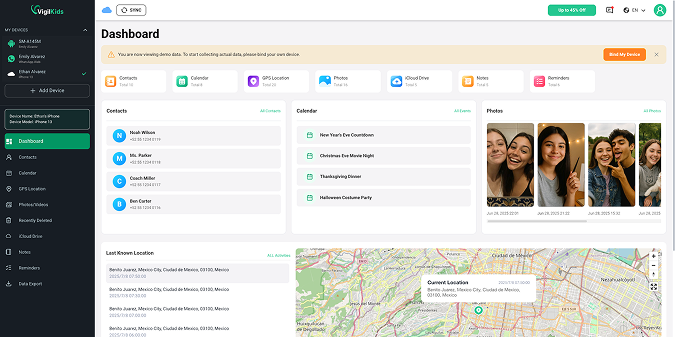
VigilKids will begin retrieving supported iCloud data after verification. The first synchronization may take some time depending on the amount of available data and the iCloud connection.

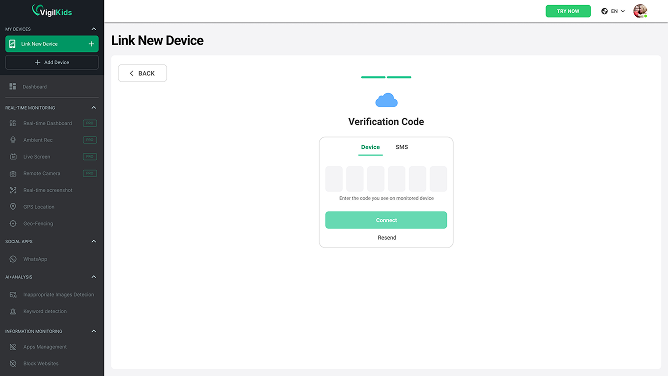
Confirm the trusted Apple device is online, check the phone number linked to the Apple account, then request a new code.
Re-enter the Apple ID and password, approve any Apple sign-in alert, and confirm that two-factor authentication is completed.
Keep the iCloud account connected and allow time for the first synchronization. Only supported data already available in iCloud can be retrieved.
Yes. Sign in to the VigilKids dashboard from your phone or computer, then connect the authorized iPhone using its iCloud account details.
No. The supplied VigilKids iCloud connection flow does not require jailbreaking the authorized iPhone.
Apple will send a verification code to a trusted device or phone number. Enter that code in VigilKids to complete the iCloud connection.
Only supported data available in the connected iCloud account can be synchronized. The first sync can also take time depending on the amount of data and connection quality.
Still need help? Contact Support.
Start protecting your family with VigilKids in just a few steps.
Already a user? Open Dashboard
Send your question directly after reading the guide so our team can understand where you need help.