
Accidentally deleted an important WhatsApp chat? You may still be able to get it back—but only if a copy exists in a backup, notification preview, chat export, or another device. That is the key to how to recover deleted WhatsApp messages safely.
Start by checking the backup date before you reinstall anything, because restoring an older copy may replace newer chats. We’ll walk you through the official Android and iPhone methods first, then cover Notification History, chat exports, and an optional forward-looking safety tool for parents.
Can Deleted WhatsApp Messages Be Recovered?
Yes, deleted WhatsApp messages can sometimes be recovered—but WhatsApp support cannot simply return them from its servers. Recovery works only when another copy still exists, such as an earlier Google Account or iCloud backup, an Android local backup, a notification preview, or a chat export created before deletion.
Before you reinstall the app, check the backup date and save any newer conversations you cannot afford to lose. This one check can tell you whether restoring the backup is likely to retrieve the deleted WhatsApp messages you need—or roll your account back too far.
 Important
A backup restore is a rollback, not a merge. Messages received after the selected backup may not appear after restoration.
How to Recover Deleted WhatsApp Messages on Android
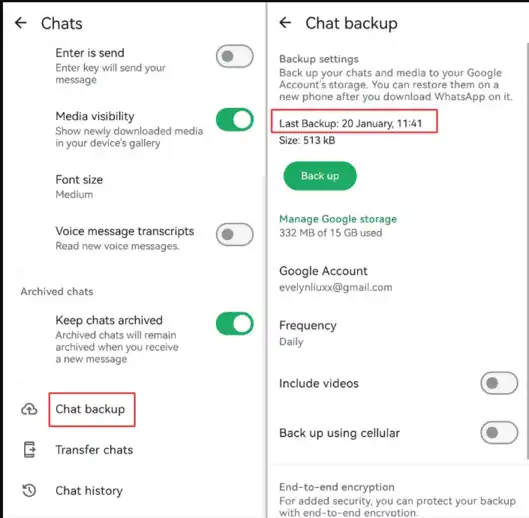
Start with WhatsApp’s built-in backup system. It is the most reliable recovery method when the backup was created after the message arrived but before it was deleted.
For example, if a message was deleted on Tuesday and your latest backup is from Monday night, that backup may contain it. Any messages received after Monday night may not return, so save important newer chats before restoring.
Restore from a Google Account Backup
- Step 1. Open WhatsApp > Settings > Chats > Chat Backup and check the backup time.
- Step 2. Uninstall and reinstall WhatsApp.
- Step 3. Verify the same phone number and Google Account.
- Step 4. Tap Restore when prompted.
- Official recovery method
- Can restore the available backup
- Easy to perform
- Requires an existing backup
- May replace newer chats
- Limited to the backup date
Restore from an Android Local Backup
No Google Account backup? Your Android phone may still contain dated WhatsApp database files. Open a file manager and check Internal storage > Android > media > com.whatsapp > WhatsApp > Databases. A file such as msgstore-YYYY-MM-DD.1.db.cryptXX is still a backup, even though it is stored locally.
Copy the Databases folder before making changes. Local-backup paths, retention, and restore behavior can vary by Android and WhatsApp version, so do not delete or overwrite the original files while testing an older copy.
Check Notification History
If you only need to see a recently deleted text, check Android Notification History. It may retain the WhatsApp preview after the sender removes the message, but it will not restore that message to the conversation.
- Step 1. Open Settings > Notifications > Notification history.
- Step 2. Turn on Notification History if the option is available.
- Step 3. Check recent WhatsApp notifications for the deleted text.
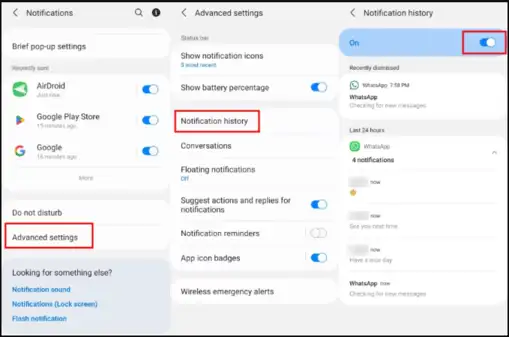
Google notes that some Android devices do not have Notification History and menu paths can differ. It must be enabled before the notification arrives. Muted chats, hidden previews, long messages, and media may not be recorded. See the official Android notification guidance for current details.
How to Recover Deleted WhatsApp Messages on iPhone
Restore from an iCloud Backup
- Step 1. Open WhatsApp Settings > Chats > Chat Backup.
- Step 2. Confirm that the backup was created before the messages were deleted.
- Step 3. Uninstall and reinstall WhatsApp.
- Step 4. Verify the same phone number and Apple ID.
- Step 5. Tap Restore Chat History.
Note: Make sure there is enough free space on both your iPhone and iCloud.
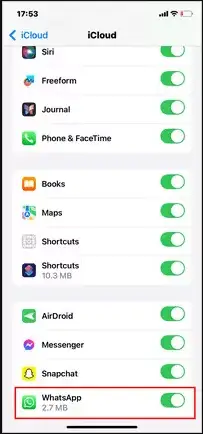
WhatsApp’s official chat restoration guide confirms that the same phone number must be used and that messages sent or received after the latest backup cannot be restored from that backup.
Check an Exported Copy
If you used Export Chat in WhatsApp before deletion:
- Search your email, Files, iCloud Drive, or computer for exported .txt files.
- Check the export folder for included attachments and media.
This works only if you exported the chat before deletion. You can read the file, but you cannot import it back into WhatsApp as a live conversation. Follow these methods for copying and exporting WhatsApp messages before attempting a backup rollback.
Deleted by the Sender or No Backup? What Still Works
WhatsApp does not include an “undelete” button after the sender uses Delete for Everyone. Your best built-in option is Android Notification History, which may preserve part of the original preview when it was enabled before the message arrived.
This method is best for reading a recent text preview. It does not reliably preserve photos, videos, voice notes, View Once media, or a message that never generated a visible notification. iPhone does not provide the same built-in persistent notification log.
Without an iCloud backup, you can recover the conversation only if another legitimate copy still exists. Check exports, shared files, a linked device, or the other participant’s copy before trusting software that promises a guaranteed device scan.
We recommend avoiding unknown recovery apps that request broad access to your iPhone or Apple Account. Their results are uncertain, and the privacy risk may be greater than the chance of recovering the chat.
You can also ask the other participant to export the conversation if it remains on their phone. If you are accessing your own account from another device, review these authorized WhatsApp access options rather than using an unknown recovery service.
How VigilKids Helps Parents Review WhatsApp Activity After Setup
If the message was deleted before a backup or notification captured it, no monitoring app can reliably bring that past content back. For a parent who is more concerned about future safety signals on an authorized child’s device, ongoing monitoring may be the more practical next step.
VigilKids web can help you review supported WhatsApp messages and activity captured after setup, including some information that may later be deleted. It cannot recover messages that were already gone before the service was connected.

VigilKids – Smart WhatsApp Monitoring
- Review Supported Messages – Check chats captured after setup.
- Notice Deleted Activity – Retain supported information captured before it is removed.
- Use Keyword Alerts – Spot selected words and possible safety concerns.
- Check Contact Patterns – See frequent or unfamiliar contacts.
- Review Shared Media – Check supported photos, videos, and voice messages.
- Understand WhatsApp Safety – Read the complete guide to transparent WhatsApp parental monitoring.
- Review Shared Locations – Learn how to use authorized WhatsApp location sharing.
How to Use VigilKids for WhatsApp Monitoring
Use VigilKids as a forward-looking option—not as a replacement for WhatsApp backups. Before setup, tell your child what the tool can collect and why you are using it.
- Step 1. Create your VigilKids account and choose a suitable subscription plan.
- Step 2. Connect the authorized child’s device and complete the required permissions or WhatsApp connection.
- Step 3. Log in to the dashboard to review the WhatsApp activity supported by that device, setup method, and plan.
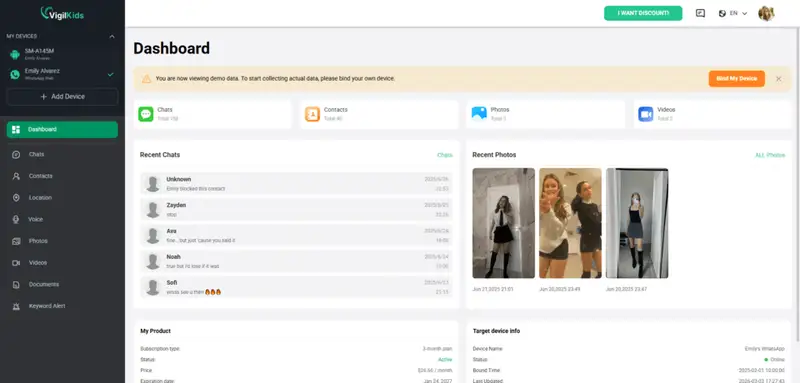
Works only after setup is completed
Does not require restoring a WhatsApp backup
Cannot retrieve content deleted before setup
Always use monitoring tools responsibly, transparently, and only on a device you own or are authorized to manage. For a broader comparison, see these WhatsApp monitoring apps for parents and their platform limitations.
How to Prevent Losing WhatsApp Messages Again
- Enable automatic WhatsApp backups daily or weekly.
- Link WhatsApp to the correct Google Account or iCloud account.
- Check the displayed backup time after important conversations.
- Export chats that need a separate work, school, or safety record.
- Enable end-to-end encrypted backups and store the passkey, password, or 64-digit key safely.
- If chats disappear unexpectedly, check whether your WhatsApp account was hacked before restoring data.
WhatsApp warns that it cannot reset or restore an encrypted backup if you lose the required password, key, or passkey. Review the official encrypted-backup guidance before enabling it.
Frequently Asked Questions
Can I read deleted messages on WhatsApp?
Sometimes. Check a backup, an Android notification preview, a previous chat export, or the other participant’s copy. WhatsApp does not provide a universal undelete button.
Can you see a WhatsApp message deleted by the sender?
Android Notification History may show part of the message if it was enabled and the notification appeared before deletion. It does not restore the message or reliably preserve media.
Can deleted WhatsApp messages be recovered without a backup?
Only when another copy exists, such as an Android notification, local Android database, previous export, or the other participant’s chat. Without another copy, recovery is unlikely.
How do I recover deleted WhatsApp messages after 24 hours?
Check for a Google Account, Android local, or iCloud backup created before deletion. Notification History is intended for recent notifications and is not a long-term archive.
Can I restore WhatsApp messages from one contact only?
WhatsApp’s standard backup restore is not selective. An exported chat lets you read one contact’s conversation, but it cannot be imported back into WhatsApp as a live chat.
Conclusion
The safest way to recover deleted WhatsApp messages is to start with a backup created before deletion. If no suitable backup exists, check Android Notification History, previous chat exports, linked devices, or the other participant’s copy before trying an unfamiliar recovery app.
If you are a parent planning for future safety rather than recovering an old deletion, VigilKids WhatsApp monitoring can help you review supported activity captured after setup on an authorized child’s device. It cannot recover earlier messages, so keep WhatsApp backups enabled too. Hope this helps you choose the right next step without risking newer chats or your privacy.
Sources
- WhatsApp Help Center: How to restore your chat history
- Google Android Help: Control notifications on Android
- WhatsApp Help Center: About end-to-end encrypted backup
Research and interface paths checked August 27, 2026. Features can vary by WhatsApp version, operating system, device, region, backup status, permissions, connection method, and VigilKids plan.
Hot Topics for WhatsApp Monitoring
6 Best WhatsApp Tracker Apps for Parents in 2026
Compare 6 WhatsApp tracker apps for parents in 2026. See features, pricing, Android and iPhone support, and which option fits your family's needs.

Hack WhatsApp Safely: 7 Best WhatsApp Monitoring Apps in 2026
Looking for a safe way to monitor WhatsApp? Compare 7 authorized parental monitoring apps, their best uses, limits, and setup needs for 2026.
How to Track WhatsApp Chats on Another Phone [Easy Guide]
Learn three authorized ways to track WhatsApp chats on another phone using Linked Devices, cloud backups, or VigilKids, with limits and steps.