
Many people search for ways to track WhatsApp calls, especially parents who want to keep their children safe online and users who need better visibility into digital communication. WhatsApp calls are widely used, but they are protected by strong end-to-end encryption, which means the actual call content cannot be accessed or listened to by others.
Because of this limitation, tracking focuses more on call activity such as logs, duration, and usage patterns rather than the conversation itself. In this guide, we'll explore practical and legal ways to monitor WhatsApp call activity effectively.
Is It Possible to Monitor WhatsApp Calls?
WhatsApp encrypts all calls end-to-end, which means:
- Call audio and video cannot be accessed externally
- No official feature allows listening to calls
- Monitoring is limited to metadata and device activity
What can sometimes be observed:
- Call history (time, duration, contact)
- App usage patterns on the device
 Note
Note
WhatsApp's end-to-end encryption is designed to protect user privacy. Any monitoring method claiming to record or listen to WhatsApp calls directly should be treated carefully.
Methods to Monitor WhatsApp Calls
| Method | View Call Logs | Real-time Monitoring | Access Call Content | Easy to Use | Overall Effectiveness |
|---|---|---|---|---|---|
| Checking WhatsApp Call Logs on Device | √ | × | × | √ | Low |
| Linked Devices (Multi-device Sync) | √ (partial) | × | × | √ | Low |
| Cloud Backup Review (iCloud / Google Drive) | √ (historical only) | × | × | √ | Very Low |
| Parental Control Tools | √ | √ (activity-level) | × | √ | High |
Checking WhatsApp Call Logs on the Device
This is the most basic and direct method. WhatsApp stores a built-in call history inside the app, which can be viewed directly from the phone.
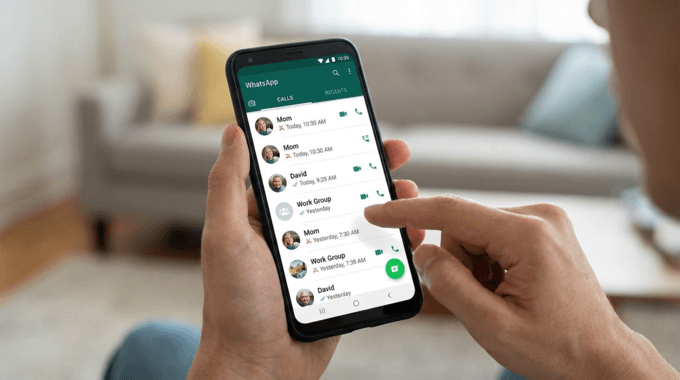
- Step 1. Open WhatsApp on the device
- Step 2. Tap the "Calls" tab
- Step 3. View incoming, outgoing, and missed calls
- Step 4. Check timestamps and call durations
Quick and easy access
No additional tools required
Useful for checking recent activity
Requires physical access to the phone
No access to call content
Call logs can be deleted manually
Using Linked Devices (WhatsApp Multi-Device Feature)
WhatsApp allows users to connect one account across multiple devices such as desktops or tablets. This feature is mainly for convenience but can offer limited visibility into activity, making it a common starting point for those wondering how to track WhatsApp calls across different platforms.
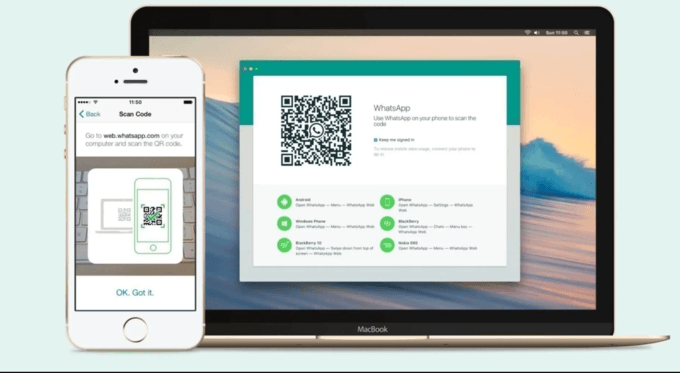
- Step 1. Open WhatsApp on the main phone
- Step 2. Go to "Linked Devices" in settings
- Step 3. Scan the QR code to connect another device
- Step 4. Access synced chats on the secondary device
Can sync WhatsApp activity across devices
Simple setup through QR code pairing
Useful for temporary account access
No access to call audio or recordings.
Call synchronization may be incomplete or delayed.
Not designed for long-term supervision.
Checking Cloud Backups (iCloud / Google Drive)
WhatsApp automatically creates backups that can be stored in cloud services. These backups can sometimes help review historical activity, which is often discussed in relation to monitor WhatsApp calls and understand past communication patterns, although they do not provide real-time tracking or access to call content.
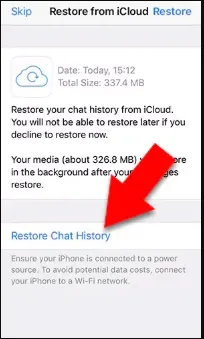
- Step 1. Check iCloud or Google Drive backups
- Step 2. Restore WhatsApp data from the backup
- Step 3. Review available chat history and media
Can recover historical WhatsApp data
Useful for reviewing older activity
Works through official cloud backup systems
Not suitable for real-time monitoring
Call logs may not always be included
Only shows information from the last backup
Using Parental Control Tools (Most Comprehensive Method)
Parental control tools provide structured monitoring by analyzing device usage behavior rather than accessing encrypted call content directly, making them a practical option for users looking for ways to monitor WhatsApp calls safely.
VigilKids is a parental control solution designed for digital safety and activity monitoring, helping users who want to understand how to monitor WhatsApp calls through usage insights and behavioral tracking rather than direct access to call content.

VigilKids
- Track WhatsApp call activity, including frequency and duration
- Monitor WhatsApp messages, usage patterns and screen time remotely
- View device activity reports from a parent dashboard
- Receive alerts for unusual WhatsApp behavior or excessive usage
- Support responsible parental supervision and digital safety
How It Works Setup Process
- Step 1. Install VigilKids on the target Android or iPhone device.
- Step 2. Connect the device to your VigilKids parent dashboard and complete the setup process.
- Step 3. Start monitoring WhatsApp activity reports, call patterns, and device usage remotely.
Provides remote activity monitoring.
Designed for parental supervision.
Easy-to-read reports and alerts.
No access to call audio or video.
Requires installation permissions.
Some features depend on device compatibility.
User Feedback
"VigilKids helped us better understand our child's WhatsApp activity without invading conversations directly. The reports were simple and useful."
—— Parent user review
Best Practices for Monitoring WhatsApp Calls
- Define a clear purpose focused on safety
- Use trusted and legitimate monitoring tools only
- Avoid excessive monitoring that harms trust
- Combine supervision with digital education
- Review reports periodically instead of constantly checking
Try VigilKids for Safer WhatsApp Monitoring
Monitor WhatsApp activity patterns, app usage behavior, and device reports through a centralized parental dashboard.
Conclusion
WhatsApp call monitoring is limited due to strong encryption, which prevents access to call content. Basic methods like call logs, linked devices, and backups only provide partial visibility.
For more structured supervision, parental control tools offer a more complete solution by analyzing usage behavior. Solutions like VigilKids help users monitor WhatsApp activity responsibly, focusing on safety insights rather than invasive access.
Hot Topics for WhatsApp Monitoring

How to Freeze Last Seen on WhatsApp? 2026 Guide
Learn how to turn off Last Seen on WhatsApp, control your privacy settings, and hide your online status easily with step-by-step methods.
How to Know If Someone Is Online on WhatsApp (Complete Guide)
Learn how to know if someone is online on WhatsApp, what online means, and the best methods to check activity. Includes safe parental monitoring tips.

Does WhatsApp Show Your Phone Number? Privacy Explained
Does WhatsApp Show Your Phone Number?