
"My 13-year-old gets 200+ WhatsApp messages a day across 12 group chats. I needed a real WhatsApp tracker, not just a screen time blocker."
— Parent on r/Parenting
WhatsApp is one of the most popular messaging apps for kids and teens, making it difficult for parents to know who their children are talking to or what happens in private chats. The best WhatsApp tracker helps parents review supported activity on a child's device they own or are authorized to manage, while encouraging transparent and responsible digital habits.
We compared six WhatsApp monitoring and parental-control apps based on supported features, Android and iPhone compatibility, setup, pricing, and practical limits. You'll see which option fits each family need—and where platform restrictions matter before you subscribe.
Quick Picks: Best WhatsApp Trackers for Parents
If you only have 30 seconds, these six options cover the main parenting needs without forcing you through a dense feature table.
- ✅ VigilKids — Best overall: cross-platform WhatsApp monitoring, with deeper phone-level context available on supported Android devices.
- mSpy — Best for parents who want an established brand with iOS and Android support and a polished dashboard.
- Eyezy — Best AI-powered WhatsApp tracker, with Magic Alerts that flag concerning conversations automatically.
- uMobix — Best quick-setup option for non-technical parents who want WhatsApp visibility without configuration headaches.
- Bark — Best if you don't want to read messages at all — it sends AI-driven alerts only when something concerning appears.
- AirDroid Parental Control — Best for Android notification context, screen-time limits, and broader device management.
6 Best WhatsApp Tracker Apps for Parents in 2026
These six apps take different approaches, from fuller device-based monitoring to risk alerts and notification context. VigilKids leads the list because its WhatsApp product supports both Android and iPhone, while its Android option adds deeper phone-level safety context.
VigilKids — Best Overall WhatsApp Tracker
VigilKids now supports authorized WhatsApp monitoring for both Android and iPhone. Its cross-platform WhatsApp connection can show supported chats, contacts, calls, and shared media in a web dashboard without requiring an iPhone jailbreak. On a compatible Android phone, VigilKids can add broader device-level context, including AI image detection and live screen recording. That distinction matters: Android and iPhone are both supported, but their setup methods and available features are not identical.
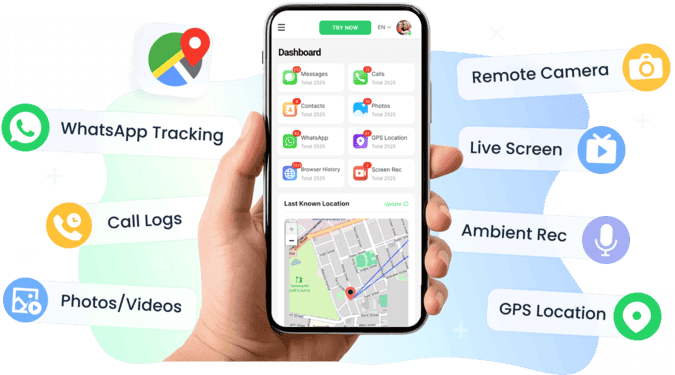
Reviews supported WhatsApp messages, calls, contacts, and shared media
Supports authorized WhatsApp connections on Android and iPhone
AI image detection flags explicit photos automatically
Multi-parent dashboard — both parents access from any browser
No jailbreak required for the iPhone WhatsApp connection
Built around transparency rather than stealth surveillance
Free demo lets parents preview the dashboard before purchase
Phone-wide tools such as live screen recording are limited to supported Android setups
Requires authorization and brief access to connect the child's WhatsApp account or device
Feature coverage varies by platform, permissions, connection method, and plan
Why VigilKids leads this list: families can connect WhatsApp from either Android or iPhone and review supported activity from a browser. Parents using the compatible Android setup can also add broader screen and device context, helping them focus on a specific concern instead of relying only on online-status tracking.
How to get started with VigilKids:
- Step 1: Create the parent account and choose the WhatsApp connection for iPhone or the compatible Android setup.
- Step 2: Follow the dashboard instructions to authorize the WhatsApp connection or grant the required Android permissions.
- Step 3: Confirm that supported data is syncing, then configure relevant alerts under clear family rules.
Feature coverage depends on the target platform, WhatsApp version, connection method, permissions, connectivity, and subscription plan. The iPhone WhatsApp connection does not include every phone-wide feature available through the Android product. VigilKids cannot retrieve content that was unavailable before the account or device was connected and syncing.
"We compared VigilKids against three other trackers before choosing. What sealed it was the live screen recording on our Android setup—we needed more context around View Once messages our 14-year-old was receiving."
—— Reviewer testing 5 WhatsApp trackers · ⭐⭐⭐⭐⭐
mSpy — Best Established WhatsApp Tracking App
mSpy has been in the parental monitoring space for over a decade, and the polish shows. The dashboard is clean, the social-chat view renders WhatsApp conversations in a familiar bubble style rather than as raw logs, and it works on both Android (full feature set) and iOS (limited features via iCloud sync). For families that prioritize brand maturity and don't mind paying premium prices for it, mSpy is the safe choice. WhatsApp coverage includes messages, media, deleted content, and basic activity tracking — though it lacks the live screen recording capability that catches View Once.
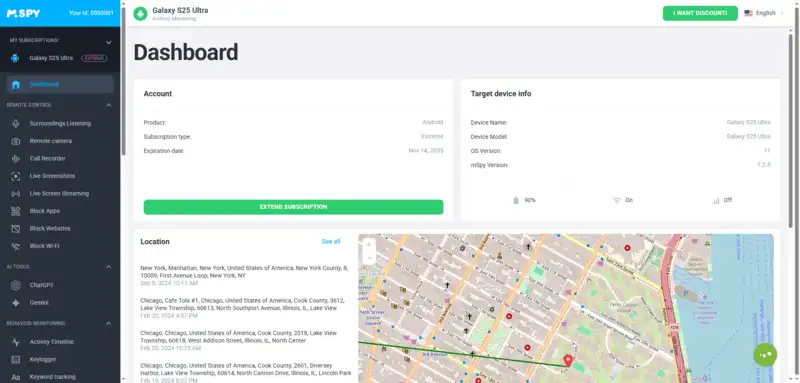
Mature, established brand with long track record
Clean, modern dashboard with chat-bubble WhatsApp view
Works on Android (full features) and iOS (limited)
Captures WhatsApp messages, media, and deleted content
Premium pricing — $48.99/month, $11.66/month on annual plan
No View Once / screen recording capture
iOS features significantly more limited than Android
Best for: parents who want a known, established brand with a polished interface and are willing to pay for it.
Eyezy — Best AI-Powered WhatsApp Tracker
Eyezy is the newest major entry in the WhatsApp tracker space, and the AI-first approach shows in two ways. First, the dashboard interface is genuinely modern — a pleasant contrast to dated competitors. Second, the Magic Alerts feature uses AI to flag potentially concerning messages based on keywords and patterns, reducing the amount of manual review parents need to do. WhatsApp coverage includes messages, media, group chats, and the AI alert layer on top. The trade-off: it's the newest tool on this list, so the track record is shorter, and some advanced features are still being refined.
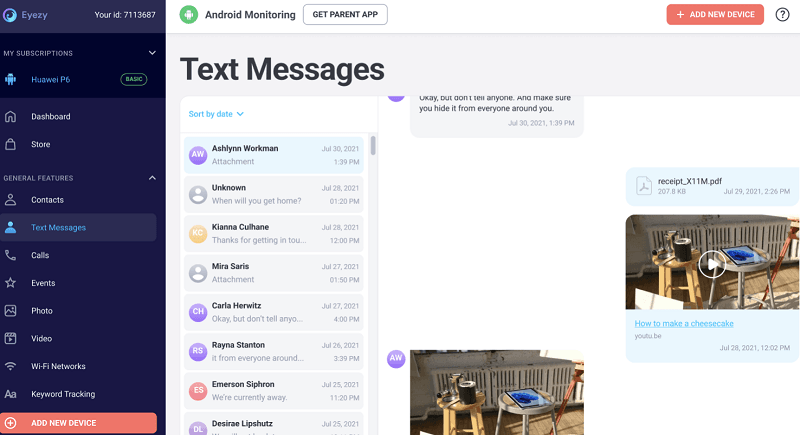
Modern interface, among the easiest of the six to navigate
Magic Alerts AI flags concerning messages automatically
Same pricing for Android and iOS
Catches WhatsApp messages, media, group chats
Annual plan $14.27/month — premium tier
Does not track WhatsApp on iPhone (Android only for WhatsApp)
AI alerts produce occasional false positives
Newer product, shorter track record than mSpy
Best for: parents who want AI-assisted monitoring instead of reading every message manually.
uMobix — Best Quick-Setup WhatsApp Tracker
uMobix wins on simplicity. Setup is among the most straightforward of the six tools. Its stated WhatsApp coverage includes messages, shared media, and contact information, although the available data depends on the platform and setup. The dashboard is less polished than mSpy or Eyezy, and the iOS feature set is reduced. For non-technical parents who prioritize a simpler setup, uMobix is the practical pick.
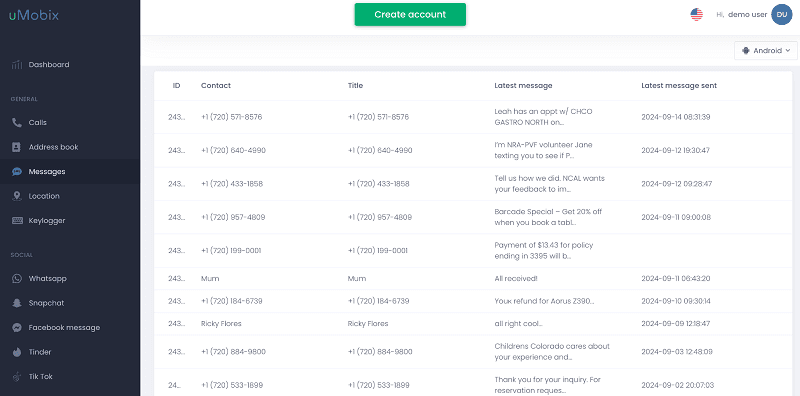
One of the simplest setups among the six options
Strong WhatsApp coverage on Android
Tracks 60+ social apps beyond WhatsApp
Annual pricing competitive with mSpy
$49.99/month monthly, $12.49/month annual — not budget-friendly
Dashboard less polished than mSpy or Eyezy
iOS WhatsApp coverage limited
No free trial; restrictive refund policy
Best for: non-technical parents prioritizing fast setup over dashboard aesthetics.
Bark — Best AI Alerts Without Reading Messages
Bark takes a fundamentally different approach to WhatsApp tracking. It doesn't give parents a full message archive — instead, AI scans WhatsApp conversations for signs of bullying, predator contact, self-harm, drug references, or sexual content, and only alerts parents when something concerning appears. For families that prioritize teen privacy and don't want a full surveillance archive, this is the most balanced approach. The trade-off: if you want to verify the full context of a flagged conversation, you can't always see the surrounding messages.
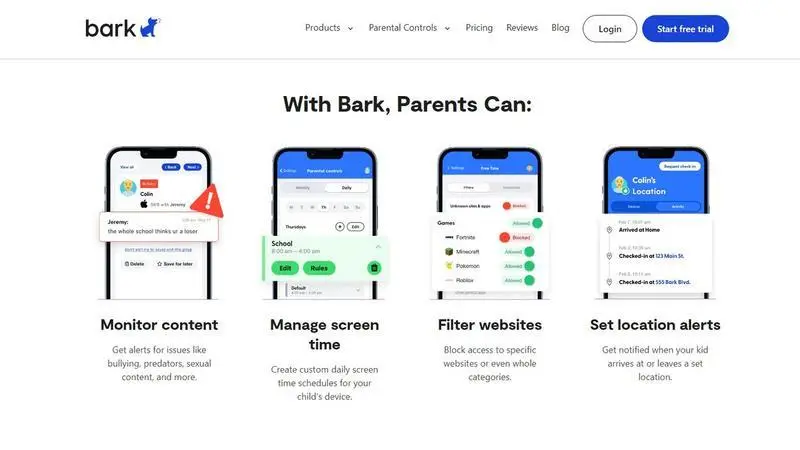
Most privacy-respecting model — no full archive, alerts only
Lower listed price than several full-archive monitoring options
AI covers bullying, self-harm, predators, drugs, sexual content
One subscription covers unlimited children and devices
Works on Android and iOS
No full message archive — only AI-flagged snippets
No View Once or screen recording capture
AI may miss context-dependent risks
Less detailed than tools that show all activity
Best for: parents prioritizing teen privacy who want alerts on real risks rather than a full message archive.
AirDroid Parental Control — Best for Android Notification Monitoring
AirDroid Parental Control can sync supported WhatsApp notifications from a connected child's Android phone and combine that context with screen-time and device-management tools. It is useful for notification awareness, but it does not create a complete WhatsApp chat archive.

Syncs supported WhatsApp notification previews from Android
Combines notification context with screen-time tools
Offers broader Android device-management features
Uses a clearly documented notification-based setup
Does not provide a complete WhatsApp message history
Muted chats and hidden previews may not appear
Depends on Android notification permissions
Available features vary by device and plan
Best for: parents who want Android notification awareness and device limits without a full conversation archive.
How to Choose a WhatsApp Monitoring App
Six tools, six different priorities. Here's how to narrow it down based on what matters most for your family.
- If you want WhatsApp support on Android or iPhone → VigilKids. Use the authorized cross-platform WhatsApp connection, or choose the supported Android setup when broader phone-level context is needed.
- If you want a long-established alternative → mSpy. It offers a polished dashboard and support for both platforms, although its iOS coverage is more limited.
- If AI-flagged conversations matter more than reading everything → Eyezy. Magic Alerts AI is the headline feature here.
- If you're not technical and prefer guided setup → uMobix. Its onboarding is comparatively straightforward, although the steps still vary by platform.
- If you don't want a full surveillance archive → Bark. AI alerts only, nothing else; most privacy-respecting model.
- If you want Android notification context and device limits → AirDroid Parental Control. It combines notification sync with broader family device controls.
For many families, VigilKids is the strongest starting point because its WhatsApp product supports Android and iPhone, while its compatible Android setup adds broader device-level features. Check the current plan and platform details before purchasing; families that prioritize a long-established brand, alert-only monitoring, or notification context may prefer another option.
WhatsApp Safety Settings for Families
Start inside WhatsApp before adding another app. Review privacy visibility, group invitations, blocked contacts, two-step verification, and linked devices with your child. If an unfamiliar session appears, follow the steps for checking whether WhatsApp was compromised.
WhatsApp is also rolling out parent-managed accounts for people below the minimum age for a standard account in their country. Supported controls can help manage parts of the account while personal conversations remain private, but availability varies by country, eligibility, operating system, version, and rollout stage. See the complete WhatsApp parental monitoring guide for native and phone-level options.
- Use WhatsApp settings for privacy, groups, blocking, reporting, two-step verification, and linked devices.
- Use Apple Screen Time or Google Family Link for bedtime, app limits, and installation rules.
- Use transparent monitoring only for a defined concern on a child's device you are authorized to manage.
- Agree on boundaries for alerts, parent review, intervention, and when monitoring can be reduced.
How We Reviewed These Apps
We compared public product documentation, stated WhatsApp features, device requirements, operating-system support, alert design, and practical limits. This is an editorial comparison, not a claim that every app completed the same controlled lab test on identical Android and iPhone devices.
Last reviewed: August 25, 2026. Features, prices, trials, refund terms, WhatsApp permissions, and operating-system support can change. Confirm current requirements on each provider's official site before purchasing.
What Makes a WhatsApp Monitoring App Useful for Parents
Not every parental control app does WhatsApp tracking well. The category has six specific capabilities that separate genuinely useful tools from generic screen-time wrappers.
The 6 capabilities that define a real WhatsApp tracker:
- Message capture — reads chats locally on the device after WhatsApp decrypts them, including group conversations and broadcasts.
- Media tracking — captures photos, videos, voice notes, and files shared in any conversation.
- Deleted message recovery — preserves content captured before deletion, surviving "delete for everyone" and disappearing messages.
- Screen capture for View Once — records screen activity to catch View Once photos and videos that vanish after viewing.
- AI risk detection — flags concerning messages, contacts, or images automatically so parents aren't reading every conversation.
- Transparency design — supports disclosed family monitoring, not covert stalkerware patterns.
Tools that nail four or more of these are worth considering. Tools that only do messages — without media, deletion recovery, or screen capture — are missing too much of where modern WhatsApp risks actually live.
Is It Legal to Monitor a Child's WhatsApp?
Many WhatsApp tracker apps are marketed as parental-control tools, but that does not automatically make every use legal. The rules can depend on who owns the device, the child's age, custody arrangements, consent or notice, and local law. Use monitoring only on a device or account you are authorized to manage, explain it to your child, and seek local legal guidance when you are unsure. Never use these tools to access a partner's or another adult's account without authorization.
WhatsApp Tracker FAQs
Q1: What is the best WhatsApp tracker app in 2026?
For many families, VigilKids is the strongest all-around option because its WhatsApp product supports both Android and iPhone. A compatible Android setup can add broader device-level context, while iPhone uses an authorized web-based WhatsApp connection without jailbreak. Bark may suit parents who prefer risk alerts instead of a fuller archive.
Q2: What can parental monitoring see on a child's WhatsApp?
Depending on the app and authorized setup, parents may see supported messages, notifications, contacts, calls, shared media, screen activity, or safety alerts. These tools do not break WhatsApp's end-to-end encryption, and none should be assumed to capture every chat or deleted item. Coverage varies by Android or iPhone, permissions, connection method, app version, and plan.
Q3: Which WhatsApp tracker works on iPhone?
VigilKids now supports authorized WhatsApp monitoring on iPhone through a web-based WhatsApp connection that does not require jailbreak or app installation. mSpy, uMobix, and Bark also advertise some iOS coverage. Do not compare brand names alone: iPhone setup and available data often differ from Android, so confirm the current iOS feature list before subscribing.
Q4: Can a WhatsApp tracker recover deleted messages?
Some tools can preserve a supported message after it has synced to the dashboard and is later deleted from WhatsApp. That is capture, not guaranteed recovery. A tracker cannot retrieve content that disappeared before the relevant account or device was connected and syncing, and results vary by platform, permissions, and message type.
Q5: Is there a free WhatsApp tracker that actually works?
Be cautious with free APKs or sites that promise remote access from only a phone number. A safer first step is an official demo or trial from a recognized parental-control provider. Check which features the trial includes, whether the child's platform is supported, and what happens when the trial ends.
Q6: Which WhatsApp tracker is fastest to install?
Setup time depends more on the platform and connection method than on the brand. VigilKids' iPhone WhatsApp option uses an authorized web connection, while its Android product requires the relevant device setup and permissions. Other apps may use an installed Android app, iCloud-based access, account linking, or notification permissions. Review the exact steps before buying.
Q7: What can a parental monitoring app see on a child's device?
Depending on the authorized setup, an app may show supported notifications, messages, contacts, media, screen activity, or safety alerts. Coverage differs by Android or iPhone, connection method, permissions, and plan.
Q8: Can WhatsApp be traced?
WhatsApp does not provide a tool for tracing another person's private activity, location, or hidden online status. A parent or guardian may use authorized device-based safety features transparently and in accordance with applicable laws and platform rules.
Conclusion
In 2026, parents need reliable context rather than promises of invisible access to everything. VigilKids WhatsApp monitoring is the lead recommendation in this best WhatsApp tracker comparison because it supports authorized connections on Android and iPhone, with broader phone-level context available through the compatible Android setup.
Used transparently, VigilKids can help parents notice warning signs earlier and begin a more informed conversation. Confirm the current device and plan requirements, then explain the monitoring boundaries to your child before setup.
Sources reviewed August 25, 2026: WhatsApp parent-managed accounts; Meta's WhatsApp anti-scam guidance; Bark's supported social-media monitoring. Features vary by region, device, OS, permissions, and plan.
Hot Topics for WhatsApp Monitoring
Does WhatsApp Show Your Phone Number? Who Can See It in 2026
Does WhatsApp show your phone number? See who can view it in chats, groups, Channels, and Business, plus what usernames change and how to protect your privacy.
How to Track WhatsApp Chats on Another Phone [Easy Guide]
Learn three authorized ways to track WhatsApp chats on another phone using Linked Devices, cloud backups, or VigilKids, with limits and steps.
How to See Others’ WhatsApp Chats on Your Android Phone: 5 Ways
Learn how to see others WhatsApp chats in your phone safely and legally. Quick signs of someone reading your WhatsApp, step-by-step checks.