
WhatsApp can encrypt every message and still expose one detail you may not want strangers to keep: your phone number. So, does WhatsApp show your phone number? In most direct chats and regular groups, yes—but Channels are different, and WhatsApp's 2026 username rollout is starting to change what new contacts see.
That distinction matters before you join a school group, message a marketplace seller, or use your personal line for business. This guide shows exactly where your number appears, separates username reservation from real number protection, and gives you five practical ways to reduce exposure without giving up WhatsApp.
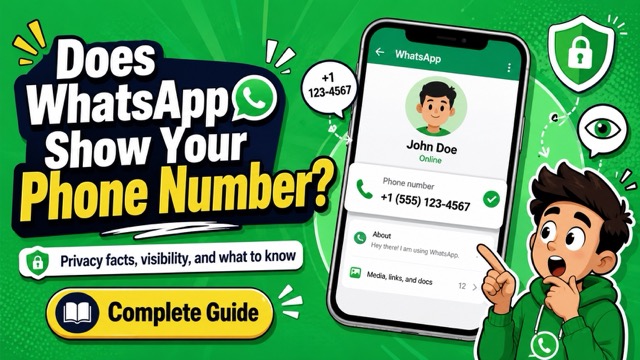
Does WhatsApp Show Your Phone Number?
Yes, in most current chats. WhatsApp still requires a phone number to register an account. If you start a direct chat or join a regular group, the number linked to your account can be visible to the other participants, including people who have not saved you as a contact.
This does not mean WhatsApp publishes your number in a searchable public directory. Someone generally needs your number, a chat link, a shared group, or—once available—your exact username to reach you. What they can see beyond the number, such as your profile photo, About information, Status, or WhatsApp Last Seen activity, depends on your privacy settings.
Quick distinction: end-to-end encryption protects the content of personal messages and calls. It does not, by itself, make your account anonymous or conceal the phone number used to identify it.
Where Your WhatsApp Number Appears
Phone-number visibility changes with the type of WhatsApp interaction. This section works as a quick scenario map, while the FAQs at the end address narrower search questions.
Visible in most one-to-one chats
In the current phone-number experience, the person you message can see the number registered to your account. Saving each other as contacts is not required once a direct conversation has started.
Visible to members of regular groups
Participants can generally open the member list and view numbers they have not saved. Treat a school, neighborhood, hobby, or public-invite group as a place where your current account number may be exposed.
Hidden when you follow a Channel
Meta states that following a Channel does not show your phone number to the Channel administrator or other followers. A Channel is therefore different from joining a group chat.
Potentially visible in WhatsApp Business interactions
A WhatsApp Business account is still registered with a number. If you use your personal line for the account, customers may encounter that number in the business interaction. A dedicated business number creates a cleaner boundary.
Changing for new username-based contacts
After the full feature reaches your account, usernames are designed to hide your phone number from new contacts. Reserving a username alone is not confirmation that protection is active; wait for the in-app rollout notice.
Encryption and visibility solve different problems. Your chats may be encrypted while your account details remain visible to participants. Also remember that hiding a profile photo or Last Seen does not hide the phone number itself.
WhatsApp Username Privacy in 2026
Not completely for every account yet. In June 2026, WhatsApp began letting users reserve an optional username under Settings > Account > Username. Meta says the full feature will launch gradually later in 2026. When enabled, it is designed to let you contact someone new without showing that person your phone number.
Reserving a username now does not necessarily switch off number visibility today. Availability varies by country and app version, and people who already know or saved your number still have it. Check the notice shown inside your own WhatsApp account instead of assuming the reservation alone has made you anonymous.
What I learned while researching this update: the easiest mistake was treating “username reserved” as “phone number hidden.” Meta's announcement separates those two stages: reservations are available first, while username-based introductions launch later. My practical rule is simple—until WhatsApp explicitly confirms the privacy feature is active on the account, assume a new direct chat can still reveal the registered number.
Using WhatsApp without your main number: WhatsApp still requires a valid number for registration. If usernames are not fully active for you, the practical alternative is a separate SIM or another number you control. See the limits in our guide to using WhatsApp without your personal phone number.
5 Ways to Protect Your WhatsApp Number
No single setting covers every situation. Choose the option that matches whether you want to meet new people, join groups, run a business account, or protect a child's privacy.
Choose by outcome: reserve a username for future introductions, adjust privacy settings for information control, restrict group invites to prevent surprise exposure, use a second number to separate identities, and block or report when unwanted contact has already happened.
1. Reserve a WhatsApp Username
Best for: people who expect to connect with new contacts, communities, or businesses after the username rollout.
- Update WhatsApp to the latest version available for your device.
- Open Settings > Account > Username.
- Reserve a unique name and add an optional username key if offered.
- Wait for WhatsApp's in-app notice confirming that username messaging and number protection are active for your account.
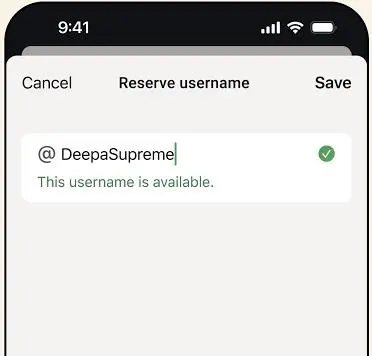
There is no public username directory. A new contact will need your exact username, and possibly your username key, to reach you when the feature becomes active.
- Prepares the account for introductions that do not rely on sharing a phone number.
- Lets new contacts use an exact username instead of searching a public directory.
- Full username privacy is still rolling out by account and region.
- Existing contacts may already know or have saved the number.
Practical advice: use the in-app confirmation—not the presence of a reserved username—as proof that number protection is active.
2. Limit What Strangers Can Learn
Best for: every WhatsApp user, especially anyone who participates in large groups.
Open Settings > Privacy and review Profile Photo, About, Status, Last Seen & Online, Calls, and Privacy Checkup. Choose My Contacts, My Contacts Except..., or Nobody where appropriate. These controls reduce the personal context attached to your number, even though they do not mask the digits.
- Free and available directly in WhatsApp settings.
- Limits the profile details and activity clues attached to a visible number.
- Does not hide the registered phone number itself.
- Restrictive settings can also limit the information you see about other users.
Practical advice: run Privacy Checkup again after a major app update because new controls may be added.
3. Control Who Can Add You to Groups
Best for: parents, students, community volunteers, and anyone invited into unfamiliar or public groups.
- Open Settings > Privacy > Groups.
- Select My Contacts or My Contacts Except....
- Review private invitations before joining and consider who will be able to view the member list.
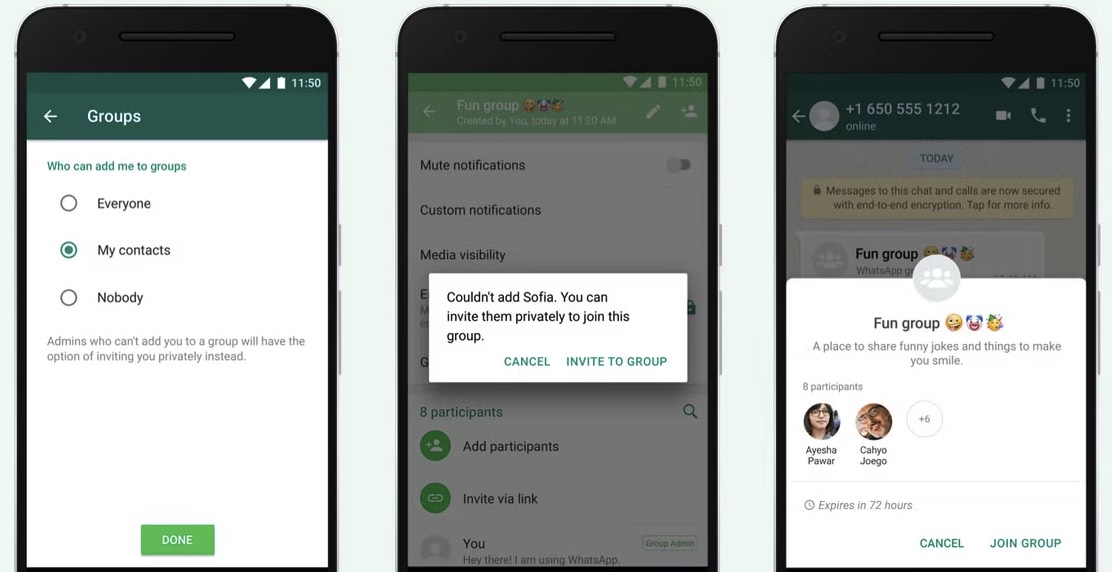
- Prevents many surprise additions to unfamiliar groups.
- Gives you time to review an invitation before exposing your account to members.
- Accepting a regular group invitation can still expose the account number.
- The setting controls invitations, not what existing members can already see.
Practical advice: ask the administrator who is in the group and whether a Channel would work better for one-way updates.
4. Use a Secondary Number
Best for: business accounts, public communities, marketplace conversations, or roles that should stay separate from family contacts.
A separate SIM, eSIM, or supported number can keep a personal line away from public groups and customer chats. The number must be able to receive WhatsApp's verification method, and you must keep control of it so the account is not reassigned later.
Virtual-number support is not guaranteed. If you are considering one, review how a Google Voice number works with WhatsApp before moving chats or relying on it for an important account.
- Keeps a primary personal line separate from public or business conversations.
- Creates a clearer boundary between family, customer, and community contacts.
- The number must remain active and available for future verification.
- Some virtual or VoIP numbers may not work reliably with WhatsApp.
Practical advice: use a long-term number you control rather than a disposable service that may recycle it.
5. Block and Report Unwanted Contacts
Best for: spam, harassment, scams, or unwanted contact that has already reached your account.
Open the chat, tap the contact or number, and choose Block or Report. Blocking prevents future WhatsApp messages and calls from that account, but it cannot remove your number from screenshots, chat history, or another person's address book. Our guide explains what blocking someone on WhatsApp changes and what it does not.
- Stops new WhatsApp calls and messages from the blocked account.
- Reporting can send recent interaction details to WhatsApp for review.
- Cannot remove a number from another person's contacts or screenshots.
- Does not prevent the person from trying another account or communication channel.
Practical advice: save relevant evidence before reporting when the contact involves threats, impersonation, or repeated harassment.
Help Your Child Manage WhatsApp Privacy
For a child, number exposure can lead to spam, unwanted group invitations, or contact from people outside the family circle. Start with WhatsApp's own privacy settings and a clear rule: do not join an unfamiliar group or share a contact link without checking with a trusted adult.

- Review supported WhatsApp messages and conversation timestamps captured after authorized setup.
- Check shared photos, videos, voice notes, and files from one parent dashboard when supported.
- Identify unfamiliar contacts and review WhatsApp voice or video call patterns with clearer context.
- Set keyword alerts for concerning terms and combine them with a transparent WhatsApp parental control setup.
- Confirm device and feature coverage in the VigilKids WhatsApp tracker review before choosing a plan.
How to Use VigilKids for Authorized WhatsApp Monitoring
- Create an account: register with an email address and choose a plan that supports the device and features you need.
- Connect the child's device: follow the setup method shown for the device and complete authorization with brief physical access when required.
- Grant the required permissions: enable only the permissions needed for the monitoring features the family has agreed to use.
- Review the dashboard together: check contacts, conversations, shared media, and alerts, then discuss concerns before changing family rules.
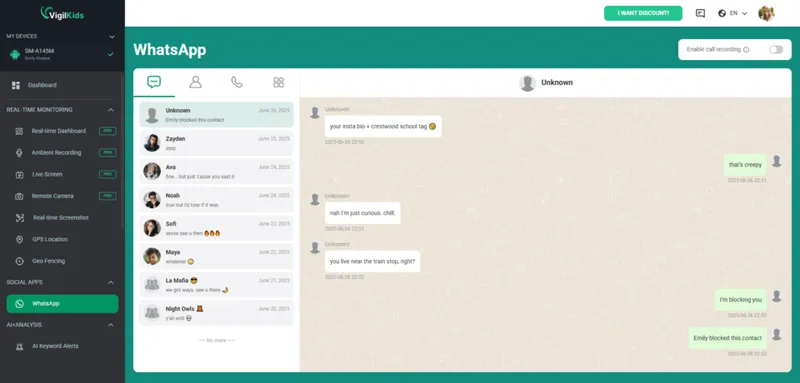
VigilKids should be used only on a device you own or are authorized to manage, with notice and consent where required. Supported data depends on the device, operating system, permissions, connection method, and plan. It cannot erase a phone number that another person has already seen or saved, and it cannot retrieve activity that was never captured after setup.
FAQs About WhatsApp Phone Number Privacy
Can people see your phone number on WhatsApp?
Usually, yes. People you message and members of a regular group can generally see the number registered to your account. Following a WhatsApp Channel is an exception because it does not reveal your number to the admin or other followers.
Does WhatsApp show your real phone number?
WhatsApp shows the number used to register the account. If you registered with your everyday mobile number, that is the number people may see. If you used a separate number you control, they see that account number instead.
Can I message someone on WhatsApp without showing my number?
Not reliably for every account yet. WhatsApp is rolling out usernames that are designed to hide your number from new people or businesses you contact. Until the app confirms that feature is active for you, assume a direct chat can reveal your registered number.
Does WhatsApp Business show your phone number?
A WhatsApp Business account is still registered with a phone number, and that number can be visible in the business interaction. Use a dedicated business line rather than a personal number if separation matters. Username-based contact may change this after it fully reaches your account.
Does blocking someone hide my WhatsApp number?
No. Blocking stops future calls and messages from that account, but it does not remove your number from an existing chat, screenshot, group history, or the person's saved contacts.
Conclusion
The current answer to does WhatsApp show your phone number is usually yes in direct chats and regular groups, but not when you simply follow a Channel. Username reservations have begun, while number-free introductions are still rolling out gradually.
Reserve a username if it appears, tighten profile and group settings now, and use a separate number when public exposure is a concern. Parents who need additional context can use VigilKids WhatsApp monitoring responsibly alongside open family conversations.
 Sources
- Meta: It's Time to Reserve Your WhatsApp Username — June 29, 2026.
- Meta: WhatsApp Channels—Here's Everything You Need to Know — September 13, 2023.
- Meta: Silence Unknown Callers and Privacy Checkup — June 20, 2023; updated December 10, 2024.
Research note: information was checked on August 11, 2026. WhatsApp features can vary by app version, country, device, and rollout stage. Recheck the settings shown inside your account before publishing or acting on a privacy feature.
Hot Topics for WhatsApp Monitoring
How to See Others’ WhatsApp Chats on Your Android Phone: 5 Ways
Learn how to see others WhatsApp chats in your phone safely and legally. Quick signs of someone reading your WhatsApp, step-by-step checks.

Best WhatsApp Tracker 2026: 5 Apps Compared by Real Tests
We tested 5 best WhatsApp tracker apps in 2026 — VigilKids, mSpy, Eyezy, uMobix, Bark. Compare features, pricing, and find the right tracker for your family.

Hack WhatsApp Safely: 7 Best WhatsApp Monitoring Apps in 2026
Searching hack whatsapp? Compare safe WhatsApp monitoring apps, see what they can track, and choose a legal alternative to risky hacking claims.