
WhatsApp Status functions similarly to Instagram Stories, disappearing after 24 hours. However, privacy settings often make it difficult to monitor updates. If you are wondering how to check WhatsApp status without being seen, there are several effective workarounds.
Whether you need to view a contact's updates discreetly or are searching for how to see hidden status on WhatsApp, we have you covered. This guide explores seven practical methods—ranging from native settings to specialized parental control tools like VigilKids—to help you maintain visibility while staying completely under the radar.
- Table Of Contents
-
Method 1: Use VigilKids to Monitor WhatsApp

- Method 2: View via Mutual Friend's Account
- Method 3: Unmute Status & Turn Off Read Receipts
- Method 4: Check WhatsApp Hidden Status Folder (Android Only)
- Method 5: View Status Offline
- Method 6: Use WhatsApp Multi-Device Login
- Method 7: Track Cross-Posted Social Media Content
- Why This Matters: The Hidden Gap in WhatsApp Status Privacy
- FAQs about Checking WhatsApp Status
- Conclusion
Table: 7 Ways to View Hidden WhatsApp Status Updates
| Method | Ease of Use | Compatibility | Key Limitation |
|---|---|---|---|
| Use VigilKids to Monitor WhatsApp | Moderate | Android, iPhone | Requires device access & consent |
| View via Mutual Friend's Account | Easy | Android, iPhone | Needs friend's cooperation |
| Unmute Status & Turn Off Read Receipts | Easy | Android, iPhone | Can't see who views your own status |
| Check WhatsApp Hidden Status Folder | Moderate | Android | No text status, media only |
| View Status Offline | Moderate | Android, iPhone | Must preload status before offline |
| Use WhatsApp Multi-Device Login | Moderate | Android, iPhone, Computer | Requires access to secondary account |
| Track Cross-Posted Social Media Content | Easy | Any | Only works if user cross-posts |
Method 1: Use VigilKids to Monitor WhatsApp
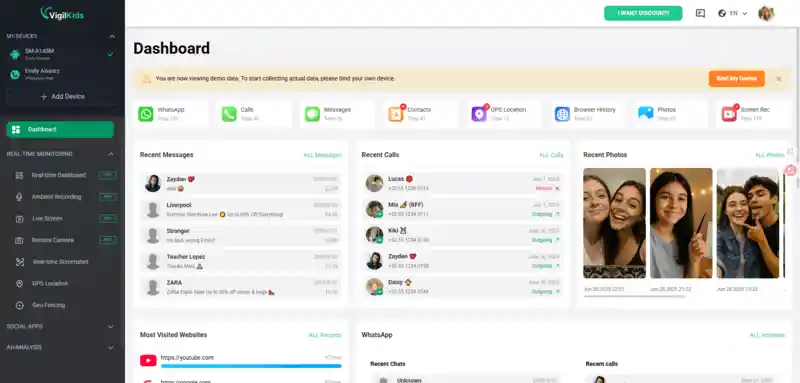
If you want a direct and reliable way to see hidden WhatsApp statuses — plus chats, calls, and shared media — VigilKids for WhatsApp Monitoring is the safest choice. It's designed for parents to discreetly keep an eye on their child's WhatsApp activity, even if statuses are hidden.
What VigilKids can do:
- Access all WhatsApp statuses (including those hidden from you) in photo, video, or text format.
- View all WhatsApp chats, including sent and received messages, so you always know what conversations are happening.
- Monitor shared media files like photos, videos, and voice messages, giving you a complete picture of WhatsApp activity.
- Get keyword alerts for suspicious content.
- Works in stealth mode on Android & iPhone.
Note:
You'll need to install the app on the target device with consent. Once set up, all data is synced to your secure VigilKids dashboard.
Method 2: View via Mutual Friend's Account
This is the simplest workaround if you're wondering how to see hidden status on WhatsApp: if you share mutual friends with the person hiding their status, you can ask them to check it for you or send you a screenshot on WhatsApp.
No need to install apps or change settings.
Relies entirely on the friend's willingness to cooperate.
Method 3: Unmute Status & Turn Off Read Receipts
Sometimes, you might have muted someone's status by accident. Unmuting it could bring it back to your updates list — but if they've hidden it from you, you still won't see it, even if you're searching for how to view hidden WhatsApp status.
If you can see their status and just want to view it without being detected while exploring how to view hidden WhatsApp status, disable read receipts:
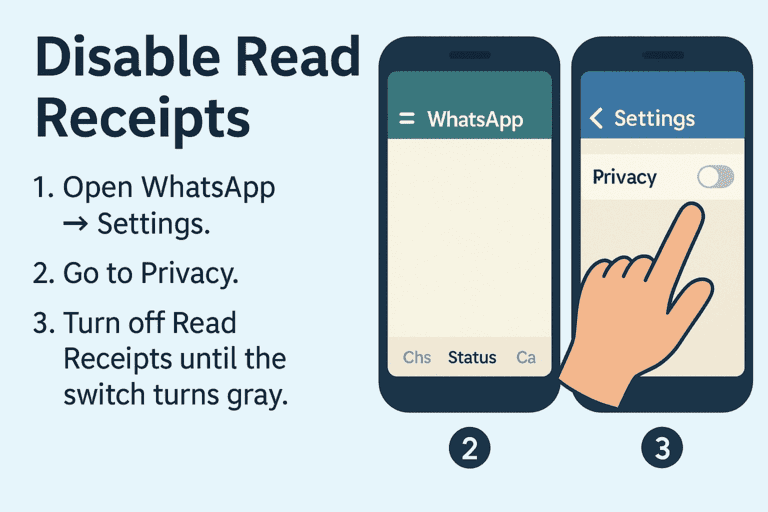
- Step 1. Open WhatsApp → Settings.
- Step 2. Go to Privacy.
- Step 3. Turn off Read Receipts until the switch turns gray.
Important:
When read receipts are off, you also can't see who viewed your own statuses. Don't turn them back on until the status you viewed disappears.
Method 4: Check WhatsApp Hidden Status Folder (Android Only)
On Android devices, WhatsApp automatically stores viewed statuses in a hidden folder. Even if you don't open them directly, the media files might still be saved locally — making it a useful trick for those searching for how to view hidden WhatsApp status.
How to do it:
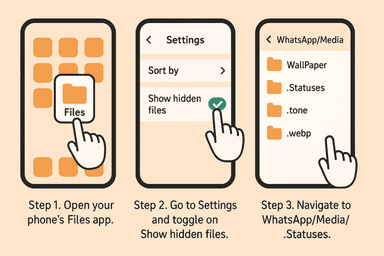
- Step 1. Open your phone's Files app.
- Step 2. Go to Settings and toggle on Show Hidden Files.
- Step 3. Navigate to WhatsApp/Media/.Statuses.
- Step 4. View images and videos from statuses without opening them in WhatsApp.
Limitations:
- Text-only statuses won't appear here.
- Files are deleted after 24 hours.
- Only works for contacts whose media you have access to.
Method 5: View Status Offline
This trick works by cutting off your internet connection before opening the status, so your view isn't recorded.
Steps:
- Step 1. Wait until the person posts a new status.
- Step 2. Turn on Airplane Mode or disconnect Wi-Fi/data.
- Step 3. Open WhatsApp and view the status.
- Step 4. Close WhatsApp completely before turning your internet back on.
Tip:
This only works if the status was preloaded while you were online.
Method 6: Use WhatsApp Multi-Device Login
WhatsApp now supports linking multiple devices to the same account. If you can log into a mutual account (with consent) on your phone or computer, you can check statuses that are visible to that account.
How to set it up:
- Step 1. On the secondary device, open WhatsApp Web/Desktop.
- Step 2. On the primary phone, go to Linked Devices in Settings.
- Step 3. Scan the QR code to link the account.
- Step 4. View statuses from the linked device.
Note:
This won't bypass visibility restrictions — the account you link must be allowed to see the status.
Method 7: Track Cross-Posted Social Media Content
Some users post the same status updates on Instagram, Facebook Stories, or Snapchat. If you follow them on these platforms, you might see the same content that was hidden from you on WhatsApp.
No technical setup required.
Relies entirely on the person cross-posting their updates.
Why This Matters: The Hidden Gap in WhatsApp Status Privacy
A recent Reddit discussion brought attention to a privacy blind spot in WhatsApp's status feature.
If someone has read receipts turned off, they can view your status without appearing on your viewer list. That's expected — but WhatsApp doesn't tell you which contacts have this setting enabled.
"Before I post a status, I should have a list of contacts like: These people have read receipts off. If they view your status, you won't know. That's not exposing what they've seen — it's giving the poster informed awareness."
—— Reddit user
This creates a false sense of control. You may think the viewer list is complete, but silent viewers can go unnoticed — unless they mention your status later. Some users even suggest showing a partial count. This lack of transparency is why people seek alternative ways to track viewers, and why tools like VigilKids can be valuable.
FAQs about Checking WhatsApp Status
Q: How to hide seen status update in WhatsApp?
A: Go to Settings > Privacy and turn off Read Receipts. Once disabled, others won't see when you've viewed their status updates. Keep in mind that this also prevents you from seeing who has viewed your own status.
Q: Can someone know that I viewed their WhatsApp status if I turn off read receipts?
A: No, they won't be notified. Disabling Read Receipts removes your name from their viewer list. However, if you turn it back on later before the status expires, your view may still be recorded.
Q: How to view WhatsApp status but not showing?
A: You can disable Read Receipts before watching the status, or use tricks like turning on Airplane Mode, viewing the status, and closing the app before reconnecting. On Android, you can also check status media from the hidden folder without opening it directly.
Conclusion
Mastering how to check WhatsApp status without being seen doesn't have to be complicated. Whether you choose to toggle off your Read Receipts or use more advanced methods to learn how to see hidden status on WhatsApp, there is a solution for every level of technical skill.
For parents, tools like VigilKids offer the most reliable and comprehensive way to stay informed about digital activity while remaining completely invisible. By following the steps outlined above, you can gain the insights you need without alerting others.