
Parents today need more than screen-time limits to keep children safe online. A phone can reveal location, browsing habits, conversations, and potential digital risks.
In this VigilKids review, we tested its Android-first parental control features—including location tracking, activity monitoring, communication insights, and AI-powered alerts—to see what it does well and where it may fall short.
Editorial disclosure: This official VigilKids review is based on internal testing across three Android devices from late January through April 2026. Results may vary by device, network, Android version, and usage conditions.
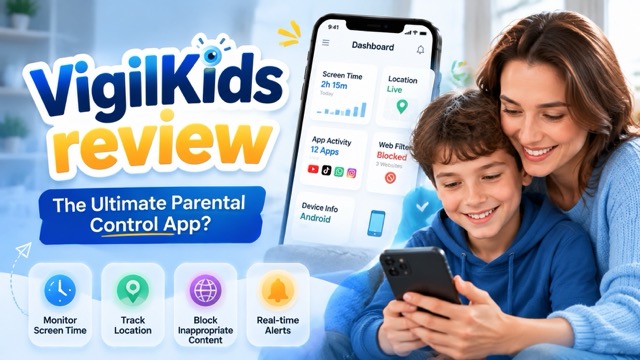
VigilKids Review: Is It Worth It? Test Results and Final Verdict
Our verdict: VigilKids is a practical choice for Android-first families that need more than app approvals and screen-time limits. Its main advantage is breadth: parents can review location, apps, web history, supported communication activity, media, and risk alerts without moving between several tools. Its main tradeoffs are the Android permissions required during setup, a short dashboard learning curve, and fewer capabilities on iOS.
| Review question | Answer |
|---|---|
| Best for | Families with parent-managed Android phones that need location, activity, and risk context |
| Not ideal for | iPhone-only homes or families needing only free screen-time tools |
| Devices tested | Pixel 7, Samsung Galaxy A54, and Xiaomi Redmi |
| Observed setup time | About 8–12 minutes, depending on Android permission screens |
| Price checked | $9.99/month on the annual plan, billed as $119.88/year; verify the current offer |
| Main limitation | The Android experience is more complete than the iOS experience |
This official test ran from late January through April 2026. It covered a Pixel 7, Samsung Galaxy A54, and Xiaomi Redmi; one device moved from Android 13 to Android 14 during the test. The three scenarios focused on teen social activity, screen-time and content boundaries in a multi-child household, and dashboard use in a co-parenting household.
- Observed: setup time, permissions, first sync, app reports, web history, GPS and geofence alerts, supported social activity, call metadata, media flags, and keyword alerts.
- Testing boundary: three devices and three scenarios provide practical observations but are not a representative study of all phones or families.
- Recommended future evidence: publish the app version, Android patch level, test count, success criteria, dated screenshots, and update log.
Readers still comparing the category can review the best parental control apps.
8 VigilKids Features Tested: GPS, Apps, Social Media & AI Alerts
1. GPS Location and Geofencing
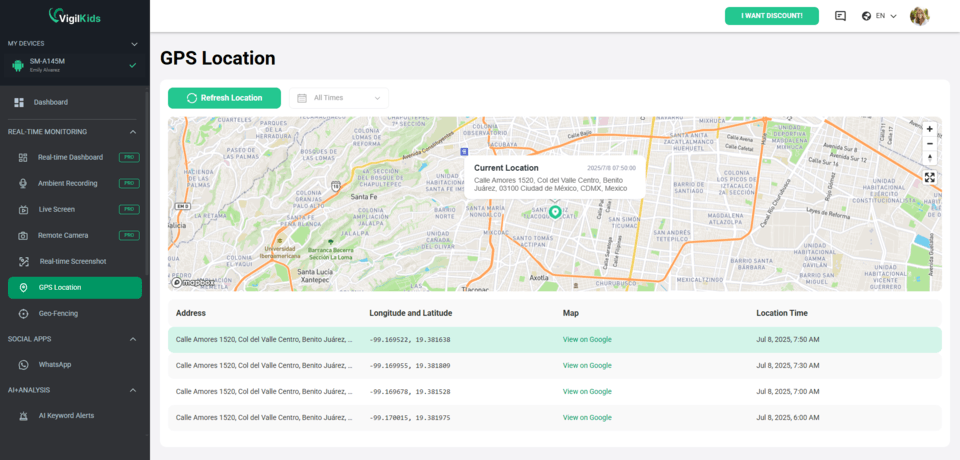
VigilKids provides current location, location history, and alerts when a child device enters or leaves a saved area. During the internal test, outdoor location was usually within roughly 10–15 meters. Of 49 recorded geofence entry and exit events, 47 produced the expected alert; both missed events occurred on the Xiaomi during weak cellular coverage.
Accuracy varies with GPS access, signal, battery settings, and permissions. See how GPS tracking software for Android behaves across different phone conditions.
2. Live Screen Monitoring and Surroundings Context
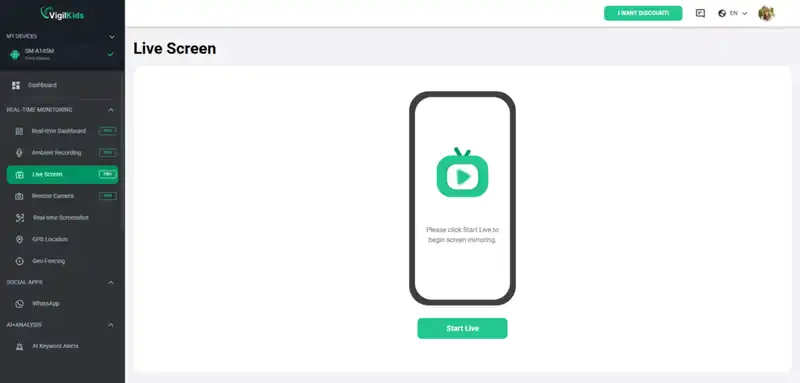
After authorized setup and with the required Android permissions, live screen tools can provide a screenshot or short recording when an alert needs visual context. Surroundings recording may add safety context when location data is unclear, but microphone access is sensitive and should be enabled only for a defined family safety need.
Availability varies by device and Android version. These features should support proportionate, transparent supervision rather than replace direct communication.
3. App Activity and Screen Time
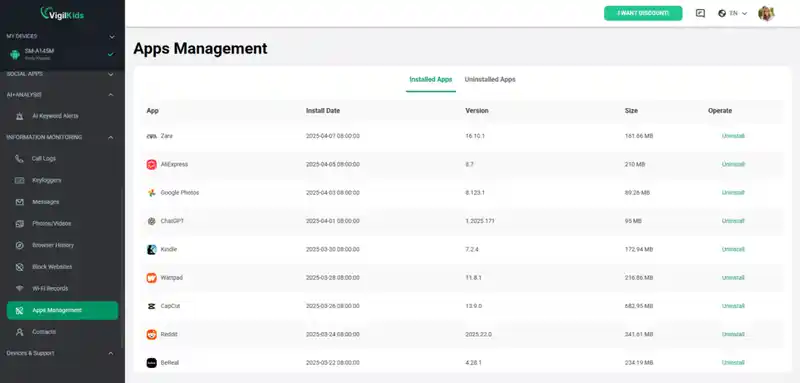
The dashboard summarizes app usage and timestamps. In testing, a newly installed app appeared within minutes, while a few uncommon apps were grouped under a general category. Parents can turn those patterns into clearer rules by checking screen time on Android and setting time limits on apps.
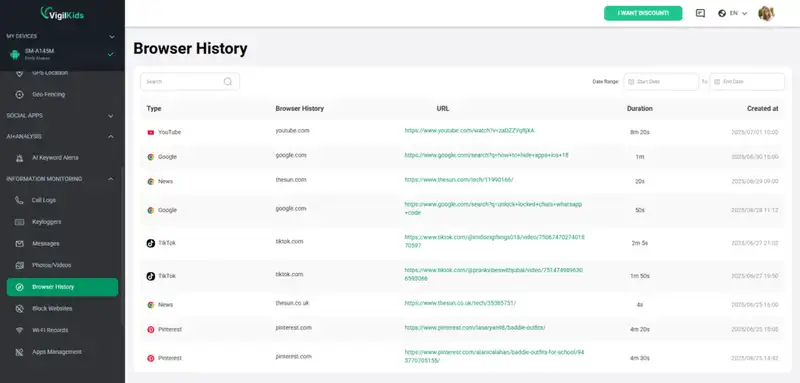
4. Web Filtering and Browsing History
Browsing history can show visited URLs and timestamps, while category rules and custom blocklists help families set boundaries. During testing, this feature was most useful as a conversation prompt when searches suggested curiosity or confusion rather than deliberate rule-breaking.
Filtering is not perfect and should be reviewed periodically. The guide to blocking inappropriate websites explains how to combine technical controls with age-appropriate rules.
5. WhatsApp and Supported Social Activity
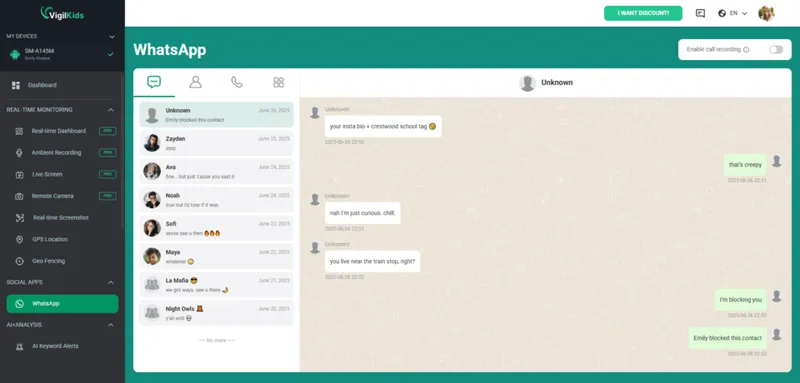
After setup on a parent-managed Android device, VigilKids can help parents review supported WhatsApp and social activity. Coverage can vary by phone, Android version, app update, and permission state. The WhatsApp parental monitoring guide explains current use cases and family-rule considerations.
6. Call Logs and SMS Context
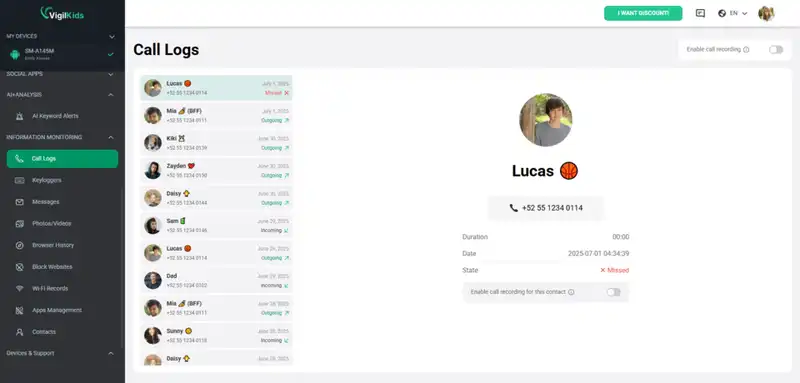
VigilKids can organize incoming and outgoing call metadata and supported message activity. Call context may include time, duration, and contact details; it does not mean call audio is available. Learn about checking call history on a parent-managed device or using an SMS tracker for family safety after authorized setup.
7. Photos, Videos, and Media Review
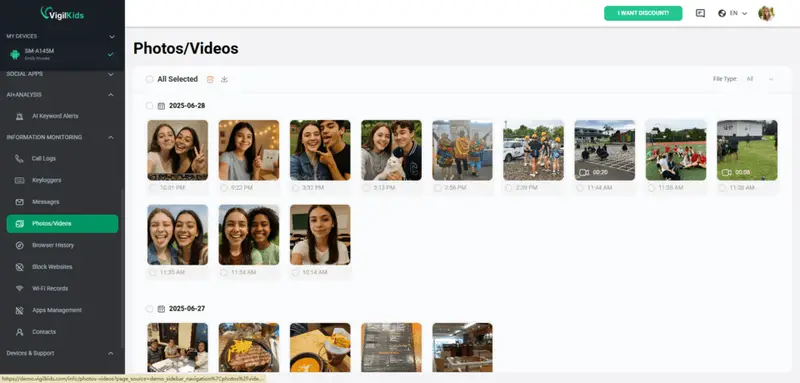
Supported media can be organized for parent review, while image-risk detection can flag items that may deserve attention. In the internal test, ambiguous beach or swimwear photos could produce false positives. Parents should review context instead of treating an automated flag as proof.
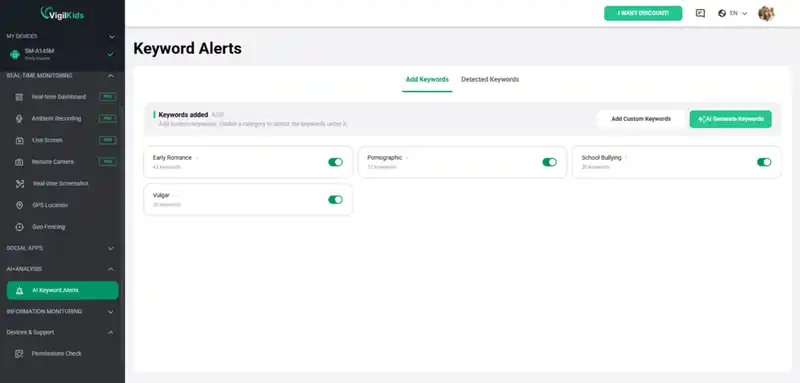
8. AI Risk Alerts and Custom Keyword Detection
VigilKids AI alerts are designed to surface potential safety signals across supported activity, including language related to bullying, self-harm, drugs, sexual content, or meeting unfamiliar people. Parents can add family-specific keywords, turning a large activity log into a smaller set of moments that may need review.
Important: AI alerts are decision support, not a verdict. They can miss context or produce false positives, so parents should review surrounding activity and talk with the child before acting. VigilKids combines configurable risk detection with human review rather than claiming automation can determine intent by itself.
VigilKids Setup Experience, Pricing, and Value Assessment
Setup Experience on Android
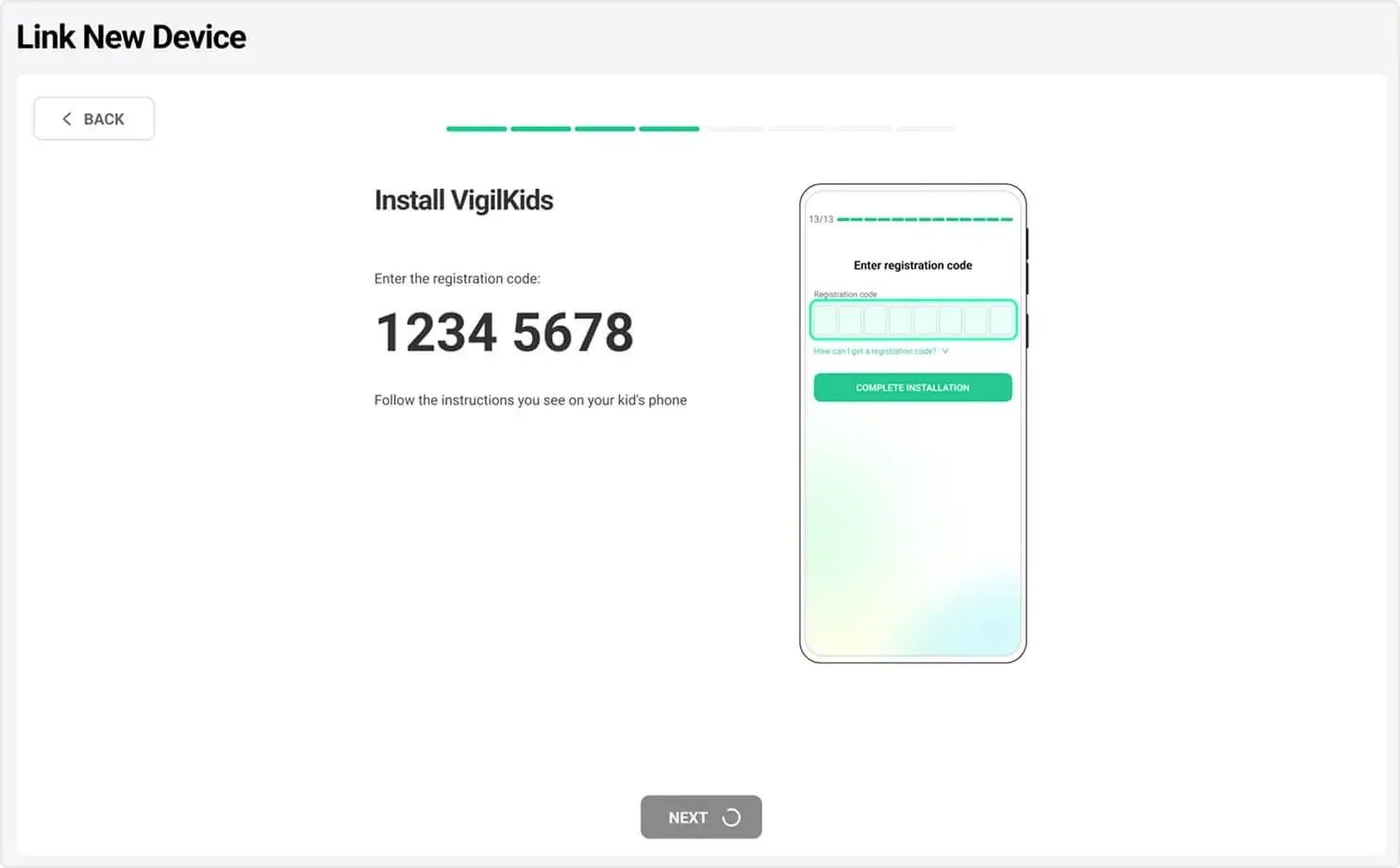
Setup took about 8–12 minutes across the three tested households. Most friction came from Android permission screens rather than account creation.
- Step 1. Create the VigilKids parent account. Sign in and generate the pairing code.
- Step 2. Set up the child device. With physical access to the parent-managed Android phone, install the companion app and grant only the permissions required for the chosen features.
- Step 3. Verify the dashboard. Confirm the device and permission status, then allow time for the first sync.

VigilKids Review: Android Features We Tested
- Android activity monitoring — Review location, app usage, web activity, and supported device insights from one dashboard. Explore Android parental control features.
- Location and safety insights — Track location history and geofence alerts to better understand daily routines.
- AI-assisted risk alerts — Use keywords and safety alerts to focus attention on activity that may require review.
- Family dashboard management — Manage supported Android devices and preview the experience with sample data before choosing a plan.
VigilKids Pricing and Value
VigilKids currently includes the same feature set with every plan, so the main choice is subscription length. The 12-month plan is the best-value option at $9.99 per month, billed as $119.98 annually. The pricing page currently shows this as a limited-time 45% discount from $18.33 per month. Because the offer can expire or change, check the live countdown and checkout total on the VigilKids pricing page.
| Plan | Price | Billed | Best for |
|---|---|---|---|
| 1 month | $39.99/month | $39.99 monthly | Short-term use without a long commitment |
| 3 months | $26.66/month | $79.98 quarterly | Families that want time to evaluate daily use |
| 12 months | $9.99/month | $119.98 annually | Best monthly value; currently shown with 45% off |
Every plan also includes a 14-day money-back period, cancellation at any time, easy setup, and access to all product features. That 14-day period gives families more time to confirm device compatibility and dashboard fit than alternatives that provide only a 7-day refund window. Refund eligibility is still subject to the current refund policy, so review the terms before purchase.
Broad Android feature coverage in one dashboard
Location, app, web, social, media, and AI risk context
Free dashboard demo before purchase
Useful for multi-child and co-parenting routines
Fewer capabilities on iOS than Android
Setup requires physical access and several permissions
Some manufacturers require extra background settings
AI and media flags can require context
Who Is VigilKids Best For?
VigilKids is best suited for Android households that want broader visibility into a child's digital activity, especially families managing multiple devices or looking beyond basic screen-time controls. Users who only need simple app limits may find built-in Android or iOS tools sufficient.
VigilKids setup is relatively straightforward for Android users, although the process requires several device permissions. Across the three tested households, setup took about 8–12 minutes, with most friction coming from Android permission screens rather than account creation.
User Feedback, Real-World Experience, and Test Limitations
Beyond the three test households, we reached out to longer-term VigilKids users to broaden the sample. Names changed; situations real.
"I have three kids on three different schedules, and I needed one tool that handled all of them without me logging into three accounts. VigilKids' family dashboard saved my Sunday mornings — I used to spend an hour reconciling screen-time data across different apps. Now it's all in one place."
—— Rachel T., mother of three (ages 9, 12, 15) · 14 months as a user · ⭐⭐⭐⭐⭐
"My ex and I disagree on a lot of things, but we both wanted visibility into our son's phone use without arguing about it every weekend. The shared dashboard means we both see the same data, so it's not 'he said, she said' anymore — it's just what the screen shows."
—— Marcus H., co-parenting a 12-year-old · 6 months as a user · ⭐⭐⭐⭐⭐
"I'm not technical and I was scared of the setup. My biggest worry was 'what if I install it wrong and my daughter sees it before I've talked to her.' VigilKids' setup wizard walked me through it clearly. The conversation I had with her afterward went better than I expected — she appreciated being told first."
—— Linda K., single mother of a 13-year-old · 4 months as a user · ⭐⭐⭐⭐⭐
"This is the fourth parental control app I've used and the first one that hasn't broken after an Android update. Two of the previous ones literally stopped working without warning. VigilKids has gone through two Android updates during my year with it and worked through both."
—— David L., father of two teens · 11 months as a user · ⭐⭐⭐⭐⭐
"My 16-year-old initially pushed back hard. What changed his mind was that VigilKids isn't covert — it's in the open, he knows what's tracked, and we agreed on the rules together. Six months in, he barely thinks about it. It's just there."
—— Jennifer W., mother of a 16-year-old · 8 months as a user · ⭐⭐⭐⭐
How to Choose the Right Parental Control App
No parental control app is the best choice for every family. This table focuses on family fit rather than declaring one universal winner.
| App | Best fit | Main strength | Main tradeoff |
|---|---|---|---|
| VigilKids | Android-first families wanting one broad dashboard | Location, activity, social context, media, and AI alerts | Android setup and iOS feature differences |
| Bark | Families with teens who prefer alert-led supervision | Risk alerts across supported services | Less emphasis on full activity review |
| Qustodio | Families wanting structured reports and cross-platform controls | Detailed reports, schedules, and established controls | Can feel heavier for simple needs |
| Google Family Link | Younger Android users needing a free starting point | App approvals, time limits, and Google integration | Limited social and message context |
Privacy, Consent, Responsible Use, and Sources
Consent and parental control requirements vary by location, age, device ownership, guardianship, and feature. Use VigilKids only on a device you are authorized to manage, explain the rules in age-appropriate language, and check local requirements when needed.
Before subscribing, read the current privacy policy, check what each enabled feature collects, protect the parent account, and remove access when it is no longer needed.
Sources
- VigilKids on Google Play — Android product listing and public feedback.
- VigilKids on the Apple App Store — iOS listing and platform information.
- Google Search's reviews system guidance — original research and useful review principles.
- Google guidance for AI features and websites — AI Overview and AI Mode eligibility practices.
VigilKids FAQs: Is It Legit, Safe, Free, and Compatible?
Q1: Is VigilKids a legitimate parental control app?
VigilKids has an official website, parent dashboard, pricing page, Google Play listing, and Apple App Store listing. Whether it fits your family depends on the device, required features, and approach to transparent supervision.
Q2: Is this an independent VigilKids review?
No. This is an official VigilKids article based on internal testing. The method and limitations are disclosed so readers can compare the findings with app-store feedback and independent reviews.
Q3: Does VigilKids work better on Android or iPhone?
The broader feature set is available on Android. iOS restrictions can limit some device and social activity features, so iPhone families should confirm current compatibility before purchase.
Q4: How much does VigilKids cost?
At the time of this update, the annual plan was shown as $9.99 per month, billed as $119.88 per year. Check the pricing page for current totals, renewal terms, and refund conditions.
Q5: How should parents use VigilKids AI alerts?
Treat an AI alert as a prompt to review context, not proof that harmful activity occurred. Check the surrounding information and talk with the child before taking action.
Is VigilKids Worth It? Final Review Verdict
This VigilKids review finds the product most useful for Android-first families that need location, app activity, web history, supported communication context, media review, and AI-assisted alerts in one dashboard. It is less compelling for iPhone-only homes or families needing only basic limits. Preview the VigilKids dashboard, confirm current compatibility, and choose only the supervision level your family can use responsibly.
Recommended Articles
Top Parental Control Apps 2026: iPhone, Android, Mac & PC
The top parental control apps in 2026 for every family type — by age, by platform, by household setup. Compare 7 picks including VigilKids, Bark, and Family Link.

Sexting on Snapchat: Why Parents Shouldn’t Ignore It
Understand why teens (and even adults) use Snapchat for sexting, the risks involved, and how tools like VigilKids help parents stay informed safely.

Is Spotify Safe for Kids? A Practical Guide for Parents in 2025
Is Spotify Safe for Kids? A Practical Guide for Parents in 2025