
Eyezy markets itself as the "phone monitoring app that does it all" — headlined by its AI-driven Magic Alerts and an Invisible Shield stealth mode. It's one of the most heavily advertised parental tools of 2026, but flashy marketing and day-to-day reliability aren't the same thing. This Eyezy reviews takes a different angle: instead of just listing features, we look at what Eyezy is actually built around, whether its signature tools live up to the hype, and the things parents genuinely need that it leaves out — then point to a more dependable option in VigilKids.
In one line:
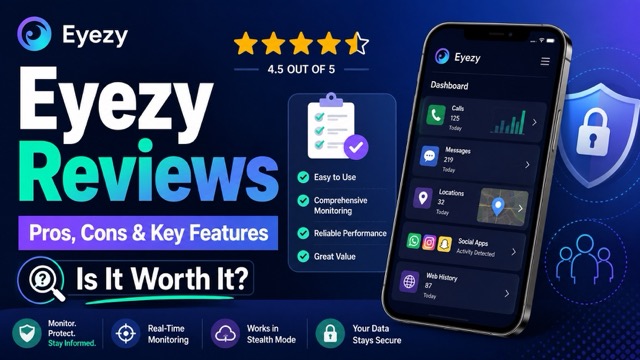
Eyezy is a feature-packed, stealth-focused monitoring app with a clever keyword-alert system — but it leans more toward surveillance than parenting, skips screen-time limits, suffers from delayed alerts, and is pricey month-to-month. Parents wanting reliable, real-time, family-first monitoring will find VigilKids a better fit.
What Eyezy Is Built Around
Most monitoring apps log data and dump it into a dashboard. Eyezy's pitch is different — it's built around two headline ideas that shape the whole product.
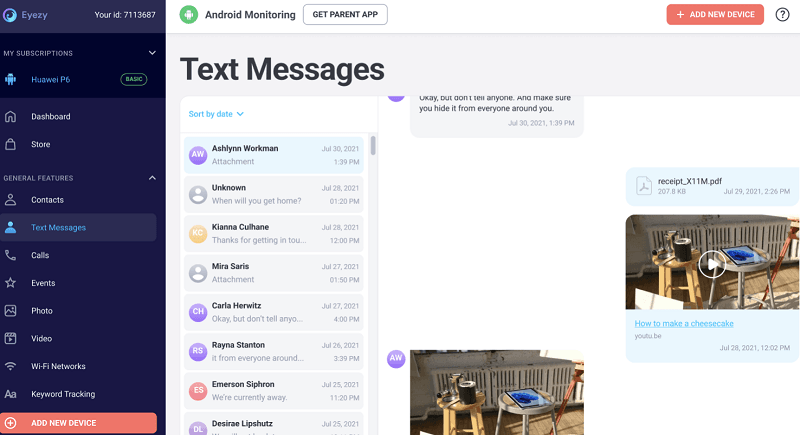
The first is Magic Alerts, an AI-flavored alert engine. Rather than expecting you to scroll through every message, you set keywords, locations, or contacts, and Eyezy pings you when one is triggered. The second is the Invisible Shield, a stealth layer that hides the app entirely on the target device — no icon, no trace, and it survives screenshots or attempts to find it. Around these sit the usual tools: keystroke capture, social-media monitoring (WhatsApp, Instagram, Snapchat, and 30+ apps), screen recording, GPS, and geofencing.
Eyezy supports Android and iPhone, but the setup and available data are not identical. Android generally requires physical access for installation; iPhone connections may use iCloud or a local sync method, with access depending on credentials, two-factor authentication, backups, permissions, and device configuration. Eyezy’s own FAQ also says remote installation still requires physical access to the target device. Check the official compatibility policy and confirm the exact connection method with support before buying.
Important distinction:
Eyezy also offers app-store products whose feature descriptions can differ from the web-based monitoring service reviewed here. Match the product, operating system, plan, and installation route before comparing claims.
If you’re comparing stealth-focused tools, Eyezy sits in the same category as other monitoring apps for Android, though its keyword-alert system is its main differentiator. On paper, it is a broad toolkit. The more useful question is how those headline features perform under real device and setup limits.
Do Its Signature Features Live Up to the Hype?
This is where a marketing-led product meets reality. Based on hands-on reviews across the web in 2026, here's the honest scorecard.
Magic Alerts: Clever, but Narrow and Delayed
The concept is genuinely useful — getting pinged only when something matters saves time. In practice, though, two real limits surface. First, alerts only fire on the keywords you set; Eyezy won't proactively flag inappropriate content that falls outside your list, and it has no built-in detection for categories like bullying, self-harm, or profanity. Second, alerts are delivered by email and can be noticeably delayed — testers have reported geofence alerts arriving up to 20 minutes late, which undercuts the whole point of a "real-time" warning.
The underlying keystroke capture is similar to what you'd find in a dedicated Android keylogger, but an alert is only as useful as its timing.
Invisible Shield: Effective Stealth, Questionable Philosophy
The stealth mode does what it claims — Eyezy hides itself well on Android. But heavy, hidden surveillance is exactly the design choice that's drawn criticism: independent reviewers note Eyezy behaves "more like a surveillance tool than a parental controls app." For families, covert monitoring can backfire on trust, and it sidesteps the open, conversation-first approach that actually keeps kids safer long-term.
Core Monitoring: Powerful When It Works
When everything's running, Eyezy is capable — pulling WhatsApp conversations, Instagram DMs, and Snapchat messages that weaker apps miss. But reliability wobbles: testers have seen WhatsApp data stop updating for an entire day, and frequent screenshots can drain the target phone's battery fast. "Powerful when it works" is the recurring theme — and the caveat.
For WhatsApp specifically, our roundup of the best WhatsApp trackers shows how Eyezy's reliability compares.
What Eyezy Leaves Out
For a tool that bills itself as doing "it all," some notable gaps matter specifically for parenting rather than surveillance:
- No screen-time limits. Eyezy can show you how long an app is used, but it won't let you actually set or enforce limits — a core parental-control expectation it simply doesn't meet.
- Slow, unreliable blocking. Where blocking exists, a blocked app can take around 15 minutes to stop working and may keep running in the background, draining battery.
- No proactive risk detection. Without your exact keywords, harmful content slips through; there's no smart categorization of dangerous topics.
- Limited location depth. Location works, but recurring-pattern tracking is thin; dedicated location tracker tools or geofencing software go deeper.
- One device per subscription. Each plan covers a single device, so multi-child families pay repeatedly.
- No free trial. You commit first; there's a demo and a 14-day money-back guarantee, but no proper trial.
The pattern:
Eyezy is strong at quiet, deep surveillance but weak at the everyday parenting controls — time limits, reliable blocking, proactive safety alerts — that most families actually want. If your goal is guiding healthy habits rather than just watching, that mismatch matters.
Eyezy Pricing: Is It Worth It?
Eyezy's pricing is where the value question gets sharp. Introductory rates start low — around $7.99/month on the longest commitment — but renew at much higher rates, and the month-to-month plan is steep at roughly $47.99. Each subscription covers only one device.
| Plan | Intro Price (per month) | Notes |
|---|---|---|
| 1-Month | ~$47.99 | Most expensive per month |
| 3-Month | Mid-tier | Renews higher |
| 12-Month | From ~$7.99 | Best rate; renews at higher price |
Eyezy’s pricing article says the same primary feature set is included across its standard subscription durations, but the official site does not present one permanent public price that applies to every visitor. Use the official Eyezy pricing overview, then verify the amount charged today and the next renewal date on the final checkout screen.
Is Eyezy Trustworthy? Trustpilot Reviews and Cancellation
If your real question is “is Eyezy legit?”, Eyezy is operated by Fortunex Limited, which publishes company contact details, terms, privacy information, compatibility requirements, and a refund policy. That supports the conclusion that Eyezy is a real commercial product. Whether it is trustworthy for your family is a separate question involving billing clarity, device compatibility, support, and whether the service delivers the features you need.
As checked on September 2, 2026, Eyezy reviews on Trustpilot showed an average TrustScore of 3.4 from 579 reviews. The distribution was unusually polarized: 53% were five-star and 43% were one-star. Positive feedback often mentioned ease of use or helpful support, while negative feedback frequently raised billing, refund, setup, functionality, or iPhone concerns. Trustpilot also notes that reviews are individual user opinions, not findings verified by Trustpilot, so use them as experience signals rather than proof that every claim is true.
To cancel, Eyezy’s official FAQ says you can use your account or email support@eyezy.com. Cancel before the renewal date and keep the confirmation. If you want a refund, submit the request promptly and read the official refund policy; eligibility is conditional and generally limited to the first subscription within 14 days.
Where VigilKids Does It Better
If Eyezy's surveillance-first design, delayed alerts, and missing parental controls are dealbreakers, VigilKids takes the opposite approach — built around reliable, real-time visibility and family-first transparency rather than deep stealth. You can see exactly how it works in the monitoring demo.

VigilKids Pro
- Review supported WhatsApp, Messenger, and Snapchat activity from one dashboard
- Use live screen tools on supported devices to understand activity in context
- Review app usage and pair those insights with practical app time-limit settings
- Create keyword and contact alerts for selected safety concerns
- Combine app activity with a GPS tracker for kids and family geofencing
Here is how the two products differ on the points many parents care about most:
| Feature | Eyezy | VigilKids |
|---|---|---|
| Remote camera | ❌ | ✅ |
| Unknown-contact risk detection | ❌ | ✅ |
| Keyword alerts | ✅ | ✅ |
| Live screen viewing | ✅ | ✅ |
| Geofencing alerts | ✅ | ✅ |
*Based on the companies’ current official feature descriptions. Eyezy’s FAQ says remote camera is not currently available, while its alerts rely on user-configured keywords and zones. Features may vary by Android or iOS, device permissions, setup method, add-ons, and plan.
VigilKids is also included in our guide to the best parental control apps. If you are comparing broader device-monitoring choices, see how features and limits differ among the best phone monitoring apps.
Eyezy FAQs
Is Eyezy trustworthy?
Eyezy is a real paid product operated by Fortunex Limited, but user experiences are mixed. Check device compatibility, the final checkout total, renewal terms, cancellation instructions, and the conditional refund policy before buying.
Is Eyezy undetectable?
No monitoring app should be described as guaranteed undetectable. Eyezy says it can hide its app icon, but permissions, battery or data use, security software, operating-system changes, and device behavior may still expose it. Use monitoring only where you are authorized and explain it to your child in an age-appropriate way.
How much does Eyezy cost?
Eyezy offers 1-month, 3-month, and 12-month plans, plus Family Kit. Prices and promotions can change, so verify the total due today, the renewal price, optional add-ons, and the number of covered devices at checkout.
Does Eyezy offer a free trial?
Eyezy’s current FAQ says it does not offer a standard free trial, but it provides an online demo. Its 14-day refund policy is conditional and contains exclusions; it is not the same as trying the full service without risk.
How do I cancel Eyezy?
Cancel through your Eyezy account or email support@eyezy.com, according to Eyezy’s official FAQ. Do it before the renewal date, save the confirmation, and submit any eligible refund request within the policy window.
What are some free alternatives to Eyezy?
Google Family Link and Apple Screen Time provide free, transparent parental controls for compatible family accounts. They can manage app access or screen time, but they do not provide the same deep social-message monitoring advertised by Eyezy.
Conclusion
Our Eyezy review shows that Eyezy is a genuinely powerful surveillance tool with a clever alert concept and effective stealth — and when everything's running smoothly, it captures more than many rivals.
But for most parents, the gaps are telling: no real screen-time limits, keyword-only alerts that miss what they're not told to look for, email notifications that arrive late, reliability hiccups, single-device pricing, and a stealth-first philosophy that can erode trust. It's built more to watch than to parent. For reliable, real-time, transparent family safety in 2026, VigilKids is the alternative we'd point parents to.
Sources
Eyezy Official FAQ — compatibility, setup, device limits, demo, cancellation, and support.
Eyezy Refund Policy — published September 5, 2025; refund eligibility and exclusions.
Trustpilot: Eyezy Reviews — rating, review distribution, and recent customer feedback.
All About Cookies Eyezy Review — independent setup and feature testing, updated May 6, 2026.
Research checked September 2, 2026. Pricing, ratings, compatibility, setup methods, and available features may change by device, operating system, region, permissions, connection method, and plan.
You May Also Like

MoniMaster Reviews 2026: Features, Pricing, Pros & Cons
An honest 2026 MoniMaster review — features, pricing, pros, cons, and real user feedback. See if it fits, or if VigilKids is the better alternative for parents.
Hoverwatch Reviews 2026: Features, Pricing, Pros & Cons
An honest 2026 Hoverwatch review — features, pricing, pros and cons, and the best alternative. See if it fits your needs or if VigilKids is the better pick.
FlexiSpy Review 2026: Is It Worth It? Better Alternative Inside
Our hands-on FlexiSpy review tests installation, features, and reliability on Android and iOS in 2026 — plus the FlexiSpy alternative built for parents.