
Keeping children safe while giving them independence is a growing concern for modern families. A reliable GPS Tracker for Kids helps parents stay informed about a child's whereabouts in real time, whether they are at school, playing outside, riding the bus, or commuting alone for the first time.
Today's children's tracking devices range from smartwatches to compact clip-on trackers, Bluetooth tags, and apps that turn a child's smartphone into a more complete safety tool. This updated guide keeps the original device comparison, adds parent-first selection tips, and explains where VigilKids can fit when your child already carries a phone.
Part 1. Best GPS Tracker for Kids: Compare Your Options
The best gps tracker for kids depends less on the gadget itself and more on your child's age, phone habits, route, and risk level. A kindergartener may need a simple wearable. A middle-schooler with an Android phone may need real-time location, location history, geofencing, and digital-safety context in one parent dashboard.
| Tracker type | Best for | Strong point | Main limit |
|---|---|---|---|
| VigilKids app-based tracking | Kids with smartphones | Location + activity context | Needs authorized setup |
| GPS smartwatch | Younger kids without phones | Calls + SOS + location | Extra device and plan |
| Clip-on GPS tracker | Backpacks, jackets, simple tracking | Small and distraction-free | Fewer phone-safety tools |
| Bluetooth / smart tag | Items, bags, short-range finding | Low cost | Not true live GPS |
1. VigilKids App-Based Tracking
If your child already has a smartphone, you may not need another children's tracking device at all. A parent-authorized monitoring app can turn the phone into a child gps tracker while adding the context many hardware trackers miss.
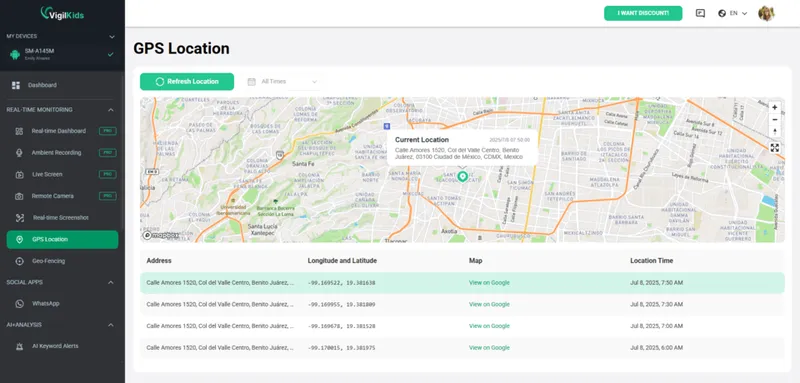
For example, apps like VigilKids enhance basic gps tracking for kids by combining location tools with broader family-safety features. Parents comparing parental control app options for Android should look for transparent, authorized use rather than hidden tracking promises. With the right setup, parents can not only see real-time location updates but also review location history, helping them understand regular routes, after-school patterns, and whether a one-time delay is actually unusual.

VigilKids Location Safety
- Real-time family location — check a child's current phone location when the device, permissions, and connection allow it.
- Location history — review supported route history instead of relying on one last-known point; helpful when comparing with iPhone location history expectations.
- Geofencing alerts — get notified when a child enters or leaves saved places such as home, school, or a tutoring center; compare more options in our geofencing software guide.
- Device activity context — connect location concerns with supported screen activity, app use, and online-safety signals.
- One parent dashboard — manage key family-safety information without switching between several separate trackers.
This option is strongest for older children who already carry an Android phone and need both physical-location awareness and digital-safety support. As with any monitoring tool, use it on a device you own or are authorized to manage, explain the family safety purpose, and check plan, OS, permission, and device compatibility before relying on it.
2. GPS Smartwatches for Kids
Smartwatches are among the most popular trackers for kids because they combine communication and tracking in one wearable device. They are ideal for kids who are not ready for a smartphone but still need a way to call a parent, send a voice message, or trigger an SOS alert.
Key features:
- Real-time GPS location tracking
- Two-way calling and voice messaging
- SOS emergency button
- Safe zone alerts for home, school, or common routes
Example devices:
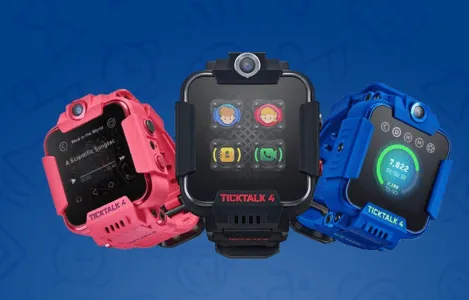
- TickTalk 4 — a feature-rich smartwatch with video calling, GPS tracking, and parental controls
- Garmin Bounce — designed for younger kids with location tracking and text messaging
- Xplora X6 Play — offers GPS tracking, step tracking, and controlled contacts
3. Clip-On GPS Trackers
Clip-on devices are small, lightweight, and easy to attach to a backpack, belt, or jacket. They are simple but effective children's tracking devices when your main goal is knowing whether a younger child arrived somewhere safely.
Key features:
- Real-time location updates
- Long battery life, often several days depending on model and refresh rate
- Compact and discreet design
- No screen, which means less distraction
Example devices:
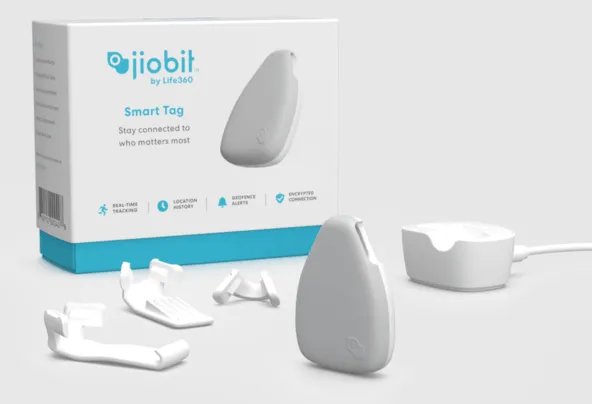
- Jiobit Smart Tag — known for strong attachment options and location tracking
- AngelSense GPS Tracker — offers real-time tracking, alerts, and caregiver-focused features
- Cube GPS Tracker — a budget-friendly option for basic location updates
These are practical for younger children, children with special supervision needs, or families that want a kids tracking device without opening the door to games, social apps, or web browsing.
When AngelSense Personal GPS Tracker Makes Sense
The AngelSense Personal GPS Tracker is worth mentioning because many parents search for it specifically when they need more than a basic backpack tracker. According to AngelSense's own feature pages, the device is designed for children with special needs and loved ones who may wander, with live location tracking, route history, safe-place alerts, and a search mode for urgent situations.
This makes AngelSense a stronger fit for younger children, nonverbal children, or families managing wandering and elopement risks. For older kids who already carry a smartphone, an app-based option like VigilKids may be more practical because it combines location awareness with broader device activity context in one parent dashboard.
4. Bluetooth & Hybrid Smart Tags
Smart tags are entry-level tracking tools that rely on Bluetooth and nearby device networks. They can help find a backpack, jacket, or set of keys, but parents should not confuse them with real-time gps tracking for kids.
Key features:
- Affordable and easy to use
- No subscription required in some cases
- Works best when nearby compatible phones pass through the area
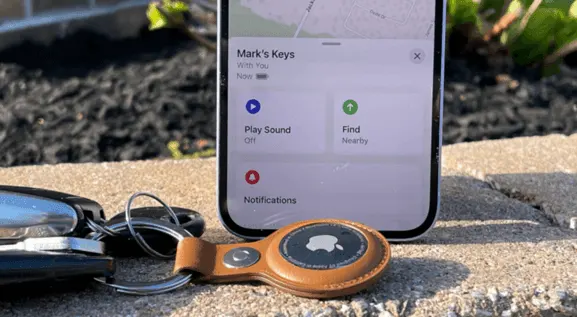
Example devices:
- Apple AirTag — uses Apple's Find My network for item location
- Samsung Galaxy SmartTag — works with Samsung devices for nearby item finding
- Tile trackers — useful for bags and household items, depending on local network coverage
These tags are convenient for objects, but they are less reliable over long distances and are not designed as a full child safety system. Android families comparing tag-style options can also read our AirTag alternative for Android guide.
Part 2. How to Choose the Right Tracker by Age
Parents often search for the best gps tracker for kids as if one product fits every age. In reality, the right choice changes as children move from preschool routines to independent bus rides, friend visits, sports practice, and their first smartphone.
- Ages 3-6: choose a wearable or clip-on tracker with simple alerts, strong attachment, and a caregiver-friendly app.
- Ages 7-10: consider a GPS smartwatch if your child needs calls, SOS, and safe-zone alerts without a full phone.
- Ages 11-13: app-based tracking becomes more practical if your child already carries a phone to school or activities.
- Teens: focus on agreed check-ins, location sharing rules, emergency expectations, and privacy boundaries.
If you are comparing several family location apps rather than physical devices, this roundup of the best location sharing app options can help you see how everyday family tools differ from dedicated monitoring tools. For budget-focused families, the best free family tracking apps guide is a useful next read.
For younger kids, the tracker is mostly about arrival and emergency alerts. For older kids, location works best as part of a larger agreement: when to share, when to call, and what happens if the phone battery dies.
Part 3. Device vs App: What Should Parents Choose?
The right choice depends on whether your child already has a smartphone and what problem you are actually trying to solve. A standalone tracker answers “Where is the child?” An app-based solution can also help answer “What else was happening around that concern?”
- For younger children: a wearable or clip-on gps tracking device for kids is simple, durable, and less distracting.
- For older kids with smartphones: an app-based solution offers more flexibility, including geofencing, location history, and broader phone-safety context.
- For cross-device families: review compatibility carefully, especially when parents use iPhone and children use Android, or the other way around.
- For stronger safety coverage: many families use both, such as a smartwatch for quick calls and a monitoring app for deeper control and tracking.
If you are trying to find a child's Android from an iPhone, the process can feel confusing because Apple's Find My, Google's tools, Samsung Find, and third-party apps do not all talk to each other. Our guide on how to track an Android from an iPhone explains the main routes. For map-based tracking questions, see tracking a mobile number on Google Maps and why phone-number tracking claims often need caution.
Compared with traditional trackers for kids, a phone-based approach can be more cost-effective and practical for older children. It also avoids charging and carrying a second device, though it depends on the child's phone battery, data connection, permissions, and willingness to keep the device with them.
Part 4. Safety, Privacy, and AirTag Limits Parents Should Know
A tracker should lower family stress, not create a hidden surveillance habit. The healthiest setup is clear: tell your child what is being tracked, why it matters, when you will check it, and what emergency situations override normal privacy.
Do not treat item trackers as child GPS trackers
AirTag, SmartTag, and similar products can help locate objects, but they are not the same as a real-time gps tracking device for kids. They may update only when compatible devices are nearby, and anti-stalking protections can alert people to unknown trackers. That is good for safety, but it also means a tag is not a dependable child-location tool.
Be cautious with “track phone number for free” claims
Many search results promise instant location from a phone number alone. In real life, precise location generally depends on device permissions, account access, app setup, carrier tools, or emergency services. For a safer breakdown, compare with our guide on how to track a phone number for free.
Use location history for patterns, not punishment
Location history can help parents spot route changes, missed buses, or unexpected stops. It should not become a reason to interrogate every small delay. If your child's phone is a Samsung device, start with official recovery and location tools such as Find My Samsung Phone, then add a parental monitoring layer only when it solves a real safety need.
Part 5. Setup Tips for More Reliable Location Tracking
Most tracker problems are not dramatic. They are usually boring little things: battery saver, poor signal, disabled permissions, an app that was force-closed, or a child who left the device in a locker. A few setup habits make any child gps tracker more dependable.
- Step 1. Turn on location permissions for the tracker app or device companion app.
- Step 2. Allow background location where the OS and app require it.
- Step 3. Save important places such as home, school, grandparents' house, and practice locations.
- Step 4. Test arrival and departure alerts on a normal day before relying on them in an emergency.
- Step 5. Create a family rule for low battery, dead zones, and what your child should do if location stops updating.
If your family uses both iPhone and Android, location sharing may need extra planning because default tools are often platform-specific. This guide to sharing location from iPhone to Android can help you choose the cleanest setup before adding another tracker.
Part 6. GPS Tracker for Kids FAQs
The best option depends on age and device habits. Younger kids often do well with a smartwatch or clip-on tracker. Older kids who already carry a phone may benefit more from an app-based solution such as VigilKids because it combines location tracking with broader phone-safety context.
An AirTag can help find items, but it is not a true real-time child GPS tracker. It relies on nearby Apple devices and includes unwanted-tracking alerts. It may be useful for a backpack, but it should not be your only safety plan for a child.
Some do. GPS smartwatches and clip-on trackers can work without a child's smartphone, although many require a cellular plan or subscription. Bluetooth tags usually do not provide the same real-time long-distance tracking.
Parents can generally use location tools for child safety on devices they own or are authorized to manage, but laws and school rules can vary. Use transparent family rules, avoid secret tracking, and check local requirements if you are unsure.
Prioritize accurate location updates, geofencing, battery life, emergency contact options, easy setup, and privacy controls. For older kids, location history and app-based context can be more useful than a separate device.
Conclusion
A reliable gps tracker for kids is no longer just a gadget purchase; it is a family safety decision. Smartwatches offer communication, clip-on trackers provide simplicity, smart tags are useful for belongings, and app-based tools like VigilKids can combine location tracking with broader digital protection.
The best choice is the one your child will actually carry, your family can use responsibly, and your safety plan can support every day. To add location history, geofencing, and parent dashboard context to an authorized device, explore VigilKids location tracking today.
Sources
Source note: Reviewed on August 7, 2026. Features can vary by device, operating system, region, permissions, connection status, and plan.
Hot Topics for Parents
8 Best Parental Control Apps for Android in 2026: Screen Time, GPS, and App Blocking
Compare the best Android parental control apps in 2026 for screen time, location tracking, app blocking, web filtering, and teen safety. See tested picks.
Google Family Link Parental Controls: A Complete Parent Guide
Learn how Google Family Link parental controls work, set them up on parent and child phones, manage apps and screen time, and understand key limits.
Roblox Parental Controls: Complete Guide for Parents
Everything parents need to know about Roblox parental controls — how to set them up, what they cover, and what to do when they're not enough.