
Sharing your location on WhatsApp is one of the most practical features for modern communication. Whether you are meeting a friend at a crowded park, coordinating a group event, or ensuring a family member reaches home safely, knowing how to share location on WhatsApp is an essential digital skill.
In this comprehensive guide, we will walk you through the various methods to share your coordinates on both Android and iPhone, how to use Google Maps integration, and how to enhance your family's safety with advanced parental control tools like Vigilkids for WhatsApp.
How to Share Your Location on WhatsApp (Static Location)
A static location, often referred to as a "pin," sends a single point on the map. This does not update if you move; it simply tells the recipient Where you are on WhatsApp (or where a specific place is) at that exact moment.
For Android Users:
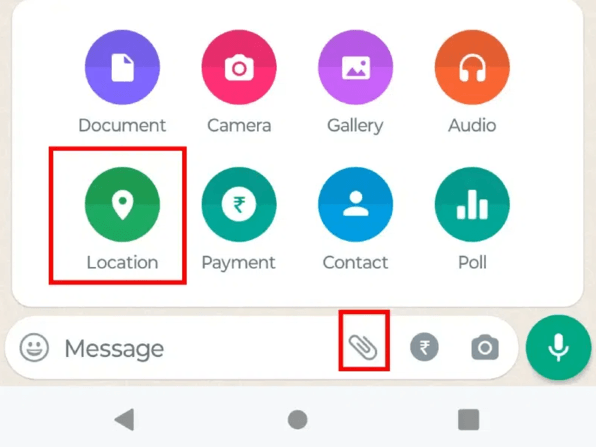
- Step 1. Open the chat with the person or group you want to message.
- Step 2. Tap the Paperclip icon (Attachment) in the message bar.
- Step 3. Select Location.
- Step 4. Grant WhatsApp permission if prompted.
- Step 5. Tap Send your current location to drop a pin.
For iPhone (iOS) Users:
- Step 1. Open the specific chat.
- Step 2. Tap the "+" icon on the bottom left.
- Step 3. Select Location.
- Step 4. Tap Send Your Current Location.
Static location only shares a fixed point.
It does not update if you move.
Best for quick meetups or sharing addresses.
How to Share Live Location on WhatsApp (Real-Time)
The most dynamic feature of the app is Live Location. This allows the recipient to see your movement on a map for a specific duration.
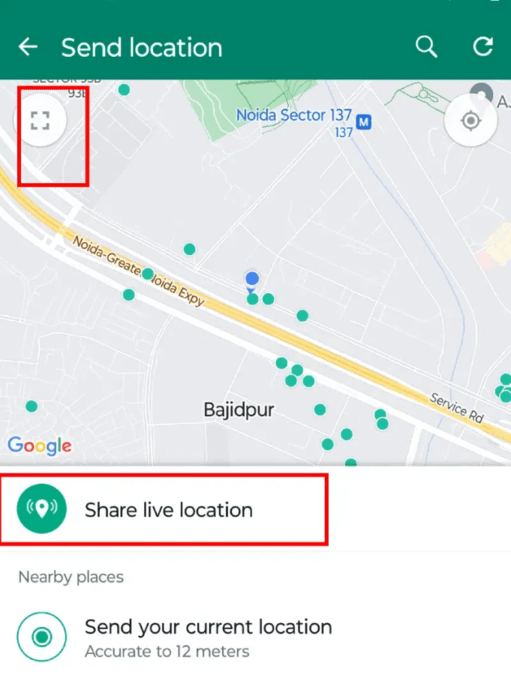
- Step 1. Open the chat and tap the attachment or "+" icon.
- Step 2. Select Location.
- Step 3. Tap Share Live Location.
- Step 4. Choose duration (15 minutes, 1 hour, or 8 hours).
- Step 5. Add a comment if needed and tap Send.
How to Share My Location on WhatsApp via Google Maps
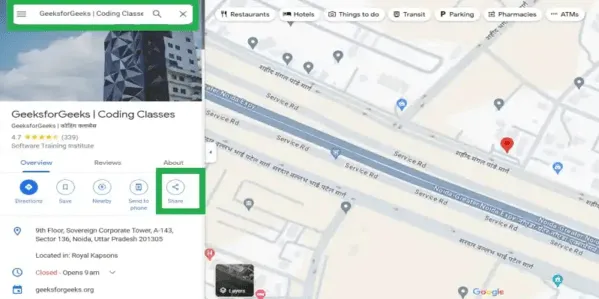
You can also share a location directly from Google Maps, which is perfect for sending exact places like restaurants or meeting points.
- Step 1. Open Google Maps and search or drop a pin.
- Step 2. Tap the Share button.
- Step 3. Select WhatsApp.
- Step 4. Choose the contact and send.
Sharing via Google Maps ensures higher accuracy and allows recipients to open directions instantly in their preferred map app.
Monitor Kids Safely with VigilKids for WhatsApp
While WhatsApp provides useful location-sharing tools, parents often need more advanced monitoring solutions. Vigilkids for WhatsApp offers a complete parental control experience tailored for WhatsApp safety.
Key Features:
- Location Tracking: Beyond basic WhatsApp pins, Vigilkids allows parents to keep an eye on their child's whereabouts, ensuring they are where they say they are.
- Message Monitoring: It provides insights into incoming and outgoing messages, helping to identify potential cyberbullying or contact with strangers.
- Call Logs: See who your child is talking to and for how long.
- Multimedia Access: View photos and videos shared over the platform to ensure no inappropriate content is being exchanged.
- Stealth Mode: The app operates discreetly, allowing parents to monitor without interfering with the child's natural use of the phone, fostering a balance between trust and safety.
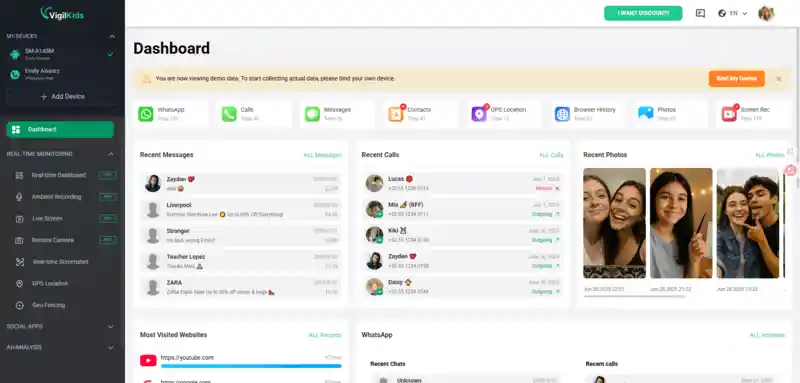
3 Simple Steps for VigilKids (QR Code Method)
- Step 1. Sign Up: Create your account on the official VigilKids website and log in to your user dashboard.
- Step 2. Scan the QR Code: Open the WhatsApp "Linked Devices" setting on the target phone and scan the QR code displayed on your VigilKids dashboard.
- Step 3. Start Syncing: Once the scan is successful, the WhatsApp data will automatically sync to your control panel for remote viewing.
Quick setup with no technical skills required.
Works through WhatsApp Web linking feature.
Ensure stable internet connection during setup.
Frequently Asked Questions (FAQs)
Is sharing location on WhatsApp free?
Yes, it is completely free, but it uses mobile data or Wi-Fi.
Can I share a location that isn't where I am?
Yes, you can search and send any location or landmark.
How do I stop sharing live location?
Open the chat and tap "Stop Sharing" anytime.
Can others see my live location activity?
Only people in that chat can view your location until sharing ends.
Conclusion
Mastering how to share location on WhatsApp helps you stay connected and safe. Whether using static pins or live tracking, the platform offers flexible solutions for everyday communication.
For families, combining WhatsApp features with tools like Vigilkids for WhatsApp adds an extra layer of protection, ensuring children can explore the digital world safely while staying connected.