
Text messages are still where a lot of a child's online life happens, from group chats with classmates to messages from strangers met on social apps. For parents who want to support their kids' digital safety, a good SMS tracker can help spot bullying, scams, or risky contacts before they escalate.
This guide walks through how SMS tracking actually works in 2026, what the latest iOS and Android updates mean for parental monitoring, and which apps are worth considering for family use.
Is It Possible to Track SMS Messages?
Yes, it is possible to track SMS messages on a phone you own and manage as a parent. Most apps collect text data from the device and send it to a secure online dashboard you log into. On Android, this typically requires installing an app directly on the phone. On iPhone, some tools read messages through iCloud backup data, though Apple has added several layers of protection in recent iOS versions that make this approach less reliable than it used to be.
Criteria for Choosing the Best SMS Tracker
Before picking an app, think about what matters most for your family. Here are the key things to consider:
- Data security: Your child's messages are sensitive data. Look for end-to-end encryption, clear retention policies, and a readable privacy policy.
- No root or jailbreak needed: Apps that require rooting an Android or jailbreaking an iPhone introduce serious security risks and void the warranty. Choose an app that works on stock devices.
- Free trial or demo: Try the dashboard and confirm it actually delivers what the marketing promises before committing to a long plan.
- Platform coverage: Useful if you need to monitor both Android and iPhone in the same family.
- Transparency: A trusted vendor has a real company name, a working support channel, and doesn't market itself as "100% invisible spyware."
Quick Comparison of the 8 Best SMS Trackers in 2026
Use this table as a quick reference before reading the detailed reviews. Prices are starting points on annual plans; vendors run frequent promotions, so always check the live pricing page.
| App | All Features in One Plan | No Root / JB Needed | Beginner-Friendly Setup | Data Refresh | Starting Price |
|---|---|---|---|---|---|
| VigiKids ★ Editor's Pick | Yes — single plan | Yes | Yes — guided setup | Near real-time | From $9.99/month |
| mSpy | Yes | Yes (Android), iOS limited | Android yes; iOS complex | Hourly to near real-time | From $11.66/month |
| XNSPY | Basic vs Premium tier | Some features need root | Moderate | Every 15–30 min | From $4.99/month |
| uMobix | Yes | Yes | Moderate — layout confusing | Near real-time | From $12.49/month |
| Qustodio | SMS needs separate add-on | Yes | Yes | Hourly | $54.95/year |
| Phonsee | Advanced features need root | Basic yes; advanced no | Yes | Every 5 minutes | From $8.85/month |
| Eyezy | Yes | Yes | Yes | Hourly | From $9.99/month |
| FlexiSPY | Lite vs Premium vs Extreme | No — root/JB required | No — complex | Variable | From $29.95/month |
The 8 Best SMS Tracker Apps for Parents in 2026
VigiKids
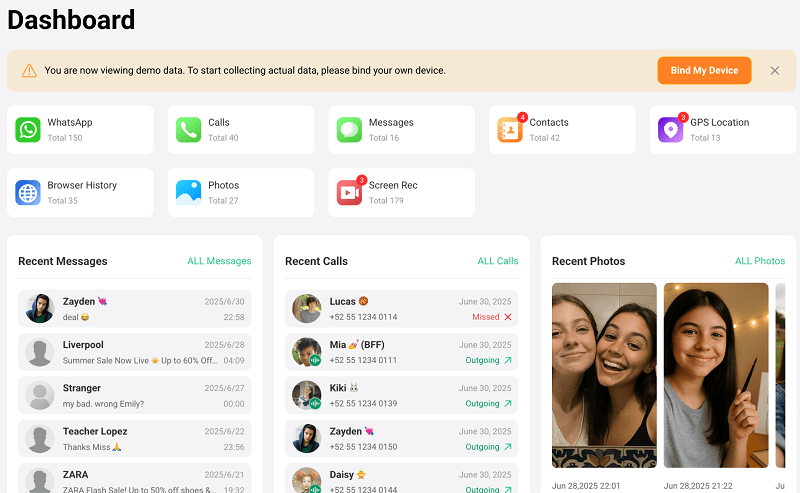
Looking for one dashboard that handles SMS, location, and screen time without a steep learning curve? VigiKids is built around exactly that need. It works on Android 5 and above, and the parent dashboard runs in any modern browser on Windows, Mac, or Chromebook. Beyond SMS tracking, it covers call logs, GPS location, screen time limits, app blocking, and activity alerts, so most families won't need a second tool alongside it.
Key Features:
- SMS tracking for sent, received, and deleted messages with contact names and timestamps
- Real-time GPS location tracking with location history
- Screen time limits and app blocking on a per-app basis
- Monitor surrounding sounds and ambient activity in real time.
- Works with WhatsApp, browser history, photos, and more on Android
- Easy to set up, even for non-technical parents
- Clean, modern dashboard that runs in any browser
- Combines SMS, GPS, screen time, and app blocking in one app
- Affordable annual plan compared with most competitors
- Some advanced features may take longer to sync on slow networks
Price: Annual plan from $9.99/month. Monthly and quarterly plans also available.
mSpy
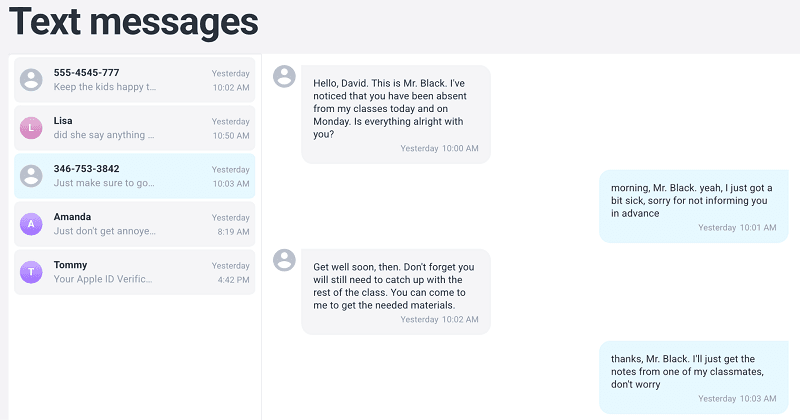
Launched over a decade ago, mSpy has the kind of track record most newer parental monitoring apps can't match. It supports Android 5 and later and iOS 11 through the current version. Once installed, the web-based dashboard shows a color-coded activity graph for texts, calls, GPS, and WhatsApp. Parents access sent and received SMS threads with timestamps, contact names, and downloadable media files.
Key Features:
- Full conversation threads with timestamps
- Downloadable shared photos and videos
- Color-coded activity graph for quick overview
- Intuitive chat view and media export
- Comprehensive iOS support once installed
- Long track record in the parental control space
- No single-message list view
- Lacks in-message search
- iOS setup is complex and lengthy
- Pricier than several alternatives on shorter plans
Price: 1 month at $48.99, $27.99/month on the 3-month plan, or $11.66/month on the annual plan.
XNSPY
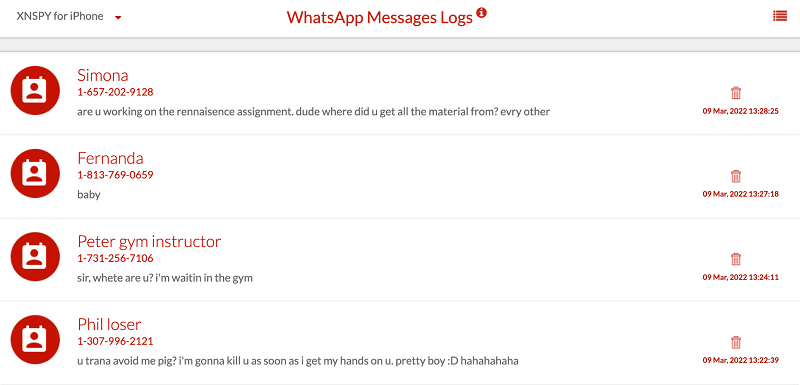
If you want both a chat-style threaded view and a flat searchable list of every text, XNSPY gives you both in the same dashboard. The veteran tracker has been around for over a decade and gives parents remote access to a child's phone after a one-time installation.
Chat view shows full conversation threads with timestamps, while list view pairs each message with the GPS location at the time it was sent or received. The search bar lets you find specific contacts or filter messages by date, which is genuinely useful in busy family chats.
Key Features:
- Chat view and list view for texts
- GPS location attached to each message
- Search and date filters
- Keyword and watchlist alerts
- See every sent and received text
- View shared media and links
- Set alert words for instant notice
- No dedicated tab for deleted messages
- Advanced features may need rooting or jailbreaking
- Dashboard design feels dated
Price: Basic plan from $4.99/month (annual); Premium plan from $7.49/month (annual).
uMobix
uMobix launched in 2020 and focuses on near real-time updates. It supports modern Android phones (Android 5+) and iPhones (iOS 7+), and the dashboard updates almost as messages come in.
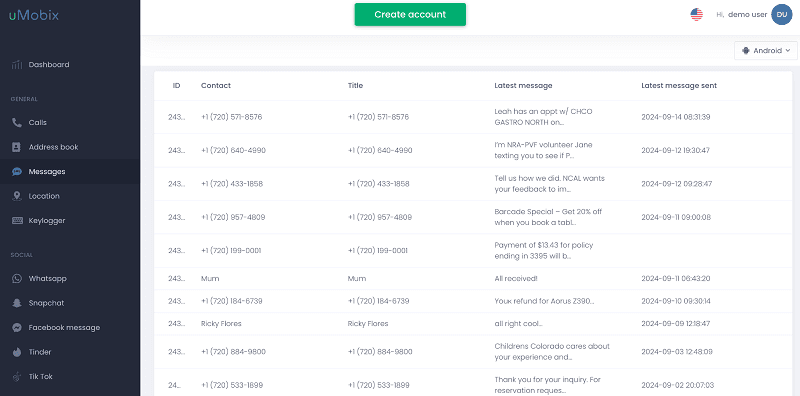
On the main screen, you can see recent location, top websites, call list, and new contacts. The Messages tab lists texts in rows with contact name, subject, last sent, and last received, sorted by recency. The trade-off is that there is no chat-style threaded view yet.
Key Features:
- Five-column message list with sender and recipient info
- Shows contact name and number
- Real-time updates as new texts arrive
- View every text as it arrives
- Clear contact details
- Fast initial sync
- Row-based layout can confuse new users
- No chat thread view
- No in-message search
Price: $49.99 for 1 month, $29.99/month on the 3-month plan, or $12.49/month on the annual plan.
Qustodio
Think of Qustodio less as an SMS tracker and more as a full family safety suite that happens to include SMS monitoring. It covers web filtering, screen time, app blocking, and location across Android, iOS 14 or later, Windows, Mac, Chromebooks, and Kindle.
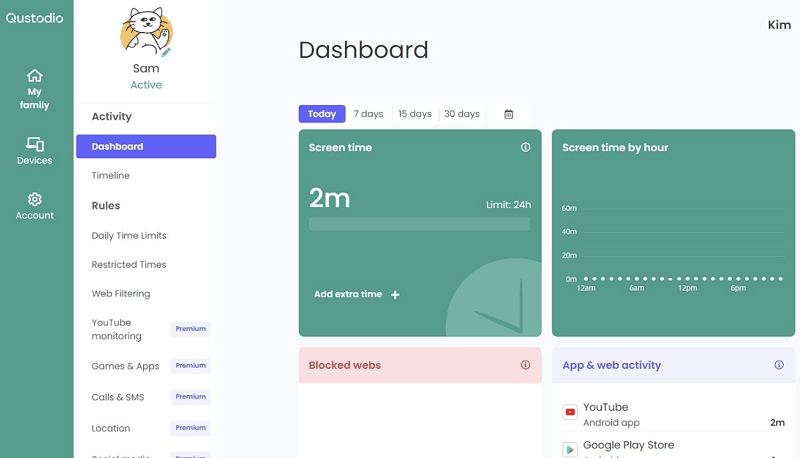
SMS tracking is part of the free "Calls & Messages" add-on, which you enable separately. Updates appear roughly once an hour or when you refresh manually, and parents can read full SMS conversations and block specific contacts with a click.
Key Features:
- Full SMS read with one-click contact blocking
- Hourly auto-update or manual refresh
- Integrates with Qustodio's screen time and web filtering rules
- Strong cross-platform support including Chromebook and Kindle
- Read every message content
- Block risky numbers quickly
- Established brand with transparent privacy policy
- SMS requires the separate Calls & Messages add-on
- No media view inside the message tab
- Updates are not real-time
Price: $54.95/year for the Basic plan; $99.95/year for the Complete plan.
Phonsee
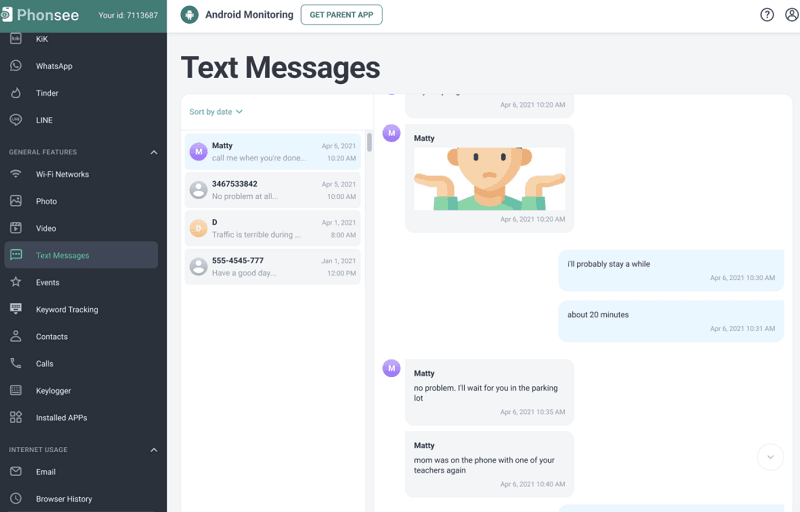
Phonsee stands out for its fast dashboard refresh rate. It works on Android 5 and above and iPhones running iOS 7 or later. After setup, the dashboard updates every five minutes with text messages, call logs, social media activity, browsing history, and media files. Texts appear in a chat-style view with photos, videos, and timestamps, and the layout is clean enough to find what you need without hunting.
Key Features:
- Chat-style view with photos and videos
- 5-minute auto data refresh
- Simple modern dashboard
- View texts and all shared media in one view
- Fast and frequent dashboard updates
- Easy-to-use interface
- No search inside messages
- Advanced features need root on Android
- Smaller user community than mSpy or Qustodio
Price: $42.51 for 1 month, $24.79/month on the 3-month plan, or $8.85/month on the annual plan.
Eyezy
Among the apps in this guide, Eyezy has the most polished interface — it's the one that doesn't look like enterprise software from 2012. It works on Android and iOS, and the dashboard gives a quick view of browsing history, GPS location, messaging activity, and top contacts.
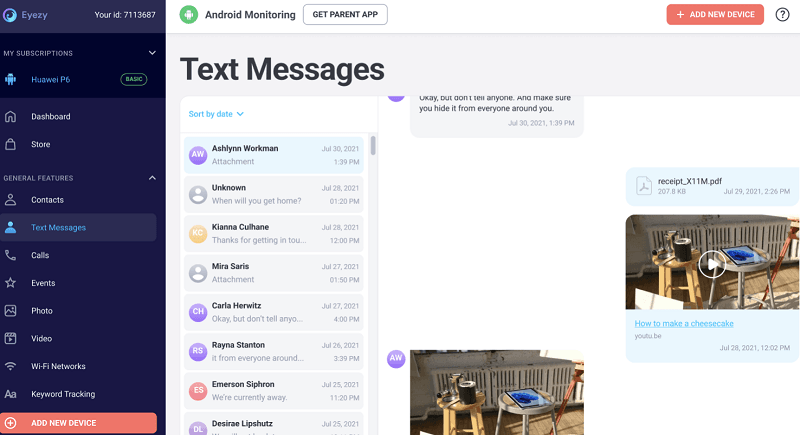
Text messages are grouped under a feature called "Social Spotlight," shown in chat view by contact with timestamps and any shared media. The interface looks more modern than most competitors, though some basic features like in-message search and full contact number display are still missing.
Key Features:
- SMS tracking with chat view
- Monitors browser activity, GPS, and social apps
- Visual dashboard with graphs and summaries
- Works on Android and iOS
- Easy to navigate
- Shows shared media inline with messages
- Polished, modern UI
- No search tool inside the message view
- Contact phone numbers not always shown
- Newer brand with less long-term track record
Price: $47.99 for 1 month, $27.99/month on the 3-month plan, from $9.99/month on the annual plan.
FlexiSPY
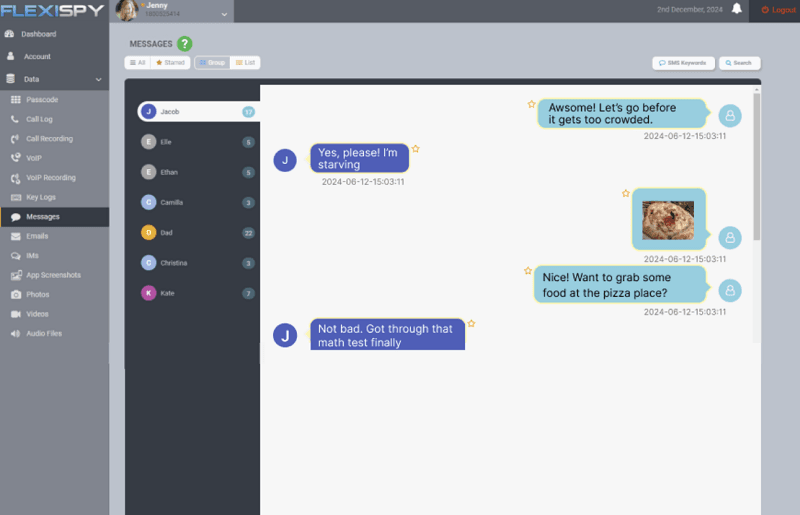
Power, complexity, and a price tag to match — that's the FlexiSPY trade-off. FlexiSPY packs features like live call listening and remote camera access that most parental control apps don't offer. It runs on Android, iOS, computers, and tablets, which puts it closer to a corporate surveillance suite than a family app. SMS tracking is found under the "Data" section, with messages viewable in group view (by contact) or list view (by time). Each message includes timestamps and shared media.
Key Features:
- SMS tracking with chat and list views
- Remote access to calls, camera, and microphone
- Tracks social media, files, and location
- Supports phones, tablets, and computers
- Broadest control and monitoring feature set
- Records calls and accesses device remotely
- Works across multiple device types
- Expensive and complex to install
- Dashboard looks outdated
- Heavier than what most parents need
- Full features require rooting or jailbreaking
Price: Plans start at $29.95/month for the Lite tier; Premium and Extreme tiers cost more.
Apple Screen Time and Google Family Link: Why Not Just Use Them?
Both Apple and Google ship free family controls built into their operating systems. It's a fair question to ask why parents would pay for a third-party app when these official tools exist. The honest answer: for many families, the built-in tools really are enough, and for others, they leave specific gaps that third-party apps fill. Here's how they compare.
What Apple Screen Time Does Well
Screen Time is built into every iPhone and iPad, with no extra installation needed. Through Family Sharing, parents can set daily app limits, schedule downtime, require approval for App Store purchases, filter explicit content in Safari and the App Store, and see weekly activity reports. Location sharing comes through Find My, which is reliable and battery-friendly. Communication Safety can warn kids before they send or receive nude images. Setup is straightforward if everyone is already inside the Apple ecosystem.
What Google Family Link Does Well
Family Link offers similar coverage on Android: app approval, daily screen time limits, location through Google Maps, school-hour modes, content filters in Google Play and Chrome, and the ability to lock the device remotely. Parents and kids both install Family Link, and the child's view is transparent — they can see what's being managed. For children under 13 on a Google Account, Family Link is required, which means many families already have it set up.
Where Built-in Tools Fall Short
Neither Screen Time nor Family Link lets you read text messages, WhatsApp chats, or social DMs. They also don't show call logs, browser history beyond top-level filtering, or what's being typed in chat apps. There's no keyword alerting, no view of deleted messages, and no way to see who specifically is contacting your child.
Screen Time can be bypassed by a determined teen who knows the passcode workaround, and Family Link's controls loosen automatically when a child turns 13 unless they opt to keep them on. For families dealing with specific concerns — a child being contacted by strangers, signs of bullying, suspicious late-night messaging — these gaps matter.
Side-by-Side Comparison
| Capability | Apple Screen Time | Google Family Link | Third-party Tracker |
|---|---|---|---|
| Price | Free | Free | $5–$50/month |
| Screen time limits | Yes | Yes | Most apps yes |
| App blocking | Yes | Yes | Most apps yes |
| Location tracking | Yes (Find My) | Yes | Yes |
| Read SMS content | No | No | Yes |
| Read WhatsApp / DMs | No | No | Yes (Android) |
| Call logs | No | No | Yes |
| Keyword alerts | No | No | Yes (most apps) |
| Deleted message recovery | No | No | Yes (most apps) |
| Works after age 13 | Yes, with cooperation | Limited | Yes |
Our Recommendation
Start with the built-in tools. For most families with younger kids, Apple Screen Time or Google Family Link covers the basics well enough, costs nothing, and keeps everything transparent.
Add a third-party SMS tracker if you have a specific reason: a teenager whose social life has moved heavily into messaging, signs of cyberbullying or stranger contact, or a younger child on Android where Family Link doesn't give you visibility into chat content. The best parental control setup often combines both — the official tools for time and content management, plus a focused tracker for the message visibility gap.
FAQ
Q1: Is SMS tracking legal?
For parents monitoring a minor child on a phone they own and pay for, it's generally legal in most countries, though the laws vary. Monitoring an adult's phone without their knowledge and consent is illegal in most places, including the US, UK, Canada, and the EU. Always check your local laws and have an open conversation before installing any monitoring tool.
Q2: Can I track SMS without installing an app on the target phone?
On iPhone, some apps can pull data from iCloud backups using the Apple ID and password, which doesn't require installing software directly. On Android, you almost always need to install an app on the device. Beware of services that promise "no installation" tracking on Android — they're usually scams or phishing tools.
Q3: Will my child know the app is installed?
Most parental control apps run quietly in the background. However, the most important thing is to tell your child you're monitoring their phone, both because hidden monitoring damages trust and because some platform features (like iOS Safety Check or Android accessibility prompts) may surface the app's presence anyway.
Q4: Can SMS trackers read WhatsApp, iMessage, or Signal?
Plain SMS is always readable. WhatsApp and iMessage are often readable on Android with the right permissions or on iOS through iCloud sync. Signal and Snapchat are mostly not readable due to encryption and disappearing messages — apps that claim otherwise typically rely on screen capture, which is unreliable.
Q5: Can I see deleted text messages?
Yes, many apps capture messages the moment they arrive and store them in the dashboard, so deleting them on the phone afterwards doesn't remove them from your view. Apps with periodic sync (like Qustodio) may miss messages that are deleted before the next sync.
Q6: Do I need to root my Android or jailbreak my iPhone?
For most family monitoring needs on Android, no — apps like VigiKids, mSpy, uMobix, and Qustodio work on stock devices. Rooting or jailbreaking unlocks deeper features but introduces serious security risks and voids the warranty. We recommend avoiding it for everyday parental control.
Conclusion
Choosing an SMS tracker comes down to matching the app to your family's situation: what platforms your kids use, how old they are, what you specifically want to keep an eye on, and how openly you've talked with them about monitoring. VigiKids covers the common needs — SMS, location, screen time, and app controls — in one dashboard that doesn't require a tech background to use, and its annual pricing is friendly compared with most of the alternatives in this guide.
Whichever app you choose, treat your child's messages as sensitive data, keep monitoring openly communicated, and revisit the rules as your child grows. The best parental control setup is one your whole family understands and can live with for the long term.
Try VigiKids Today
See SMS, calls, GPS location, and app activity in one easy dashboard. Set up in minutes, no root required.
Related Topics
How to Check Call History of Any Number for Free?
Learn how to check any number call history for free with WhatsApp, phone logs, or carriers. Stay legal with easy, secure methods!
Can You Hide Text Messages? Best Ways to Hide Text Messages on Android
Wondering can you hide text messages? Learn how to hide text messages on Android with easy, proven methods to protect your privacy in minutes.
Best Phone Tracker App 2026: Top 7 Safe & Family Picks
Discover the best phone tracker app in 2026. Compare VigilKids, Life360, Find My & more for real-time GPS, family safety, and privacy-first monitoring.