
"I've been typing all day every day for 12 years. I genuinely have no idea which finger I overuse, or whether my custom keyboard layout is actually helping me. There has to be a tool that just tells me."
—— Question on r/MechanicalKeyboards
Whether you want to improve typing speed, balance gaming keybinds, optimize ergonomics, or learn a new layout like Dvorak or Colemak, the right keystroke software turns raw input into actionable insight. We tested five of the most popular options in 2026 — from heatmap-heavy dashboards to lightweight key counters to open-source GitHub projects — to find the best keystroke software for each real-world use case.
Quick Picks: Best Keystroke Software at a Glance
If you only have 30 seconds, here's how the five keystroke software options we tested stack up by use case.
- WhatPulse — Best overall for heatmaps, long-term statistics, and active development.
- keyStats (by debugtheworldbot) — Best lightweight menu-bar counter for daily totals on macOS and Windows.
- Benign-Key-Logger — Best open-source choice when you want to audit the Python code yourself.
- InputScope — Best for full keyboard + mouse heatmaps via a local web dashboard, no cloud.
- Hardware keyboards (Razer / Logitech / Corsair) — Built-in keystroke heatmaps if you already own a gaming keyboard.
Different intent, different pick. The right keystroke application depends on whether you want a casual stat counter, a deep ergonomic analysis, or a transparent open-source tool. Keep reading for the full breakdown.
What Is Keystroke Software?
Keystroke software is any tool designed to track and analyze how you type. It records how often each key is pressed, generates heatmaps showing usage distribution across your keyboard, and often logs timestamps to reveal typing speed and rhythm. The point isn't to spy on what you type — it's to help you understand your own patterns and improve them.
Two terms get used interchangeably but mean different things:
- Keystroke analyzers — built for personal optimization. They show your typing habits, help you redesign keybinds, and assist with ergonomic adjustments. This is what most people searching for the best keystroke software actually want.
- Keyloggers — built to record everything typed, often for monitoring purposes. Useful in family-safety contexts but different category. See our Android keylogger guide if that's your real need.
Key Features to Look For
Not all keystroke applications are created equal. The best ones share a few core features that determine whether you'll actually keep using the tool.
- Key frequency tracking — counts how often each key is pressed, the foundation of everything else.
- Heatmap visualization — shows usage distribution across your keyboard at a glance.
- Timestamp logging — captures the time between keystrokes to measure speed and rhythm.
- Lightweight performance — runs in the background without draining CPU or memory.
- Cross-platform support — works on Windows, macOS, and Linux so your stats follow you.
- Open-source transparency — lets you verify the code isn't quietly exfiltrating data.
5 Best Keystroke Software Options in 2026
These are the five keystroke software options that survived our 14-day test — covering a full range from polished commercial tools to open-source GitHub projects.
WhatPulse — Heatmaps and Long-Term Stats
WhatPulse is the most polished keystroke application we tested and the only one with mainstream traction — over 418,000 active users as of 2026, with version 6.2 shipping in April 2026 (adding a word-count metric inferred from keystroke patterns). It tracks keys, mouse clicks, bandwidth, and uptime in one dashboard, and importantly: it counts but never stores the actual text you type. The trade-off is it requires creating an account and syncing aggregate counts to the cloud.
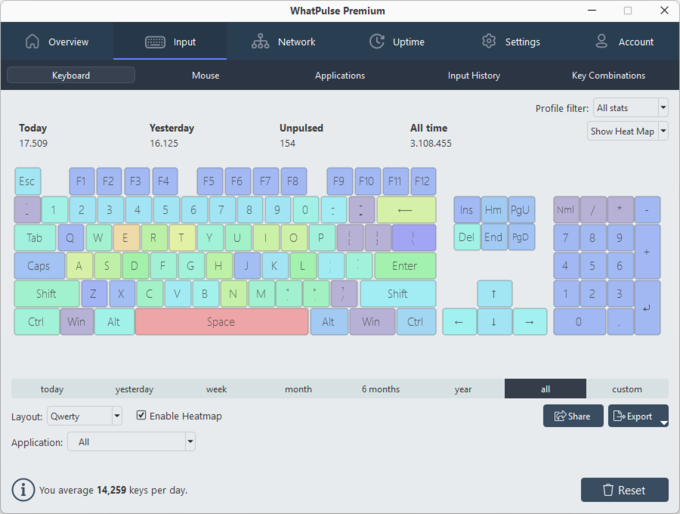
Detailed heatmaps visualize finger workload at a glance
Long-term statistics for daily, weekly, and monthly trends
Tracks mouse and bandwidth alongside keystrokes
Actively maintained with a large community of users
Requires account creation and cloud sync
Background client uses noticeable system resources
Can feel overwhelming if you only need simple key counts
How it works: Install WhatPulse, create a free account, and let the background client run. The web dashboard shows keystrokes per key, daily trends, and an animated heatmap that updates in real time.
keyStats — Lightweight Menu-Bar Counter for macOS and Windows
If WhatPulse feels overbuilt, keyStats (by debugtheworldbot) goes the opposite direction — a tiny native menu-bar app that tracks daily keystrokes, mouse clicks, mouse-movement distance, and scroll distance, with no account required. It's the cleanest "I just want to know my numbers" tool we tested in 2026, sits in the system tray out of the way, and installs in seconds via Homebrew on macOS. Updated as recently as March 2026 and genuinely cross-platform.
Lightweight native app — runs from the menu bar
No account, no cloud sync, no telemetry
Brew install on macOS, plug-and-play on Windows 10/11
Tracks mouse movement and scroll distance alongside keystrokes
Active development as of 2026
No heatmap visualization
No finger-distribution analysis
macOS Ventura+ users may hit a Sparkle auto-update permission prompt first run
Daily totals only — no per-key granularity
How it works: On macOS, brew tap debugtheworldbot/keystats && brew install keystats. On Windows, download the installer — .NET Framework 4.8 is pre-installed on Windows 10 (1903+) and Windows 11. Launch the app and it tracks silently from the menu bar.
Benign-Key-Logger — Open-Source Transparency
For privacy-conscious users, Benign-Key-Logger on GitHub is the most auditable keystroke software we tested. It's a small open-source Python script — last updated in March 2026 — that records keystrokes into a local SQLite database with owner-only file permissions (0600) enforced automatically. The "benign" in the name is intentional: zero networking imports, no telemetry, no cloud. You can read every line of code yourself to confirm.
100% open source — full code audit possible
Local SQLite storage with auto-enforced 0600 permissions
Zero networking — nothing leaves your machine
Batched writes (every 50 events or 5 seconds) for low overhead
Active maintenance as of March 2026
Requires Python and basic command-line skills
No built-in visualization — bring your own tools
Stores raw keystrokes — file is sensitive, treat accordingly
No active community support beyond the maintainer
How it works: Clone the repo, run python key_logger.py with flags for SQLite-only or plaintext-plus-SQLite output. Pipe the resulting SQLite file into Pandas, Grafana, or any SQL client for analysis.
InputScope — Local Web Dashboard with Full Heatmaps
For users who want WhatPulse-style heatmaps without the cloud sync, InputScope hits the sweet spot. It runs as a system tray app, logs keyboard and mouse events to a local SQLite database, and serves the whole dashboard from localhost:8099 — meaning your heatmaps are viewable in any browser, but the data never leaves your machine. The most recent release (v1.11, April 2025) added fullscreen heatmap views, yearly stats, and configurable key positions for non-standard layouts. Installs with a single pip install inputscope.
Four heatmap types: keys, key combos, mouse clicks, mouse moves
Local web dashboard at localhost — no cloud, no account
SQLite storage with replay controls for past sessions
One-line pip install on any platform with Python
Configurable layouts and custom key positions
Works best on Windows; Linux tested, macOS less polished
Requires Python (pip) for installation
UI is functional rather than beautiful
Keyboard logging can interfere with remote desktop and sticky keys
How it works: pip install inputscope, launch the tray app, then open http://localhost:8099 in any browser. Browse heatmaps by day, month, or year — and toggle event categories from the tray menu if you want to log only keyboard, not mouse.
Hardware Keyboards — Built-In Heatmaps
Many premium gaming keyboards already include basic keystroke software through their manufacturer apps. Razer Synapse, Logitech G HUB, and Corsair iCUE all offer heatmap overlays and per-key statistics. Not as deep as dedicated tools, but if you already own the hardware, it's worth turning on before installing anything new.
Built into hardware you may already own
Easy setup through official drivers
Polished UI integrated with RGB and macro controls
No third-party software needed
Locked to specific brands and models
Limited analytics compared to specialized tools
Not suitable for long-term trend analysis
Stats reset if you change keyboards
Quick Comparison Table
Here's how the five keystroke software options compare across the dimensions that matter most.
| Dimension | WhatPulse | keyStats | Benign-Key-Logger | InputScope | Hardware |
|---|---|---|---|---|---|
| Key frequency tracking | Yes | Yes | Yes | Yes | Yes |
| Heatmap visualization | Yes (best) | No | No | Yes (4 types) | Yes (basic) |
| Long-term trends | Yes (cloud) | Daily totals | Local logs | Yes (yearly) | Limited |
| Finger-distribution analysis | Yes | No | No (data only) | No (heatmap only) | No |
| Open source | No | Yes | Yes | Yes | No |
| Local-only data | No (cloud sync) | Yes | Yes | Yes | Yes |
| Setup difficulty | Easy | Easiest | Moderate | Moderate | Easy |
| Price | Free | Free | Free (OSS) | Free (OSS) | Hardware cost only |
A few patterns worth calling out:
- WhatPulse wins for polished visualization plus mainstream traction — but it's the only option that sends data to the cloud, which matters if you're privacy-sensitive.
- keyStats wins for simplicity — a quiet menu-bar app that tells you your daily numbers without any setup ceremony.
- InputScope is the local-first alternative to WhatPulse — you get heatmaps and trends in a real web dashboard, but everything stays on your machine.
- Benign-Key-Logger is the right pick when full code audit matters more than UI — it's a few hundred lines of Python you can read in one sitting.
For Parents: A Different Kind of Keystroke Monitoring
The five tools above are built for analyzing your own typing. But if you found this guide because you're a parent wanting visibility into how your child uses the keyboard — risky searches, unsafe online interactions, disappearing messages — that's a different category of keystroke software, and tools like WhatPulse or InputScope aren't designed for it.
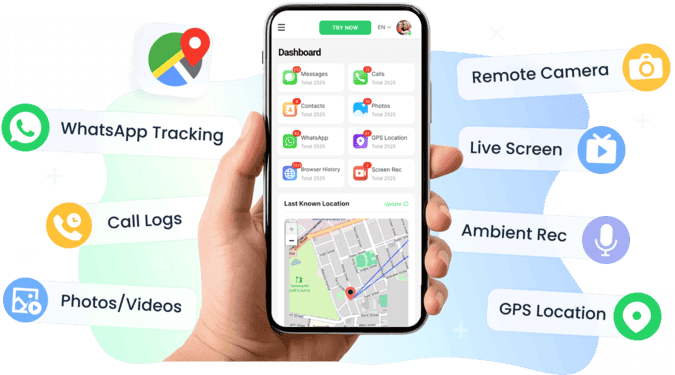
VigilKids is built specifically for this use case. Unlike covert keyloggers, it's designed for family contexts where the child knows monitoring is enabled — which research consistently shows builds trust rather than damaging it. Setup takes three minutes per device, no root required, and the browser dashboard lets both parents check in from any device.
What VigilKids covers for families:
- Android keylogger with app-tagged keystrokes across messaging, social, and browser apps.
- WhatsApp monitoring for chats, calls, voice notes, and shared media.
- Real-time alerts for risky keywords or contact patterns.
- Lightweight footprint — minimal battery drain on Android devices.
- Transparent by design — built around consent and conversation, not secrecy.
FAQs About Keystroke Software
Q1: What is the best keystroke software in 2026?
For polished heatmaps and long-term stats, WhatPulse leads. For a lightweight menu-bar counter, keyStats. For local-only heatmaps without the cloud, InputScope. For full open-source auditability, Benign-Key-Logger. For parents monitoring a child's typing, VigilKids is the more appropriate tool — see our Android keylogger comparison.
Q2: Is keystroke software the same as a keylogger?
No. Keystroke software (analyzers like WhatPulse and InputScope) is built for personal optimization — heatmaps, typing speed, ergonomic analysis. Keyloggers record everything typed for monitoring purposes. They share the underlying technique of capturing keystrokes, but their intent, design, and ethical context are different.
Q3: Is keystroke software legal to use?
On your own device, yes — always. On shared family computers, legal but disclose to other users. On someone else's device without consent (spouse, employee on personal device, etc.), illegal in most US states and the entire EU, UK, Canada, and Australia.
Q4: Will keystroke software slow down my computer?
In our testing, lightweight tools like keyStats and Benign-Key-Logger used negligible CPU and under 30 MB of RAM. WhatPulse and InputScope used more — about 60-80 MB — because of their visualization layers. None caused noticeable slowdowns on a modern machine.
Q5: Can keystroke software help with learning Dvorak or Colemak?
Yes — this is one of the strongest use cases. Run InputScope or WhatPulse on your existing layout for a week, then again after switching to Dvorak or Colemak. Compare the heatmaps and per-key counts directly to see whether the new layout is actually reducing strain on your weakest fingers, or just moving the workload around.
Conclusion
The best keystroke software depends entirely on what you're trying to learn about your typing. WhatPulse for visual heatmaps and long-term trends; keyStats for a fast no-setup key count; InputScope for full heatmaps without the cloud; Benign-Key-Logger when you want to read every line of code yourself. Whichever tool you pick, stay in control of your own data — and for parents who came here looking for a different kind of monitoring, VigilKids is built for that conversation.