
Your child carries an Android phone, while you use an iPhone. Most days, that difference hardly matters. But when pickup plans change, a location stops updating, or the phone goes missing, Apple’s Find My cannot simply add that Android device.
The good news is that how to track Android phone from iPhone is mostly a matter of choosing the right setup. Use VigilKids when you want ongoing family location history and alerts prepared in advance. If the Android is already lost, jump to Google Find Hub or Samsung Find; for voluntary sharing, use Maps, Family Link, or a messaging app.
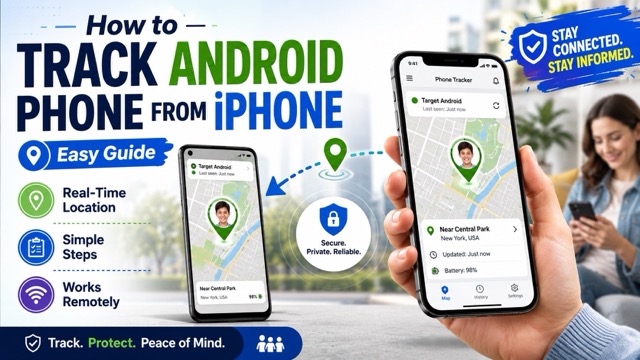
Can an iPhone Track an Android Phone?
Yes—but the iPhone is the screen you use to view the location, not the service locating the Android. That job is handled by Google Find Hub, Samsung Find, an approved location share, or a cross-platform family app. The correct account, location settings, and permissions must already be available for the method you choose.
In other words, if you are asking how to find an Android phone with an iPhone or how to locate an Android phone with an iPhone, you do not need an Apple-only solution. You need a service that recognizes the Android device and can be opened or viewed from iOS.
Already lost? Use the device account. Planning ahead? Set up sharing first. Need a live update? Keep the Android online with Location enabled. Managing a child’s phone? Use a supervised or authorized family setup.
This distinction matters because “find,” “share,” and “track” are not interchangeable. A lost-device service can ring, lock, or erase a phone, while a location-sharing service depends on the Android user choosing to share. A parental-control service must be installed and connected before it can provide ongoing family location features.
6 Ways to Track an Android Phone from an iPhone
Start with the job you need to solve: ongoing family location support, lost-phone recovery, or short-term sharing. Then follow the setup for that method instead of installing several tools that do the same thing.
| Method | Best for | Cost | Setup needed first? | Main limitation |
|---|---|---|---|---|
| VigilKids | Ongoing authorized family location | Plan required | Install and grant permissions on Android | Not an after-loss recovery tool |
| Google Find Hub | Finding your lost Android | Free | Google Account and Find Hub enabled | Account access is required |
| Samsung Find | Finding a Galaxy phone | Free | Samsung Account and lost-device settings enabled | Samsung devices only |
| Google Maps | Consent-based live sharing | Free | The Android user must share location | Sharing can be stopped |
| Google Family Link | A supervised child’s Android | Free | Family supervision and location sharing | Only supervised family devices |
| Messaging apps | Short trips and meetups | Free | The Android user starts a live share | Temporary and app-dependent |
1. Use VigilKids for Ongoing Family Location Tracking
If you want location support ready before the next school pickup or family trip, start with VigilKids. Unlike a lost-device page that you open only after something goes wrong, VigilKids gives parents one iPhone-accessible dashboard for supported Android location history, movement updates, and geofence alerts after setup.

VigilKids Family Location Features
- View the Android phone’s available location from an iPhone dashboard.
- Review route history and movement patterns in one timeline.
- Set geofences and receive supported boundary alerts.
- Explore Android GPS tracking features.
- Review supported WhatsApp family-monitoring options.
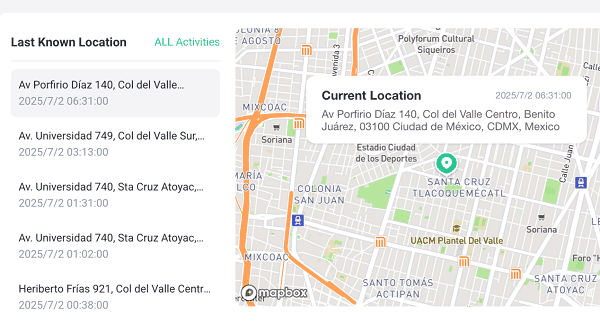
- Step 1. Create a VigilKids account and choose the appropriate family plan.
- Step 2. With authorization and physical access, install the required app on the child’s Android phone.
- Step 3. Complete the prompted location and background-permission setup on Android.
- Step 4. Open the VigilKids dashboard on the iPhone and select the connected Android device.
Still comparing tools? Review the best free family tracking apps and choose the level of history, alerts, and setup your family actually needs.
- iPhone web dashboard
- Route history
- Geofence alerts
- Broader family features
- Advance setup
- Android permissions
- Paid plan
- Not after-loss recovery
VigilKids cannot locate an Android phone that was never connected and configured. Availability depends on the Android version, device permissions, connectivity, and plan. Use it only on a child’s device you own or are authorized to manage.
2. Use Google Find Hub for a Lost Android Phone
If the Android phone is already missing, skip the family dashboards and open Google Find Hub first. Previously called Find My Device, Google’s recovery service can show an available current or last-known location, play a sound, mark the phone as lost, or erase it when recovery is no longer realistic.
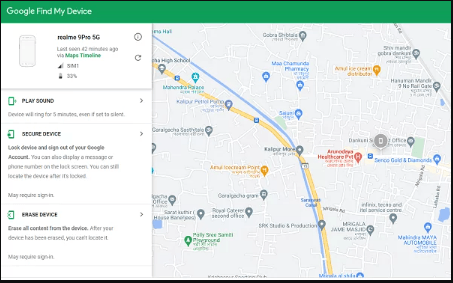
- Step 1. On the iPhone, open Safari and go to android.com/find.
- Step 2. Sign in with the Google Account connected to the missing Android phone.
- Step 3. Select the Android device and review its current or last-known position.
- Step 4. Choose Play sound, Mark as lost, Get directions, or erase the device only when appropriate.
Google recommends preparing backup codes for two-step verification before a phone is lost. If the missing phone is your main verification method, signing in from the iPhone may otherwise be difficult.
- Official Google tool
- Free browser access
- Ring, lock, erase
- Google sign-in
- Prior setup
- Possible location delay
3. Use Samsung Find for a Galaxy Phone
Galaxy owners have a second recovery route. Samsung Find and SmartThings Find can be opened from an iPhone browser, making them useful when you want to know how to track a Samsung phone on an iPhone. The Galaxy must already be linked to a Samsung Account with its lost-device settings enabled.
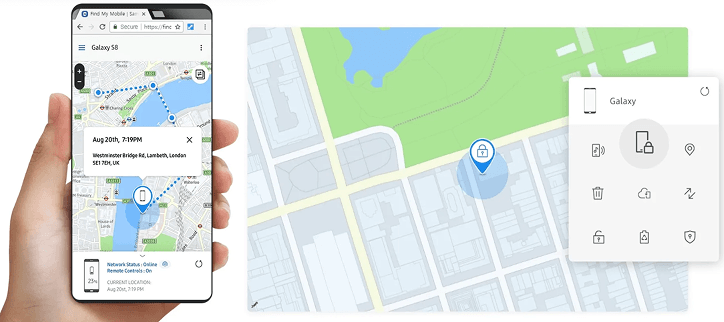
- Step 1. Open the SmartThings Find website or Samsung Find website on the iPhone.
- Step 2. Sign in with the Samsung Account used on the missing Galaxy phone.
- Step 3. Select the phone from the device list and check its available location.
- Step 4. Use Ring, Lock, Track location, or Erase data based on the situation.
For a complete walkthrough of Samsung’s requirements and recovery options, see how to find a lost Samsung phone before an emergency happens.
- Galaxy-specific tools
- Free web access
- Ring, lock, erase
- Samsung only
- Samsung Account
- Prior setup
4. Share an Android Location with Google Maps
When no phone is missing and both people simply want to stay coordinated, Google Maps is the easiest free choice. The Android user can share with a Google contact until sharing is turned off, or send a temporary link for a trip, pickup, or meetup.
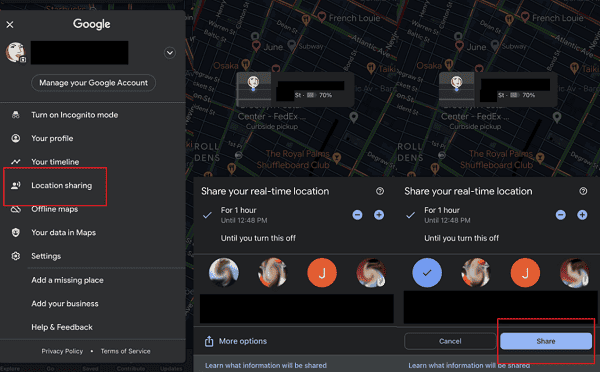
- Step 1. On Android, open Google Maps and tap the profile picture.
- Step 2. Tap Location sharing, then New share.
- Step 3. Select the iPhone user and choose how long the location will remain available.
- Step 4. On the iPhone, open Google Maps and select the Android user’s profile under Location sharing.
The detailed Google Maps location-sharing guide explains what recipients can see and why an update may be delayed.
- Free cross-platform sharing
- Battery status
- Flexible duration
- User approval
- Expiring links
- No lock or erase
5. Use Google Family Link for a Child’s Android
If your child already uses a supervised Google Account, Family Link may be all you need. The iPhone parent app can show the child’s supported Android location, create family places, and enable arrival or departure alerts after supervision and location sharing are configured.
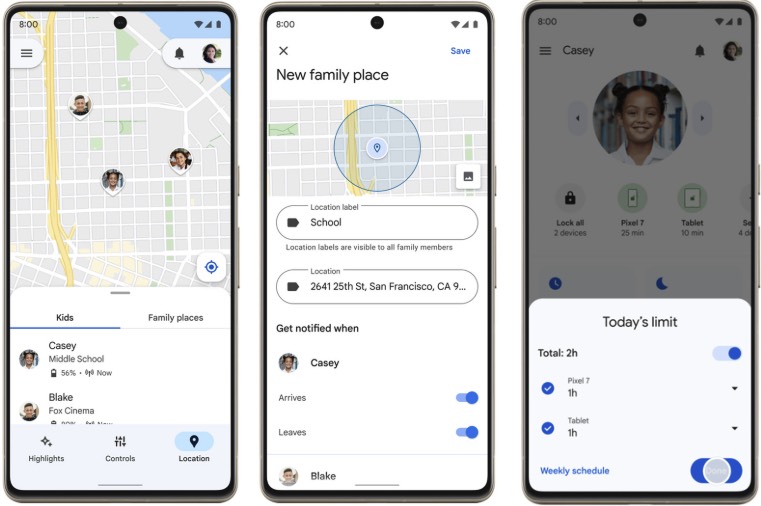
- Step 1. Set up supervision for the child’s Google Account on the Android phone.
- Step 2. Install Family Link from the App Store on the parent’s iPhone and sign in as the parent.
- Step 3. Open Location, select the child, and turn on location sharing.
- Step 4. Turn on Location Accuracy on the child’s Android if the position is unreliable.
Read the full Google Family Link guide if you also need help with screen time, apps, and family supervision settings.
- Free parent app
- Family places
- Arrival and departure alerts
- Supervised accounts only
- Device-dependent setup
- Internet required
6. Share a Temporary Location in a Messaging App
For a single journey or quick check-in, a messaging app may be enough. WhatsApp and similar apps can send a temporary live location from Android to iPhone, but the share must be started by the Android user and it ends after the selected period.
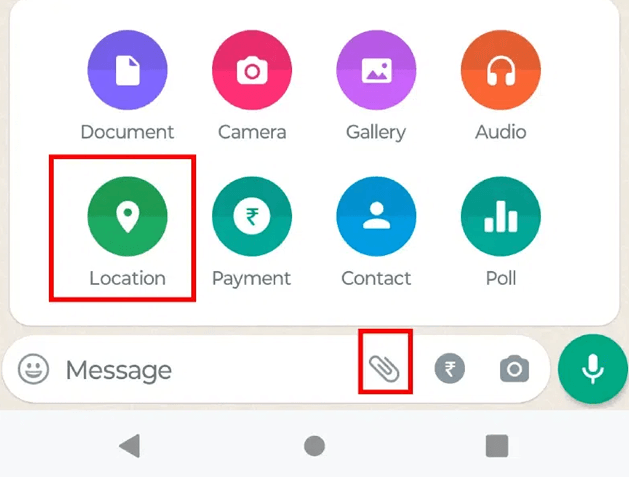
- Step 1. On the Android phone, open a chat with the iPhone user.
- Step 2. Open the attachment or plus menu and choose Location.
- Step 3. Select Share live location and choose the available duration.
- Step 4. On the iPhone, open the same conversation and tap the location card.
Follow the illustrated steps to share live location on WhatsApp, including how to stop a session early.
- Fast setup
- Familiar apps
- User-controlled duration
- Temporary only
- Active sharing required
- No lost-phone tools
Can You Find an Offline or Turned-Off Android?
Sometimes. Google Find Hub can show an encrypted recent or last-known location, and supported Android models may remain findable for a limited time after powering off when offline finding was enabled. Samsung may also show the last-known position when a Galaxy phone is off. Exact results depend on the model, settings, battery state, network participation, and how long the phone has been offline.
An AirTag attached to a case can help locate the tag through Apple’s Find My network, but it does not track the Android phone itself and can be separated from the device. If you are considering a physical device, compare dedicated GPS trackers for kids and choose one designed for the family’s actual use.
If a phone appears stolen, do not travel to an unfamiliar mapped location to retrieve it yourself. Secure the device, contact the carrier when necessary, and give location information to local authorities.
Fix an Android Location That Is Not Updating
When the map shows an old position, the problem is usually on the Android device or account connection rather than on the iPhone. Check these items in order:
- Confirm connectivity: The Android phone needs mobile data, Wi-Fi, or supported offline-finding conditions.
- Check the account: Sign in with the Google or Samsung Account associated with the device.
- Turn on Location Accuracy: GPS, Wi-Fi, and nearby network signals can improve the estimate.
- Review background access: Google Maps and family apps may stop updating when location permission or background activity is restricted.
- Check battery optimization: Aggressive battery-saving modes can delay background location updates.
- Refresh the sharing session: A Google Maps or messaging-app link may have expired or been stopped.
- Allow time after setup: Family Link and parental dashboards may need time to receive the first location.
Test the selected method while both phones are available. Confirm that the iPhone can display a fresh Android location before relying on it for a trip, school pickup, or lost-phone situation.
FAQs
Can I track an Android phone from my iPhone?
Yes. Use Google Find Hub or Samsung Find for a lost phone, Google Maps for voluntary location sharing, or a configured family-location service for a child’s authorized Android device.
Is there location sharing between Android and iPhone?
Yes. Google Maps and supported messaging apps can share an Android location with an iPhone. The Android user controls the sharing permission and duration.
How do I track my wife’s location on Android?
Ask her to share her location with you through Google Maps or another family-sharing app. Do not install or access a tracking service on an adult’s phone without clear permission.
Can I locate someone else’s Android phone?
Only with authorization, such as a location share, access to your own device account, or lawful parental management of a child’s phone. A phone number alone does not reveal private live GPS data.
How can I track an Android phone from an iPhone for free?
Use Google Find Hub for your lost Android, Samsung Find for a Galaxy device, Google Maps for consensual sharing, or Family Link for a supervised child’s Android.
Conclusion
When deciding how to track Android phone from iPhone, start with timing: prepare VigilKids or Family Link for ongoing family use, choose Maps for voluntary sharing, and turn to Find Hub or Samsung Find when a device is already missing.
For parents who need prepared family-location tools rather than one-time recovery, the VigilKids Location Tracker can connect an authorized Android device to an iPhone-accessible dashboard. Set it up and test the required permissions before you need the location.
- Google Android Help: Find, secure, or erase a lost Android device
- Google Maps Help: Share your real-time location with others
- Google For Families Help: Find and manage your child’s location
- Samsung Support: Locate a lost Galaxy phone or tablet
Research checked on August 19, 2026. Features can vary by region, Android version, phone model, account, permissions, connectivity, and plan.
Hot Topics for Mobile Tracker
How to Track a Phone Number for Free: What Actually Works
Learn how to track a phone number for free safely. Compare Google Find Hub, Apple Find My, reverse lookup tools, social apps, and VigilKids location tracking.
How to Locate My Boyfriend's Phone: 4 Free Ways to Track in 2026
Wondering how to locate your boyfriend's phone for free? Discover 4 effective methods—Find My, Google Maps, WhatsApp, VigilKids & more—with full consent.
How to Stop Sharing Location Without Them Knowing (7 Ways)
How to stop sharing location without them knowing — 7 ways to turn off location sharing on iPhone & Android with no notification sent. iPhone & Android tips.