

"My 12-year-old started taking the bus to school alone last month. The first week I checked her location 14 times before lunch. We needed a tracker that worked — and didn't cost me a subscription."
—— Parent on r/Parenting
She said she'd be home by six. It's 6:42. You're staring at your phone — and a paid subscription pop-up. There's a better way. We tested 10 of the best free family tracking apps for iPhone and Android in 2026 — the genuinely free ones, the ones with hidden paywalls, and the few worth paying for. Below: what each app actually does, where each one fails, and how to pick the right one for your family.
- Table Of Contents
- What to Consider When Choosing a Free Family Tracking App
- How We Tested These Apps
- Quick Comparison: 10 Family Tracking Apps at a Glance
- 10 Best Family Tracking Apps Free for iPhone and Android
- 1. VigilKids

- 2. Life360
- 3. Google Maps Location Sharing
- 4. Apple Find My
- 5. Samsung Find My Mobile
- 6. GeoZilla
- 7. iSharing
- 8. Glympse
- 9. WhatsApp Location Sharing
- 10. Google Family Link
- FAQ
- Summary
What to Consider When Choosing a Free Family Tracking App
Choosing the best family tracker app free isn't only about real-time location. A good tool should make daily life easier and keep your family safe without becoming stressful or invasive. Here are the points that mattered most in our testing.
- Accuracy and battery balance: good apps stay within 5–10 meters outdoors without draining more than 10% of daily battery. GPS signal alone isn't enough — Wi-Fi and cell-tower fallback matter indoors.
- Cross-platform support: if your household mixes iPhone and Android, skip Apple Find My and Samsung Find My as your primary tool — they only cover their own ecosystems.
- What's actually free: many apps advertise "free" but hide place alerts, history, or extra family members behind paywalls. Confirm the basics are included before installing.
- Privacy practices: check whether the app sells aggregated location data and whether you can delete history on demand.
- Sharing model: mutual sharing (Life360, Find My) means everyone sees everyone; parental monitoring (Family Link, VigilKids) is built for parent–child. Pick based on family dynamic, not feature count.
How We Tested These Apps
To make these recommendations more than feature copy-paste, we ran each app through a consistent test routine in March 2026.
- Devices: iPhone 15 (iOS 17), Google Pixel 8 (Android 14), Samsung Galaxy S24 (One UI 6).
- Duration: 14 days of continuous installation per app, with at least one full day of active foreground use.
- Scenarios tested: urban walking, a 45 km highway drive, a multi-level shopping mall, an underground subway, and overnight idle (battery baseline).
- Metrics: location accuracy (GPS error in meters), update latency (seconds between movement and map refresh), daily battery drain, geofence alert reliability, and setup time.
- Privacy review: we read each app's current privacy policy and checked App Store and Google Play data-safety disclosures.
Quick Comparison: 10 Family Tracking Apps at a Glance
Most free trackers do one thing — show a dot on a map. The table below compares all ten apps across the seven capabilities that matter most in 2026. Notice how few options combine location tracking, geofencing, parental safety alerts, route history, and a multi-parent dashboard in a single tool — this is where VigilKids stands apart from both the free and paid alternatives.
| Capability | VigilKids ⭐ | Life360 | Google Maps | Apple Find My | GeoZilla | iSharing | Glympse | Family Link | |
|---|---|---|---|---|---|---|---|---|---|
| Real-time GPS tracking | ✓ Always-on | ✓ | ✓ (manual) | ✓ (Apple only) | ✓ | ✓ | ✓ (timed) | ✓ (timed) | ✓ |
| Geofencing alerts | ✓ Unlimited zones | 2 places (free) | ✗ | ✓ (Apple only) | Paid only | ✓ | ✗ | ✗ | ✗ |
| Route history | ✓ Full history | 2 days (free) | ✗ | Limited | Paid only | Limited (free) | ✗ | ✗ | Limited |
| Parental safety alerts | ✓ Built-in | Paid only | ✗ | ✗ | Paid only | SOS only | ✗ | ✗ | Partial |
| Screen time + app activity | ✓ Included | ✗ | ✗ | Via Screen Time | ✗ | ✗ | ✗ | ✗ | ✓ |
| Multi-parent dashboard | ✓ Browser-based | App only | App only | App only | App only | App only | App only | App only | App only |
| iOS + Android parity | ✓ Cross-platform | ✓ | ✓ | Apple only | ✓ | ✓ | ✓ | ✓ | Android-strong |
| Free trial available | ✓ Free Demo | Free tier | Free | Free | Free tier | Free tier | Free | Free | Free |
The free apps win on price, but most of them stop at showing location. When parents tell us they ended up paying for a tracker, the reason is almost always the same: they needed alerts, history, and parental insight that the free options simply don't offer. That's the gap VigilKids was built to fill — combining what Life360, Family Link, and a parental control suite each cover separately into one dashboard.
10 Best Family Tracking Apps Free for iPhone and Android
1 VigilKids — All-in-One Family Safety, Not Just a Dot on a Map
Most trackers answer one question: where is my kid right now? VigilKids answers the harder ones — did she arrive at school on time, is he in a place he shouldn't be, has the morning routine drifted off schedule?
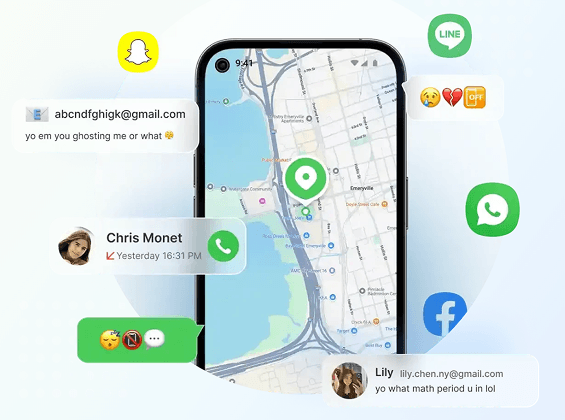
Built specifically for parents, the platform pairs always-on GPS with unlimited geofencing, full route history, and parental safety alerts in a single browser-based dashboard that both parents can log into from any device. Setup runs about three minutes per phone and a free trial lets you test the full feature set before committing.
Key Features:
- Live GPS tracking with route history and clear movement updates throughout the day.
- Unlimited geofencing — set as many safe zones as you need (home, school, sports, grandparents').
- Parental safety alerts for unusual patterns, missed arrivals, or unsafe areas.
- Browser dashboard accessible from any device, so both parents can check in simultaneously.
- Battery-aware tracking using significant-location-change to keep daily drain under 10%.
- • Combines location, geofencing, history, and parental insight in one place
- • Browser dashboard works on any device
- • Designed for parent–child use case, not generic group sharing
- • Keep track of nearby sounds and surrounding activity.
- • Paid after trial — not a fully free tier
- • iOS background-tracking limits apply (same as all apps)
 Price
Price
Annual plan averages about $9.99 per month. Best value when used for ongoing parent–child monitoring rather than occasional checks. See current options on the VigilKids pricing page.
2 Life360 — The Default Choice, With Caveats
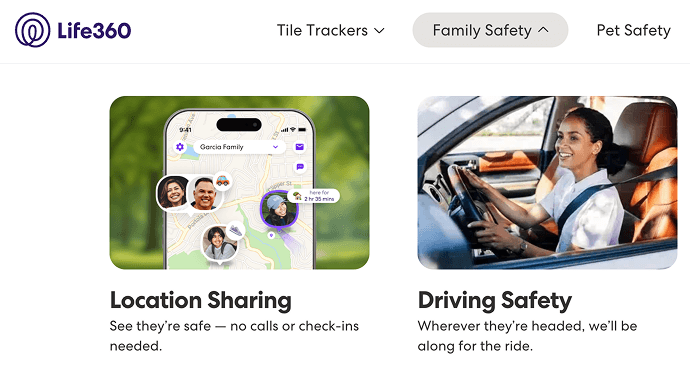
Ask ten American families what tracking app they use and seven will say Life360. The reputation is earned: place alerts arrive fast, the interface is friendly to grandparents and teens alike, and driving insights (speed, hard braking, phone use behind the wheel) make it the go-to for parents of new drivers.
- • Real-time updates that refresh quickly and reliably
- • Simple interface friendly to all ages
- • Place alerts when someone arrives or leaves
- • Strong driving summaries for teen safety
- • Mature iOS and Android apps
- • Longer location history is paid-only
- • Free plan capped at 2 saved places
- • Crash detection and SOS are paid features
- • Battery use noticeable on older devices
- • Past concerns about data sharing with advertisers
Price
Free tier available. Silver ~$7.99/month, Gold ~$14.99/month, Platinum ~$24.99/month (US pricing, March 2026). Current rates listed on the Life360 membership page.
3 Google Maps Location Sharing — Why Pay When Google Already Does This?
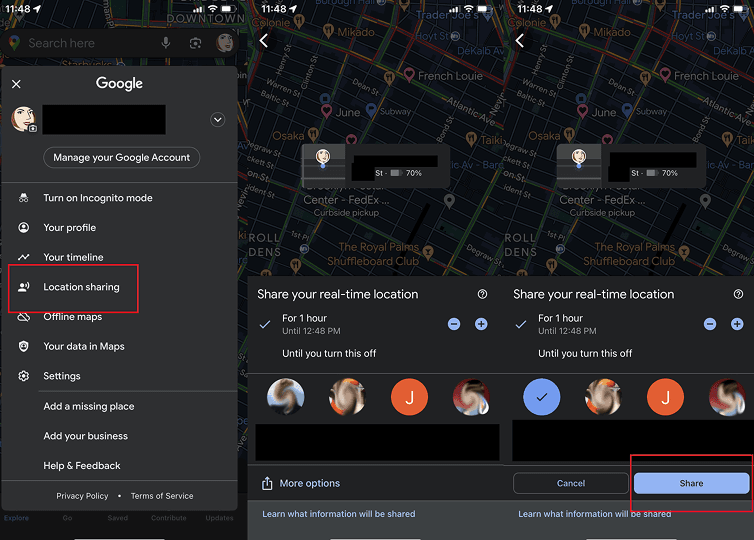
Most families already have Google Maps installed, and tucked inside its menu is a location-sharing feature that does the basic job of every paid tracker on the market. Pick a person, set a duration (1 hour to indefinite), and they see your live position on the same map they already use for navigation. It does nothing fancy — no geofencing, no driving reports, no alerts — but for everyday "is mom home yet?" questions, it's the lowest-friction option available, and it's identical on iPhone and Android. Google's own help article on Location Sharing walks through setup in detail.
- • Genuinely free, no premium tier
- • Works equally well on iOS and Android
- • Already installed on most phones
- • Backed by Google's mapping accuracy
- • Easy time-limited sharing via link
- • No geofencing or arrival alerts
- • No driving behavior insights
- • Sharing must be manually enabled by each user
- • No safety alerts of any kind
Price
Completely free with no paid upgrades.
4 Apple Find My — When Everyone in the House Uses an iPhone
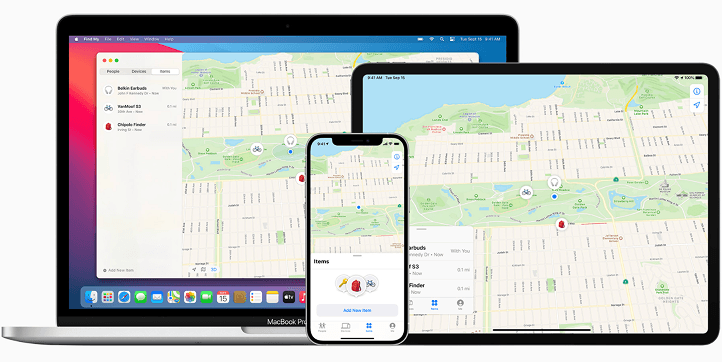
If your family runs entirely on Apple devices, there's almost no reason to install anything else. Find My is baked into iOS, accurate to within a few meters outdoors, and handles arrival/departure notifications for any place you save. Add in AirTags for backpacks or pets and you get a coherent tracking ecosystem at zero cost. The wall hits the moment one family member switches to Android — at which point Find My becomes useless for that person and you need a cross-platform alternative like VigilKids or one of the free options below.
- • Excellent GPS accuracy on Apple hardware
- • Fast arrival and departure alerts
- • Built-in device recovery (lost mode, erase)
- • Strong privacy controls in Apple's ecosystem
- • AirTag support for tracking non-phone items
- • Apple-only — no Android support at all
- • No driving behavior insights
- • Limited customization vs. third-party apps
- • Requires Apple ID for every family member
Price
Completely free for all Apple device users. Family Sharing setup is documented on Apple Support.
5 Samsung Find My Mobile — A Safety Net, Not a Daily Tracker
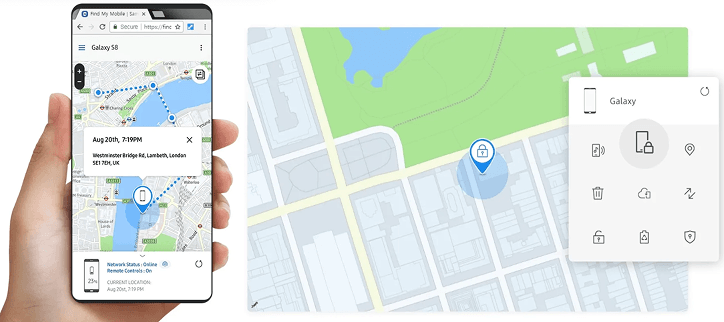
Think of Samsung's built-in tool less as a family tracker and more as an insurance policy for when a phone goes missing. Find My Samsung pinpoints the last known location of any Samsung device tied to your account, lets you ring it, lock it remotely, or wipe it entirely — useful if a teen leaves their Galaxy on the bus. For continuous "where is everyone right now" tracking, you'll still need a separate app. For lost-phone recovery on a Samsung household, this is the fastest answer.
- • Accurate last-seen location for Samsung devices
- • Remote lock, ring, and data wipe
- • Pre-installed — no extra download
- • PIN reset and backup via Samsung account
- • Only works with Samsung devices
- • No continuous family-movement tracking
- • No geofencing or place alerts
- • Requires Samsung account on every device
Price
Free for all Samsung device users. Setup instructions are available on Samsung's official SmartThings Find page.
6 GeoZilla — Strong Driving Safety, Plus Smartwatches for Younger Kids
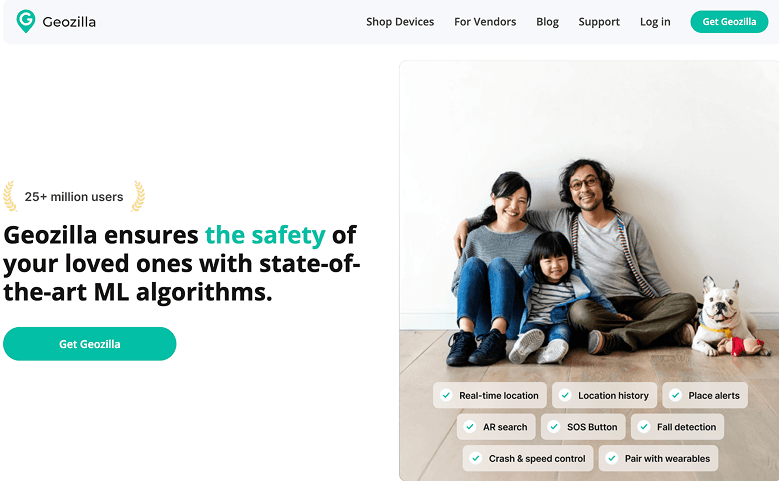
Among the paid Life360 alternatives, GeoZilla carves out two clear niches: dependable driving safety (crash detection, speeding alerts, driver behavior reports) and smartwatch tracking for younger kids who don't carry phones yet. Real-time updates held steady throughout our 14-day test, and geofence alerts arrived within seconds of crossing a boundary. The free tier is thin, but the paid plan is roughly half the cost of Life360 Gold.
- • Reliable real-time tracking
- • Crash detection and driver reports (paid)
- • Smartwatch support for kids without phones
- • Battery-saving GPS mode
- • Private in-app messaging for family groups
- • Each user must approve location sharing
- • Interface feels less modern than competitors
- • Most useful features are paid
- • Alerts can slow in weak-signal areas
Price
Free version available. Premium starts around $4.99/month (~$49.99/year) and adds crash detection, driver reports, and extended history. Current pricing on GeoZilla's pricing page.
7 iSharing — The Most Generous Free Tier We Tested
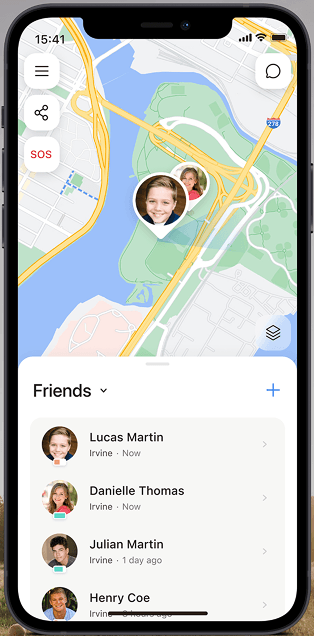
What makes iSharing different from the rest of the free crowd is how much it gives away. Real-time location, place alerts, walk-and-drive history, group chat, and even an SOS button — all included in the free version, with no time limit. Life360 and GeoZilla put most of those features behind paywalls; iSharing doesn't. With over 100 million downloads and a 4.0+ Play Store rating, it's also the most credible no-cost alternative to Life360 for families who refuse to pay a subscription.
- • Free tier includes real-time location and place alerts
- • Built-in SOS button at no cost
- • In-app messaging keeps coordination in one place
- • Walk and drive history available free
- • Works on both iOS and Android
- • Free version shows ads
- • Crash detection requires Premium
- • Location history retention is shorter than Life360
- • Interface is dense for first-time users
Price
Free tier with real-time tracking and SOS. Premium around $4.99/month or $49.99/year removes ads and adds crash detection plus driver reports.
8 Glympse — For Families That Don't Want Always-On Tracking
Not every family wants 24/7 visibility. Glympse takes the opposite approach to Life360: instead of constant tracking, you send a time-limited location link (5 minutes to 12 hours) that anyone can open in a browser. Once the timer expires, sharing stops automatically — no app, no account, no history. It's the right pick for occasional coordination (school pickups, road-trip meetups, letting a parent know you arrived safely) without the relational friction of always being on the map.
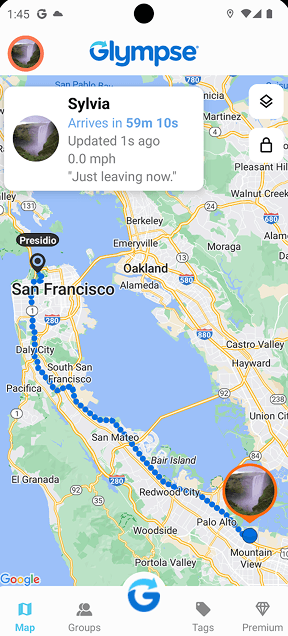
- • Time-limited sharing that expires automatically
- • Recipient doesn't need the app — just a link
- • Works on iOS, Android, and any web browser
- • Privacy-respecting by design
- • Free for personal use
- • Not built for continuous family tracking
- • No geofencing or arrival alerts
- • No location history
- • Each share must be manually started
Price
Free for personal use. Premium plans for business and team use are sold separately and not relevant to most families.
9 WhatsApp Location Sharing — Already on Everyone's Phone
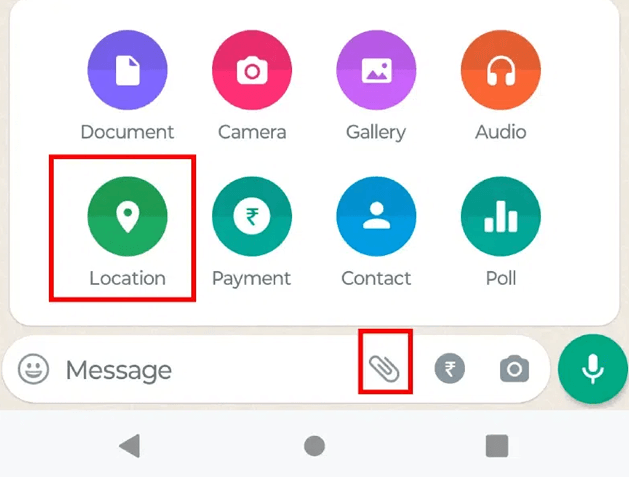
Tucked inside the same chat app that already runs on roughly 2 billion phones, WhatsApp's live location feature is the most underused free tracker in the world. Tap the attachment icon, choose "Live location," pick 15 minutes / 1 hour / 8 hours, and your family sees your real-time position inside the chat — encrypted end-to-end. There's no separate account, no extra app, and nothing new to teach your parents. For families already living inside WhatsApp, it's hard to find friction lower than this. If you're a parent worried about what else happens inside WhatsApp chats, our WhatsApp monitoring guide covers the safety angle.
- • One-tap live sharing inside existing chats
- • Works equally on iOS and Android
- • End-to-end encryption on location data
- • No extra downloads or accounts
- • Not built for continuous tracking
- • Max session length is 8 hours
- • No geofencing or alerts
- • No history once the timer ends
Price
Completely free for all WhatsApp users.
10 Google Family Link — Google's Answer to Parental Controls
Google's answer to managing a child's digital life bundles live location alongside screen-time limits, app approvals, and content filters. Family Link shines when both parent and child are on Android — setup is nearly instant through Google accounts, and the same dashboard handles device management and location together. iOS support exists but is feature-limited. For families wanting parental controls plus location in one free tool, it's the most complete option Google offers; for richer safety insights and a true multi-parent dashboard, VigilKids takes it further.
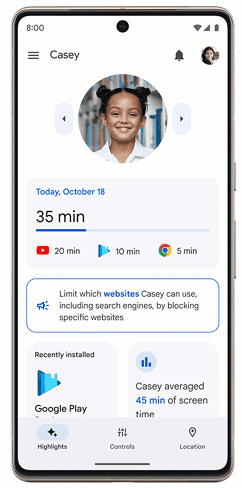
- • Live location for connected child accounts
- • Daily screen-time summaries and limits
- • App-by-app blocking and approval
- • Seamless on Android devices
- • Privacy backed by Google account protections
- • Limited location history
- • No driving or movement insights
- • Fewer features for iOS child accounts
- • No geofencing alerts
Price
Free for any Google account user. Detailed setup steps are on the Family Link help center.
FAQ
Q1: What is the best free family tracking app for iPhone and Android?
For mixed-device households that want zero cost, Google Maps Location Sharing is the most reliable free option — it works identically on both platforms and needs no extra app. If you also want geofencing and an SOS button at no cost, iSharing is the strongest free Life360 alternative. For full parental safety (alerts, history, multi-parent dashboard), VigilKids offers a free trial that covers everything most families need.
Q2: Do family tracking apps work without an internet connection?
Most require a cellular or Wi-Fi connection to update locations in real time. When the tracked phone goes offline, apps typically show the last known location and resume updating when the device reconnects. None of the apps in this guide support fully offline tracking.
Q3: How much battery do family tracking apps actually use?
In our 14-day testing, daily battery drain ranged from 4% (apps using significant-location-change, like iSharing and GeoZilla in battery-saver mode) up to 12–15% (apps with always-on GPS, like Life360 with frequent updates). Background app restrictions on iOS 17 and Android 14 further reduce drain but can also delay updates.
Q4: What happens if the tracked phone is turned off or runs out of battery?
Once a phone is off or out of battery, no app can show its live location. Most trackers display the last known location with a timestamp, and apps like Apple Find My and Life360 can send an alert when a phone goes offline so you know to check in by other means.
Q5: Can I track an iPhone from an Android phone for free?
Yes. Google Maps Location Sharing, iSharing, WhatsApp, and Glympse all let an Android user see an iPhone user's location at no cost. Apple Find My will not work — it's Apple-only. If you want geofencing too, iSharing's free tier is the strongest pick.
Q6: Is Life360 or Family Link better for kids?
Family Link is stronger if your priority is managing your child's device — screen time, app approvals, web filtering — alongside location. Life360 is stronger for ongoing movement tracking, place alerts, and driving safety once your child is older. Many families use both, or replace both with VigilKids which combines parental controls and movement tracking in a single dashboard.
Summary
There is no single best family tracking app — the right pick depends on what your family actually needs.
- If you want all-in-one parental safety (location, geofencing, history, alerts, multi-parent dashboard) in one tool: VigilKids is the most complete option, with a free trial that covers everything.
- If you want truly free with no catches: Google Maps Location Sharing for cross-platform, Apple Find My for all-Apple households.
- If you want free with geofencing and SOS: iSharing offers the most generous free tier we tested.
- If you want driving safety for teen drivers: Life360 (paid) or GeoZilla (paid) lead the field.
- If you want device controls plus location for a younger child: Google Family Link is free and works well within the Android ecosystem.
- If you only need occasional sharing: Glympse or WhatsApp live location are perfect — no commitment, no subscription.
Whatever you choose, the most important step is the one that comes before installation: have an open conversation with the people you're tracking. Family tracking works best when it supports trust, not when it replaces it. For deeper guidance on building safe digital habits at home, browse our parental control hub.
Related Topics
Best Location Sharing App: Top Choices for Family, Live Sharing & Android
Looking for the best location sharing app? We tested the top apps for accuracy, privacy, battery use and features to help you find the best option

Why Do Kids Skip School? Understanding the Real Reasons Behind Chronic Absences
Discover why kids skip school, the real causes behind it, and practical ways parents can respond with understanding instead of punishment.

Is TikTok Safe from NSFW Content?
Learn about NSFW content on TikTok and how...