
Need to find your Samsung phone fast? Start with the account-based tools that can actually locate a Galaxy device: Samsung's SmartThings Find or Samsung Find, and Google's Find Hub. Both can show a current or last known location, ring the phone, secure it, or erase it when the right account and settings are already in place.
This guide shows which tool to use first, what to do if the phone is offline or stolen, and how VigilKids can help parents with ongoing family location tracking before a device goes missing.
- Table Of Contents
- PART 1. Fast Answer: Which Samsung Phone Locator Should You Use?
- PART 2. Samsung Find vs Google Find Hub vs VigilKids
- PART 3. Use VigilKids for Ongoing Family Location Tracking

- PART 4. Find My Samsung Phone with SmartThings Find or Samsung Find
- PART 5. Find My Device Samsung with Google Find Hub
- PART 6. How to Find a Samsung Phone If It Is Offline, Dead, or Stolen
- PART 7. Settings to Turn On Before Your Samsung Phone Goes Missing
- FAQ About Finding a Samsung Phone
- Conclusion
PART 1. Fast Answer: Which Samsung Phone Locator Should You Use?
If you want to find my Samsung phone free, use this order:
- Step 1. Try SmartThings Find first if the lost phone is signed in to your Samsung account.
- Step 2. Try Google Find Hub if the phone is linked to your Google account.
- Step 3. Use Ring or Play sound if the phone may be nearby.
- Step 4. Lock or mark it as lost if the phone is outside your control.
- Step 5. Erase only when recovery is unlikely, because erasing can remove future location access.
On newer Galaxy phones, Samsung may show the feature as Samsung Find. On older phones, you may still see Find My Mobile or SmartThings Find. The core idea is the same: the phone must already be connected to the right Samsung account and have location or finding settings enabled.
PART 2. Samsung Find vs Google Find Hub vs VigilKids
Different tools solve different problems. Samsung and Google help after a phone is missing; VigilKids helps parents see location patterns before there is a problem.
| Tool | Find lost phone | Ring / lock / erase | Live location | Route history | Geofence alerts | App context | SIM / IMEI help |
|---|---|---|---|---|---|---|---|
| SmartThings Find / Samsung Find | ✅ | ✅ | ❌ | ❌ | ❌ | ❌ | ❌ |
| Google Find Hub | ✅ | ✅ | ❌ | ❌ | ❌ | ❌ | ❌ |
| Carrier or police report | ❌ | ❌ | ❌ | ❌ | ❌ | ❌ | ✅ |
| VigilKids Best for families |
✅ | ❌ | ✅ | ✅ | ✅ | ✅ | ❌ |
In short, Samsung and Google are best for emergency recovery after a phone is lost. VigilKids is stronger for families because it keeps location, routes, geofencing, and device activity context visible before a problem happens.
PART 3. Use VigilKids for Ongoing Family Location Tracking
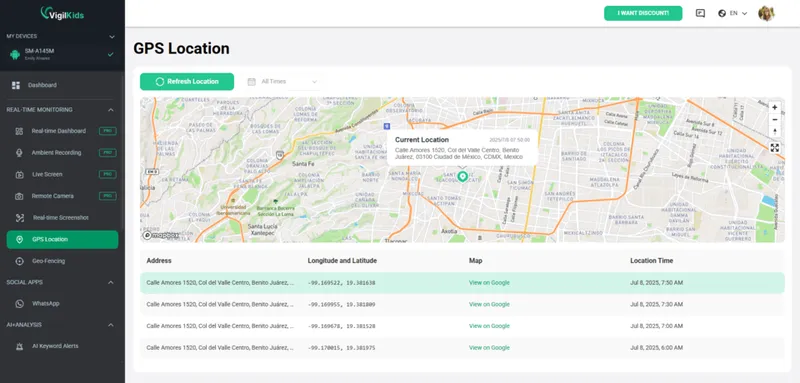
SmartThings Find and Google Find Hub are recovery tools. They are helpful after a phone goes missing, but they do not give parents a daily view of a child's route history, safe-zone alerts, app activity, and screen context. For that use case, VigilKids is a better fit when it is set up on a managed Android device in advance.

VigilKids Pro
- View a child's current and recent Samsung phone locations
- Check route history and location changes over time
- Use geofencing alerts for home, school, and other important places
- Combine location with app usage, screen activity, and messages for context
How to Use VigilKids on a Samsung Phone
Set up VigilKids before a Samsung phone goes missing. It is designed for parent-managed Android devices and needs one-time access to the child's phone for installation and permission setup.
- Step 1. Create a VigilKids account or open the free demo to see how the location panel works.
- Step 2. Install VigilKids on the child's Samsung phone with appropriate parent permission.
- Step 3. Allow the required location and device permissions so location updates, route history, and safety alerts can work.
- Step 4. Open the VigilKids panel from your phone or computer to check the current Samsung phone location.
Use VigilKids as a family safety and monitoring layer, not as a replacement for Samsung or Google recovery tools after a phone is already gone. For setup and category context, see Android parental control and best free family tracking apps.
PART 4. Find My Samsung Phone with SmartThings Find or Samsung Find
For a Galaxy device, the Samsung route is the most direct answer to find my phone Samsung. Use the Samsung account that was already signed in on the lost phone.
1 Set up Samsung finding features before the phone is lost
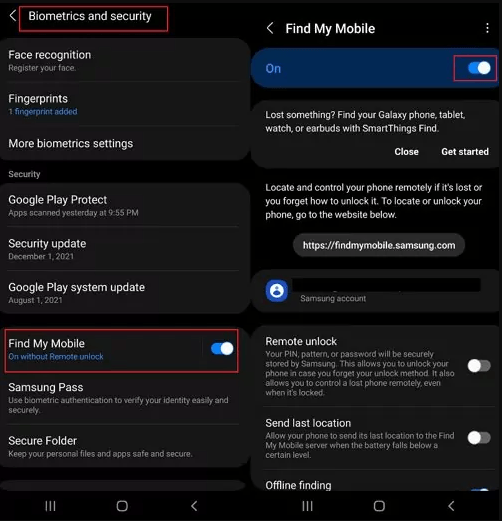
If the phone is still with you, turn these settings on now. The exact menu name can vary by One UI version and region, but the path is usually under Settings, your Samsung account, Security and privacy, or a Samsung Find / Find My Mobile option.
- Step 1. Open Settings on your Samsung phone.
- Step 2. Make sure the phone is signed in to your Samsung account.
- Step 3. Search settings for Samsung Find, SmartThings Find, or Find My Mobile.
- Step 4. Turn on finding, remote controls, offline finding, and send last location if those options are available on your model.
- Step 5. Save backup codes for your Samsung account so two-step verification does not depend only on the missing phone.
2 Locate the Samsung phone from the web portal
When the phone is missing, move quickly but keep the sequence simple.
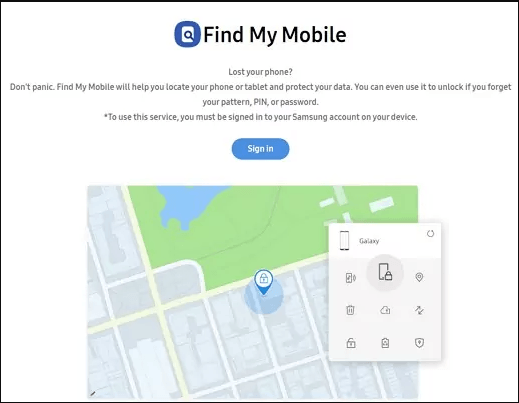
- Step 1. Go to smartthingsfind.samsung.com from another phone or computer.
- Step 2. Sign in with the Samsung account connected to the missing Galaxy phone.
- Step 3. Select the phone from your device list.
- Step 4. Check the map for the current or last known location.
- Step 5. Use Ring if it is nearby, Lock if it may be in someone else's hands, or Erase only when recovery is unlikely.
If the map does not update, do not keep refreshing for hours without securing your accounts. Change the passwords for important email, banking, cloud, and social accounts, then contact your carrier if the SIM could be misused.
PART 5. Find My Device Samsung with Google Find Hub
If Samsung's tool does not show the phone, use Google's Android locator. Google now calls this Find Hub, although many users still search for Find My Device Samsung.
- Step 1. Open Google Find Hub in a browser or use the Find Hub app on another Android device.
- Step 2. Sign in with the Google account connected to the Samsung phone.
- Step 3. Select the lost Samsung device from the list.
- Step 4. Review the current or last known location on the map.
- Step 5. Choose Play sound, Mark as lost, get directions, or erase based on the risk level.
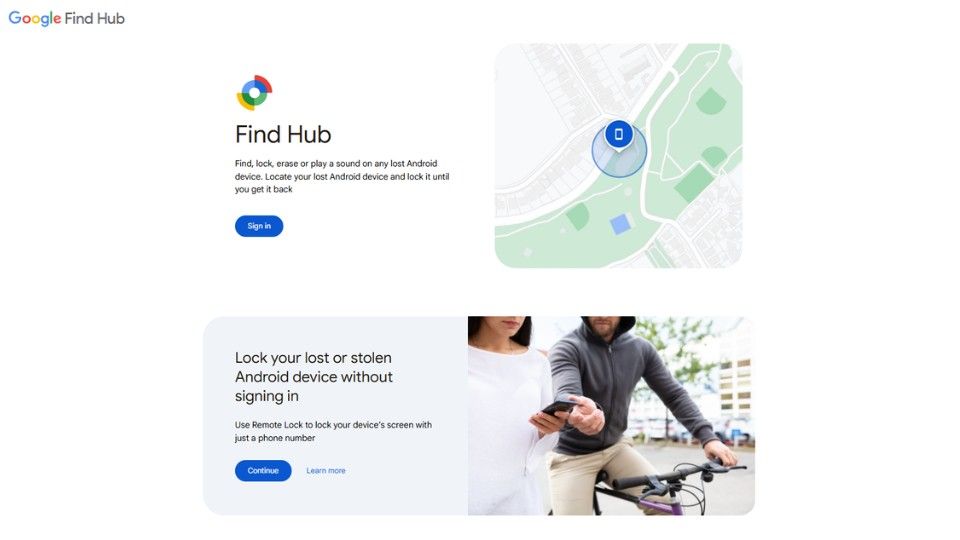
Google explains that Find Hub can show location information, play a sound, mark the device as lost, and still show the last known location when the current location is unavailable. The device normally needs power, a Google account, Find Hub enabled, and either a connection or a recent stored location.
If your search is more about phone number tracking than a missing Samsung device, read how to track a phone number for free and how to find your phone with your phone number.
PART 6. How to Find a Samsung Phone If It Is Offline, Dead, or Stolen
A Samsung phone locator is strongest when the phone still has power and was prepared before it went missing. If the phone is offline, dead, or stolen, switch from "track it forever" to "recover what you can and protect the data."
1 If the Samsung phone is offline
- Check SmartThings Find or Samsung Find for the last known location.
- Check Google Find Hub for a second last-known-location source.
- Wait for a possible update if the phone reconnects to mobile data or Wi-Fi.
- If offline finding was enabled, nearby compatible devices may help update location, but results are not guaranteed.
2 If the Samsung phone is dead
- Use the last known location to retrace your route.
- Check places where the phone may have run out of battery, such as a car, office, school, gym, or store.
- Call the location before visiting if it is a business or public place.
- Keep the device in your account tools so you can receive an update if it turns back on.
3 If the Samsung phone may be stolen
- Step 1. Do not go to an unsafe location alone.
- Step 2. Lock or mark the device as lost.
- Step 3. Change passwords for important accounts.
- Step 4. Contact your carrier to suspend or protect the SIM.
- Step 5. Report the IMEI to the carrier or police if theft is likely.
- Step 6. Erase the device only after deciding that data protection matters more than continued tracking.
For a related scenario, see how to know if someone's phone is dead.
PART 7. Settings to Turn On Before Your Samsung Phone Goes Missing
Most failed recovery attempts happen because the device was not ready. Set up these items while the Samsung phone is still in your hand.
- Samsung account: Keep the phone signed in and verify that account recovery methods work.
- Google account: Keep Find Hub enabled and make sure the phone appears in your Google device list.
- Location: Leave location services on for better map accuracy.
- Screen lock: Use a strong PIN, password, fingerprint, or face unlock.
- Offline or recent location options: Turn on offline finding and last location options where available.
- Backups: Back up photos, contacts, and important data so you are not forced to delay an erase decision.
- IMEI record: Save the IMEI in a password manager or safe place before anything happens.
If you need a broader Android monitoring setup, this guide to GPS tracking software for Android explains the difference between lost-phone tools and ongoing location monitoring.
FAQ About Finding a Samsung Phone
Q: Does Samsung have Find My Phone?
A: Yes. Samsung offers finding features through SmartThings Find, Samsung Find, or Find My Mobile depending on the device and region. Use the Samsung account connected to the lost Galaxy phone.
Q: How can I find my Samsung phone for free?
A: Try SmartThings Find or Samsung Find first, then Google Find Hub. Sign in with the account already connected to the phone, select the device, and use location, ring, lock, or erase options.
Q: What is the best Samsung phone locator?
A: For your own Galaxy phone, Samsung's built-in finding tool is usually the best first choice. Google Find Hub is the best backup for Android account recovery. VigilKids is better for ongoing parent-managed location monitoring.
Q: Can I find my Samsung phone if it is offline?
A: You may see the last known location, and offline finding may help if it was enabled before the phone went missing. If the phone is fully powered off and has no recent location, tracking options are limited.
Q: Can I find my Samsung phone without a Samsung account?
A: You may still be able to use Google Find Hub if the phone is linked to your Google account and Find Hub is enabled. Without Samsung or Google setup, contact your carrier and use the IMEI for protection steps.
Q: Can I find my Samsung phone with a phone number?
A: A phone number alone usually cannot show a precise live GPS location. Use the Samsung or Google account connected to the phone. Your carrier can help suspend or protect the number if the SIM is at risk.
Q: Should I erase my stolen Samsung phone?
A: Erase only when recovery is unlikely or data risk is high. Remote erase protects personal data, but it can also remove future location access, so lock and mark as lost first when possible.
Q: Can VigilKids track a Samsung phone?
A: Yes. VigilKids can help parents monitor a managed Android device with location tracking, route history, geofencing, app activity, and safety context after setup.
Conclusion
The best way to find my Samsung phone is to use the recovery tool tied to the phone's account: SmartThings Find or Samsung Find for Samsung accounts, and Google Find Hub for Google accounts. If the phone is offline, dead, or stolen, focus on last known location, account security, carrier protection, and IMEI reporting.
For parents, lost-phone tools are only part of the picture. Set up VigilKids before there is a problem if you need ongoing visibility into a child's Samsung phone location, routes, geofencing, and device activity.
Hot Topics for Phone Monitoring
How to Track a Phone Number for Free: What Actually Works
Learn how to track a phone number for free safely. Compare Google Find Hub, Apple Find My, reverse lookup tools, social apps, and VigilKids location tracking.
How to Forward SMS to Another Phone Automatically (iPhone & Android)
Learn how to forward SMS to another phone automatically on iPhone and Android, including how to forward text messages from Android to iPhone, step by step.
Find My iPhone Not Working? How to Fix It and What to Do Next
Find My iPhone not working? Learn why it happens and get 13 quick fixes — from iCloud and Location to Family Sharing and tracking backups.