
If you want to track a phone number for free, start with the right expectation: a phone number alone usually cannot show someone's exact real-time GPS location. Free tools can help you find your own lost phone, identify an unknown caller, or collect clues from public profiles, but precise live location normally requires account access, device permissions, or a trusted monitoring setup.
This guide explains what actually works in 2026: Google Find Hub for Android, Apple Find My for iPhone, free reverse phone lookup tools, social media checks, and VigilKids for parents who need ongoing location visibility on a managed Android device.

PART 1. Can You Track a Phone Number for Free?
Yes, but only in limited ways. You can often find a phone's location for free if it is your own Android or iPhone and Find Hub or Find My was already enabled. You can also use free reverse lookup tools to identify a number. But you generally cannot type any phone number into a website and see that person's live GPS location.
That difference matters. Many searches for phone number tracker free mix together three different goals:
- Finding your own lost phone: Use Google Find Hub or Apple Find My.
- Identifying an unknown number: Use reverse lookup, carrier, spam, or public-profile clues.
- Monitoring a child's device: Use a properly installed parental control tool such as VigilKids.
If your goal is finding your own device, see this related guide on how to find your phone with your phone number. If you want to understand map-based tracking, read how mobile number tracking works with Google Maps.
PART 2. Best Free Phone Number Tracking Options
Use the method that matches your actual goal. The table below separates real location tracking from caller identification and profile lookup.
| Method | Best for | Free? | Main limitation |
|---|---|---|---|
| Google Find Hub | Finding your own Android phone | Yes | Requires the phone to be signed in, locatable, and connected or recently located |
| Apple Find My | Finding your own iPhone or Apple device | Yes | Find My must be enabled before the device is lost |
| Reverse phone lookup | Identifying unknown callers | Often partly free | Usually shows public records or spam clues, not live GPS |
| Social apps | Finding profile clues linked to a number | Yes | Depends on privacy settings and public profile visibility |
| VigilKids | Parent-managed Android location monitoring | Demo available | Requires setup on the managed device and appropriate permission |
PART 3. Track an Android Phone with Google Find Hub
For Android, the safest free option is Google Find Hub, previously known as Find My Device. Google says it can help you find, secure, or erase a lost Android device remotely when the device meets the required conditions.
- Step 1. Open Find Hub in a browser or use the Find Hub app.
- Step 2. Sign in with the Google Account connected to the lost Android phone.
- Step 3. Select the phone from your device list.
- Step 4. Check the current or last known location on the map.
- Step 5. Use Play sound, Mark as lost, lock, or erase if needed.
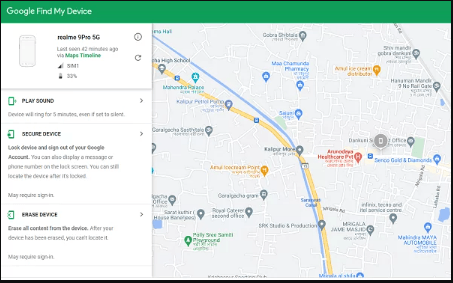
This is a real free phone locator for your own Android device, but it is not a way to track any random phone number. The phone needs power, internet access or a recent known location, and the right Google account connection.
If you use Samsung, this related guide may help: Find My Samsung Phone.
PART 4. Track an iPhone with Apple Find My
For iPhone, use Apple Find My. Apple explains that Find My must be turned on before you can locate a lost iPhone, iPad, Mac, Apple Watch, AirPods, AirTag, or supported accessory.
- Step 1. Go to iCloud.com/find or open the Find My app on another Apple device.
- Step 2. Sign in with the Apple Account used on the missing iPhone.
- Step 3. Select the device from the list.
- Step 4. View its location, play a sound, mark it as lost, or erase it if recovery is unlikely.
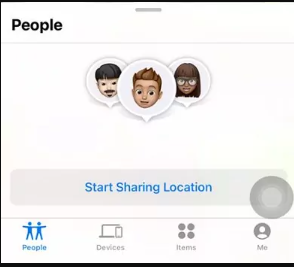
Apple also notes that Find My can help locate devices even when they are offline in some cases, but the setup has to happen before the device goes missing.
PART 5. Use Free Reverse Phone Lookup Tools
If your goal is identifying an unknown caller, a free reverse lookup tool can help. These tools may show a caller name, region, carrier, spam reports, or public business information. They are useful for screening unknown numbers, but they are not reliable live location trackers.
- Step 1. Copy the phone number exactly, including country code if available.
- Step 2. Search it in a trusted reverse lookup or spam-reporting tool.
- Step 3. Compare results across more than one source.
- Step 4. Treat names, locations, or carrier clues as leads, not proof.
For related safety checks, see how to check call history online for free.
PART 6. Check Social Media and Messaging Apps
Some people link a phone number to WhatsApp, Telegram, Facebook, or other apps. This can reveal a profile name, photo, or mutual-contact clue, but only if the app and the user's privacy settings allow it.
- Step 1. Save the number in your contacts.
- Step 2. Open messaging apps such as WhatsApp or Telegram and check whether a profile appears.
- Step 3. Search the number in social platforms where phone lookup is supported.
- Step 4. Do not message suspicious profiles quickly; scammers may use fake identities.
If you are trying to understand communication activity on a managed phone, this guide on reading phone messages explains a related monitoring scenario.
PART 7. Use VigilKids for Ongoing Family Location Tracking
Free phone number tools are best for one-time clues. If you are a parent managing a child's Android device and need ongoing visibility, VigilKids is a stronger fit because it focuses on real device activity, not public phone-number guesses.

VigilKids Features
- View current and recent locations in one place
- Check route history and location changes over time
- Use geofencing alerts for important places
- Combine location with app usage, screen activity, and messages for context
For a broader comparison of family tracking tools, you can also read best free family tracking apps.
PART 8. What to Do If Your Phone Is Lost or Stolen
If your phone is missing, do not waste time on random phone number tracker websites. Start with the account-based tools that can actually secure your device.
- Use Google Find Hub or Apple Find My first.
- Play a sound if the phone may be nearby.
- Lock or mark the device as lost if it may be outside your control.
- Change passwords for email, banking, and key accounts.
- Contact your carrier if the SIM may be misused.
- Use remote erase only when recovery is unlikely, because it can remove future location access.
If you need Android-specific tracking details, see GPS tracking software for Android.
FAQ About Tracking a Phone Number for Free
Q: Can I track a phone number location for free online?
A: You can find your own lost phone for free with Google Find Hub or Apple Find My, and you can use reverse lookup tools for caller clues. But a phone number alone usually cannot reveal someone's exact live GPS location.
Q: What is the best free phone number tracker?
A: For your own Android phone, use Google Find Hub. For iPhone, use Apple Find My. For unknown callers, use reverse lookup tools. For a managed child's Android device, use a parental control tool such as VigilKids.
Q: Can Google Maps track a phone number?
A: Google Maps cannot track a random phone number by itself. It can show location sharing when a user has shared location, and Google Find Hub can locate your own Android device through your Google account.
Q: Can I find my phone by number for free?
A: Sometimes, but not by the number alone. Use the Google or Apple account connected to the phone. Your carrier may also help protect or suspend the SIM if the phone is lost.
Q: Are free reverse phone lookup tools accurate?
A: They can be useful for identifying spam, carrier, city, or business clues, but they are not always accurate and usually do not provide real-time location.
Q: Can VigilKids track a phone location?
A: Yes. VigilKids can help parents monitor a managed Android device with location tracking, route history, geofencing, app activity, and other safety context after setup.
Q: Is it okay to track someone else's phone?
A: Only use tracking tools on your own device, a device you manage, or in situations where you have proper permission. If a phone may be stolen, use official recovery tools and contact the carrier or local authorities when needed.
Conclusion
The safest way to track a phone number for free is to match the tool to the goal. Use Google Find Hub or Apple Find My for your own lost phone, reverse lookup for unknown caller clues, and social apps for public profile hints. If you need continuous family location tracking on a managed Android device, VigilKids is a better fit than one-time phone number tracker websites.
Hot Topics for Phone Monitoring

How to Forward SMS to Another Phone Automatically (iPhone & Android)
Learn how to forward SMS to another phone automatically on iPhone and Android, including how to forward text messages from Android to iPhone, step by step.
Find My iPhone Not Working? How to Fix It and What to Do Next
Find My iPhone not working? Learn why it happens and get 13 quick fixes — from iCloud and Location to Family Sharing and tracking backups.

Best Phone Monitoring App 2026: 7 Apps Tested for
What's the best phone monitoring app in 2026? We tested 7 options on iPhone and Android — features, pricing, stealth, and which to skip for safety.