
Want to use the same WhatsApp account on two phones — or check a family member's WhatsApp from your own device? There are two very different needs here: running one WhatsApp account across two phones for yourself, and a parent keeping an eye on a child's WhatsApp safely. This guide covers both, starting with WhatsApp's own official way to use one account on multiple devices, then the legitimate, consent-based options for family monitoring. No shady "cloning" hacks — just methods that actually work and stay within WhatsApp's rules.
PART 1 — How to Use the Same WhatsApp on Two Phones (Official Way)
The simplest and safest way to run one WhatsApp account on two phones is WhatsApp's own built-in feature: Linked Devices. This lets you mirror your WhatsApp chats on another phone, tablet, or computer while keeping end-to-end encryption intact. It's a legitimate option provided by WhatsApp — not a hack, mod, or clone.
| Method | Best For | Needs Consent? | Hidden? |
|---|---|---|---|
| WhatsApp Linked Devices | Using your own account on 2 phones | Device owner scans QR | No (always visible) |
| VigilKids | Parents monitoring a child | Yes (parental) | No (on-device notice) |
| Family Link / Screen Time | App usage & time limits | Yes (parental) | No (visible) |
| "Cloning" / mod apps | Not recommended | — | Violates WhatsApp ToS |
How Linked Devices Works
The Linked Devices function allows a WhatsApp account to be accessed on multiple devices at the same time. Messages sync securely through WhatsApp's servers, and end-to-end encryption is maintained. It does require the phone owner to scan a QR code, which ensures full transparency — both phones will show that the account is active in more than one place.
Step-by-Step: Link WhatsApp to a Second Phone
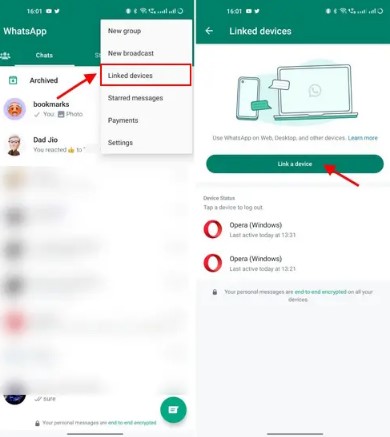
- Step 1. On the second phone, install WhatsApp and tap Linked Devices on the welcome screen (or open WhatsApp Web/Desktop on a computer).
- Step 2. On the primary phone, go to Settings > Linked Devices.
- Step 3. Tap Link a Device and scan the QR code shown on the second phone or computer.
- Step 4. Once connected, the same WhatsApp chats appear on both phones, syncing in real time.
Note:
WhatsApp will always show an active session on the original phone, so the account owner can see when it's linked elsewhere — this method is designed for transparency and cannot be hidden. If you want to recover or move chats instead, see our guide on how to copy WhatsApp messages.
PART 2 — Monitoring a Child's WhatsApp Safely with VigilKids
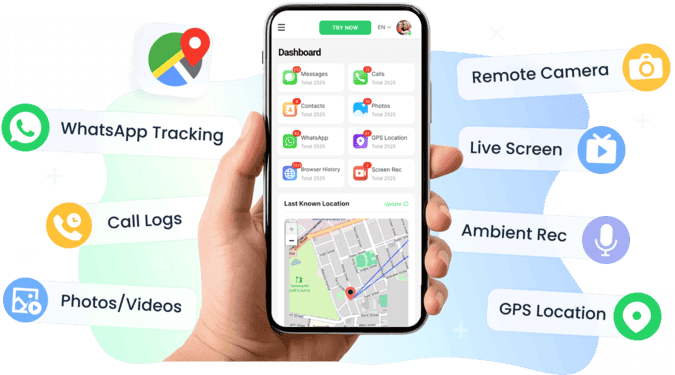
If your real goal is keeping a child safe on WhatsApp — not running your own account on two phones — linking devices isn't ideal, since it shares everything both ways. With parental approval, a dedicated tool like VigilKids is the better fit. Unlike unauthorized "cloning" methods, VigilKids works transparently, with clear permissions and data protection built in, and it's one of the best WhatsApp trackers for families.
Why VigilKids Is the Recommended Choice
- Comprehensive coverage — VigilKids lets parents see app usage, online patterns, and alerts for risky behavior across apps, not just WhatsApp. You can spot sudden spikes in chat activity or late-night screen time, which often signal emotional or social issues.
- Easy setup and dashboard — Installation takes minutes, and parents get an intuitive dashboard to monitor key indicators remotely. The app sends alerts when unusual behavior occurs.
- Focus on safety, not intrusion — VigilKids surfaces trends and behaviors with parental oversight, giving peace of mind while respecting boundaries.
- Cross-device access — Once installed, parents can check updates anywhere through the web dashboard or mobile companion app.
These features make VigilKids ideal for parents or guardians who need to stay informed during travel or long-distance caregiving.
Step-by-Step: Setting Up VigilKids for WhatsApp Monitoring
- Step 1. Get parental consent — Before installing anything, parents should confirm the monitoring is solely for their child's safety. This ensures transparency and compliance with local laws.
- Step 2. Install VigilKids on the child's device — With the parent or child present, create your VigilKids account from the official website. Complete the setup wizard, granting necessary permissions like app usage and notifications.
- Step 3. Create and link the parent account — Sign in or create a parent dashboard account. Link the child's device using the pairing code displayed during setup.
- Step 4. Customize monitoring preferences — Choose what to monitor: WhatsApp activity, screen time, app usage, or location. Set alert triggers such as "new unknown contacts" or "late-night messaging."
PART 3 — Legal, Ethical, and Privacy Basics
Whichever route you choose, a few ground rules keep you on the right side of the law and protect your relationships.
Why Secret Cloning Can Be Illegal and Harmful
Although you'll find online tutorials claiming to "clone WhatsApp remotely," most rely on intercepting private data or unauthorized apps — both of which can break privacy laws in many countries. Even with protective intentions, installing spyware without consent can be considered illegal surveillance. Secret monitoring also backfires emotionally: someone who discovers hidden surveillance may feel betrayed and lose trust, making honest communication much harder later.
Consent and Guardian Responsibility
Before installing or linking any monitoring tool, authorization from the parent or device owner is mandatory. A sibling or temporary guardian cannot legally decide alone to monitor a child's communications. Always involve the parents and make sure they understand what information the tool will access. With consent, you can use legitimate parental-control tools that clearly define what data is collected and how it's used.
Building Trust Instead of Secrecy
Privacy is part of a child's emotional development. When supervision turns into secrecy, it can make a child more defensive online. Psychologists recommend a transparent family digital agreement, where adults explain what will be monitored and why. That way, monitoring is understood as protection, not punishment — and it helps the child learn safe online habits instead of hiding activity.
PART 4 — Other Family-Safe Alternatives
If a device can't be linked or you prefer a non-technical method, several responsible alternatives let you stay aware of a child's well-being without crossing privacy lines.
Set Boundaries with Written Consent
The first and most important step is communication. Talk to the child's parents and agree on clear supervision boundaries. A short written note prevents misunderstandings later — for example:
- "For the next three weeks while I'm away, I'd like to help check [child's name]'s phone activity for safety. I'll use tools like Family Link or weekly reports, only to monitor time and app usage."
Ask Parents to Perform Local Checks
If the child lives with the parents, they can do periodic phone reviews on your behalf. Encourage them to look at app usage stats, open WhatsApp chats together, or review who the child interacts with. This preserves direct communication between parent and child.
Use Google Family Link or iCloud Family Sharing
For Android, Google Family Link lets parents see app usage, set time limits, and block inappropriate apps. For iOS, Screen Time and Family Sharing offer similar functionality. These tools are built for families and comply with privacy regulations. You can set up daily reports showing screen time, app categories, and new installs — useful indicators of behavioral changes.
Non-Intrusive Remote Interaction
- Schedule weekly video calls and ask the child to show their phone's main screen briefly.
- Encourage them to talk about new friends, group chats, or photos they've received.
- When you sense discomfort, ask open-ended questions like, "Did anyone make you feel weird online this week?"
When to Involve Teachers or Professionals
If you suspect serious issues — such as online grooming, bullying, or exposure to explicit content — don't handle it alone. Contact the parents immediately, and if needed, alert the school counselor or local child-protection agency. Professional intervention is always safer than secret investigation.
FAQs About Using WhatsApp on Two Phones
1. Can I use the same WhatsApp account on two phones?
Yes. WhatsApp's official Linked Devices feature lets you use one account on multiple phones, tablets, or computers at once. Just scan the QR code from your primary phone — no cloning app needed.
2. Can I secretly clone someone's WhatsApp without them knowing?
No. Doing so is illegal and unethical. If you need to monitor a child’s device with proper authorization, VigilKids offers parental monitoring features such as activity tracking, screen monitoring, and location insights designed for family safety.
3. Can I link WhatsApp to a phone in another city?
No. The QR code must be scanned in person on the device being linked. Remote linking or cloning is not possible or allowed.
4. Does VigilKids read private WhatsApp messages?
Yes. With proper authorization and on a device you are legally permitted to monitor (such as your child's device), VigilKids can help parents view WhatsApp messages and related activity, providing greater visibility into their child's online interactions and safety.
5. Will the other phone know WhatsApp is linked?
Yes. WhatsApp always shows linked sessions under Settings > Linked Devices, so this method is fully transparent and can't be hidden.
6. How do I explain monitoring to a child?
Use simple, reassuring words: "This app helps us keep you safe online, just like seatbelts keep us safe in the car."
Final Thoughts
Using WhatsApp on two phones is straightforward with the official Linked Devices feature, and keeping a child safe on WhatsApp is best done with transparent, consent-based tools rather than risky cloning hacks. Tools like VigilKids give families a responsible way to stay informed while preserving privacy and dignity — the goal isn't to read every chat, but to recognize danger signs early, encourage honesty, and keep loved ones safe.
Related Topics for WhatsApp Monitoring
How to Record a WhatsApp Call: Complete 2026 Guide for All Devices
Learn how to record a WhatsApp call on Android, iPhone & PC in 2026. Free built-in methods, the best WhatsApp call recorder apps, and the legal points to know.
Does WhatsApp Have Parental Controls? Full 2026 Guide
hatsApp has no built-in parental controls. Learn how to set up safe monitoring in 2026 using WhatsApp's privacy settings, family rules, and the right app.

How to Use WhatsApp Without a Phone Number (2026 Guide)
Wondering can you use WhatsApp without a phone number? Yes—learn 5 proven methods, including landline, prepaid SIM, and Companion Mode & key risks. 2026 guide.