
You can track WhatsApp chats on another phone only when you own the account, manage your child’s device, or have the account holder’s permission. The practical options are WhatsApp Linked Devices for synchronized conversations, an existing Google Drive or iCloud backup for recovery, or a parental monitoring service such as VigilKids.
This guide compares all three methods, explains the setup, and shows what each option can—and cannot—display.
Quick Comparison: 3 Ways to Track WhatsApp Chats
The right method depends on whether you want ongoing parental context, live access to your own account, or recovery from an earlier backup.
| Method | Live Updates | Older Chats | Initial Phone Access | Best For |
|---|---|---|---|---|
| VigilKids | ✅ | Limited | ✅ | Authorized parental oversight |
| Linked Devices | ✅ | Limited | ✅ | Your own WhatsApp account |
| Cloud Backup | ❌ | ✅ | Account access | Restoring previous chats |
Method 1. Use VigilKids for Parental WhatsApp Monitoring
VigilKids gives parents a web dashboard for reviewing WhatsApp activity on a child’s authorized device. It is more suitable than a temporary Linked Devices session when a parent wants conversation context, contacts, shared media, call activity, and risk alerts in one place.

VigilKids
- Review WhatsApp conversations, contacts, shared media, documents, and call activity
- Filter relevant conversations with custom keyword alerts
- Connect WhatsApp through a web-based flow on Android or iPhone
- Open the parent dashboard from a phone, tablet, or computer
- Run discreetly in the background without draining battery or affecting performance
What VigilKids Can Show
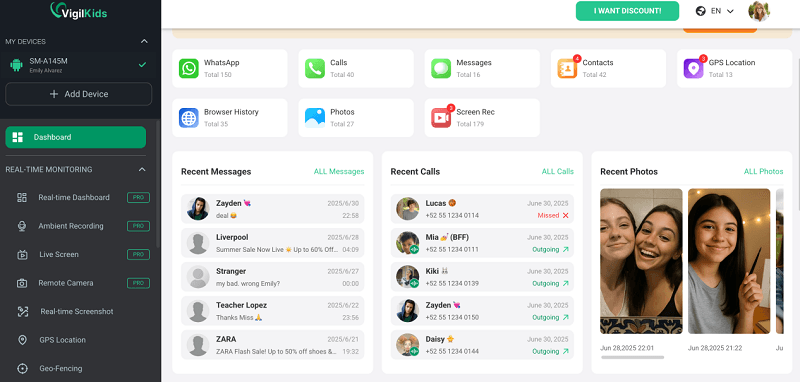
After the account is connected, the dashboard organizes available WhatsApp data by conversation and timeline. Parents can review messages, voice notes, photos, videos, documents, contacts, call history, and keyword-matched conversations. The exact history available depends on what WhatsApp synchronizes or retains after connection; a monitoring tool cannot reconstruct data that was never synchronized or backed up.
- Conversation text with timestamps and contact context
- Shared photos, videos, voice notes, and documents
- WhatsApp contacts and voice or video call history
- Custom keyword filtering for conversations that may need attention
 Note
Note
VigilKids offers a web-based WhatsApp connection that does not require installing an app or jailbreaking the phone. Its broader Android phone-monitoring features use a separate installation and permission flow. Choose the setup shown in your dashboard for the device and features you actually need.
How to Use VigilKids
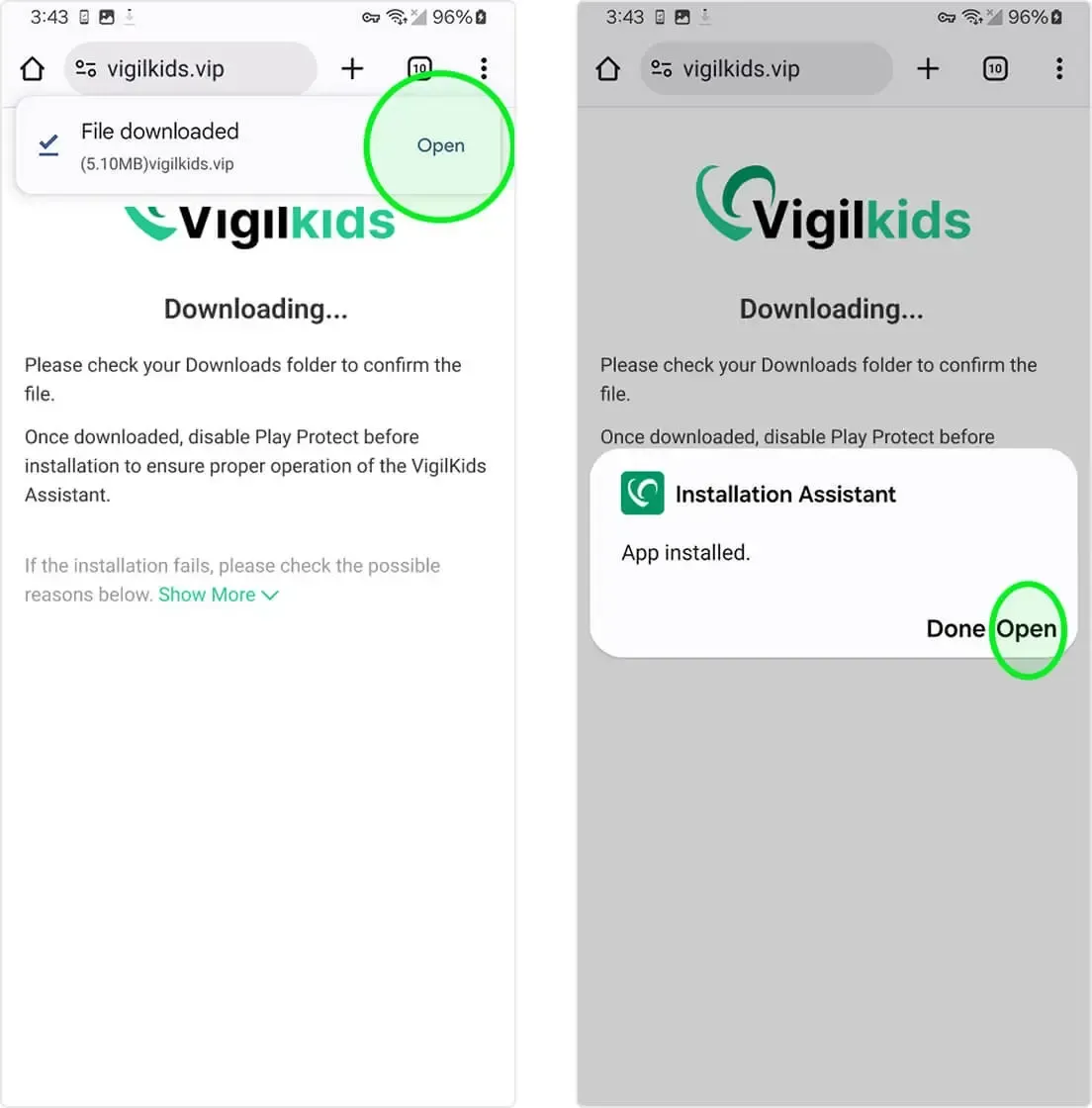
- Step 1. Create a VigilKids account, choose a plan, and follow the setup wizard for the device and features you need.
- Step 2. Follow the connection instructions on the child’s phone. If you select broader Android phone monitoring, install the companion app and grant the requested permissions.
- Step 3. Open the VigilKids dashboard and allow synchronization to finish before reviewing conversations, contacts, media, calls, and alerts.
Method 2. Link WhatsApp to Another Device
WhatsApp Linked Devices is the simplest free option for accessing your own account on another phone, tablet, or computer. A primary phone can link up to four companion devices, and each connection uses end-to-end encryption. It is designed for multi-device access—not hidden monitoring—and every linked session remains visible to the account owner.
What You Need
- Brief access to the primary phone to approve the new companion device
- Two-step verification, if enabled, must be bypassed with the correct PIN
- An internet connection on both devices during the initial link
How to Link WhatsApp
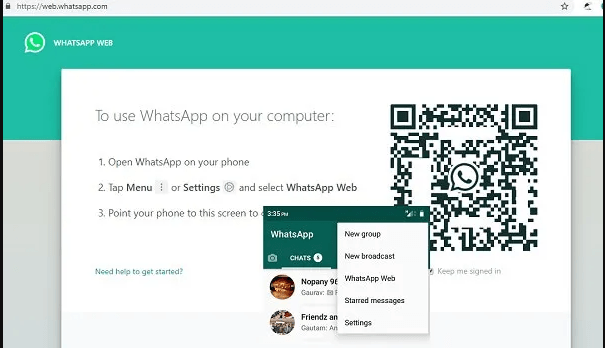
- Step 1. Open WhatsApp on the primary phone and go to Settings or the menu, then Linked Devices.
- Step 2. Select Link a Device and complete the phone’s authentication prompt.
- Step 3. Open WhatsApp Web, WhatsApp Desktop, or WhatsApp on the companion phone and display its QR code.
- Step 4. Scan the QR code with the primary phone and wait for the available chat history to synchronize.
Linked Devices can display synchronized conversations, media, group information, and new messages. It does not guarantee access to every historical or previously deleted message. If unfamiliar sessions appear, the account owner can review and remove them from Linked Devices; this is also an important step when checking whether a WhatsApp account may be compromised.
Free official WhatsApp feature
Independent encrypted companion-device access
Easy to review and log out from the primary phone
Every linked device is visible in the app’s Linked Devices list
No stealth mode: the account owner can remove the session at any time
Only the synchronized history is available
Method 3. Restore WhatsApp Chats from a Cloud Backup
A Google Drive or iCloud backup may restore older WhatsApp conversations to another phone, but it is not a live tracking method. You need control of the WhatsApp number and the relevant Google or Apple account. If end-to-end encrypted backup is enabled, you also need its password, recovery key, or supported passkey authentication.
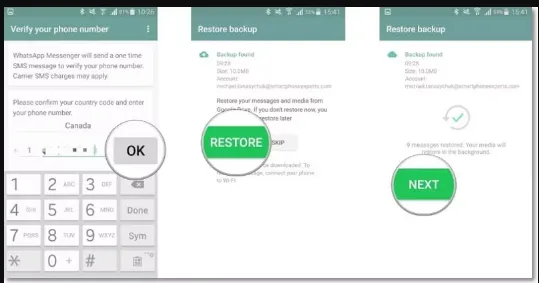
How to Check for a Backup
On Android, open WhatsApp and go to Settings, Chats, then Chat backup. Confirm the Google account, backup date, and backup status.
On iPhone, open WhatsApp and go to Settings, Chats, then Chat Backup. Confirm that a recent iCloud backup exists and that the same Apple account is available on the replacement device.
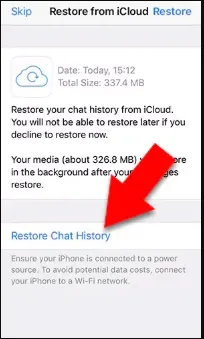
How to Restore the Backup
- Step 1. Install or reinstall WhatsApp on the replacement phone.
- Step 2. Verify the same phone number and sign in to the Google or Apple account that holds the backup.
- Step 3. Select Restore when WhatsApp detects the backup.
- Step 4. Complete encrypted-backup authentication if requested, then wait for chats and media to download.
A restore can only return content included in that backup. Messages created after the backup—or deleted before it was made—will not reappear. For additional troubleshooting, see how to recover deleted WhatsApp messages from available device or backup data.
Authoritative Sources
- Meta Engineering: WhatsApp multi-device security and encryption
- Meta Engineering: WhatsApp device verification
- Meta: End-to-end encrypted WhatsApp chat backups
- VigilKids: Official WhatsApp setup guide
FAQ About Tracking WhatsApp Chats
Can someone read WhatsApp messages from another phone?
Yes, but only through an authorized route such as Linked Devices, an account backup, or an approved monitoring setup. A phone number alone is not enough to open private chats.
Can I track WhatsApp chats remotely without touching the phone?
Initial setup normally requires brief phone access or account authentication. After an authorized connection is complete, supported data may be reviewed from another device or web dashboard.
Does WhatsApp show linked devices?
Yes. The account owner can see linked companion devices, review recent activity, and remotely log out any session from WhatsApp’s Linked Devices menu.
Can deleted WhatsApp messages be recovered?
Only when a copy remains in a synchronized device, monitoring record, or backup created before deletion. Encryption does not create a universal archive of deleted messages.
Does VigilKids work with WhatsApp on Android and iPhone?
Its web-based WhatsApp connection supports accounts used on Android and iPhone. Broader device-monitoring features and setup requirements vary by operating system, so check the plan and device guide before purchase.
Conclusion
For quick access to your own account, Linked Devices is the easiest free choice. For restoring an earlier conversation archive, use the official Google Drive or iCloud backup flow. Parents who need ongoing, authorized context can use VigilKids WhatsApp monitoring to review available chats, media, contacts, call activity, and keyword alerts from one dashboard. Whichever option you choose, tracking WhatsApp chats on another phone still requires valid device or account authorization.
Related Topics
How to Recover Deleted WhatsApp Messages Easily
Learn how to recover deleted WhatsApp messages on iPhone and Android using backups, tools, and apps like VigilKids to view deleted chats easily.
What Does Last Seen Mean on WhatsApp? (+ Why You Can’t See It)
What Does Last Seen on WhatsApp Mean?
7 Ways to See WhatsApp Status Updates Without Being Seen
Learn how to see hidden status on WhatsApp and check updates without being seen. Discover 7 discreet methods, from native settings to parental control tools.