
If you've ever received an important text on WhatsApp, you might wonder: is there a way to copy WhatsApp messages? The answer is yes—and there are several methods depending on your goal.
Whether you want to copy a single message, transfer chats between devices, or even print conversations, this guide covers everything step by step.

Can You Copy WhatsApp Messages?
Yes. WhatsApp allows users to copy messages directly inside WhatsApp. You can also export chats, transfer them between devices, or even use third-party tools for advanced needs.
Because WhatsApp uses end-to-end encryption, other apps cannot freely access messages without permission, which protects your privacy.
Method 1: How to Copy and Paste on WhatsApp (Basic Way)
This is the simplest method if you just want to copy and paste on WhatsApp.
- Step 1. Open a chat in WhatsApp
- Step 2. Tap and hold the message
- Step 3. Select Copy
- Step 4. Paste it anywhere (Notes, Email, etc.)
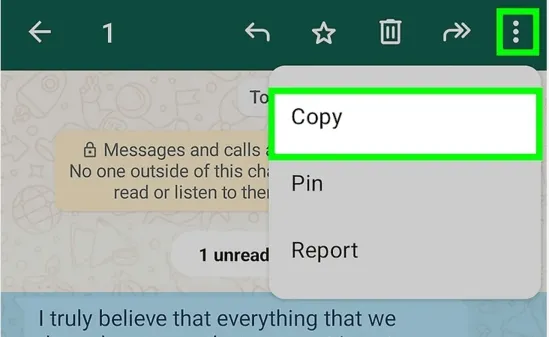
Tip: You can select multiple messages on some devices and copy them together.
Method 2: Export Chat (Copy Full Conversations)
If you want to copy entire WhatsApp Message:
- Step 1. Open the chat
- Step 2. Tap the menu (or contact name)
- Step 3. Select Export Chat
- Step 4. Choose with media or without media
- Step 5. Send via email or save to cloud
This method is ideal if you're asking:
- how to copy WhatsApp messages in bulk
- how to print a WhatsApp message
Exported chats are saved as .txt files, which you can open or print easily.
Method 3: Use Monitoring Tools (For Parents)
If you're a parent concerned about your child's online activity, manual copying may not be enough. VigilKids is a parental control tool that helps monitor WhatsApp messages remotely.
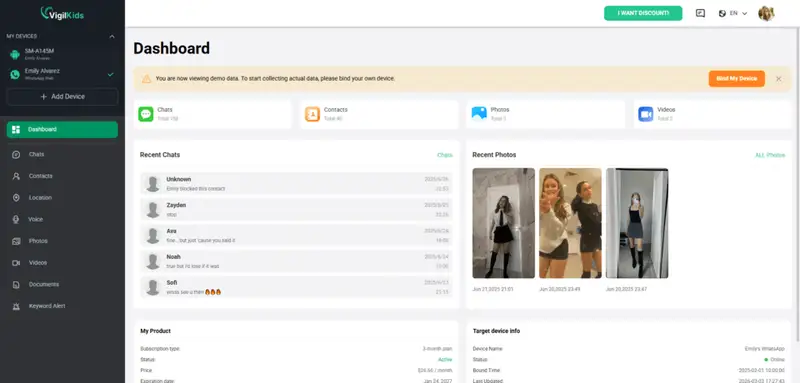
VigilKids – Smart WhatsApp Monitoring
- View sent & received WhatsApp messages
- Track deleted messages in real time
- Monitor media files (photos, videos, voice notes)
- Record WhatsApp call remotely
- Set alerts for suspicious keywords
Method 4: Screenshot or Screen Recording
Another quick method is taking screenshots on WhatsApp.
Saving proof
Sharing visually
Not editable text
Hard to manage large chats
Method 5: Copy WhatsApp Messages from Android to iPhone
Switching devices? You can transfer chats instead of manually copying.
Use Apple's Move to iOS app
- Works during iPhone setup
- Transfers chats, media, and settings
- Requires same phone number
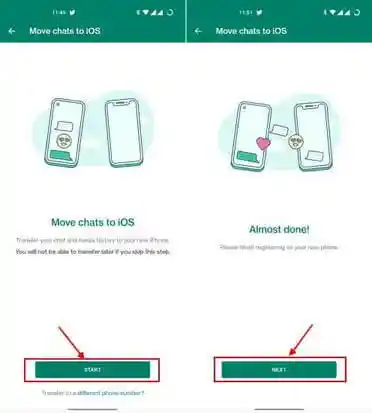
This is currently the most reliable way to copy WhatsApp messages from Android to iPhone. You can also track an Android from an iPhone using this way.
Other Methods:
- Google Drive backup (limited cross-platform support)
- Email chat export
- Third-party tools like MobileTrans
Method 6: Copy Messages via WhatsApp Web
- Step 1. Open WhatsApp Web
- Step 2. Select a conversation
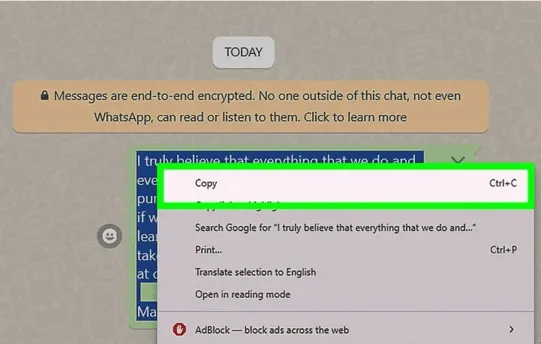
- Step 3. Highlight text with your mouse
- Step 4. Copy and paste
- Easier for long messages
- Great for work or documentation
Unlike manual copying, VigilKids provides continuous monitoring without needing access to the phone every time.
Does WhatsApp Notify When You Copy a Message?
No. WhatsApp does not notify the sender when you copy, paste, or export messages.
- Safe to copy messages privately
- No alerts or read receipts triggered
How to Print a WhatsApp Message
- Option 1: Export chat → open file → print
- Option 2: Screenshot → print image
- Option 3: Export → email → print from computer
FAQs about Copy WhatsApp Messages
1. Is there a way to copy WhatsApp messages without the sender knowing?
Yes. In WhatsApp, you can copy messages by long-pressing and selecting "Copy," take screenshots, or export chats. These actions are private—WhatsApp does not notify the sender when you copy or save messages.
2. Can I export WhatsApp chats to PDF?
Yes. In WhatsApp, you can export chats as a .txt file via "Export Chat." Then open it in a document editor (like Word or Google Docs) and save or print it as a PDF.
3. Is there a way to copy multiple WhatsApp messages?
Yes. In WhatsApp, you can copy multiple messages by tapping and holding one message, then selecting additional messages. Tap the copy icon to copy them all at once. You can also export the entire chat for bulk copying.
Conclusion
So, is there a way to copy WhatsApp messages? Absolutely.
- Copy and paste individual messages
- Export full chats
- Transfer messages between devices
- Print conversations
- Use tools like VigilKids for monitoring
For simple tasks, built-in features are enough. But for advanced needs—like parental control VigilKids or cross-device transfers—specialized tools offer more flexibility.