
Want to use WhatsApp without exposing your personal number but keep getting stuck at the verification screen? Here’s the truth: you cannot create a new account with no number at all, but you can use WhatsApp without a phone number from your everyday mobile plan. A prepaid number, landline, VoIP service, or linked device may be the solution, depending on your specific needs.
There’s also an important 2026 update: WhatsApp usernames are being introduced, allowing users to chat without sharing their phone numbers. In this guide, you’ll discover what works today, what may not work, and which option offers the best balance of privacy, reliability, and long-term account security.
- Table of Contents
- Can You Use WhatsApp Without a Phone Number?
- 4 Ways to Use WhatsApp Without Your Personal Number
- Use a prepaid SIM or voice-capable eSIM
- Register a landline with WhatsApp Business
- Try a VoIP number cautiously
- Link a tablet, computer, or second phone
- How to Add, Chat With, or Share WhatsApp Without a Phone Number
- Protect the Account Before You Stop Using the Number
-
What Parents Should Know About Secondary WhatsApp Accounts

- FAQ
Can You Use WhatsApp Without a Phone Number?
You cannot currently create a new WhatsApp account using only an email address or username. WhatsApp’s registration process still asks for a phone number that can receive a verification code by SMS or phone call.
WhatsApp now lets users reserve a username under Settings > Account > Username. When the feature becomes available in your country, a username can help you connect without showing your number to someone new. The rollout is gradual, and a username does not yet remove the phone-number requirement for account registration.
It helps to identify what you actually want to do:
- Avoid sharing your personal number: use a separate number now, or a WhatsApp username once the contact feature reaches your account.
- Use WhatsApp on a device without a SIM: link that device to an already registered account.
- Keep using WhatsApp while traveling: connect through Wi-Fi, a local SIM, or a data eSIM after the account has been verified.
- Message someone without saving them: start a chat with their number; you do not need to add it to your contacts first.
If privacy is your main concern, also review when WhatsApp shows your phone number. The answer is changing as usernames roll out.
Four Ways to Use WhatsApp Without Your Personal Number
Every option below either uses a different number for initial verification or reuses an account that has already been verified. There is no legitimate method that creates a completely numberless account today.
| Method | Best for | Needs a number? | Main limitation |
|---|---|---|---|
| Prepaid SIM or voice eSIM | A separate, long-term account | Yes, for verification | You must keep control of the number |
| Landline | A business with a fixed line | Yes, by voice call | Use WhatsApp Business and confirm regional support |
| VoIP number | Users who accept verification uncertainty | Yes | Some numbers are rejected or later recycled |
| Linked device | A tablet, computer, or second phone | No new number | It shares an existing account |
Method 1: Use a Prepaid SIM or Voice-Capable eSIM
A prepaid number is usually the most dependable way to keep your personal number separate. Choose a plan that can receive SMS or calls; many travel eSIMs provide data only and cannot receive a WhatsApp verification code.
- Step 1. Obtain a prepaid SIM or an eSIM that includes a real phone number and can receive SMS or calls.
- Step 2. Install WhatsApp and enter that number in full international format.
- Step 3. Enter the verification code sent to the number.
- Step 4. Keep the number active and under your control for future verification or account recovery.

After setup, WhatsApp messages and calls use an internet connection, so the verification SIM does not have to provide the device’s daily data. Do not let the number expire, though: a carrier may eventually reassign it.
- Usually the most dependable option for a separate account.
- Works with standard SMS or call verification.
- Keeps your everyday personal number private.
- Requires a paid SIM or voice-capable eSIM.
- The number must remain active and under your control.
- SIM registration rules and costs vary by country.
Method 2: Register a Landline With WhatsApp Business
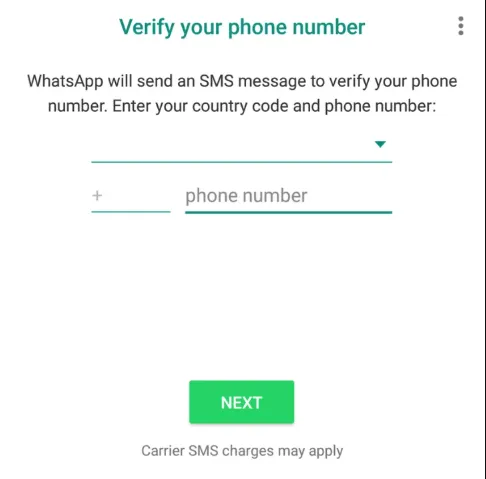
WhatsApp Business can support registration with a fixed phone number when that number can receive an automated verification call. Availability and prompts can vary, so follow the current instructions shown in the app.
- Step 1. Install WhatsApp Business.
- Step 2. Enter the landline with its country and area code.
- Step 3. If SMS is unavailable, wait until the app offers phone-call verification.
- Step 4. Answer the landline and enter the code you hear.
This option is intended for a business number you are authorized to use. It does not make the account anonymous, and you may need access to the same line again later.
- No mobile SIM is required.
- Useful for a home office or an established business line.
- The setup uses a verification phone call.
- Best suited to WhatsApp Business rather than a personal account.
- You need access to the landline during verification.
- Availability and verification prompts can vary.
Method 3: Try a VoIP Number Cautiously
Some Google Voice and other VoIP numbers can receive verification calls or texts, but acceptance is inconsistent. A free number may also be reclaimed after inactivity. That can prevent future verification or expose the number to a new owner.
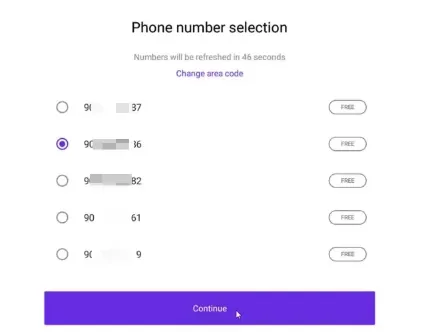
- Confirm that the service allows verification messages or calls.
- Use a number assigned only to you, not a public temporary-number website.
- Read the provider’s inactivity and number-recycling policy.
- Do not build an important account around a number you cannot keep.
For service-specific details, see our guide to using a Google Voice number for WhatsApp.
- Often free or inexpensive.
- No physical SIM is required.
- Can separate your WhatsApp identity from your personal mobile number.
- WhatsApp may reject some VoIP numbers.
- Free numbers may be recycled after inactivity.
- Losing the number can make account recovery difficult.
Method 4: Link a Tablet, Computer, or Second Phone
A linked device does not need its own SIM or WhatsApp number. It uses the same account and identity as the primary device, so this is the simplest option if you already have a working account.
- Step 1. Open WhatsApp Web, the desktop app, or WhatsApp on the secondary mobile device.
- Step 2. On the primary phone, open Settings or Menu and choose Linked devices.
- Step 3. Choose Link a device and scan the QR code, or follow the on-screen linking option.
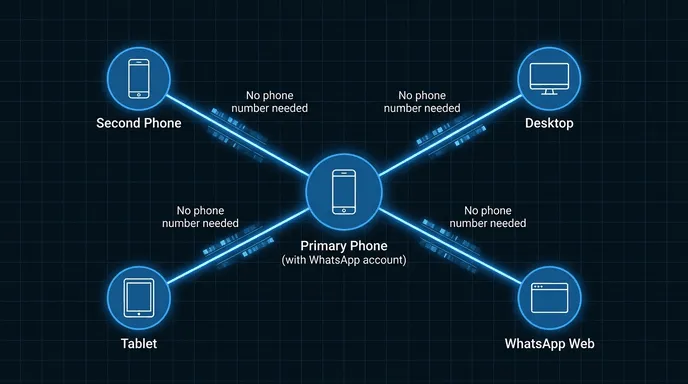
WhatsApp supports linking up to four additional devices to a primary phone. Linked devices are not separate accounts, and anyone with access to them may be able to read synced conversations, so review the Linked devices list regularly.
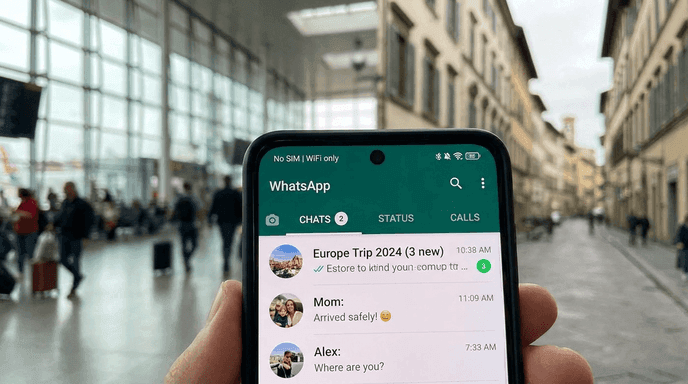
- The secondary device needs no separate number or SIM.
- Official linking works on supported phones, tablets, and computers.
- Useful for desktop-first or travel setups.
- You must already have a verified primary account.
- Linked devices share the same account and conversations.
- A lost or shared linked device can expose synced chats.
How to Add, Chat With, or Share WhatsApp Without a Phone Number
Several search questions sound like account-registration questions but are really about contacts. Here is the direct answer for each task.
- Add someone without their phone number: until usernames are fully available, you generally need the person’s WhatsApp number, QR code, invitation link, or an existing group/chat connection. Once username messaging reaches your country, you will be able to contact an enabled user by entering their exact username; WhatsApp says there will be no public username directory.
- Chat without saving the number: enter the number in WhatsApp’s new-chat search or open https://wa.me/ followed by the full international number without spaces, brackets, or a plus sign. For example, https://wa.me/14155552671 opens a chat if that number is registered on WhatsApp.
- Share WhatsApp without sharing your number: once the feature is active on your account, share your exact username. Before then, a group invite link or QR code may work, but recipients may still see phone numbers depending on the chat type and available privacy features. Never publish a private invite link where anyone can join.
- Call a non-WhatsApp number: this is not supported. WhatsApp voice and video calls work between WhatsApp accounts; they do not place ordinary calls to an unregistered number.
Protect the Account Before You Stop Using the Number
A temporary number may get you through registration, but long-term control is what protects the account. Complete these checks before removing a SIM or ending a plan:
- Keep the number active: if it is reassigned, another person may receive future verification messages.
- Enable two-step verification: create a PIN and add a recovery email you control.
- Use Change number when moving: transfer the account to your new number before the old one expires.
- Review linked devices: log out any computer, tablet, or phone you do not recognize.
- Never share a registration code: WhatsApp support and legitimate contacts do not need your six-digit code.
If you see unexpected verification messages or unfamiliar sessions, follow our checklist for checking whether your WhatsApp account is compromised.
What Parents Should Know About Secondary WhatsApp Accounts
A second number or linked device can make a child’s WhatsApp use harder to spot through a carrier bill alone. Start with a calm conversation, agree on which accounts and devices are allowed, and review WhatsApp’s privacy and linked-device settings together.
When a parent needs additional oversight on a device they own or are authorized to manage, VigilKids WhatsApp monitoring can add context after setup and required permissions:

VigilKids for WhatsApp
- Review supported WhatsApp messages and call activity from the parent dashboard.
- Receive alerts for supported keywords or potentially concerning content.
- Check relevant device activity when a child uses a secondary WhatsApp setup or another number.
- Use monitoring alongside family rules, regular conversation, and age-appropriate parental control tools.
How VigilKids Helps Parents monitoring:
- Step 1. Create a VigilKids account.
- Step 2. Connect a device you own or are authorized to manage and grant required permissions.
- Step 3. Review supported activity through the parent dashboard.
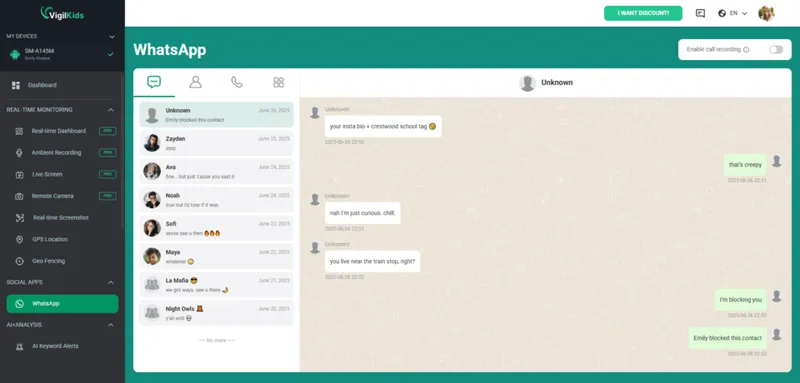
Available features depend on the device, operating system, app version, region, permissions, and subscription plan. VigilKids cannot access activity that was not captured after installation and permission setup.
VigilKids is not a replacement for WhatsApp or family communication. Instead, it works as an additional safety layer that helps families use messaging apps more responsibly while maintaining digital awareness at home.
For a broader family setup, read our practical guide to WhatsApp parental monitoring.
FAQ About WhatsApp Without a Phone Number
Can I create WhatsApp with only an email address?
No. An email can support account security and recovery, but WhatsApp still requires a phone number for initial registration and verification.
Can I use WhatsApp without a SIM card?
Yes, after the account has been verified. You can use Wi-Fi or another data connection, but you should keep control of the registered number for future verification.
Can I download WhatsApp without a phone number?
You can download and install the app without entering a number, but you cannot activate a new account until you verify one. A linked secondary device can use an existing account without its own number.
Do WhatsApp usernames replace phone numbers?
Not for registration. WhatsApp began username reservations in June 2026 and plans a gradual rollout that lets enabled users connect without showing their number. The account itself still requires number-based setup.
What is the safest way to use WhatsApp without my personal number?
Use a separate mobile number that you can keep active and control. A prepaid SIM or voice-capable eSIM is generally more dependable than a free temporary or recycled VoIP number.
Conclusion
You can use WhatsApp without a phone number from your personal plan, but a new account still requires a number for verification. A prepaid number, landline, or linked device may work depending on your needs.
For families using WhatsApp across multiple devices, VigilKids WhatsApp Monitoring helps parents gain visibility into supported activity on authorized devices and encourage safer digital habits. WhatsApp usernames may improve privacy in the future, but they do not currently replace phone number registration.
Sources
Platform behavior was checked against official WhatsApp and Meta resources.
- Meta: It’s Time to Reserve Your WhatsApp Username — June 29, 2026
- WhatsApp Help Center: How to register your phone number
- WhatsApp Help Center: About linked devices
Research checked on July 30, 2026. Features may vary by app version, device, operating system, country, permissions, and plan; WhatsApp says username availability will roll out gradually.
Hot Topics for WhatsApp Monitoring
How to Recover Deleted WhatsApp Messages Easily
Learn how to recover deleted WhatsApp messages on iPhone and Android using backups, tools, and apps like VigilKids to view deleted chats easily.
How to Freeze Last Seen on WhatsApp? 2026 Guide
Learn how to turn off Last Seen on WhatsApp, control your privacy settings, and hide your online status easily with step-by-step methods.
Is There a Way to Copy WhatsApp Messages? Easy Methods (2026 Guide)
Learn how to copy WhatsApp messages, export chats, print conversations, and transfer data from Android to iPhone. Discover easy and secure methods.