

WhatsApp has become the go-to messaging app for families, friends, and even businesses. But what if you don’t want to use your personal phone number—or you don’t have one at all? Many users switching to flip phones, traveling abroad, or running an organization without a dedicated line face the same question: can you actually use WhatsApp without a phone number?
- Table Of Contents
- PART 1. Can you use whatsapp without phone number
- PART 2. Why WhatsApp Requires a Phone Number
- PART 3. Alternative Ways to Use WhatsApp Without a Regular Mobile Number
- 3.1 Can You Use WhatsApp with a VoIP Number?
- 3.2 Can You Register WhatsApp with a Landline?
- 3.3 Is a Prepaid or Spare SIM the Best Option?
- 3.4 Can You Run WhatsApp Without a Smartphone?
- 3.5 Does WhatsApp Work Abroad with eSIM or WiFi?
-
Bonus: Keeping WhatsApp Safe with VigilKids

PART 1. Can you use whatsapp without phone number
The short answer is no, you cannot create a WhatsApp account without some kind of phone number. WhatsApp’s entire system is built around linking your account to a number, and verification codes are sent through SMS or voice calls. That said, there are several alternative methods people use to get around the “traditional SIM card” requirement—from VoIP services and landlines to spare prepaid SIMs, emulators, and eSIM setups while traveling. Each option comes with its own benefits and limitations, which we’ll explore below.
PART 2. Why WhatsApp Requires a Phone Number
To understand whether you can use WhatsApp without a number, it helps to know why the app was built around phone numbers in the first place.
-
Account architecture
WhatsApp doesn’t use usernames or email logins. The system relies on phone numbers as unique identifiers. That’s why your contact list syncs automatically—because it matches saved numbers to registered accounts.
-
Verification process
At sign-up, WhatsApp sends a one-time code via SMS or voice call. This step ensures the number is active and under your control. Without it, you can’t create an account.
-
Security and anti-spam measures
Phone number verification reduces the spread of bots and fake accounts. Many VoIP and disposable numbers are blocked for this reason.
-
Practical effect
After registration, all communication runs over the internet (WiFi or mobile data). The SIM card itself isn’t needed anymore, but the verified number remains tied to your identity.
PART 3. Alternative Ways to Use WhatsApp Without a Regular Mobile Number
While WhatsApp won’t let you create an account without some form of number, there are a few workarounds that people use when they don’t want to rely on a regular SIM card. Below are the most common methods and how well they actually work.
3.1 Can You Use WhatsApp with a VoIP Number?
Yes, in some cases—but success is inconsistent. Apps like Talkatone, TextFree, Text+, or Google Voice can sometimes be used to register a WhatsApp account. The key is to request a voice call verification instead of SMS.
How it works:
- Step 1.Download a VoIP app such as Talkatone or TextFree.
- Step 2.Sign up to get a virtual number.
- Step 3.Enter that number into WhatsApp.
- Step 4.When SMS verification fails, choose Call me to receive the code by phone.
- Free or very low-cost.
- Quick to set up.
- Many numbers are flagged as invalid by WhatsApp.
- Providers like Talkatone admit their numbers aren’t officially supported.
- VPN conflicts can block the verification call.
3.2 Can You Register WhatsApp with a Landline?
Yes, this older method still works in some regions. By entering your fixed phone number, WhatsApp will fail to send an SMS but eventually allow a voice call.
How it works:
- Step 1.Enter your landline number during signup.
- Step 2.Wait for SMS to fail a few times.
- Step 3.Select Call me when prompted.
- Step 4.Answer the landline and note down the code.
This approach has been used successfully in office setups and by individuals who don’t own a mobile. However, it’s less common today and reliability depends on your service provider.
3.3 Is a Prepaid or Spare SIM the Best Option?
Yes—this is the most reliable workaround. Buying a prepaid SIM card just for verification ensures you can register your account without risking failed codes.
How it works:
- Step 1.Buy a prepaid SIM (local or international).
- Step 2.Insert it in your phone or a spare device.
- Step 3.Use the number to receive the one-time code.
- Step 4.Complete WhatsApp registration and remove the SIM.
Once set up, you can run WhatsApp entirely on WiFi or eSIM data. The SIM doesn’t need to stay active. This method is widely recommended for travelers or people moving to minimalist phones.
3.4 Can You Run WhatsApp Without a Smartphone?
Yes. If you’d rather not use a smartphone at all, WhatsApp still works on desktop or emulators.
Options include:
- WhatsApp Web/Desktop: Pair once by scanning a QR code. You’ll need to re-scan if the session expires.
- Android emulators (Bluestacks, LDPlayer): Install WhatsApp directly on your PC. You’ll still need a number to register.
- Alternative devices: Lightweight Android devices like Chromebooks or Boox Palma let you keep WhatsApp without carrying a full smartphone.
3.5 Does WhatsApp Work Abroad with eSIM or WiFi?
Yes. Once your account is created, WhatsApp doesn’t depend on your home SIM. All calls and messages are sent over the internet.
Real-world feedback:
- Travelers in Europe and Japan used Ubigi, Mobimatter, and Revolut eSIMs successfully.
- Performance was reliable, with only minor slowdowns in rural areas.
- Hotels and contacts can message your WhatsApp number no matter what SIM you’re using.
Caveat: If you reinstall WhatsApp or switch devices, you’ll need the original number to verify again.
Bonus: Keeping WhatsApp Safe with VigilKids
If your main concern is not just how to register WhatsApp, but also how to use it safely, then information security and children’s usage habits need to be part of the conversation. Many parents find that kids on WhatsApp can be exposed to strangers, inappropriate content, or other risks.
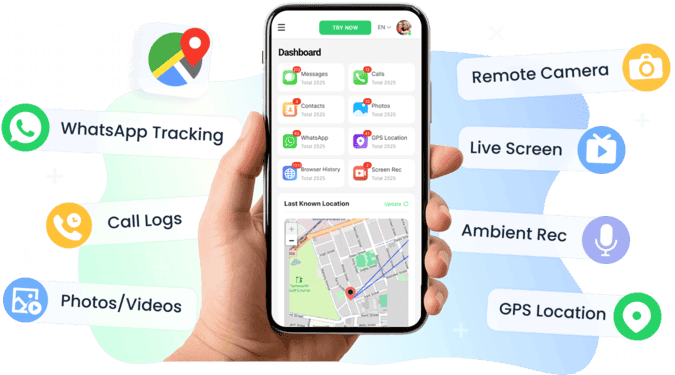
This is where a parental tool like VigilKids becomes valuable:
- It can track WhatsApp chats, voice messages, and call activity.
- It detects sensitive images or flagged keywords and alerts parents right away.
- It also offers screen recording and ambient sound features, allowing parents to stay informed without being overly intrusive.
VigilKids is not a replacement for WhatsApp—it’s an extra layer of protection that helps families continue using WhatsApp while maintaining digital safety at home.
Conclusion
Strictly speaking, you cannot create a WhatsApp account without any phone number at all.
- A prepaid SIM card or spare number remains the most stable solution.
- Landline registration and VoIP numbers may work in some cases, but they’re unreliable and carry a higher risk of being blocked.
- Once your account is verified, you can continue using WhatsApp over WiFi, eSIM, desktop apps, or even abroad, without relying on the original SIM.
If your only question is whether WhatsApp can function without a permanent mobile number, the methods above cover the main options available today. But if you also worry about how your children use WhatsApp, VigilKids can serve as a helpful companion tool—allowing you to keep using WhatsApp freely while staying reassured about your family’s safety.