
How to read text messages from another phone is a common question, but the safe answer depends on access. You can do it through your own synced devices, backups, shared accounts, or a parent-managed monitoring setup. You should not rely on random tools that claim to open private SMS from only a phone number.
This guide compares safe ways to read SMS on another device, recover old messages, and use VigilKids when parents need ongoing visibility into a child's phone activity.
- Table Of Contents
- Part 1: Can You Read Text Messages from Another Phone Remotely?
- Part 2: Safe Ways to Read Text Messages from Another Device
- Part 3: Use VigilKids for Parent-Managed Message Monitoring

- Part 4: Use Google Messages for Web on Android
- Part 5: Restore Android SMS from Google Backup
- Part 6: Use Text Message Forwarding and iCloud on iPhone
- FAQs About Reading Text Messages Remotely
Part 1: Can You Read Text Messages from Another Phone Remotely?
Yes, but only in limited, legitimate situations. Text messages are private device and account data. Safe access usually requires your own account, a synced device, a backup, consent from the phone owner, or a parent-managed child's device.
- You can: read your own SMS on a synced computer, tablet, or backup-connected device.
- You can: restore messages from a backup if you control the account and device.
- Parents can: use a parental monitoring setup on a child’s managed phone after setup and required permissions.
- You should avoid: websites that claim to reveal private texts from a phone number alone.
If you only need to know whether a message was seen, this guide on how to know if someone read your text may answer a narrower question without needing full message access.
Part 2: Safe Ways to Read Text Messages from Another Device
The right method depends on whether you need current SMS, old backups, iPhone syncing, or ongoing parental visibility.
| Method | Remote? | Best for | Main requirement | Limit |
|---|---|---|---|---|
| VigilKids | ✅ | Parent-managed monitoring | Setup on the child’s managed device | Designed for family safety, not public message lookup |
| Google Messages for Web | ✅ | Reading your Android SMS on desktop | QR pairing with the Android phone | Needs the phone and paired account |
| Google Backup | Limited | Restoring old Android SMS | Backup enabled before data loss | Restore may affect current phone data |
| Text Message Forwarding | ✅ | Apple devices on the same account | Same Apple ID and trusted devices | Only works inside the Apple ecosystem |
| iCloud Messages | ✅ | Syncing or restoring iPhone messages | iCloud access and enough storage | Not a way to access unrelated private phones |
For a deeper comparison of dedicated tools, you can also read this SMS tracker guide.
Part 3: Use VigilKids for Parent-Managed Message Monitoring
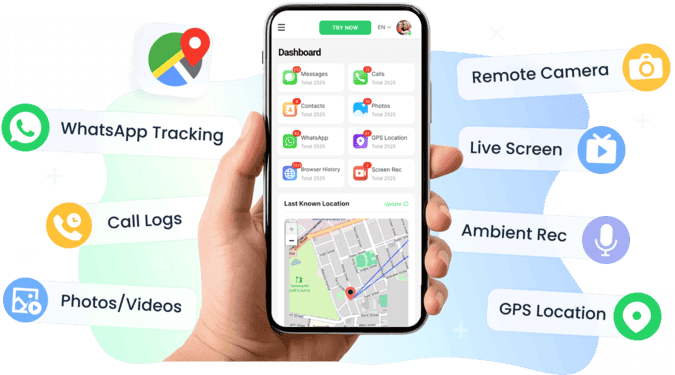
For parents who need ongoing visibility into a child's Android phone, VigilKids is a stronger fit than one-time sync or backup methods. It is built for parent-managed monitoring after setup, helping parents review message activity alongside broader safety context.

VigilKids SMS Monitoring
- Review SMS and message activity from the parent dashboard
- Check message context together with app activity, screenshots, and location
- Use alerts and activity patterns to spot concerning communication earlier
- Access monitored data from a secure parent account after device setup
How parents can use VigilKids:
- Step 1. Create a VigilKids account and choose the child’s Android device for setup.
- Step 2. Install and configure the app on the parent-managed device with the required permissions.
-
Step 3. Open the dashboard to review SMS, message-related activity, screenshots, and other safety signals.
If your main goal is choosing a broader monitoring product, compare this page with the best phone monitoring app guide. If you specifically want parental text-message coverage, this related guide on an app for parents to track text messages can help.
Part 4: Use Google Messages for Web on Android
Google Messages for Web is useful when you want to read and reply to your Android SMS from a computer. It does not give public access to another person’s messages; it works through device pairing.
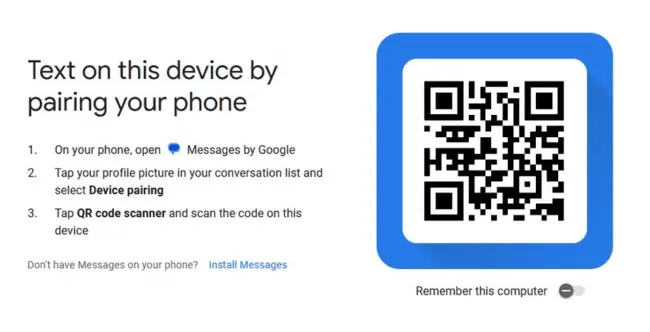
- Step 1. Open the Messages app on the Android phone.
- Step 2. Go to device pairing or Messages for Web.
- Step 3. Open Messages for Web on the computer and scan the QR code with the phone.
- Step 4. Keep the device paired only on computers you trust.
This method is best for your own Android phone or a device you are allowed to manage. It is not a solution for deleted conversations or app messages outside SMS.
Part 5: Restore Android SMS from Google Backup
If the goal is to read older SMS after switching phones or losing data, Google Backup may help when backups were enabled before the messages disappeared.
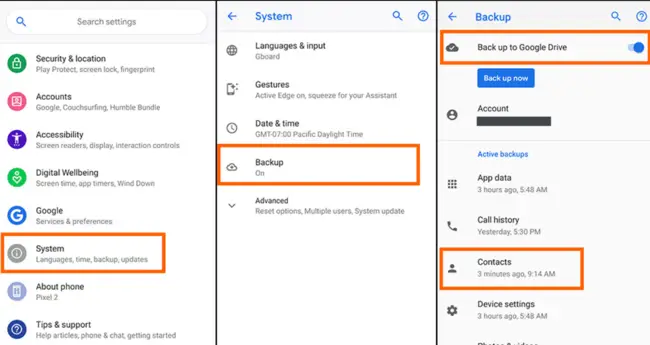
- Step 1. On the Android phone, check whether Google Backup was enabled.
- Step 2. Confirm the backup includes SMS or device data.
- Step 3. Restore the backup on a device linked to the same Google account.
Backup restore is useful for your own device history, but it can overwrite newer data. If your question is about a messaging app instead of SMS, see the guides on how to find deleted messages on Messenger.
Part 6: Use Text Message Forwarding and iCloud on iPhone
For iPhone, Apple’s built-in options are the safest place to start. They work only when devices are trusted and linked to the right Apple ID.
1 Text Message Forwarding
Text Message Forwarding lets SMS from an iPhone appear on another Apple device signed in with the same Apple ID.
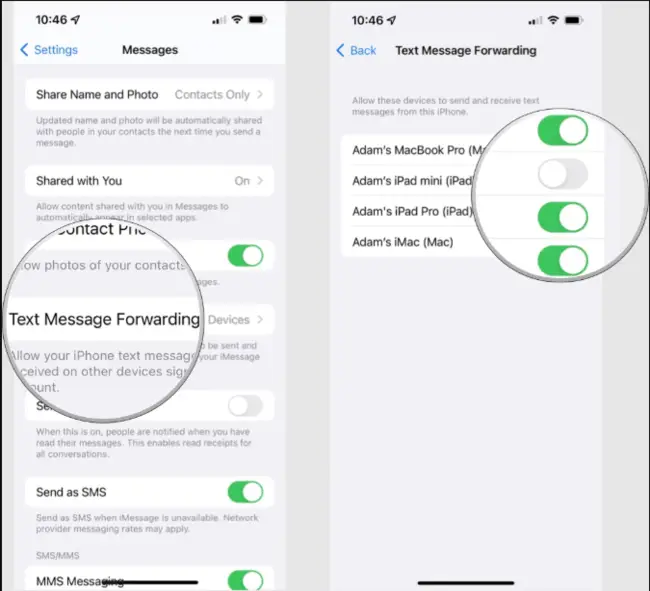
- Step 1. On the iPhone, go to Settings and open Messages.
- Step 2. Tap Text Message Forwarding.
- Step 3. Choose the trusted Apple devices where SMS should appear.
2 iCloud Messages
iCloud Messages can sync conversations across Apple devices or help when moving to a new device, as long as you use the same Apple account.
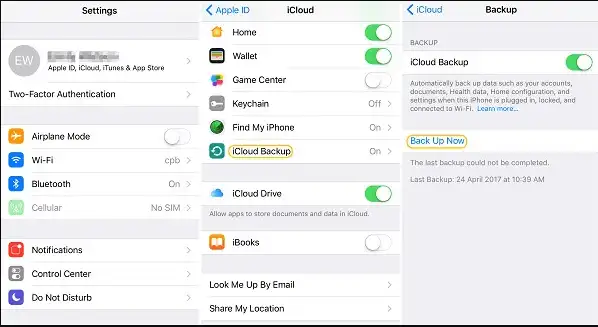
- Step 1. Open iCloud settings on the iPhone.
- Step 2. Turn on message syncing if it is available for the account.
- Step 3. Sign in on another trusted Apple device to sync or restore conversations.
If you are trying to recover older iOS conversations, this related guide on how to find deleted messages on iPhone is a better next step.
FAQs About Reading Text Messages Remotely
Q1: Can I read text messages from another phone remotely?
Yes, but only in legitimate access scenarios such as your own synced device, a backup you control, a shared account with consent, or a parent-managed child device. Public lookup tools cannot safely reveal private SMS from a phone number alone.
Q2: How can parents read SMS on a child’s phone safely?
Parents can use device-level tools like Google Messages, backups, or a parent-managed monitoring app such as VigilKids after proper setup and required permissions.
Q3: Can I read iPhone text messages on another device?
Yes, if the devices are trusted and connected through the same Apple ID with Text Message Forwarding or iCloud Messages enabled. This is meant for accounts and devices you control or are allowed to manage.
Q4: Can deleted text messages be recovered?
Sometimes. Backups, iCloud, Google backup, or app-specific recovery options may help if they were enabled before the messages were deleted. Without a backup or account record, recovery may not be possible.
Q5: Is VigilKids useful for message monitoring?
Yes, for parent-managed devices. VigilKids helps parents review SMS and related activity from a secure dashboard after setup, alongside app activity, screenshots, and location context.
Q6: Can someone access my phone through a text message?
A normal text message usually cannot give someone access to your phone. The bigger risk is clicking phishing links, downloading unknown files, or installing unsafe apps from messages. Keep your device updated and avoid suspicious links.
Conclusion
How to read text messages from another phone comes down to safe access: your own synced devices, backups, Apple or Google account tools, or a parent-managed monitoring setup. Avoid services that promise private SMS access from only a number.
For one-time access, start with Google Messages, iCloud, or backups. For ongoing family safety, VigilKids gives parents a clearer way to review message activity together with broader device context.
Hot Topics for Phone Monitoring
Find My Device With Phone Number: What Actually Works
Learn how a phone number can help recover your own lost device. Compare Google Find Hub, Apple Find My, carrier/IMEI steps, and VigilKids family tracking.
Find My Samsung Phone: How to Locate, Ring, Lock, or Erase It
Find your Samsung phone for free with SmartThings Find or Google Find Hub. Compare steps for lost, offline, or stolen Galaxy phones, plus family tracking tips.

Can Someone Listen to Your Phone Calls? How Live Surrounding Devices Work
Is Someone Listening? How Live Surrounding Devices Work — And What You Can Do About It