
If you are searching for how to find deleted messages on iPhone, start with the Recently Deleted folder in Messages. On iOS 16 or later, Apple lets you recover conversations deleted within the last 30 to 40 days. If the message is no longer there, recovery depends on whether an older backup or another existing copy still contains it.
This guide covers how to see deleted messages on iPhone, how to check recently deleted texts, how to retrieve deleted iMessages from a backup, and what to try when messages disappeared months ago. It also explains which popular recovery claims do not work, so you can avoid resetting your iPhone or sharing sensitive account details unnecessarily.
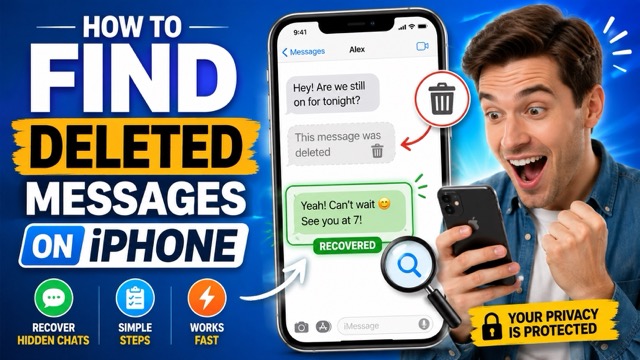
Can You Recover Deleted Messages on iPhone?
Yes, but only in a few situations. The best option depends on when the message was deleted, whether it was permanently removed, and whether a usable copy exists elsewhere. There is no hidden iPhone folder that stores every permanently deleted text.
Deleted within the last 30 to 40 days
- Best option: Open Recently Deleted in Messages.
- Main limit: Requires iOS 16 or later, and the message must not have been permanently deleted.
No longer in Recently Deleted
- Best option: Look for a backup made before the deletion.
- Main limit: Restoring a backup replaces the iPhone's current state and does not selectively restore one text.
No usable backup
- Best option: Check an Apple device that did not sync the deletion, or ask the other person for a copy.
- Main limit: If Messages in iCloud was on, deleting a message normally removes it from every connected Apple device.
If the message is gone from Recently Deleted, absent from every backup and device, and unavailable from the recipient, a consumer app cannot guarantee its recovery. Treat claims of guaranteed or instant recovery with caution.
How to Check Recently Deleted Messages on iPhone
For anyone asking how to view deleted messages on iPhone or where to find deleted texts, this is the fastest and safest method. Apple says Messages can recover conversations deleted within the last 30 to 40 days on iOS 16 or later. The exact time remaining appears beside each conversation.
- Step 1. Open the Messages app.
- Step 2. From the conversation list, tap Edit. Depending on your iOS version and message filtering settings, you may see Filters instead.
- Step 3. Tap Show Recently Deleted or Recently Deleted.
- Step 4. Select the conversation or messages you want back.
- Step 5. Tap Recover, then confirm Recover Message or Recover Messages.
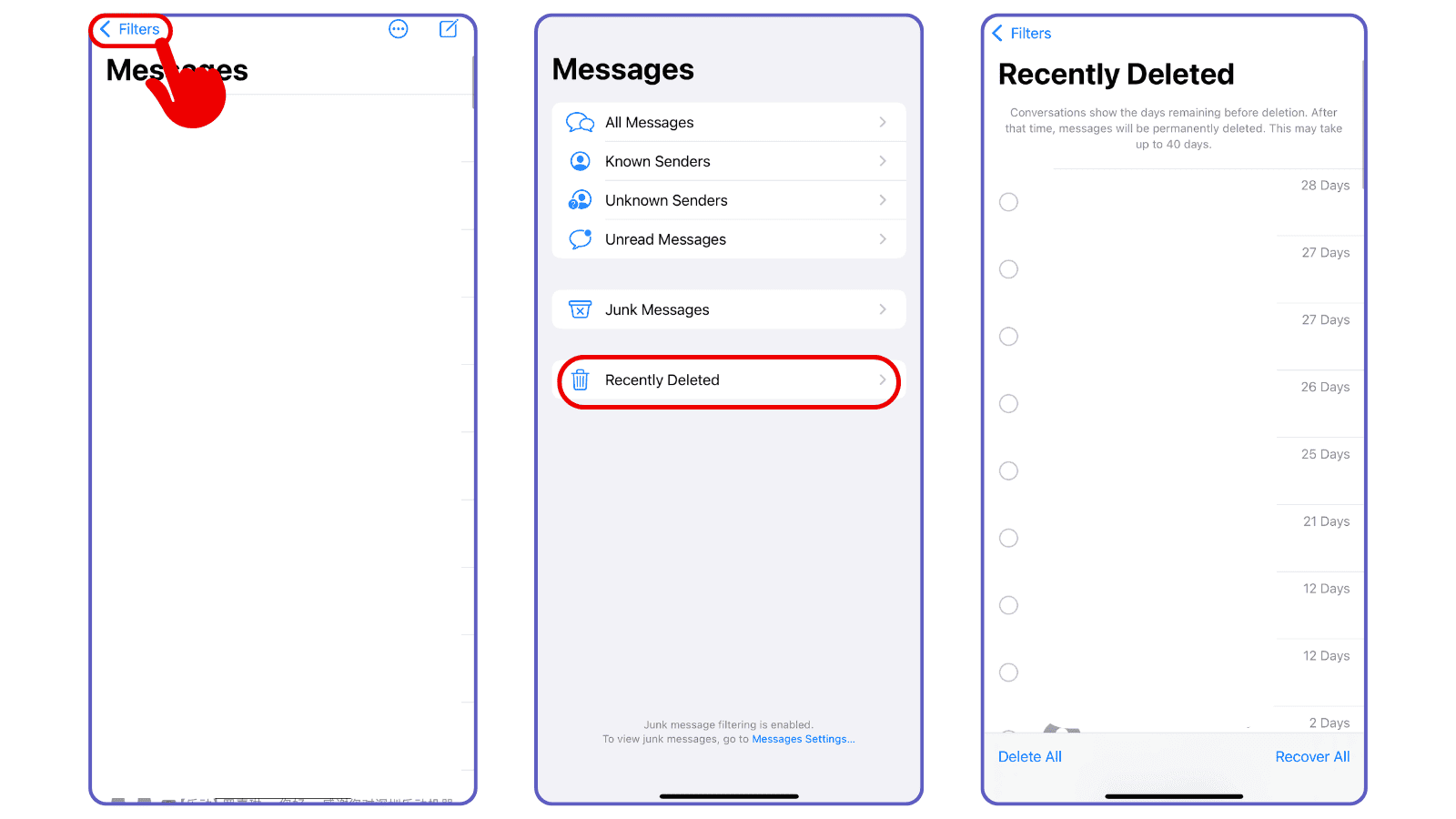
If you do not see Recently Deleted, confirm that the iPhone runs iOS 16 or later and that at least one conversation was deleted recently. Messages removed with Undo Send, expired audio messages that were not saved, and items you permanently deleted from Recently Deleted cannot be restored through this folder. For Apple's current steps, see its deleted-message recovery guide.
How to Recover Deleted Messages from iPhone Backups
If you need to retrieve deleted messages from iPhone after the Recently Deleted window has expired, an earlier backup is the next option to check. The backup must predate the deletion and actually contain Messages data. Before restoring anything, make a current computer backup or separately save new photos and files because an older restore can remove newer data.
When Messages in iCloud is enabled, messages sync separately and are not included in the nightly iCloud device backup. In that case, restoring an older iCloud device backup usually will not bring back a message that was already deleted from iCloud. When Messages in iCloud was off, texts and attachments may be included in the device backup.
Restore an iCloud Backup
Check the backup date at Settings > [your name] > iCloud > iCloud Backup. Continue only if the backup predates the deletion and you understand that the restore replaces the current contents of the iPhone.
- Step 1. Save any current data you cannot afford to lose.
- Step 2. Go to Settings > General > Transfer or Reset iPhone > Erase All Content and Settings.
- Step 3. After the iPhone restarts, follow setup until you reach Transfer Your Apps & Data.
- Step 4. Choose From iCloud Backup, sign in to your Apple Account, and select the backup by date and size.
- Step 5. Keep the iPhone connected to Wi-Fi and power while the restore completes.
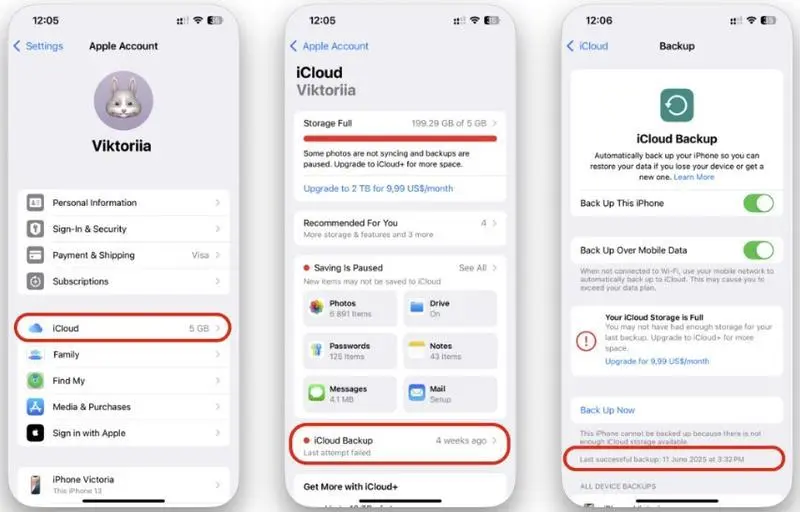
Apple documents the full process in its iCloud transfer and restore instructions.
Restore a Mac or PC Backup
A Finder, Apple Devices, or iTunes backup can help when it was created before the messages disappeared and includes the needed data. This method also restores the device as a whole; it is not a one-message extraction tool.
- Step 1. Connect the iPhone to the Mac or PC that holds the older backup.
- Step 2. Open Finder on a current Mac, Apple Devices on Windows, or iTunes on an older system.
- Step 3. Select the iPhone, choose Restore Backup, and compare the available backup dates and sizes.
- Step 4. Choose the pre-deletion backup. Enter the password if it is encrypted, then keep the device connected until the restore finishes.
See Apple's computer-backup restore steps for the current Finder, Apple Devices, and iTunes paths.
How to Find Deleted Texts on Another Device
When a backup is unavailable, the remaining practical way to find deleted texts or view deleted iMessages is to locate a copy that was never removed. This does not recover data from the iPhone's deleted storage; it preserves an existing version from another device or participant.
Check Another Apple Device
Look in Messages on a Mac, iPad, or older iPhone signed in to the same Apple Account. This can work if Messages in iCloud was off on that device or the device did not receive the deletion update. If Messages in iCloud was on and the device synced normally, Apple says the deletion is reflected everywhere.
- Check the conversation before changing sync settings.
- If the message is present, save a screenshot, export the conversation using a trusted local method, or copy the needed information.
- Do not toggle Messages in iCloud off and on expecting deleted texts to reappear. Resyncing updates the device to the current cloud state; it is not a recovery feature.
If you want current SMS, MMS, or RCS messages to appear on a Mac or iPad in the future, review Apple's Text Message Forwarding setup or this practical guide to text message forwarding.
Ask the Other Person
Deleting a conversation from your iPhone does not delete the recipient's copy. Ask the other person to send screenshots, copy the text, or forward the relevant message. This is often the best option when you need a few details rather than the complete conversation history.
Delete removes a message from your devices. Undo Send retracts an iMessage from the conversation on supported devices within Apple's time limit. A message removed with Undo Send is not available in Recently Deleted.
When Deleted iPhone Messages Cannot Be Recovered
Permanently deleted iPhone messages usually cannot be recovered when they are no longer in Recently Deleted, no pre-deletion backup contains them, every Apple device synced the deletion, and the recipient has no copy. The following commonly suggested methods do not change that result.
- Turning Messages in iCloud off and back on: This resyncs the current cloud library. It does not restore content already deleted from iCloud.
- Checking iCloud.com for a Messages inbox: Apple does not provide a general Messages web app on iCloud.com for browsing deleted iPhone texts.
- Asking a carrier for the message body: A carrier account may show messaging activity, dates, or numbers, but you should not expect it to provide the content of deleted iMessages. Carrier retention and legal processes vary.
- Installing an app after deletion: A monitoring app cannot travel back in time and recover content it never captured. Be cautious with tools that request Apple Account credentials or promise guaranteed recovery.
- Restoring the newest backup: A backup created after the deletion normally reflects the already-deleted state.
How to Prevent Future Message Loss
Keep Messages in iCloud enabled when you want current conversations synchronized across your Apple devices, and save irreplaceable information outside the chat. For a child's iPhone, begin with Apple's built-in family settings and review how to set up parental controls on iPhone before considering additional monitoring.
VigilKids for Future Android Message Monitoring
VigilKids should not be presented as an iPhone recovery method. The current VigilKids FAQ states that the monitored or target device must be Android. For a parent managing a child's Android device with permission, VigilKids can support future visibility after setup, but it cannot recover old iPhone texts or content deleted before capture.
VigilKids Pro for Android Family Monitoring
- Designed for a parent-owned or authorized Android target device
- Reviews supported message activity after setup and permissions
- Provides a web dashboard for family monitoring
- Does not recover previously deleted iPhone messages
For a broader look at responsible options, compare the platform limits, setup requirements, and privacy checks in this guide to SMS tracker apps for parents before choosing a tool.
FAQ
Q1: How do I view recently deleted messages on iPhone?
Open Messages and return to the conversation list. Tap Edit or Filters in the top-left corner, then tap Show Recently Deleted or Recently Deleted. The option requires iOS 16 or later and may not appear when there are no recently deleted conversations.
Q2: How long do deleted messages stay on iPhone?
Apple says you can recover messages deleted within the last 30 to 40 days on iOS 16 or later. The Messages app shows the remaining time. You can also permanently delete items sooner, which cannot be undone through Recently Deleted.
Q3: How do I recover permanently deleted messages on iPhone without a backup?
Only if another copy still exists, such as on an unsynced Apple device or the recipient's phone. If the message is absent from Recently Deleted, backups, and every other copy, there is no guaranteed consumer recovery method.
Q4: Does restoring an iCloud backup bring back deleted messages?
It can only help when the backup predates the deletion and contains Messages data. If Messages in iCloud was enabled, messages synced separately and were not included in the device backup, so restoring that backup usually will not restore a message already deleted from iCloud.
Q5: Can I find deleted messages on iPhone from months ago?
Only when a backup from before the deletion contains the messages or another device or participant still has a copy. If the texts are absent from Recently Deleted and every usable backup, an app installed now cannot retrieve months-old deleted messages.
Conclusion
The safest way to handle how to find deleted messages on iPhone is to work from the least destructive option to the most disruptive: check Recently Deleted, look for an existing copy, and restore an older backup only after protecting your current data.
No backup or monitoring tool can guarantee recovery after every copy is gone. If you are a parent planning future oversight for an authorized Android device, review VigilKids Pro for Android and set clear family expectations before monitoring begins.
- Apple Support: Recover deleted text messages on your iPhone or iPad — updated April 2, 2026.
- Apple Support: What information iCloud Backup includes — updated December 2, 2025.
- Apple iPhone User Guide: Delete messages and attachments in Messages — current guide reviewed August 25, 2026.
Research checked August 25, 2026. Menu labels and recovery behavior can vary by iOS version, device, region, account settings, backup state, permissions, and product plan.
More Message Recovery & Safety Guides
How to Forward SMS to Another Phone Automatically (iPhone & Android)
Learn how to forward SMS to another phone automatically on iPhone and Android, including how to forward text messages from Android to iPhone, step by step.
7 Proven Ways to See Deleted Messenger Messages
How to view deleted messages on Messenger? Discover 7 proven ways to retrieve lost chats and recover Messenger messages in 2026.

Can You Hide Text Messages? Best Ways to Hide Text Messages on Android
Wondering can you hide text messages? Learn how to hide text messages on Android with easy, proven methods to protect your privacy in minutes.