
If you have ever heard "just five more minutes" turn into twenty, you already know the YouTube struggle. One minute your child is watching a homework video or a silly music clip, and the next they are deep into Shorts, random recommendations, and a late-night rabbit hole.
For many families, the hardest part is not always one inappropriate video. It is how easily YouTube turns a quick break into hours of endless watching. That is where YouTube parental controls come in. In this guide, we’ll walk through how they work, what they can and cannot fix, and how families can make YouTube a little easier to manage without turning every screen-time moment into a battle.
What YouTube parental controls actually do
Many parents start looking for YouTube parental controls after realizing the challenge is not always one bad video — it is how quickly YouTube keeps kids watching longer than expected.
A child may watch on a phone after school, switch to a tablet before dinner, and then keep watching on a smart TV at night. That is why safer YouTube habits usually come from several protections working together, not one perfect setting.
Some protections come from YouTube itself, while others come from device settings, parental control apps, or the screen-time routines families already use at home.
Built-in YouTube parental controls
YouTube already includes several built-in tools that help parents reduce inappropriate content and create healthier viewing habits for kids. Parents who want step-by-step setup instructions can also learn how to put parental controls on YouTube across phones, tablets, and smart TVs.
Restricted Mode is often the first setting parents try. It helps filter mature videos, explicit language, and some inappropriate search results on shared family devices, but many parents notice quickly that it does not catch everything.
Some content still slips through, especially videos built around clickbait thumbnails, influencer drama, suggestive jokes, or fast-changing internet trends that are harder for filters to recognize.
YouTube Kids takes a much more locked-down approach for younger children. The app feels simpler, calmer, and more manageable for many families during the elementary-school years. Parents can choose age ranges, approve videos manually, and limit how much of the wider YouTube platform children can explore.
For many families, YouTube Kids is the starting point before children move to the regular YouTube app later on.
Supervised accounts are designed more for older kids and teens. Using Google Family Link, parents can apply viewing restrictions while still giving children a little more independence as they get older.
YouTube also includes smaller tools like autoplay controls, bedtime reminders, break reminders, watch-history settings, and basic screen-time management features.
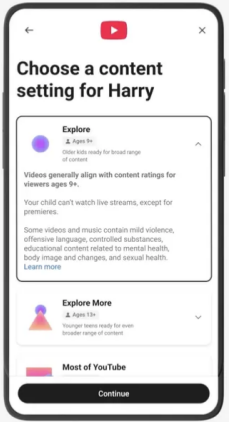
2026 update: YouTube has started rolling out new parental controls for supervised teen accounts, including stronger controls for YouTube Shorts. Parents can now limit how long teens spend scrolling Shorts and may soon be able to block Shorts completely during certain times like homework hours or bedtime.
Why some families add extra parental control tools
As kids get older, many parents realize the bigger challenge is no longer just blocking one inappropriate video. It becomes managing overall screen habits, endless scrolling, late-night watching, and how difficult YouTube can feel to pause once kids get pulled in.
That is why some families use additional parental control apps alongside YouTube’s built-in settings. Instead of focusing only on filtering videos, these tools help parents create more consistent routines across devices and daily screen time.
For example, some families use parental control apps to block YouTube during homework or bedtime, set healthier app time limits, manage multiple devices from one dashboard, and reduce compulsive scrolling habits without removing technology completely.
Device-level controls still matter too
Many parents also combine YouTube settings with device-level protections on phones, tablets, browsers, and home Wi-Fi networks.
This may include Apple Screen Time, Android parental settings, Chromebook supervision tools, browser restrictions, or tools that help parents check screen time on Android devices more consistently.
For younger children especially, most families eventually find that layered protection works much better than relying on a single YouTube setting alone.
A healthier YouTube strategy usually focuses on three things:
- reducing inappropriate content
- creating natural stopping points
- helping kids build healthier long-term screen habits
Why many parents still worry about YouTube
Most parents do not see YouTube as completely bad. Kids use it for homework help, gaming videos, music, hobbies, and entertainment every day. The problem is that YouTube rarely stays limited to just one video. A child may start with something harmless, but the platform is designed to keep recommending more and more content without natural stopping points.
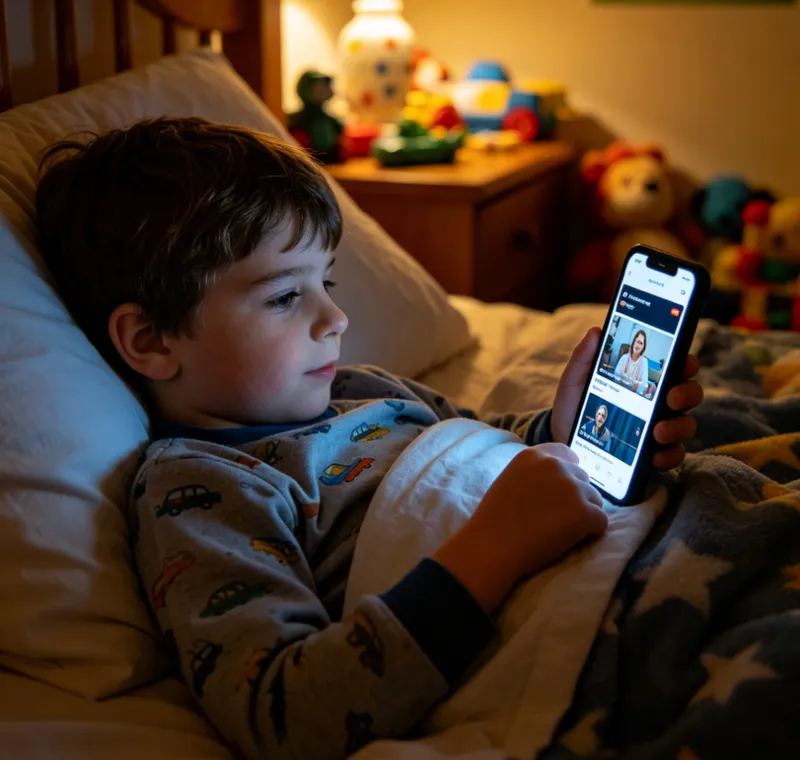
For many families, the bigger concern is not always one inappropriate video — it is how difficult YouTube makes it for kids to stop watching. Shorts, autoplay, and nonstop recommendations can easily turn “five more minutes” into an hour of scrolling before children even realize how much time has passed.
Some parents also notice that too much short-form content can make it harder for younger kids to focus, especially after children accidentally start watching inappropriate things online through recommendations or viral videos.
Even with YouTube parental controls enabled, many parents still find themselves searching for better screen-time boundaries, healthier viewing habits, and age-appropriate ways to manage YouTube as kids grow older.
The biggest limitations of YouTube parental controls
YouTube’s built-in parental controls can help reduce certain risks, especially for younger children. But many families eventually realize that filtering content is only part of the challenge.
The harder problem is how quickly YouTube keeps kids watching once recommendations, autoplay, and Shorts take over. Even when inappropriate content is filtered out, endless scrolling and screen-time struggles can still become daily problems at home.
But many families eventually realize that the hardest part of YouTube is not always blocking one clearly inappropriate video. It is how quickly the platform changes, how easily kids move between devices, and how difficult it can be to manage screen habits consistently once children become more independent online.
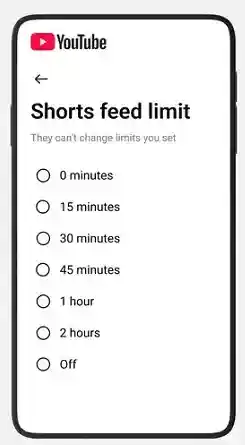
Many parents also feel frustrated that YouTube Shorts still cannot be fully disabled inside the standard app, which is why some families eventually look for ways to block distracting apps on Android or reduce endless scrolling habits altogether.
Another challenge is that YouTube’s built-in tools mainly focus on filtering content — not necessarily helping families manage overall screen habits. Even with parental controls enabled, autoplay, recommendations, and constant scrolling can still make it difficult for kids to put devices down without arguments or frustration.
Because of that, many parents eventually start looking beyond YouTube’s built-in settings alone. Some families combine them with stronger screen-time boundaries, device-level controls, or parental control apps that help create more consistent rules across phones, tablets, and computers.
YouTube parental control strategies by age group
As kids grow older, the YouTube challenge usually changes too. Younger children often need stronger filtering, while older kids struggle more with screen habits, independence, and endless scrolling.
That is why many families gradually change their YouTube parental controls as kids grow older, instead of relying on one fixed setup forever.
Ages 0–5: Stay with YouTube Kids and watch together
For very young children, many parents feel more comfortable starting with YouTube Kids.
At this age, YouTube Kids usually works best alongside co-viewing, simple screen-time limits, and keeping devices in shared family spaces whenever possible.
Ages 6–9: Add stronger routines and screen-time boundaries
As kids get older, many start asking for more freedom online. But this is also the age when recommendations, Shorts, and autoplay can suddenly turn a quick video into a long scrolling session.
Many families continue using YouTube Kids while adding clearer device routines, bedtime rules, and daily viewing limits to help reduce constant scrolling.
Ages 10–12: Introduce supervised accounts carefully
Pre-teen years are often when YouTube becomes harder to manage. Kids want more independence, but many still struggle with endless recommendations and late-night watching.
Supervised accounts can help create a middle ground by giving children more freedom while still letting parents manage content settings and screen habits more closely.
Ages 13–17: Focus more on habits than strict blocking
For teenagers, most families eventually shift away from trying to monitor every video and focus more on healthier screen habits overall.
At this stage, sleep routines, screen-time expectations, and open conversations about online content usually become more effective than overly strict restrictions alone, especially as teens begin spending more time on platforms like Snapchat and WhatsApp.
Parents who are navigating multiple social platforms may also explore tools for WhatsApp parental monitoring or safer social media habits overall.
Why some families use additional parental control apps
For some families, YouTube’s built-in controls work well enough for a while. But as kids get older, screen-time arguments, late-night scrolling, and difficulty getting kids to stop watching often become the bigger challenge.
At that point, the challenge usually becomes bigger than one inappropriate video. Many parents say the harder part is managing everyday screen habits like endless Shorts scrolling, homework distractions, bedtime routines, and constant “just one more video” negotiations.
| Option | Works Best For | Main Limitation |
|---|---|---|
| YouTube Kids | Younger children | Kids eventually outgrow it |
| Restricted Mode | Shared family devices | Filters are not always consistent |
| Supervised Accounts | Pre-teens and teenagers | Limited screen-time management tools |
| Parental control apps | Families managing multiple devices and routines | Require setup and ongoing family communication |
For many parents, the issue eventually becomes less about blocking one bad video and more about creating healthier daily routines around screens overall.
That is why some parents choose broader parental control tools alongside YouTube’s native settings. Instead of only filtering videos, these tools can help families manage screen time, bedtime schedules, and device routines more consistently across phones, tablets, and computers.
- Monitor YouTube, Snapchat activity, and gaming apps in one place
- View your child’s YouTube browsing habits and screen activity in real time
- Detect inappropriate content with customizable keyword alerts
- Set app limits or block YouTube during homework, bedtime, or family time
- Use live screen monitoring to see what your child is watching online
For most parents, the goal is usually not to monitor every single video. It is to create healthier digital habits, reduce daily screen-time battles, and help kids build a better relationship with technology over time.
FAQs
Q1:What types of YouTube parental controls are available?
YouTube offers several types of parental controls, including Restricted Mode, YouTube Kids, supervised accounts, autoplay controls, and screen-time reminders. Many families also combine these with third-party parental control tools.
Q2:Does Restricted Mode fully block inappropriate content?
No. Restricted Mode helps filter some mature content, but it does not catch everything. Many parents still monitor usage habits and combine multiple safety strategies.
Q3:Can parents completely block YouTube Shorts?
Completely blocking Shorts can be difficult because the feature is deeply integrated into YouTube. Some families instead use screen-time tools, app restrictions, or alternative viewing routines.
Q4:How can families manage YouTube across multiple devices?
Many parents combine YouTube's built-in controls with device-level restrictions and third-party parental control apps to manage usage consistently across phones, tablets, and computers.
Conclusion
There is no single setting that makes YouTube completely safe or stress-free for every family. For many parents, the bigger challenge is not just inappropriate videos — it is helping kids build healthier screen habits in a platform designed to keep them watching. That is why effective YouTube parental controls usually involve more than one tool or setting alone.
While YouTube’s built-in tools can help reduce certain risks, some families also use broader digital wellness tools like VigilKids to support more consistent screen-time habits at home.
Hot Topics for Parental Controls
8 Best Android Parental Control Apps in 2026
The 8 best Android parental control apps for 2026 — screen time, location, app blocking, and content filtering. Free and paid options compared.
VigilKids Review 2026: Features, Pricing, Pros & Cons Explained
VigilKids review: 90 days tested across 3 households. Features, pricing, real-family feedback, and whether the $9.99/month parental control app is worth it.
Review of the 3 Best Parental Control Apps (Beginner's Guide)
Compare the top 3 parental control apps — VigilKids, mSpy, and Bark. See which one offers the best WhatsApp monitoring, real-time location tracking, and ease of use for everyday parents. Find the right tool to keep your child safe online.