
Eyezy markets itself as the "phone monitoring app that does it all" — headlined by its AI-driven Magic Alerts and an Invisible Shield stealth mode. It's one of the most heavily advertised parental tools of 2026, but flashy marketing and day-to-day reliability aren't the same thing. This review takes a different angle: instead of just listing features, we look at what Eyezy is actually built around, whether its signature tools live up to the hype, and the things parents genuinely need that it leaves out — then point to a more dependable option in VigilKids.

In one line:
Eyezy is a feature-packed, stealth-focused monitoring app with a clever keyword-alert system — but it leans more toward surveillance than parenting, skips screen-time limits, suffers from delayed alerts, and is pricey month-to-month. Parents wanting reliable, real-time, family-first monitoring will find VigilKids a better fit.
- Table Of Contents
- What Eyezy Is Built Around
- Do Its Signature Features Live Up to the Hype?
- What Eyezy Leaves Out
- Pricing: Is It Worth It?
- Where VigilKids Does It Better

- Final Verdict
- FAQs
What Eyezy Is Built Around
Most monitoring apps log data and dump it into a dashboard. Eyezy's pitch is different — it's built around two headline ideas that shape the whole product.
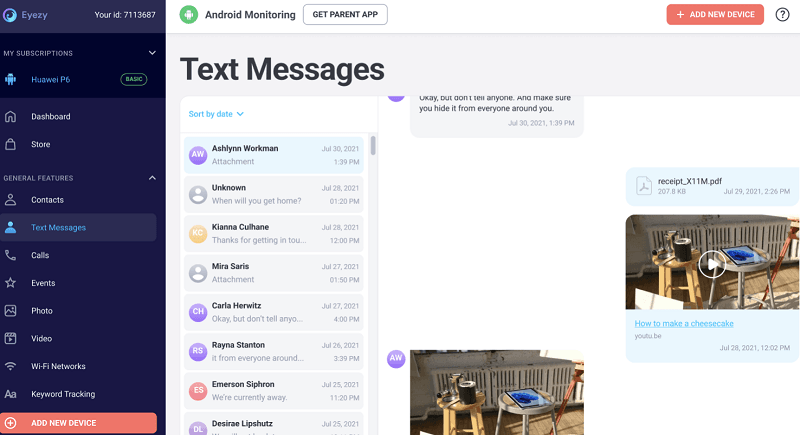
The first is Magic Alerts, an AI-flavored alert engine. Rather than expecting you to scroll through every message, you set keywords, locations, or contacts, and Eyezy pings you when one is triggered. The second is the Invisible Shield, a stealth layer that hides the app entirely on the target device — no icon, no trace, and it survives screenshots or attempts to find it. Around these sit the usual tools: keystroke capture, social-media monitoring (WhatsApp, Instagram, Snapchat, and 30+ apps), screen recording, GPS, and geofencing.
It works on both Android and iPhone, and most features run without rooting or jailbreaking — though some advanced iPhone capabilities still require a jailbreak. If you're comparing stealth-focused tools, Eyezy sits in the same category as other monitoring apps for Android, though its keyword-alert system is its main differentiator. On paper, it's one of the more complete toolkits available — the interesting question is how those two headline features hold up in practice.
Do Its Signature Features Live Up to the Hype?
This is where a marketing-led product meets reality. Based on hands-on reviews across the web in 2026, here's the honest scorecard.
Magic Alerts: Clever, but Narrow and Delayed
The concept is genuinely useful — getting pinged only when something matters saves time. In practice, though, two real limits surface. First, alerts only fire on the keywords you set; Eyezy won't proactively flag inappropriate content that falls outside your list, and it has no built-in detection for categories like bullying, self-harm, or profanity. Second, alerts are delivered by email and can be noticeably delayed — testers have reported geofence alerts arriving up to 20 minutes late, which undercuts the whole point of a "real-time" warning.
The underlying keystroke capture is similar to what you'd find in a dedicated Android keylogger, but an alert is only as useful as its timing.
Invisible Shield: Effective Stealth, Questionable Philosophy
The stealth mode does what it claims — Eyezy hides itself well on Android. But heavy, hidden surveillance is exactly the design choice that's drawn criticism: independent reviewers note Eyezy behaves "more like a surveillance tool than a parental controls app." For families, covert monitoring can backfire on trust, and it sidesteps the open, conversation-first approach that actually keeps kids safer long-term.
Core Monitoring: Powerful When It Works
When everything's running, Eyezy is capable — pulling WhatsApp conversations, Instagram DMs, and Snapchat messages that weaker apps miss. But reliability wobbles: testers have seen WhatsApp data stop updating for an entire day, and frequent screenshots can drain the target phone's battery fast. "Powerful when it works" is the recurring theme — and the caveat.
For WhatsApp specifically, our roundup of the best WhatsApp trackers shows how Eyezy's reliability compares.
What Eyezy Leaves Out
For a tool that bills itself as doing "it all," some notable gaps matter specifically for parenting rather than surveillance:
- No screen-time limits. Eyezy can show you how long an app is used, but it won't let you actually set or enforce limits — a core parental-control expectation it simply doesn't meet.
- Slow, unreliable blocking. Where blocking exists, a blocked app can take around 15 minutes to stop working and may keep running in the background, draining battery.
- No proactive risk detection. Without your exact keywords, harmful content slips through; there's no smart categorization of dangerous topics.
- Limited location depth. Location works, but recurring-pattern tracking is thin; dedicated location tracker tools or geofencing software go deeper.
- One device per subscription. Each plan covers a single device, so multi-child families pay repeatedly.
- No free trial. You commit first; there's a demo and a 14-day money-back guarantee, but no proper trial.
The pattern:
Eyezy is strong at quiet, deep surveillance but weak at the everyday parenting controls — time limits, reliable blocking, proactive safety alerts — that most families actually want. If your goal is guiding healthy habits rather than just watching, that mismatch matters.
Pricing: Is It Worth It?
Eyezy's pricing is where the value question gets sharp. Introductory rates start low — around $7.99/month on the longest commitment — but renew at much higher rates, and the month-to-month plan is steep at roughly $47.99. Each subscription covers only one device.
| Plan | Intro Price (per month) | Notes |
|---|---|---|
| 1-Month | ~$47.99 | Most expensive per month |
| 3-Month | Mid-tier | Renews higher |
| 12-Month | From ~$7.99 | Best rate; renews at higher price |
All tiers unlock the same features — Eyezy doesn't gate advanced tools behind premium plans, which is a genuine plus. But with renewal price hikes, single-device coverage, and no free trial, the real cost over time can climb. Always check the official site for current pricing.
Where VigilKids Does It Better
If Eyezy's surveillance-first design, delayed alerts, and missing parental controls are dealbreakers, VigilKids takes the opposite approach — built around reliable, real-time visibility and family-first transparency rather than deep stealth. You can see exactly how it works in the monitoring demo.

VigilKids Pro
- Real-time visibility into WhatsApp, Messenger, Snapchat messages, media, and contacts
- Live screen mirroring and remote screenshots — see activity as it happens, not 20 minutes late
- Built-in screen-time controls to actually set and manage daily limits
- Instant keyword and stranger-contact alerts that don't rely on email delays
- GPS location, geofencing, and app usage from one transparent dashboard
Here's how they line up on the points that matter most:
| Feature | Eyezy | VigilKids |
|---|---|---|
| Real-time alerts | Email, often delayed | Instant |
| Screen-time limits | No (view only) | Yes |
| Proactive risk detection | Keyword-only | Keyword + stranger alerts |
| Live screen viewing | Screen recording | Live mirroring |
| Approach | Stealth surveillance | Transparent, family-first |
VigilKids is also one of the most complete parental control apps and a full Android parental control solution — and if you're comparing several, our roundup of the best phone monitoring apps shows where each one fits.
FAQs
Q1: What is Eyezy's Magic Alerts feature?
Magic Alerts lets you set keywords, locations, or contacts and get notified when one is triggered. It's useful, but it only catches the keywords you specify, won't flag content outside your list, and alerts arrive by email and can be delayed.
Q2: Does Eyezy work without jailbreaking an iPhone?
Most core features work on iPhone via iCloud without a jailbreak, but some advanced capabilities still require jailbreaking. On Android, most features run without rooting after install.
Q3: Does Eyezy have screen-time limits?
No. Eyezy can show how long apps are used, but it can't set or enforce screen-time limits — a key parental-control feature it lacks. For real limits, a tool like VigilKids is a better fit.
Q4: How much does Eyezy cost and is there a free trial?
Intro pricing starts around $7.99/month on the annual plan and up to about $47.99 monthly, renewing at higher rates, with one device per subscription. There's no free trial — only a demo and a 14-day money-back guarantee.
Q5: What's a good Eyezy alternative for parents?
VigilKids is a strong alternative for parents who want real-time (not delayed) alerts, actual screen-time controls, live screen viewing, and a transparent, family-first design rather than stealth-first surveillance.
Final Verdict: Is Eyezy Worth It?
Eyezy is a genuinely powerful surveillance tool with a clever alert concept and effective stealth — and when everything's running smoothly, it captures more than many rivals. If deep, hidden monitoring of a single device is exactly what you want, it delivers on that narrow promise.
But for most parents, the gaps are telling: no real screen-time limits, keyword-only alerts that miss what they're not told to look for, email notifications that arrive late, reliability hiccups, single-device pricing, and a stealth-first philosophy that can erode trust. It's built more to watch than to parent. For reliable, real-time, transparent family safety in 2026, VigilKids is the alternative we'd point parents to.
Related Topics

MoniMaster Reviews 2026: Features, Pricing, Pros & Cons
An honest 2026 MoniMaster review — features, pricing, pros, cons, and real user feedback. See if it fits, or if VigilKids is the better alternative for parents.
Hoverwatch Reviews 2026: Features, Pricing, Pros & Cons
An honest 2026 Hoverwatch review — features, pricing, pros and cons, and the best alternative. See if it fits your needs or if VigilKids is the better pick.

FlexiSpy Review 2026: Is It Worth It? Better Alternative Inside
Our hands-on FlexiSpy review tests installation, features, and reliability on Android and iOS in 2026 — plus the FlexiSpy alternative built for parents.