
You've Heard About Snapchat Family Center — But What Does It Actually Do?
Someone mentioned it at school pickup. Or you saw it in a Snapchat settings menu and weren't sure what it was. Either way, you're here because you want to know whether Snapchat Family Center is worth setting up — and whether it actually does what it sounds like it does.
The short answer: it's a useful starting point. But it has real limits that most parents don't find out about until after they've set it up. This guide walks you through everything — what it is, how to use it, what you can actually see, and where it stops.
- Table Of Contents
- What Is Snapchat Family Center?
- How to Set Up Snapchat Family Center
- What Can Parents See on Snapchat Family Center?
- When Family Center Isn't Enough — VigilKids

- Snapchat Family Center Not Working? Common Fixes
- FAQs
What Is Snapchat Family Center?
 Quick Answer
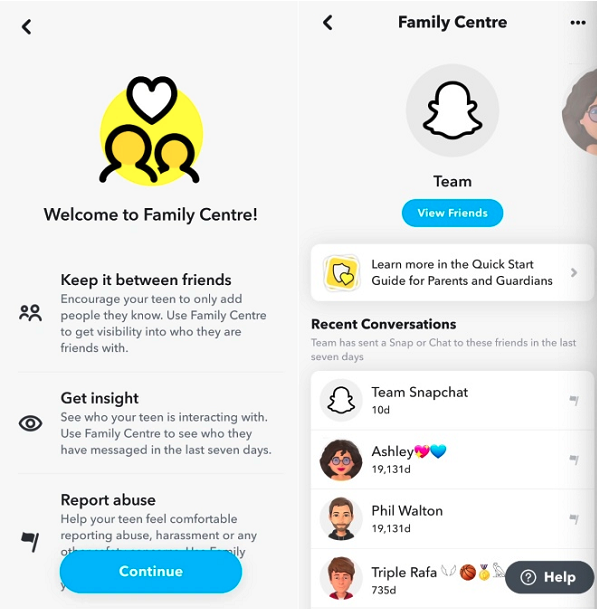
Snapchat Family Center lets parents review who their teen is friends with, who they’ve recently messaged, and certain safety and privacy settings from their own device.
Family Center on Snapchat is Snapchat’s free, built-in parental supervision feature. It lives inside the app, so there’s no separate download or subscription required.
The setup is straightforward. A parent sends an invite from their Snapchat account. The teen receives the invitation and chooses whether to accept it. Once the connection is established, the parent can access a dedicated Family Center dashboard to review activity and manage supported settings.
A few things to know upfront:
- Both parent and teen need Snapchat accounts — the parent must have an account to send the invitation
- The teen must accept the invitation — Family Center can’t be enabled without their participation
- It only applies to the linked account — separate Snapchat accounts are not included in Family Center
- It’s designed for teen accounts
For a broader look at everything available to manage Snapchat use, our guide to Snapchat parental controls covers the full picture.
How to Set Up Snapchat Family Center
Setting up Snapchat Family Center usually takes just a few minutes once both accounts are ready and the teen has accepted the invitation.
Parent Side — Sending the Family Center Invitation
Before you begin: Both accounts should be updated to the latest Snapchat version, and your teen must be between 13 and 17 years old.
- Step 1. Download Snapchat and create a parent account if you don't already have one.
- Step 2. Add your teen as a Snapchat friend.
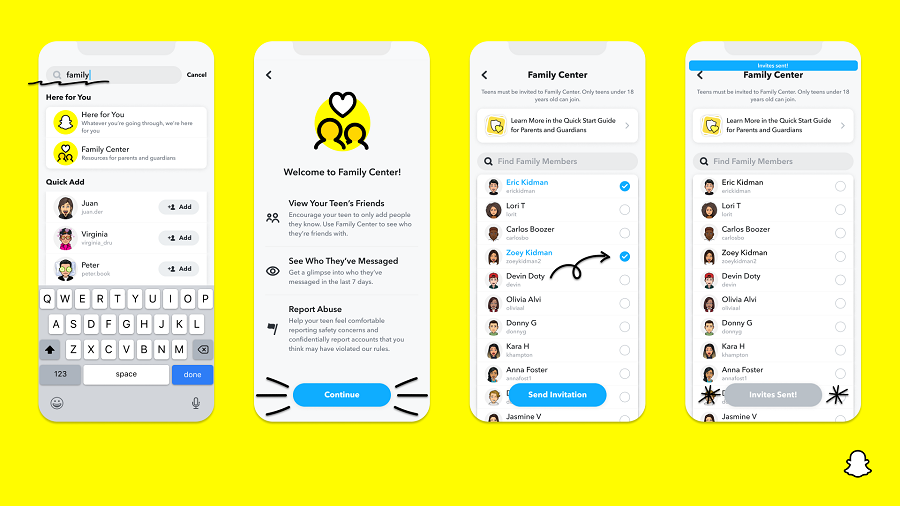
- Step 3. Use the search bar at the top of your profile page and search for Family Center.
- Step 4. Open Family Center, tap Get Started, and select I'm a Parent.
- Step 5. Tap Get Started and choose I'm a Parent.
- Step 6. Select your teen from your friends list and send a Family Center invitation.
- Step 7. Wait for your teen to accept the invitation.
Teen Side — Accepting the Invitation
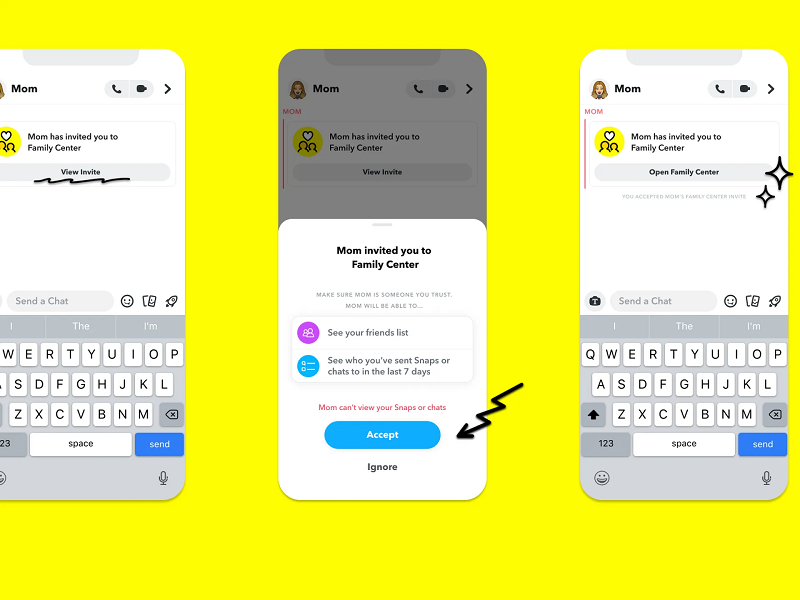
- Step 1. Open Snapchat and tap the Family Center invitation notification.
- Step 2. Review what information can be shared with your parent.
- Step 3. Tap Accept to complete the connection.
- Step 4. Once accepted, Family Center becomes active on both accounts.
Family Center is designed to be transparent. Your teen can see that Family Center is active and review the information shared with you. If you ever want to disconnect the account, you can remove the pairing at any time from the parent account.
What Can Parents See on Snapchat Family Center?
One of the most common questions parents ask is: Can Snapchat Family Center see messages? The short answer is no. Family Center lets parents view certain account activity and safety settings, but it does not provide access to message content, Snaps, or Stories.
Here's what parents can see through Snapchat Family Center:
- Recent contacts your teen has communicated with
- Friends added during the past 7 days
- Privacy and safety settings
- Sensitive content control status
- Tools for reporting concerning accounts
The table below shows exactly what Family Center can and cannot access.
| Information | Can Parents See It? | Notes |
|---|---|---|
| Recent friend additions | ✅ Yes | Visible for the last 7 days |
| Who they've communicated with | ✅ Yes | Usernames only — no message content |
| Privacy settings status | ✅ Yes | Parents can review current settings |
| Sensitive content controls | ✅ Yes | Shows the current content-filter setting |
| Message content | ❌ No | Conversations remain private |
| Snaps sent or received | ❌ No | Not accessible through Family Center |
| Stories viewed or posted | ❌ No | Not visible to parents |
| Contents of My Eyes Only | ❌ No | Protected and inaccessible to parents |
| Real-time location through Family Center | ❌ No | Location sharing is managed separately through Snap Map |
 Note
Note
The biggest limitation: Family Center shows who your teen is communicating with, but not what they're saying. Parents can view activity patterns, but Snapchat keeps message content private.
That said, Family Center only goes so far. My Eyes Only — Snapchat's password-protected folder inside Memories — remains completely inaccessible to parents. You can learn more about what My Eyes Only hides and how it works. If your teen creates a second Snapchat account, it won't appear in your Family Center dashboard at all. And activity on other apps like Instagram, TikTok, or Discord is entirely outside Family Center's reach.
For families who want visibility beyond these limits, that's where a tool like VigilKids comes in.
When Snapchat Family Center Isn't Enough
Family Center gives parents limited visibility into Snapchat activity, but it only covers part of the picture. There are no message details, no cross-app visibility, and no insight into overall phone usage.
For many families, that's enough to get started. But if you've ever felt like you're only seeing fragments of your child's digital life, that gap becomes hard to ignore.
VigilKids is built to fill that gap — not by accessing private content, but by helping you understand behavior patterns across apps and time.

VigilKids
- Monitor Snapchat and all app usage from one parent dashboard
- Keyword alerts across messaging apps when something concerning appears
- Real-time GPS location — see where your child is at any time
- Screen time reports broken down by app and time of day
- Detects sudden changes in app activity or usage patterns
How to get started with VigilKids:
- Step 1. Create your VigilKids account in minutes using your email.
- Step 2. Download the app and follow the simple setup guide on your phone.
- Step 3. Connect your child's device and choose what you want to monitor.
- Step 4. Start receiving activity insights, alerts, and usage reports in your dashboard.
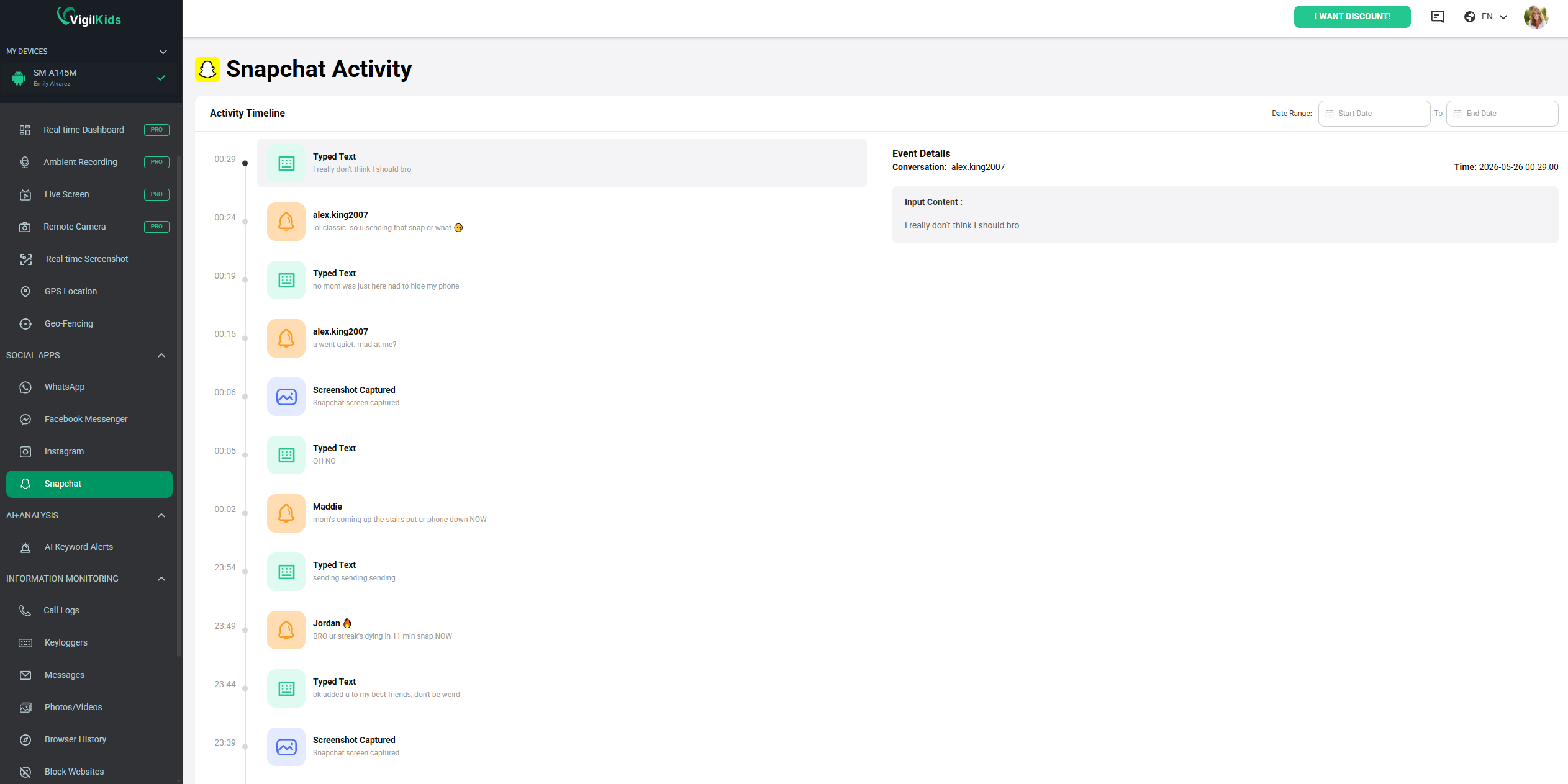
VigilKids works best as a support tool — not a replacement for communication. The goal is not constant monitoring, but earlier awareness when something changes. For parents exploring broader safety options, our guide on Snapchat parental controls provides a useful next step.
Snapchat Family Center Not Working? Common Fixes
If Snapchat Family Center isn't working, the problem is usually related to account eligibility, an unaccepted invitation, or an outdated app version. Before assuming the feature is broken, check the following common causes.
Check Age and Account Requirements
Family Center only works when both accounts meet Snapchat's eligibility requirements. The parent account must be registered as 18 or older, while the teen account must be between 13 and 17 years old. In addition, both accounts must already be connected as Snapchat friends before Family Center can be activated.
Verify the Invitation Status
Family Center won't activate until your teen accepts the invitation. If the invite is still pending, ask your teen to check their Snapchat messages and notifications. If they can't find it, send a new invitation from the parent account. Keep in mind that Family Center is designed for teens, so the connection will no longer work once the linked account reaches adulthood.
Update and Refresh Snapchat
Many Family Center issues are caused by outdated app versions. Make sure Snapchat is updated on both devices, then close and reopen the app. If the dashboard still isn't loading correctly, try clearing Snapchat's cache or removing and reconnecting Family Center.
If Family Center features appear different from screenshots you've seen online, regional availability and gradual feature rollouts may be the reason. Snapchat occasionally releases Family Center updates at different times across countries and app versions.
If you're still having trouble, visit Snapchat's official support resources for the latest troubleshooting guidance and Family Center updates.
Frequently Asked Questions
Q1: Does Snapchat Family Center show messages?
No. Snapchat Family Center only shows a list of friends your teen has recently communicated with. Parents cannot read message content, view photos or videos exchanged in chats, or access disappearing messages. Snapchat keeps conversations private, even when Family Center is enabled.
Q2: Can my child turn off Family Center?
No. A teen cannot remove Family Center on their own once the parent-child connection has been established. Teens can see that Family Center is active, but only the parent account can disconnect the relationship through Family Center settings.
Q3: Can I turn off Snapchat Family Center?
Yes. Parents can disable Snapchat Family Center at any time by removing the linked teen account from the Family Center dashboard. Once disconnected, parental visibility into recent contacts and safety notifications will no longer be available.
Q4: Does Snapchat Family Center show location?
No. Snapchat Family Center does not include real-time location tracking. If your child shares their location through Snap Map, Family Center will not display it. Location visibility is controlled separately through Snapchat's location-sharing and Ghost Mode settings.
Q5: Is Snapchat Family Center enough to keep my child safe?
Family Center is a helpful first step, but it has limitations. It cannot show message content, monitor activity on other apps, track device usage, or detect secondary accounts. Many parents use it alongside broader parental monitoring tools for additional visibility.
Conclusion
Snapchat Family Center is worth setting up. It gives you visibility into who your teen is talking to, a way to report concerning accounts, and confirmation that certain content filters are active — genuinely more than having nothing.
But it's a starting point, not a complete solution. Message content, hidden folders, second accounts, and other apps are all outside its reach. For parents who want more, combining Family Center with active conversations and a monitoring tool like VigilKids is the right next step — start with a free demo today.
Hot Topics for SnapChat Parental Controls

Snapchat Best Friends Planets: Full Order & Meaning
Snapchat best friends planets explained — the full planet order from Mercury to Neptune, what each one means in your best friends list, and common myths debunked.
9 Best Anonymous Snapchat Story Viewers 2026
Want to view Snapchat stories anonymously? Compare the 9 best Snapchat story viewers of 2026 — features, safety, and how to watch without being seen.

Best Alternatives to Snap | Apps Like Snapchat in 2026
Looking for alternatives to Snap? Discover the best apps like Snapchat and apps similar to Snapchat for private chats, filters, and messaging.