
You Found "Snapchat My Eyes Only" on Your Teen's Phone — Now What?
So you were looking through your kid's phone and spotted something called My Eyes Only inside Snapchat. Now you're wondering what it is and whether you should be worried.
You're not overreacting — and you're not alone. Snapchat is one of the most popular apps among teens, and My Eyes Only is one of its least-understood features. By parents, at least. Teens know exactly what it does. This guide walks you through what the feature is, what it can and can't hide, and what you can actually do about it.
What Is "My Eyes Only" on Snapchat?
 Quick Answer
Snapchat My Eyes Only is a password-protected folder inside Snapchat Memories that allows users to hide photos, videos, and saved Snaps behind a separate 4-digit passcode.
My Eyes Only is built into Snapchat's Memories section — think of it like a locked photo album hidden inside the app. Once something is saved there, it disappears from the regular Memories tab completely and won't show up unless someone enters the correct code.
Snapchat designed it as a privacy feature, and that's reasonable in theory. In practice, it's become the go-to spot for content teens don't want adults to find.
What can be stored in My Eyes Only:
- Saved Snaps (photos and videos)
- Memories moved from the main camera roll
- Screenshots saved within the app
My Eyes Only was built for privacy — but for tweens and teens, "private from parents" and "safe" are not the same thing. If you're looking for a broader overview of how to manage your child's Snapchat use, our guide to Snapchat parental controls covers the full picture.
How to Get to My Eyes Only on Snapchat
A lot of parents ask: where is My Eyes Only on Snapchat? It's not buried deep in settings — it's just one tap from the main camera screen, which is part of why teens use it so regularly.
How to access My Eyes Only on Snapchat:
- Step 1. Open Snapchat and tap your profile icon in the top-left corner
- Step 2. Tap the Memories icon (the small card icon below the camera button)
- Step 3. Swipe right to find the My Eyes Only tab at the top of the screen
- Step 4. Tap it — a passcode prompt appears immediately
- Step 5. Enter the 4-digit code to open the folder
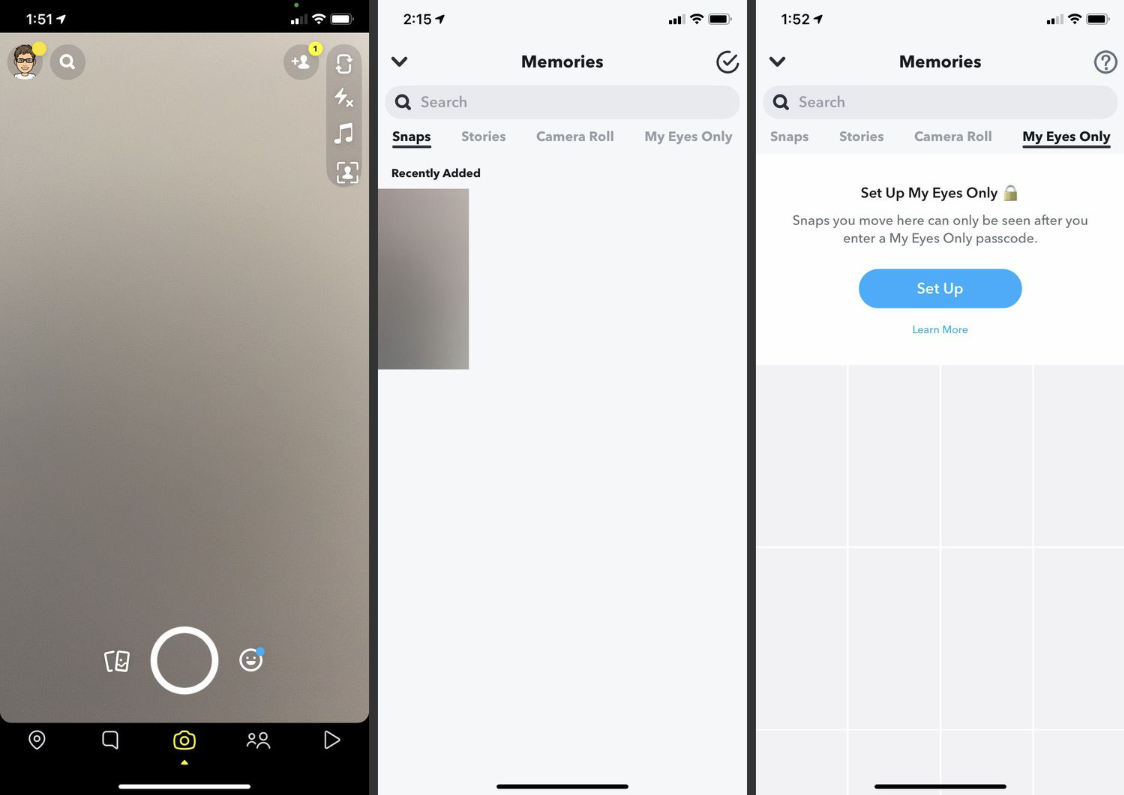
My Eyes Only is only available in the Snapchat mobile app. It cannot be accessed through Snapchat Web, and no legitimate third-party app can unlock or view its contents.
Can Anyone See My Eyes Only on Snapchat?
This is one of the most common questions parents have — and the answer is mostly reassuring, with a few important caveats.
Friends and classmates can't see it. My Eyes Only is completely private to the account holder. No other Snapchat user has any access, regardless of how close they are to your teen.
Parents can't see it directly either. Without the passcode, there is no built-in way to open the folder. Snapchat doesn't provide a parental override, and there's no backdoor — even for account owners who forget their own code.
Snapchat itself has very limited access. Content stored in My Eyes Only is encrypted on the device. Snapchat doesn't normally access it — though like any platform, they may cooperate with law enforcement under specific legal circumstances.
Hacking tools aren't a realistic threat. So-called "Snapchat My Eyes Only viewer" tools are universally scams — they either do nothing or install malware. The only real exposure risk is physical: someone who has the device and can guess or already knows the passcode. Some teens also use anonymous Snapchat viewers to browse content without leaving a trace, which is a separate but related concern worth knowing about.
| Who | Can Access My Eyes Only? | Explanation |
|---|---|---|
| Friends / other users | ❌ No | Completely private within the account |
| Parents | ❌ No | Requires passcode access |
| Snapchat | ⚠️ Limited | Encrypted; only accessed under strict legal circumstances |
| Hackers / third-party tools | ❌ No (in practice) | Most "viewer tools" are scams or malware |
| Physical device owner | ⚠️ Possible | If passcode is known or guessed |
Signs your child may be using My Eyes Only to hide concerning content:
- They get visibly anxious or defensive when you're near their phone
- They use Snapchat heavily but have almost nothing in regular Memories
- They've recently changed their Snapchat passcode without mentioning it
- They close the app quickly when you walk by
How to See My Eyes Only on Snapchat Without Passcode
Short Answer
You can't. There is no way to open My Eyes Only without the correct passcode. The only official option Snapchat provides is a full reset — which permanently deletes all stored content.
Many parents search for Snapchat My Eyes Only password recovery without deleting everything — unfortunately, that option simply doesn't exist. No cloud backup, no recovery link, no workaround. Once the reset is triggered, the content is gone for good.
How to Reset My Eyes Only Password on Snapchat
Use this only if the passcode is forgotten and you're not concerned about what's stored inside:
- Step 1. Go to Memories → tap the My Eyes Only tab
- Step 2. At the passcode screen, tap "Forgot Your Passcode?"
- Step 3. Verify your Snapchat account password
- Step 4. Confirm the warning — all content will be permanently deleted
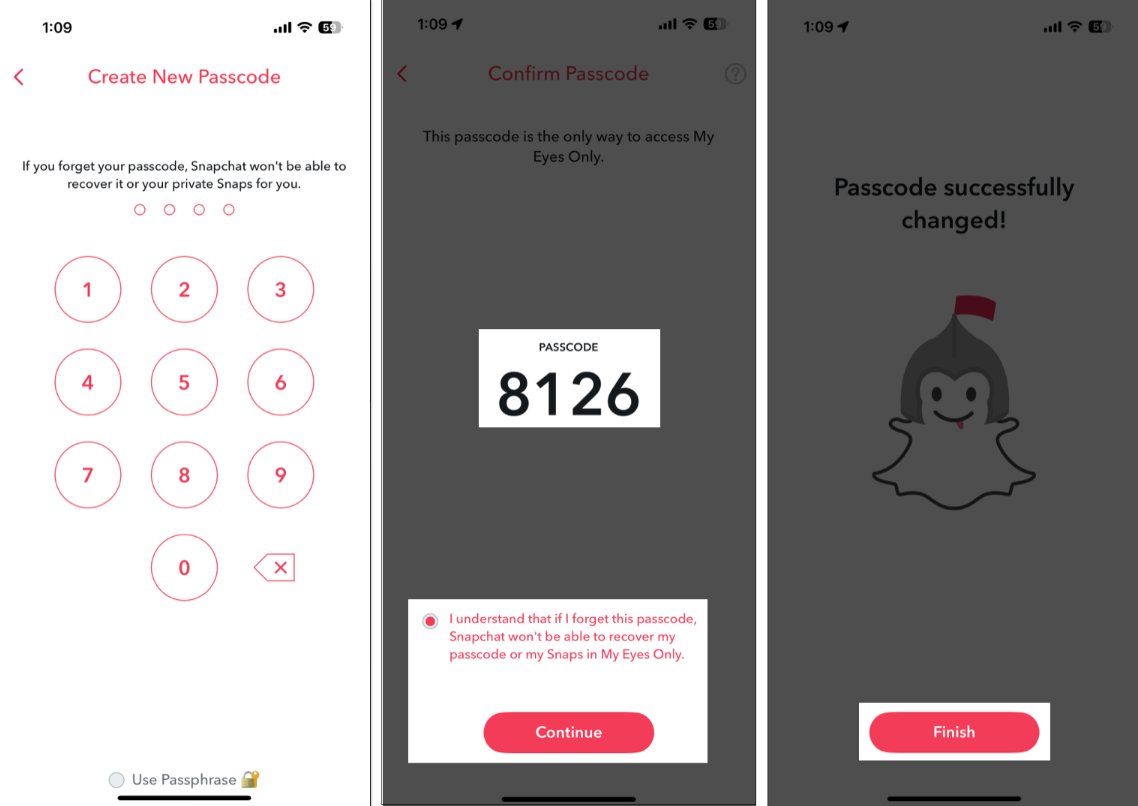
How to Change My Eyes Only Password on Snapchat
If the current passcode is known, changing it takes less than a minute:
- Step 1. Open My Eyes Only with the current passcode
- Step 2. Tap the gear icon (top-right) → select "Change Passcode"
- Step 3. Enter and confirm a new 4-digit code
 Note
Note
If you suspect My Eyes Only contains harmful content involving a minor, do not reset the passcode. Preserve the device and contact local law enforcement or the National Center for Missing & Exploited Children (NCMEC) at 1-800-843-5678.
What Should Parents Actually Do About My Eyes Only?
Finding a hidden folder on your kid's phone is unsettling. But grabbing the phone or issuing an ultimatum usually backfires. Here's what actually works.
Start with curiosity, not confrontation. Ask your teen what they use My Eyes Only for before assuming the worst. Some kids use it to protect embarrassing selfies from a sibling. Others may be hiding something that needs your attention. You won't know until you ask.
Revisit your household phone agreement. If you don't have one, now's a good time. Clear expectations around privacy and apps make every future conversation easier.
Thinking about turning it off entirely? You can't fully disable My Eyes Only from Snapchat's settings. But you can ask your teen to move all content out and leave the folder empty — some families treat this as part of a broader reset of phone boundaries. Just remember: deletion is permanent.
Know the limits of manual monitoring. Spot-checking your teen's phone gives you a snapshot — but it misses a lot. Teens know how to clean up before handing over a device. Learning how to set up parental controls on Snapchat gives you a more consistent layer of oversight without turning every interaction into a phone inspection.
- Have a calm conversation about what your teen stores there and why
- Review (or create) your household's phone and social media agreement
- Understand what My Eyes Only stores — and what it doesn't
- Consider a parental monitoring app for ongoing visibility between check-ins
- Know your school counselor or community resources if content is a concern
- Follow up — one conversation is a start, not a finish
Conversation starters that actually work:
- "I saw there's a locked folder on Snapchat — can you show me what that is?"
- "I'm not trying to read everything on your phone. I just want to understand how it works."
- "Is there anything on your phone you'd be uncomfortable with me seeing? Let's talk about why."
- "What would you do if someone sent you something that made you uncomfortable?"
Not sure how to bring up harder topics? This guide on sexting on Snapchat has practical scripts for starting those conversations at any age.
How VigilKids Helps Parents Stay Informed Without Invading Privacy
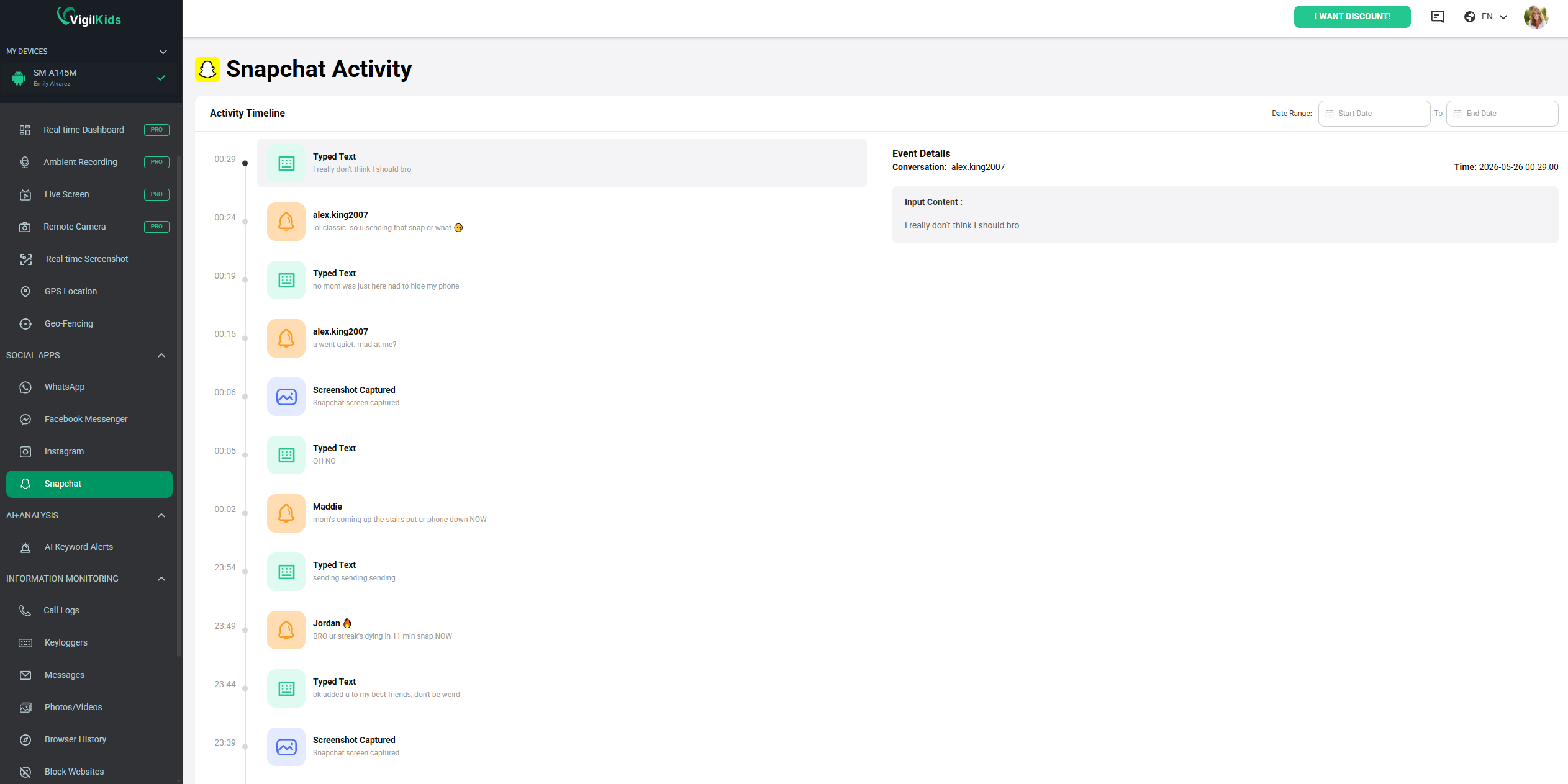
Manual phone checks have a ceiling. You can look through the camera roll, but you can't read disappearing Snaps. You can see the apps installed, but you can't know your teen was on Snapchat at midnight. And you definitely can't open My Eyes Only without a passcode.
That's where VigilKids fills the gap — not by breaching encrypted folders, but by surfacing the patterns and signals that actually matter. Think of it less as a surveillance camera and more as an early warning system.

VigilKids Features
- Monitor Snapchat screen time, usage frequency, and daily activity patterns in one place
- Get instant alerts when suspicious or high-risk online behavior is detected
- Track real-time GPS location from a secure parent dashboard anytime, anywhere
- Analyze screen time with detailed insights, including peak usage hours and daily trends
- Easy setup with background monitoring that runs quietly without interrupting device use
How to use VigilKids without damaging trust:
- Step 1. Tell your child you're using it — transparency builds more trust than secrecy
- Step 2. Frame it as a family safety net, not a punishment
- Step 3. Use the data to open conversations, not as evidence in arguments
- Step 4. Review activity reports together occasionally
- Step 5. Adjust boundaries as your teen gets older and earns more independence
No app replaces the relationship. VigilKids works best as one part of an ongoing, open conversation about your family's digital life — not a substitute for it.
My Eyes Only Is Just One Part of Snapchat Safety
If Snapchat My Eyes Only caught your attention, it's worth knowing it's not the only feature that creates blind spots for parents. Snapchat was built around disappearing content — which is appealing to teens precisely because it feels less permanent. But less permanent doesn't mean less risky.
| Feature | What It Does | Risk Level |
|---|---|---|
| Disappearing Messages | Snaps and chats delete after viewing | 🔴 High — no record kept by default |
| My Eyes Only | Password-protected media folder | 🔴 High — no parental visibility |
| Snap Map | Shares real-time location with friends | 🟡 Medium — location privacy concern |
| Quick Add | Suggests friends of friends to add | 🟡 Medium — contact with strangers |
| Stories | Semi-public posts visible to friends | 🟢 Lower — more visible to others |
| Snapchat+ | Paid subscription with extra features | 🟢 Lower — mostly cosmetic |
Snapchat's built-in Family Center lets parents see who their teen is friends with and who they've recently messaged — but not what was said. It requires your teen to accept the connection, so it works best introduced as a mutual agreement. It's a start, but most parents find it doesn't go far enough on its own. For a deeper look at all your options, see our roundup of the best parental control apps for Snapchat.
Frequently Asked Questions
Q1: Can my teen's friends see My Eyes Only on Snapchat?
No. My Eyes Only is completely private to the account holder. Other Snapchat users, including friends, cannot access or view anything stored in this folder.
Q2: What happens if Snapchat is deleted from my child's phone?
Everything inside My Eyes Only is permanently deleted when Snapchat is uninstalled. The content is stored locally on the device and is not backed up to the cloud.
Q3: Can third-party apps or “viewer tools” access My Eyes Only?
No legitimate tools exist. Any app claiming to view Snapchat My Eyes Only is a scam or malware designed to steal account information.
Q4: How many wrong passcode attempts are allowed?
Snapchat does not publish an exact limit, but repeated incorrect attempts may temporarily lock access. The content is not deleted unless the user manually resets the passcode.
Q5: Can My Eyes Only be recovered after reset?
No. Once the passcode is reset, all content in My Eyes Only is permanently deleted and cannot be restored.
Conclusion
Discovering Snapchat My Eyes Only on your teen's phone doesn't automatically mean something is wrong. But it is worth a conversation — one you start before things escalate, not after.
The parents who handle this best aren't the ones who monitor everything. They're the ones who stay informed, keep communication open, and use the right tools to stay aware of the bigger picture. If you're ready to go beyond this one feature, VigilKids is built to help you put those controls into practice.
Hot Topics for Social media privacy
How to Tell If Someone Is Active on Snapchat? 100% Work!
Snapchat hides online status on purpose. Here are 5 reliable ways to tell if someone is online on Snapchat, what each signal really means, and when they fail.
What Does the Green Dot Mean on Snapchat? Explained
What does the green dot on Snapchat mean? Learn if it means someone is online, how accurate it is, and how to turn it off easily.
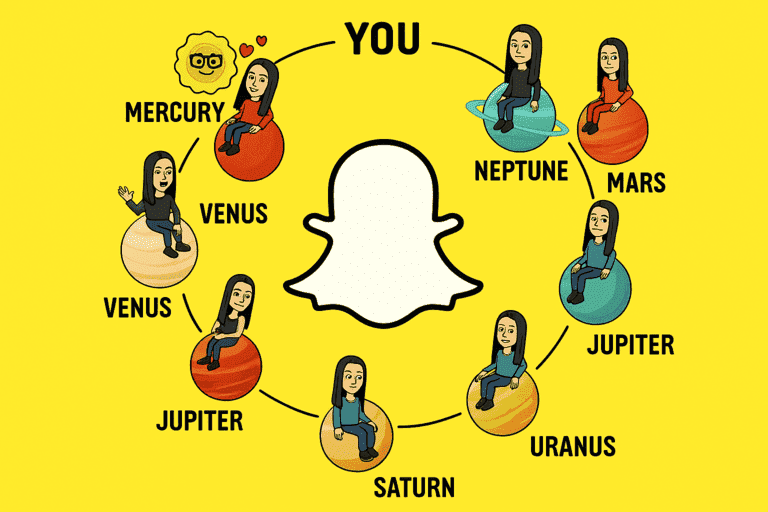
Snapchat Best Friends Planets: Full Order & Meaning
Snapchat best friends planets explained — the full planet order from Mercury to Neptune, what each one means in your best friends list, and common myths debunked.