
Whether you're trying to reconnect with an old friend or a business associate, knowing how to find someone on WhatsApp is a vital skill. Unlike social media platforms like Facebook or Instagram, WhatsApp is designed with a focus on privacy, meaning it doesn't have a public search directory.
In this comprehensive guide, we will explore the most effective methods to find contacts, how to locate a person's physical whereabouts for safety, and introduce a powerful tool, Vigilkids, for parents who want to ensure their children's security.
Part 1: How Do You Find Someone on WhatsApp? (Standard Methods)
The most direct way to find a person on WhatsApp is through their phone number. Since WhatsApp accounts are tied to mobile digits, the app automatically syncs with your phone's address book.
1 Syncing Your Contacts
If you already have the person's WhatsaApp number saved in your phone's contacts, follow these steps:
- Step 1. Open WhatsApp.
- Step 2. Go to the Chats tab.
- Step 3. Tap the New Chat icon (a green bubble on Android or a square icon on iOS).
Browse your contact list. If the person has a WhatsApp account, their name will appear here.
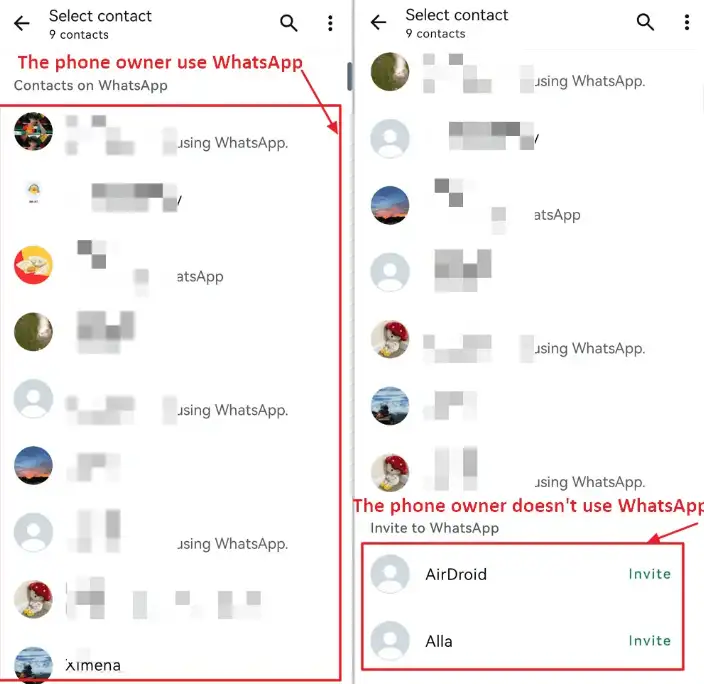
2 Adding a New Contact Directly in WhatsApp
If you have a new number and want to check if they are on WhatsApp:
- Step 1. Tap New Chat > New Contact.
- Step 2. Enter the name and phone number (ensure you include the correct international country code).
- Step 3. Once saved, WhatsApp will tell you if that number is registered.
Part 2: How to Find Someone on WhatsApp Without Their Phone Number
Many users often ask, "How do I search for someone on WhatsApp if I don't have their digits?" While the app doesn't allow a "name search" globally, there are clever workarounds.
1. Check Shared Group Chats
If you are part of a large community or work group, you can find people even if their number isn't in your contacts:
- Step 1. Open the group chat.
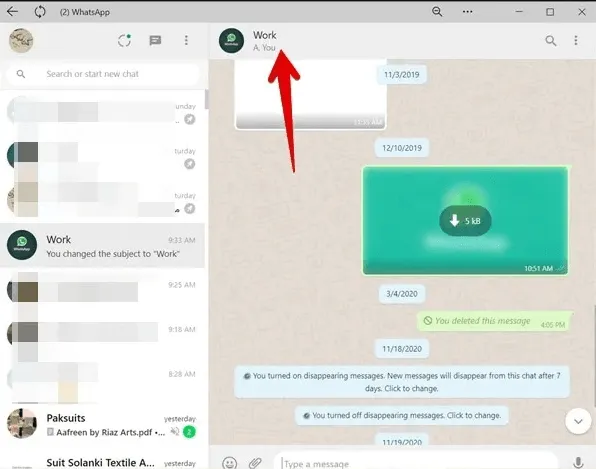
- Step 2. Tap the group subject at the top to see the Group Info.
- Step 3. Scroll down to the Participants list.
- Step 4. You can see everyone in the group. Tap a profile to message them directly if you recognize them.
2. Search via Social Media Profiles
Many people link their contact details to other social platforms. Try searching their name on:
- Facebook: Check the "About" section under "Contact and Basic Info."
- LinkedIn: Professional profiles may list contact numbers for business inquiries.
- Instagram/X (Twitter): Look for "Linktree" links or "Contact" buttons in their bio.
3. Use a QR Code
Meeting someone in person or seeing a flyer? Scan their WhatsApp QR code to add them instantly.
4. Reverse Lookup Tools
If you have a name but no number, third-party "People Finder" tools like Spokeo or TruePeopleSearch can sometimes provide the associated mobile number. Once you have the number, add it to your phone to check WhatsApp.
Part 3: How to Locate Someone in WhatsApp
While messaging is the core function, users often need to know the physical location of a contact for meetups or safety checks. Here is how:
1. Real-Time Live Location
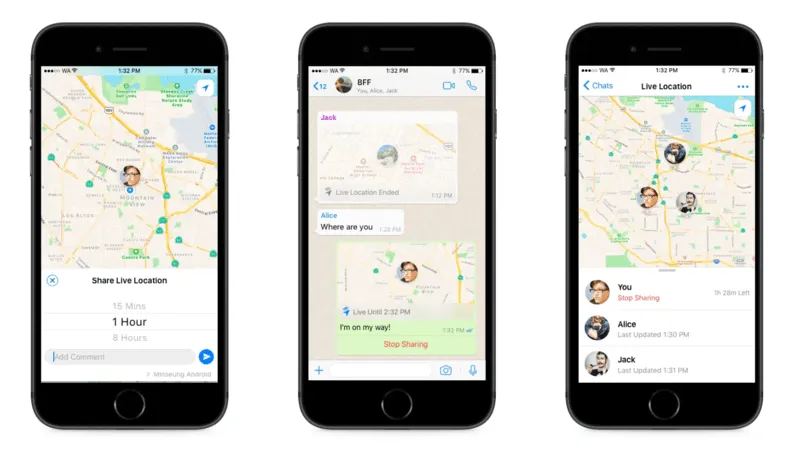
The "Live Location" feature allows a user to share their moving location for a specific period (15 minutes, 1 hour, or 8 hours). They must proactively share this with you.
2. Static Location Pins
A person can send a "Current Location" pin to show their location at a specific moment.
3. Location via Status Updates
Users often post photos with location stickers that reveal their current city or venue.
Part 4: Using Vigilkids for WhatsApp to Locate Someone Safely
Parents want to ensure their children aren't interacting with dangerous individuals. Vigilkids for WhatsApp becomes an essential tool for monitoring safely.
What is Vigilkids?
Vigilkids is a specialized parental control app designed to give parents peace of mind. While WhatsApp's encryption protects privacy, it can hide bullying or predatory behavior. Vigilkids helps parents monitor these interactions responsibly.

How Vigilkids Helps You Locate and Monitor
- High-Precision GPS Tracking: Real-time map of a child's location, more consistent than WhatsApp's 8-hour limit.
- Contact Monitoring: See who your child communicates with and intervene if unknown numbers appear frequently.
- Online Activity Tracker: Monitor when your child is online, identifying late-night interactions.
- Geo-Fencing: Receive alerts if your child enters or leaves specific areas.
- Real-time Alerts: Instant notifications when your child goes online, managing screen time effectively.
Why Use Vigilkids?
Using Vigilkids isn't about spying; it's about digital safety. Parents can prevent online risks before they become real-world problems.
Part 5: Summary of Methods
- By Number: Save the contact with a country code and refresh your list.
- By Group: Check participant lists in shared communities.
- By Social Media: Look for phone numbers in Facebook or LinkedIn bios.
- By QR Code: Scan their unique code for instant connection.
- For Locating: Use Live Location or Vigilkids for continuous, reliable safety monitoring.
FAQs about Find Someone on WhatsApp
Q1: How do you find someone on WhatsApp that isn't in your contacts?
Join a mutual group chat and tap their profile in the participant list. Alternatively, use a WhatsApp QR code or direct "wa.me" link. If you have their number, add it to your phone to sync automatically.
Q2: How do I search for someone on WhatsApp by name?
WhatsApp does not have a global name-search directory. You can only search by name within your own contact list or a group chat you've joined. Finding someone new usually requires a phone number or QR code.
Q3: How to check if someone is on WhatsApp?
Save their phone number (with country code) in your contacts. Open WhatsApp, tap "New Chat," and search for their name. If they have an account, their profile appears immediately.
Conclusion
Finding the right person on WhatsApp is easy if you have their phone number, but requires detective work otherwise. Shared groups, social media, and QR codes bridge the gap. For parents, tools like Vigilkids for WhatsApp add an essential layer of safety.
Whether reconnecting with an old friend or protecting your family, understanding how to find someone on WhatsApp ensures you stay connected and safe in the digital world.