
Instagram does not offer an official Instagram stalker list, so you cannot identify every person who visits your profile. You can only review visible clues such as Story viewers, repeated interactions, old-post likes, follower changes, and suspicious accounts. The six methods below help you spot patterns—not prove who opened your profile—while Instagram’s privacy controls help you act when attention becomes unwanted.
Can You See Who Views Your Instagram Page?
No. Instagram does not provide a profile-visitor list, notify users when someone opens a profile, or reveal the names behind professional-account profile-visit totals. Story and Live viewer lists are different because they show who viewed that specific temporary content—not who browsed the profile or feed.
This distinction matters when learning how Creator and Business accounts differ: professional Insights can reveal trends such as reach and profile activity, but they do not identify individual visitors.
What Instagram Shows—and What It Does Not
Instagram offers identity-level viewing information in only a few places. The table below separates direct evidence from indirect clues so you do not mistake an algorithmic list or an aggregate count for a profile-viewer log.
| Instagram Signal | Shows Names? | What It Tells You | What It Cannot Prove |
|---|---|---|---|
| Profile visits | ❌ | Aggregate activity only | Who opened your profile |
| Story viewers | ✅ | Who viewed that Story | How often they visit your profile |
| Likes, comments, DMs | ✅ | Visible engagement | Silent profile views |
| Followers-list order | Names only | Your followers | A stalker ranking |
The most useful evidence is therefore repeated, visible behavior: the same account viewing Stories, reacting quickly, messaging repeatedly, or interacting with old content. Even several clues together indicate attention, not motive.
Signs That Someone May Be Stalking Your Instagram
If you are wondering how do you know if someone is stalking your Instagram, focus on repeated behavior rather than one interaction. A pattern across several features is more meaningful, especially when it continues after you stop responding or ask the person to stop.
Possible signs of unusually persistent attention include:
- The same account regularly views your Stories soon after you post
- Someone repeatedly likes posts from months or years ago
- An account sends frequent unwanted Story replies or message requests
- A person follows, unfollows, and follows again to regain attention
- New low-activity accounts appear after you remove or block someone
- Your photos, location details, or personal information are reused without permission
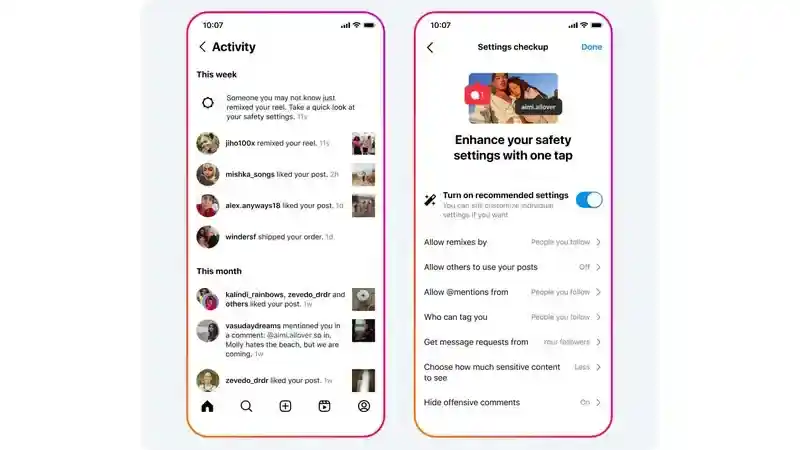
People searching for an “Instagram Direct stalk” often mean repeated unwanted attention through Instagram Direct. Persistent DMs, new message requests after a block, or several accounts sending similar messages are more concerning than one ordinary reply.
These clues do not identify a silent visitor, and the position of a name in the Story viewer list is not proof of stalking. If the account belongs to a teen, review the broader Instagram safety risks for children before deciding what action is proportionate.
6 Ways to Find Out Who Stalks Your Instagram Without an App
These six methods use information already available inside Instagram. They can reveal engagement and suspicious patterns, but none creates a complete list of profile visitors.
Method 1: Check Your Story Viewers
Story viewers are the closest Instagram comes to an identity-level viewer list. They show who watched one Story, so compare multiple Stories over time instead of treating the first few names as a ranking.
- Step 1. Post a new Story and allow time for followers to view it.
- Step 2. Open Your Story from the top of the Instagram home feed.
- Step 3. Tap Activity or swipe up to open the viewer list.
- Step 4. Note recurring viewers across several Stories, especially accounts that do not otherwise interact.
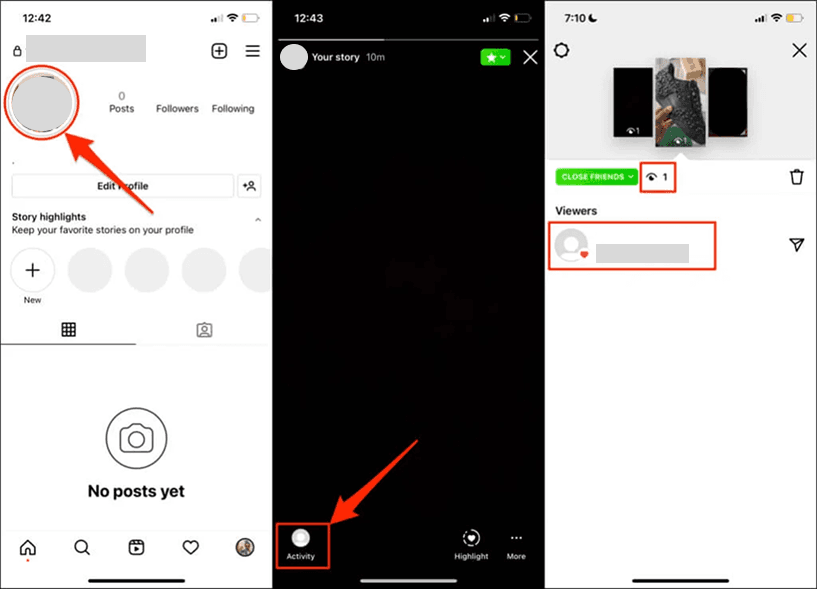
Repeat the check across different posting times and topics. A recurring viewer is evidence that the account watched those Stories, but it does not show whether the person visited your profile. Also remember that people may use methods for viewing public Instagram Stories anonymously, so a viewer list may not capture every viewer.
Method 2: Switch to a Professional Account
A Creator or Business account adds Instagram Insights. Insights can show aggregate profile activity, accounts reached, audience locations, and content performance, but it never names individual profile visitors.
- Step 1. Go to Settings and activity, then Account type and tools, and select Switch to professional account.
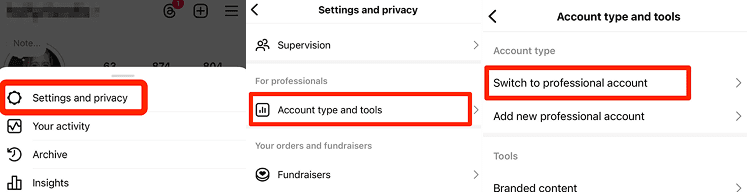
- Step 2. Choose Creator or Business based on how you use the account.
- Step 3. Allow enough time for Insights to collect new account activity.
- Step 4. Review profile activity, reach, and audience trends after publishing.
A spike after a post can show increased interest in your profile, but audience locations are aggregated and cannot be connected to a particular person. Use Insights to understand reach, not to accuse someone of stalking.
Method 3: Review Consistent Interactions and Old-Post Likes
Likes, comments, Story replies, and DMs are direct interactions. Someone who repeatedly engages—or suddenly likes posts from years ago—has clearly spent time with your content, although the behavior may reflect ordinary interest rather than harassment.
- Review notifications for repeated likes on older posts
- Check whether the same non-follower regularly comments or replies
- Look for repeated message requests after you have not responded
- Compare the pattern over time instead of relying on one accidental like
Follower changes can add context. If someone repeatedly follows and unfollows, use Instagram’s notifications and your follower list; a separate guide explains how to see who unfollowed you on Instagram without assuming that an unfollow proves harmful intent.
Method 4: Use a Close Friends Story Test
A Close Friends Story can narrow the audience to a small group when you want to know which selected accounts view a specific Story. Add only people whose access you are comfortable testing, post neutral content, and review the resulting Story viewer list.
This method shows only which invited accounts watched that Story. It cannot reveal people outside the Close Friends list, prove repeated profile visits, or expose an anonymous visitor. Avoid posting bait, private accusations, or misleading content just to provoke a reaction.
Method 5: Audit Your Followers List
Your followers list helps you find unfamiliar accounts, recent additions, and profiles you no longer want in your audience. Its order is not a reliable ranking of who visits your profile—even for accounts with fewer than 200 followers.
- Step 1. Open your profile and tap Followers.
- Step 2. Review unfamiliar profiles, mutual connections, account history, and recent activity.
- Step 3. Remove accounts you do not trust or switch to a private account before approving future requests.
A private account limits full post and Story access to approved followers. For a broader explanation of what private status does and does not expose, see the guide to private Instagram account visibility.
Method 6: Look for Suspicious Accounts
New or empty accounts that repeatedly view Stories, send requests, or reappear after a block deserve closer review. Warning signs include copied photos, recently created profiles, unrelated usernames, minimal genuine activity, and repeated contact from several similar accounts.
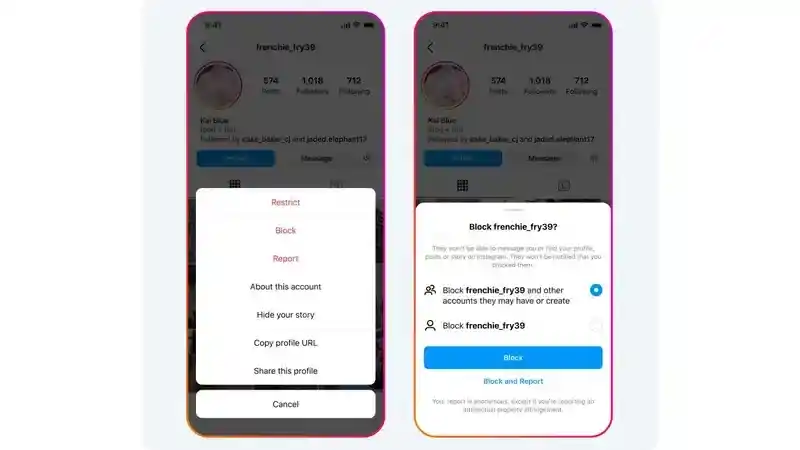
An empty profile is not proof that it belongs to a stalker; it may be a new user, a private secondary account, or a bot. Block or report the account based on its behavior, not appearance alone. Parents should also review Instagram Teen Account protections when suspicious profiles contact a child.
Are Instagram Stalker Apps Safe?
An Instagram stalker viewer that promises an exact profile-visitor list is not reliable because Instagram does not provide that identity-level profile-view data through its normal user features. At best, these services rearrange followers and visible interactions; at worst, they ask for credentials, collect account data, or trigger suspicious logins.
- Do not enter your Instagram password into an unofficial profile-viewer website
- Do not install an app that requires unnecessary contact, photo, or accessibility permissions
- Revoke unfamiliar connected apps and change your password after a suspicious login
- Enable two-factor authentication and review login activity
A legitimate follower-analysis service may summarize public engagement, follower gains, or unfollows, but it still cannot reveal silent profile visitors. Treat any “top stalkers” list as an estimate based on visible interactions, not Instagram visitor data.
How to Protect Your Instagram from Stalkers
If someone’s attention makes you uncomfortable, you do not need proof of profile visits before using Instagram’s privacy controls. Choose the least disruptive control that solves the problem, then escalate if the behavior continues.
- Make the account private and approve new followers manually
- Remove followers you no longer trust
- Hide Stories and Live videos from selected accounts
- Restrict an account to limit interactions without immediately blocking it
- Block accounts that repeatedly contact or impersonate you
- Report harassment, threats, impersonation, or non-consensual image sharing
- Avoid posting your live location, school, home, commute, or routine
- Turn on two-factor authentication and review login alerts
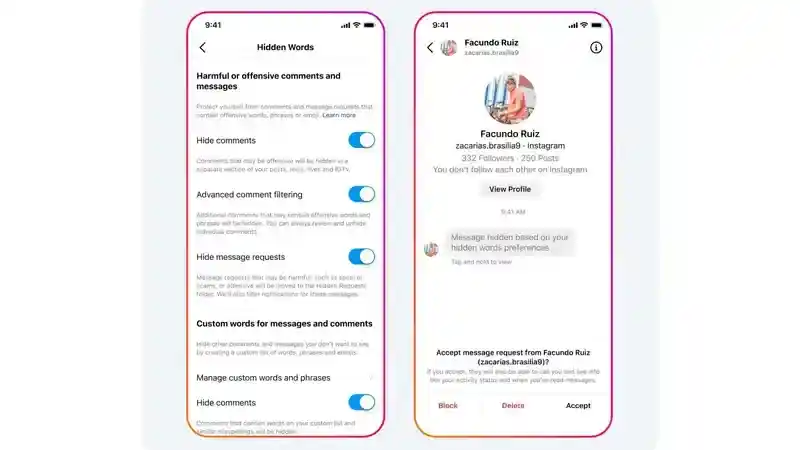
Parents can combine these settings with age-appropriate Instagram parental controls and a conversation about who may follow, message, or tag the child. General online safety habits also help reduce the personal details that persistent viewers can collect.
When Should You Be Worried?
Frequent Story views or an old-post like may be awkward but are not automatically dangerous. Take the situation more seriously when online attention becomes repeated, deceptive, threatening, or connected to offline behavior.
- Someone creates new accounts after being blocked
- You receive repeated unwanted messages, sexual content, threats, or demands
- An account copies your identity or reposts your photos without permission
- A person mentions private locations, routines, or events you did not share with them
- You notice unauthorized logins, password-reset messages, or account changes
- The behavior moves from Instagram to school, work, home, or another platform
Save relevant usernames, dates, message requests, and screenshots before blocking when doing so is safe. Use Instagram’s reporting tools, tell a trusted adult if a minor is involved, and contact local authorities or a qualified support service when there is a credible threat or immediate danger.
How VigilKids Helps Parents Respond to Instagram Risks
VigilKids Instagram monitoring is designed for parents who need context from a parent-managed child device after setup. It can help review available Instagram DMs, timestamps, on-screen Stories or Reels, and relevant device activity. It cannot produce Instagram’s nonexistent profile-visitor list or prove that a specific person repeatedly opened the child’s profile.
VigilKids for Instagram Monitoring
- Review supported Instagram messages, sender details, and timestamps
- Capture relevant on-screen Stories, Reels, photos, and profiles after setup
- Use dashboard context to guide a family conversation about unwanted contact
VigilKids requires a subscription, device connection, and the permissions needed for the selected features. Available Instagram and device data can differ by operating system, notification settings, app state, and what appeared on the phone after setup. Families that only need Instagram’s built-in privacy controls should use those free settings first.
Frequently Asked Questions
Can I really see who viewed my Instagram profile?
No. Instagram does not provide the names of profile visitors. You can see viewers of specific Stories and Live videos, plus visible likes, comments, follows, and messages.
How do you know if someone is stalking your Instagram?
Look for repeated unwanted patterns such as frequent Story views, old-post likes, persistent Instagram Direct messages, new accounts after a block, impersonation, or references to private details. No single clue proves stalking.
Can a professional Instagram account show who visited my profile?
No. Professional Insights provides aggregate profile activity, reach, and audience trends, but it does not reveal individual profile visitors.
Are Instagram stalker apps legitimate?
An app may analyze visible follower and engagement data, but it cannot retrieve an official list of silent profile visitors. Avoid services that promise exact names or request your password.
How can I block a suspected stalker on Instagram?
Open the account’s profile, tap the menu, and choose Block. You can also Restrict the account, remove it as a follower, hide your Story, or report harmful behavior.
Can VigilKids identify who stalks an Instagram profile?
No. VigilKids can provide supported activity and on-screen context from a connected child device, but it cannot reveal profile-visitor data that Instagram itself does not provide.
Conclusion
You cannot uncover every silent Instagram profile visitor, but you can review Story viewers, aggregate Insights, repeated interactions, old-post likes, follower changes, and suspicious accounts for patterns. Use those clues cautiously and rely on privacy controls when contact becomes unwanted. Parents who need more context from a connected child device can consider VigilKids for Instagram monitoring, while remembering that no tool can provide an official list of who stalks an Instagram profile.
Authoritative Sources
Hot Topics for Instagram Monitoring
How to Change Instagram Notes Colors—and Fix Missing Color Options
Learn what Instagram Notes colors mean, how to change them, and why Notes turn grey or change automatically. Fix missing color options and account differences.
Does Instagram Notify When You Screenshot? What Parents Should Know
Learn when Instagram screenshot notifications appear and how families can talk about privacy, sharing, and safer online habits.
![[7 Ways] How to View a Private Instagram Account](https://cdn.vigilkids.com/vigilkids/view_private_instagram_account_b94eb9da6b.jpg)
[7 Ways] How to View a Private Instagram Account
Thinking about viewing a private Instagram account? Discover what’s possible, safe methods, risks to avoid, and important privacy tips in this guide.