
Are Instagram parental controls really enough to keep your teen safe online? It often starts innocently enough—a few photos, a few Reels, a few messages with friends. Then come the late-night scrolling sessions, new followers you've never heard of, and the realization that much of what happens on Instagram remains invisible to parents.
If you've ever wondered how much Instagram parental controls actually let you see, you're not alone. This guide explains what Instagram's built-in supervision tools can and can't do, how to set them up, and where many families decide they need additional protection.
Does Instagram Have Parental Controls?
Yes. Instagram offers parental supervision tools through Meta Family Center. Parents can link their account to a teen's account and gain access to a limited set of monitoring and management features.
However, Instagram parental controls are designed to encourage healthier habits and safer account settings—not to provide full visibility into everything a teen does on the platform. Understanding these limitations is important before relying on Instagram as your primary parental monitoring solution.
 Tips
Tips
Instagram parental controls can help manage screen time and account settings, but they do not allow parents to read direct messages, view Reels history, monitor searches, or detect hidden secondary accounts.
- Daily time spent on Instagram
- Screen-time reminders and break settings
- Follower and following list changes
- Privacy setting updates
- Sensitive content preferences
- Reports submitted by the teen account
- Direct message conversations (DMs)
- Deleted chats or Vanish Mode messages
- Reels viewing history
- Explore page searches and browsing activity
- Secondary or "finsta" accounts
- Real-time interactions with strangers
For many parents, the biggest surprise is how much activity remains private even when supervision is enabled. While Instagram's built-in tools are useful for encouraging safer habits, they offer only a limited view of a teen's actual activity inside the app. This becomes even more complicated when teens use secondary or private accounts. To better understand how Instagram privacy settings work, you can also read our guide on how to view a private Instagram account.
How to Set Up Instagram Parental Controls Step by Step
Instagram parental controls are managed through Meta Family Center. Both the parent and teen need their own Instagram accounts before supervision can be connected.
Step 1. Open Supervision for Teen Accounts.
Open Instagram and tap your profile picture. Go to Settings and activity, scroll down to Family Center, and select Supervision for Teen Accounts.
Step 2. Start the supervision setup.
Tap Continue to begin connecting your Instagram account with your teen's account.
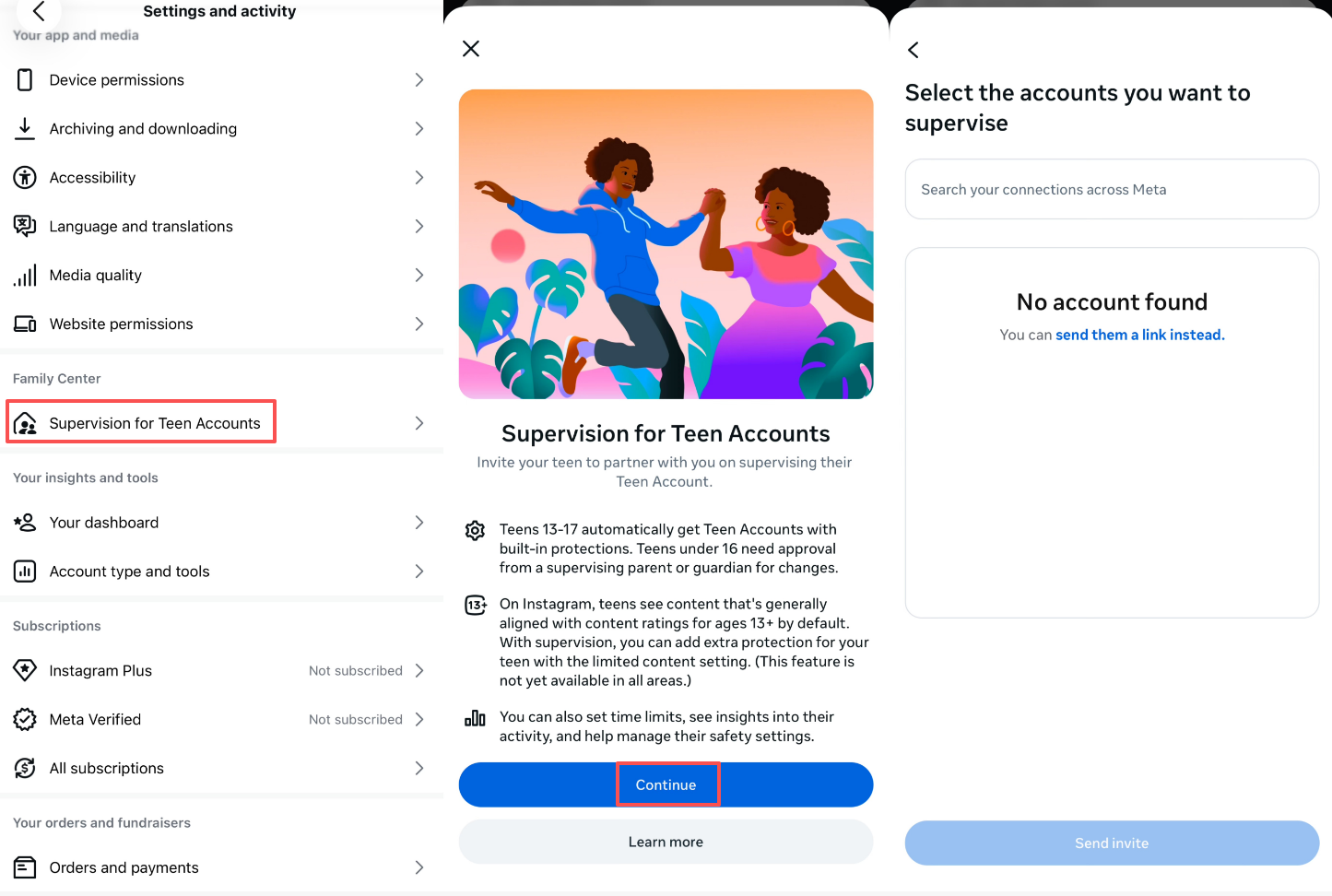
Step 3. Select your teen's account or send an invite link.
Search for your teen's Instagram account. If it does not appear, choose the option to send an invitation link instead.
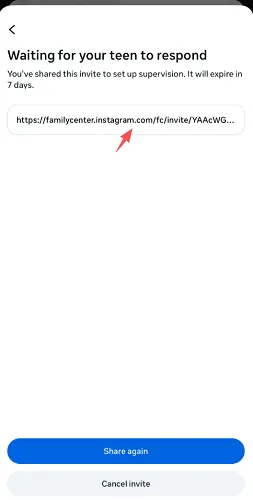
Step 4. Wait for your teen to accept the invitation.
Your teen must approve the supervision request before any parental controls or activity insights become available.
Step 5. Manage screen time and safety settings.
Once connected, you can review activity insights, set screen time limits, and manage additional safety settings for your teen's account.
 Note
Note
Instagram supervision is not silent. Teens know when Family Center is active and must approve the connection. If your teen is resistant, approaching it as a shared agreement rather than a unilateral restriction tends to work better long-term.
Instagram Risks Parents Should Know in 2026
Most teens use Instagram to stay connected with friends, follow trends, and share everyday moments. But several features create real challenges for families — especially when the algorithm starts driving more of what teens see and do inside the app.
Reels and the endless scroll problem
Instagram Reels are engineered to keep users watching continuously. Parents frequently notice teens spending far more time on the app than they originally planned — especially late at night or during homework hours. What starts as "just a few minutes" can easily become an hour or two of passive, algorithm-driven consumption.
Even parents who have set daily screen-time reminders through Instagram supervision often find that reminders are easy to dismiss and do not fully stop compulsive scrolling behavior in practice. Understanding how to check screen time on Android can help parents see just how quickly those numbers add up.
Disappearing messages and Vanish Mode
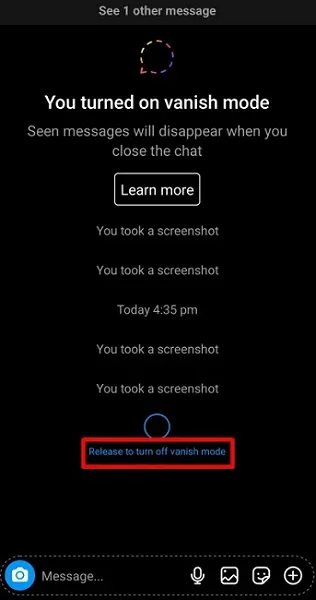
Instagram includes a disappearing messages feature called Vanish Mode, where conversations automatically erase after they are read. Many teens use this casually and harmlessly. But for parents concerned about monitoring Instagram messages, Vanish Mode makes it structurally impossible to review conversations — even if a teen hands over their phone willingly.
This is one of the most commonly asked questions: can parental controls see Instagram messages? The answer is no — and Vanish Mode is a central reason why.
Inappropriate content through Reels and Explore
Instagram's recommendation algorithm can surface mature or unhealthy content very quickly — even for teens who started with completely innocent content. Body image content, influencer drama, harmful challenges, and sexualized material can all appear through Explore and Reels recommendations without a teen actively searching for them.
Sensitive content filters help reduce exposure, but they are imperfect. Algorithm-driven recommendations change constantly, and filters cannot keep pace with every new content format or trend. Parents managing similar concerns on other platforms may also want to review guidance on what to do when a child watches inappropriate content online.
Fake profiles, finsta accounts, and online strangers
A significant number of teens maintain secondary Instagram accounts — sometimes called "finstas" — that parents do not know exist. These accounts often have different usernames, no profile photo, and a small private follower list specifically designed to stay off parents' radar.
Beyond secondary accounts, fake profiles and anonymous strangers can contact teens through DMs or comment interactions. Emotional manipulation, online scams, and inappropriate conversations are real risks that Instagram supervision tools currently have no way to detect or alert parents about. Families already navigating similar risks on other platforms may recognize the same patterns — the same concerns come up when looking at how teens use Snapchat privately.
How VigilKids Helps Parents Monitor Instagram
For some families, Instagram's native supervision tools work well enough during the early stages of social media use. But as teens become more independent and more active across multiple platforms, many parents find themselves wanting more — not just from Instagram, but from a single tool that works across every app and device.
That is the moment when Instagram parental monitoring becomes part of a bigger question: how do you manage screen habits, digital wellbeing, and social media use as a whole — without turning every evening into a battle over phones?
| Option | Works Best For | Key Limitation |
|---|---|---|
| Instagram supervision (Meta Family Center) | Basic Instagram monitoring for younger teens | Cannot view DMs, Reels history, or searches |
| Teen Accounts (automatic protections) | Baseline safety floor for under-16s | Still no DM access or real-time activity view |
| Device screen-time settings (iOS / Android) | Daily time limits per app | Easy to bypass; no cross-device visibility |
| VigilKids | Families managing multiple devices, apps, and habits | Most effective when paired with open family conversations |
This is where VigilKids fills the gap that Instagram supervision leaves behind. Rather than trying to monitor every individual message or post — which creates its own set of problems — VigilKids focuses on something more sustainable: helping families build healthier digital routines across every app teens use.

What VigilKids Can Do
- See real Instagram activity patterns — including the late-night scrolling that Family Center reminders don't actually stop
- Get one weekly view across every app — Instagram, TikTok, Snapchat, and more, instead of five separate settings screens
- Set screen time limits that stick — far more consistent than relying on built-in website and app blocking alone
- Spot new contacts early — get a clearer signal when unfamiliar accounts start reaching out, the same concern behind questions like who's quietly watching your Instagram
- Track location alongside app activity — useful context if you're also wondering whether features like Instagram Maps could be leaking your teen's location
Getting started takes three steps:
- Step 1. Create your VigilKids account and add your teen's device
- Step 2. Choose the apps and routines you want to monitor, starting with Instagram
- Step 3. Get your first weekly report — no daily phone checks required
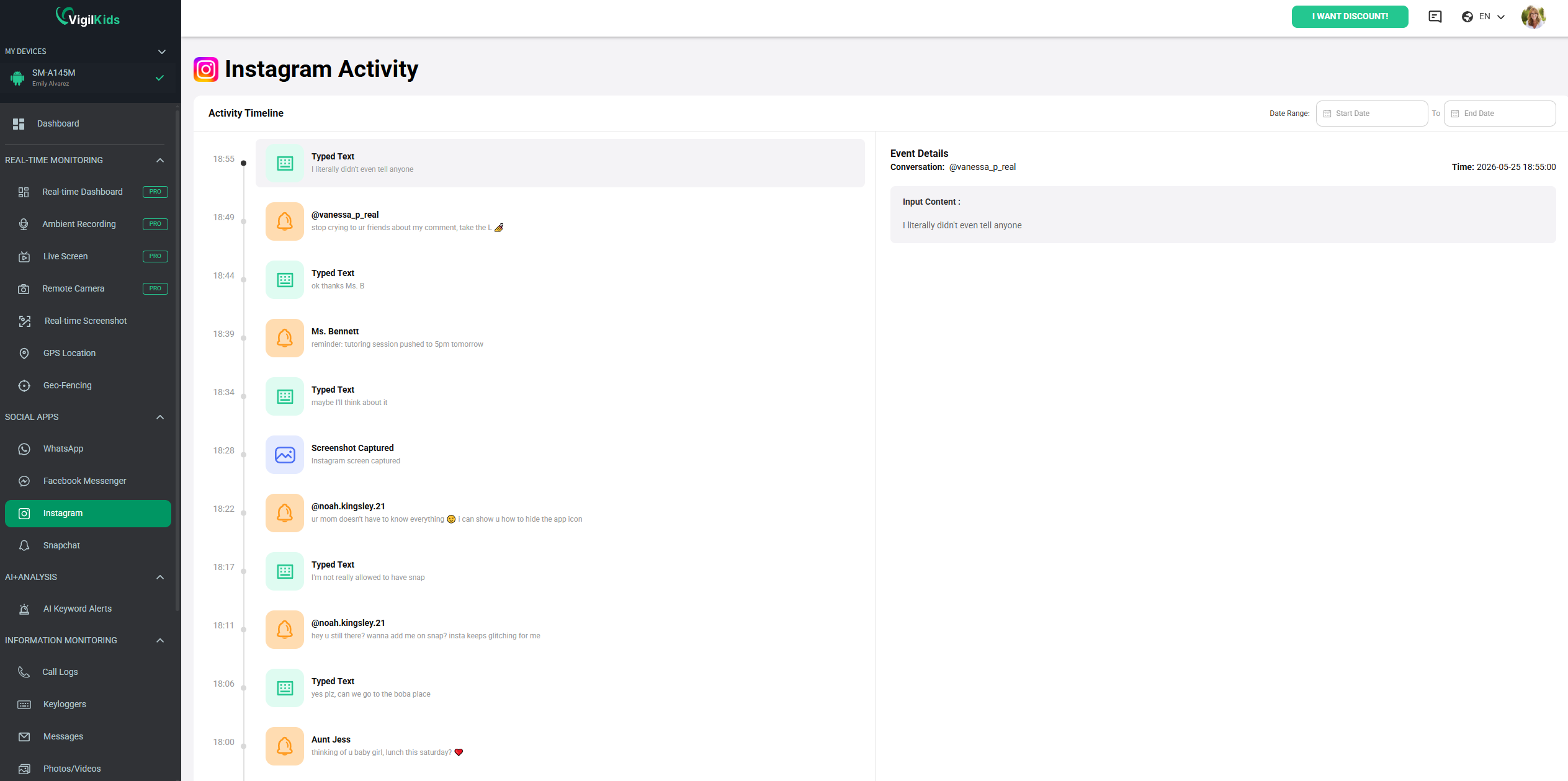
For most families, the goal is not to watch every single message or post. It is to help teens develop healthier digital habits while reducing the daily friction that screens and social media create at home — and that is exactly what VigilKids is built around.
Instagram's Two Parental Control Systems
One thing that confuses many parents is that Instagram actually operates two separate parental control systems — and they work very differently depending on your teen's age.
System 1: Meta Family Center (supervision for all teens)
Meta Family Center is the main Instagram parental control tool available to any parent whose teen has an Instagram account, regardless of age. This is where you connect your account to your teen's, manage screen-time settings, review follower activity, and adjust content filters. It requires the teen to accept a supervision invitation before any monitoring becomes active.
System 2: Teen Accounts (automatic protections for under-16s)
In late 2024, Instagram introduced a separate Teen Accounts system that applies automatic protections based on age — without requiring parents to do anything. Here is how it breaks down:
| Age Group | Default Protections | Parental Override? |
|---|---|---|
| 13–15 years | Private account by default; restricted DMs; sensitive content filters on; screen time reminders enabled | Parents can tighten settings further via Family Center |
| 16–17 years | Some restrictions apply; more freedom than 13–15 | Parents can still manage settings via Family Center |
| 18 and over | No automatic protections; full adult account | Parental supervision access ends completely |
The Teen Accounts update is a genuine improvement — especially for younger teens who might not have active parental supervision set up. But it does not change the fundamental limitation: parents still cannot read DMs, monitor real-time Instagram activity, or see what teens are watching and searching inside the app, regardless of which system is in place.
Tips
Use both systems together. Teen Accounts provide the baseline floor; Meta Family Center lets you build on top of it. Neither alone is a complete solution.
FAQs About Instagram Parental Controls
Q1: Can parents read Instagram messages with parental controls?
No. Instagram parental controls do not allow parents to read direct messages, group chats, or conversations sent through Vanish Mode. Meta Family Center provides supervision tools, but message content remains private.
Q2: Can parents monitor Instagram profiles and followers in real time?
Partially. Parents can see follower and following list changes through Family Center, but Instagram does not provide real-time alerts when new accounts interact with their teen.
Q3: Does Instagram notify teens when parental supervision is enabled?
Yes. Teens are notified when supervision is set up and must approve the connection. Instagram does not support hidden parental monitoring.
Q4: Can teens remove Instagram parental supervision?
In some cases, yes. Depending on their age and account settings, teens may be able to request that supervision be removed. Parents are typically notified before changes take effect.
Q5: Can I see who my teen follows on Instagram?
Yes. Instagram parental supervision allows parents to view their teen's follower and following lists through Family Center, helping them stay informed about new social connections.
Conclusion
Instagram parental controls are a helpful starting point for managing screen time, privacy settings, and follower visibility, but they don't provide complete oversight of a teen's online activity. For families who want broader visibility across apps and devices, pairing Instagram's built-in supervision with VigilKids can help create healthier digital habits and more consistent screen-time routines. Set up the controls today, and review them regularly as your teen grows and their online needs change.
Hot Topics for Parental Controls

Roblox Parental Controls: Complete Guide for Parents
Everything parents need to know about Roblox parental controls — how to set them up, what they cover, and what to do when they're not enough.
How to Set Up Messenger Kids Parental Controls (Step-by-Step)
A step-by-step guide to setting up Messenger Kids parental controls in 2026 — create the account, approve contacts, set Sleep Mode, and monitor activity.
TikTok Parental Controls: A Complete Guide for Parents
Learn everything about TikTok parental controls, including Family Pairing, screen time limits, and privacy settings to help keep your kids safe online.