
Your teen says, “Can you just approve this Instagram setting?” What sounds like a quick tap can turn into a much bigger question: what exactly can your child see, change, and share on Instagram?
Instagram Teen Accounts are designed to make the app safer by default, but the real value is in knowing which protections are already active and which ones parents still need to manage.
An Instagram Teen Account gives users under 18 stronger privacy, messaging, content, and time-management protections from the start. In this guide, you’ll learn what those protections do, how to manage them, and how to set healthy boundaries without turning every conversation into a conflict.
What Is an Instagram Teen Account?
An Instagram Teen Account is a regular Instagram account with extra safety settings applied automatically to users under 18. Your child does not need a separate app, and switching to a Teen Account does not erase existing posts, followers, or messages.
The difference is in the defaults. Teen Accounts limit who can contact a teen, reduce exposure to mature content, restrict certain interactions, and encourage breaks from the app. Instagram also gives parents more control when supervision is connected.
 Quick Answer
A private account controls who can see posts. A Teen Account goes further by adding protections for messages, content recommendations, tags, mentions, time spent, and certain features such as Instagram Live.
Instagram generally requires users to be at least 13, although the minimum age can be higher in some countries. Users ages 13–17 are placed into Teen Account protections. Teens under 16 need a parent’s permission to make the built-in settings less protective. Parents of older teens can also require approval by setting up supervision, as explained in Meta’s Teen Account overview.
Could a child enter a false birthday? Yes. Instagram uses age-assurance technology to identify accounts that may belong to teens, but no online age system is perfect. Check that your child’s birthday is accurate instead of assuming the right settings appeared automatically.
A private profile is still important, but it is not an invisible shield. Our guide to how private Instagram accounts work explains what people outside the approved follower list can and cannot see.
What Protections Does an Instagram Teen Account Include?
Most parents worry about three things: who can reach their child, what appears on the screen, and how long the scrolling continues. Teen Accounts address each concern, but every protection has limits worth knowing.
1. Private Account by Default
A teen’s profile is private by default. New followers must be approved before they can see posts, Stories, or other private content. This reduces casual access from strangers and unknown adults.
However, approved followers can still screenshot, record, or share what they see. Encourage your teen to accept only people they know and to review older followers together.
2. Stricter Messaging and Interaction Settings
Instagram limits who can message teens. Tags and mentions are also restricted, and offensive words and phrases are filtered through Hidden Words protections. These settings make random contact harder, but they cannot stop hurtful messages from classmates, friends, or accounts your child has already accepted.
3. Age-Appropriate Content Controls
Teen Accounts use a default 13+ content setting. Instagram aims to hide or avoid recommending sexually suggestive material, graphic images, risky stunts, strong language, and content involving adult products. The rules apply across Explore, Reels, Feed, Stories, Search, comments, and certain links shared through DMs.
Parents who want a stricter experience can choose Limited Content. This setting filters more material and removes a teen’s ability to see, leave, or receive comments under posts. Meta began expanding these updated 13+ content protections internationally in 2026, so availability and menu wording may still vary by account and region.
Content filters reduce exposure; they do not guarantee a perfectly clean feed. Instagram itself notes that its systems can make mistakes, so your child still needs to know how to block, report, and ask for help.
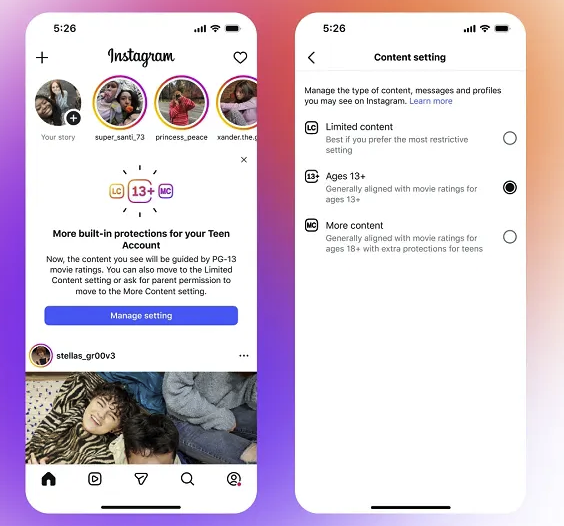
4. Protection From Unwanted Images
Instagram can blur images that it suspects contain nudity in DMs. Teens under 16 need parental permission to turn this protection off. The feature gives a child a moment to pause before viewing or forwarding an image, but automated detection may miss content.
5. Time Reminders and Sleep Mode
Teen Accounts include reminders to leave the app after extended daily use and a sleep setting that mutes notifications overnight. Parents using supervision can set a total daily limit and block Instagram during specific hours.
That helps with Instagram, not the rest of the phone. A teen can move straight to another app, which is why family-wide screen rules still matter.
6. Restrictions on Instagram Live
Teens under 16 cannot go Live without parental permission. This reduces the chance of an impulsive broadcast revealing a school, home interior, routine, or real-time location.
- Make profiles private by default
- Reduce unwanted messages and interactions
- Limit mature recommendations and searches
- Encourage breaks and quieter nights
- Require approval for key under-16 changes
- Every harmful post will be caught
- Approved followers will behave safely
- A teen will not create another account
- Parents can read every conversation
- Time limits apply across other apps
Location deserves separate attention because a private account can still share location with approved people. Review our explanation of Instagram Map and location privacy before your child uses location-based features.
How Can Parents Set Up and Manage an Instagram Teen Account?
To set up and manage an Instagram Teen Account, you need to link your account to your teen’s through Meta Family Center. Both you and your teen must agree to the supervision. Once connected, you can approve certain privacy changes, set daily time limits, and review key activity insights, while Instagram automatically applies built-in protections such as Private Accounts and Sleep Mode by default.
Step 1. Set up parental supervision.
Make sure both you and your teen have the latest version of Instagram installed. Open Instagram on your device, go to Settings and activity, then tap Supervision for teen accounts to enter Meta Family Center. Select Create Invite to generate an invitation link, then have your teen open the invite on their phone and accept it.
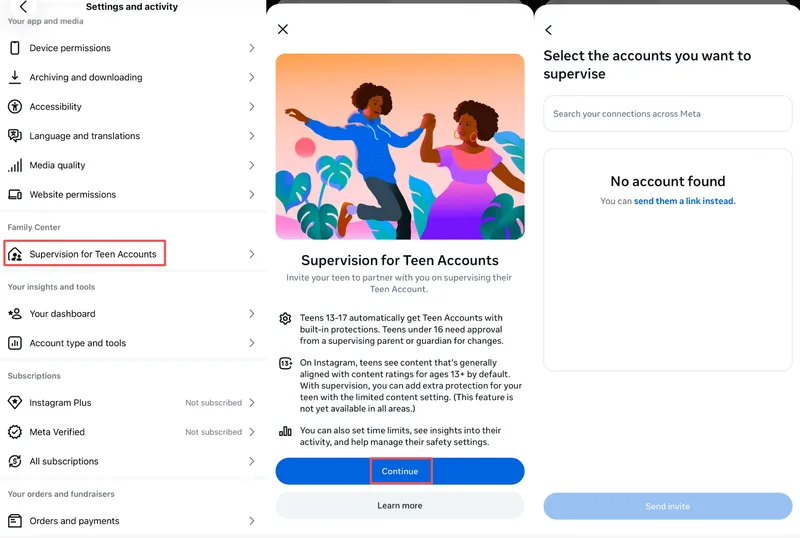
Note: You can supervise more than one teen, but each teen can only be supervised by one parent or guardian at a time.
Step 2. Review the default account protections.
Instagram Teen Accounts automatically use stronger safety settings. Teen accounts are set to private by default, and users under 16 need parental permission to change their account to public or adjust who can message and tag them.
Step 3. Understand Sleep Mode.
To encourage healthier sleep habits, Instagram automatically mutes notifications and sends auto-replies to direct messages between 10 PM and 7 AM.
Step 4. Adjust content controls.
Teens are automatically placed in the most restrictive sensitive content setting. If needed, you can further limit the account to the Limited Content setting.
Step 5. Approve or deny changes.
If your teen wants to make privacy or safety settings less protective, Instagram sends a notification to your Meta Family Center dashboard so you can approve or deny the request.
Step 6. Check activity insights.
You can view screen time insights, set specific daily time limits, and see the accounts your teen has recently messaged.
How VigilKids Helps Parents Monitor Instagram Safely
Instagram Family Center offers useful controls, but it cannot show message content or activity outside Meta’s apps. When a concern crosses Instagram, WhatsApp, Snapchat, TikTok, and the rest of the phone, VigilKids helps parents see the wider picture from one dashboard.

What VigilKids Can Do
- Social app monitoring — review activity across Instagram and other popular apps.
- Live screen insight — use screenshots and screen recording when concerning activity appears.
- App usage overview — identify excessive use and support healthier screen-time limits for your child’s apps.
- Family location safety — check GPS location and route history with reliable family location-sharing apps for parents.
- One simple dashboard — find the information you need without checking multiple services.
How to use VigilKids as part of a healthy safety plan:
- Step 1. Keep Instagram’s Teen Account protections enabled.
- Step 2. Connect Family Center supervision and agree on household rules.
- Step 3. Connect the child’s device to VigilKids with appropriate permission.
- Step 4. Review broader activity when a real safety concern or meaningful behavior change appears.
- Step 5. Talk with your child before deciding on restrictions or consequences.
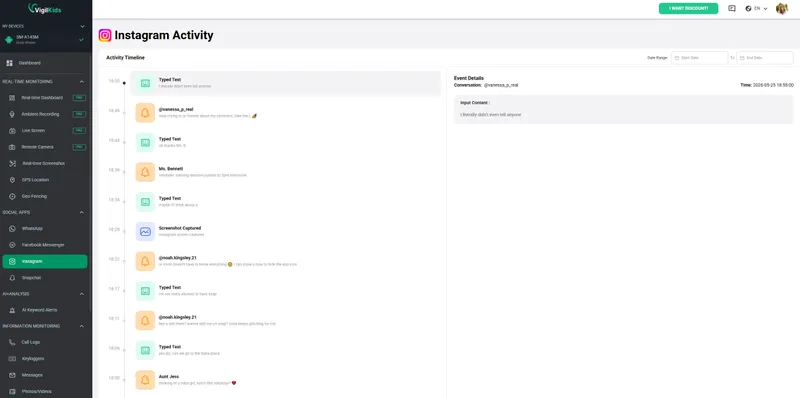
VigilKids features can vary by device, operating system, plan, and permissions. Check compatibility before purchasing, and use parental monitoring only where you have the legal authority and appropriate family consent.
Are Instagram Teen Accounts Safe Enough?
Teen Accounts make Instagram safer, but they cannot make every interaction safe. Filters understand patterns; they do not understand your child’s friendships, maturity, or the hidden meaning of every message.
A classmate can bully through an approved account. A stranger can pretend to be another teen. A harmful conversation can move to a different app. A child can also create a second account using a different birthday.
That does not make Instagram’s controls pointless. It means parents should treat them like a seat belt: essential, effective in many situations, and strongest when combined with other safe choices.
A Healthier Instagram Checklist for Families
- Use the child’s real date of birth
- Keep the account private
- Connect parental supervision
- Review followers and unfamiliar accounts together
- Keep nudity protection and sensitive-content controls enabled
- Review Instagram Map and location-sharing settings
- Create phone-free periods for sleep, schoolwork, and meals
- Teach your child to block and report uncomfortable contact
- Make it safe to admit an online mistake without immediate blame
Also remind your teen that disappearing content can still be captured. Our guide to how Instagram Story viewing works can help families understand the limits of visibility and anonymity on the platform.
The most useful question is not “How do I see everything?” It is “What would help my child come to me sooner?” Settings can reduce risk. Trust makes it more likely that your child asks for help before a bad situation grows.
Instagram Teen Account FAQs
Q1: What is an Instagram Teen Account?
It is a regular Instagram account with automatic privacy, messaging, content, interaction, and time protections for users under 18. It does not require a separate app or remove existing posts and followers.
Q2: Does Instagram automatically create Teen Accounts?
Instagram automatically places accounts it identifies as belonging to users under 18 into Teen Account protections. Because age information can be inaccurate, parents should still check the birthday and safety settings on the account.
Q3: Can a 13-year-old turn off Instagram Teen Account restrictions?
A user under 16 needs parental permission to change the built-in settings to less protective options. The teen and parent must connect supervision before the parent can approve or deny those requests.
Q4: Can parents see messages on an Instagram Teen Account?
Not through Instagram Family Center. Supervised parents can see which accounts their teen messaged during the previous seven days, but they cannot read the message content through Instagram’s supervision tools.
Q5: Are Instagram Teen Accounts actually safe?
They provide a safer default experience by limiting contact, mature content, interactions, and certain features. They cannot catch every harmful post, stop problems involving approved contacts, or supervise activity outside Instagram.
Conclusion
An Instagram Teen Account gives families a safer starting point through stronger privacy, content, messaging, and time controls. Keep those protections enabled, connect supervision, and review the settings with your child instead of treating them as a one-time setup.
The healthiest online environment is not built by software alone. It comes from clear boundaries, age-appropriate independence, and a child who knows they can ask for help. When your family needs broader context across Instagram and the rest of the phone, VigilKids can help you step in with better information, calmer questions, and less guesswork.
Hot Topics for Phone Monitoring
How to Monitor Your Child's Facebook Messenger: A Parent's Guide
A parent's guide to monitoring your child's Facebook Messenger safely. Learn the real risks, how to talk to your kids, and the best tools to keep them safe.
Does WhatsApp Have Parental Controls? Full 2026 Guide
hatsApp has no built-in parental controls. Learn how to set up safe monitoring in 2026 using WhatsApp's privacy settings, family rules, and the right app.
How to Monitor WhatsApp Messages Without Target Phone
Learn how to monitor WhatsApp messages without the target phone using safe, legal methods like VigilKids. Real-time tracking, setup guide, and tips.