
"Everyone at school has Instagram. Can I download it?" If your child hasn't asked yet, they probably will. Is Instagram safe for kids? The honest answer depends on your child's age, the protections enabled, and how involved you stay. This guide explains the risks, the latest Teen Account safeguards, and the settings to review before you decide.
Instagram includes meaningful safety tools, but stranger contact, scams, cyberbullying, and algorithm-driven content remain possible. Here's the balanced picture, plus practical steps you can take with your child.
Is Instagram Safe? Quick Answer and Overview
Instagram is a photo and video-sharing platform owned by Meta, combining Feed posts, Reels, Stories, Direct Messages, and Instagram Live in one app. Because it is highly visual and socially interactive, it is widely used by teens — and also raises important safety concerns for parents.
Quick answer: Instagram can be reasonably safe for many teens aged 13 and older when its built-in protections stay enabled and parents remain involved. It is not appropriate for children under 13 under Instagram's minimum-age rule, and no setting removes every risk.
Overall safety rating by age:
- Under 13 — Not recommended. Instagram's minimum age is 13, and younger children typically lack the judgment to navigate stranger contact and algorithmic content safely. An existing account at this age violates Instagram's Terms of Service and can be reported to Meta for removal.
- 13–15 — Consider with close supervision. Instagram Teen Account protections apply automatically, and teens under 16 need parental permission to make key protections less strict. Regular conversations still matter.
- 16–17 — Consider with age-appropriate guidance. More independence may be reasonable, but body image pressure, cyberbullying, scams, and unwanted contact remain relevant.
Here's a balanced look at what Instagram offers versus what parents should watch for:
- Built-in Teen Account protections and Family Center supervision
- Private account option limits who can view content
- Default 13+ content settings limit age-inappropriate material
- Helps teens stay connected with real-life friends
- Screen time tools and sleep mode encourage healthier habits
- Parents cannot read message content through Family Center
- Algorithm-driven Explore page can surface unvetted content
- Stranger contact possible via follow requests and comments
- Linked to body image pressure and social comparison
- Older teens may loosen settings unless supervision is enabled
Getting the settings right makes the biggest difference here — for the full breakdown of setup steps, see our guide to Instagram parental controls.
Meta says Teen Accounts now use a default 13+ content setting globally, while parents can choose the stricter Limited Content option. Teens cannot switch to a less restrictive content setting without parental permission. See Meta's June 2026 Teen Account update for the current rollout details.
Why Parents Worry About Instagram
Most parental concerns about Instagram fall into 6 categories. Understanding each one helps you know exactly what to watch for — and what to do about it.
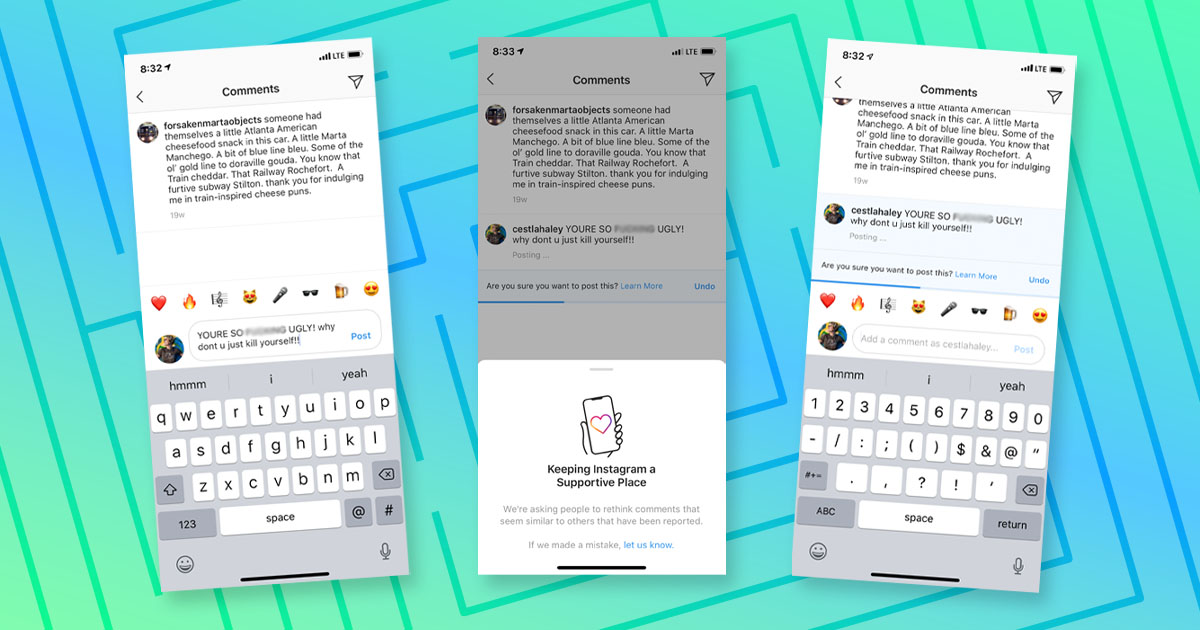
1. Cyberbullying
Comments, DMs, and public posts all create opportunities for harassment. Because Instagram is tied closely to real identity, the social stakes feel higher for teens than on more anonymous platforms.
Example: A teen posts a photo and receives a wave of mocking comments from classmates.
What parents can do: Open a calm conversation rather than demanding access to their account, save evidence when necessary, and use Instagram's reporting, Restrict, and Block tools together.
2. Online Predators
Adults can contact teens through follow requests, comments, or DMs if an account is public or a request is accepted. Predators often build trust gradually — a pattern known as grooming — before attempting to isolate a teen from parental oversight.
Practical advice: Review the follower list together regularly and ask who each person is in real life. A private account significantly reduces exposure, but it does not give anyone permission to bypass another user's privacy. Our guide explains what can and cannot be seen on a private Instagram account.
3. Scams & Fake Accounts
Fake giveaway accounts, impersonation profiles, and phishing DMs are common on Instagram. Teens are frequent targets because they're more likely to engage with prize offers or brand collaboration requests.
What parents can do: Teach teens to verify accounts before engaging and never click links promising free items or followers.
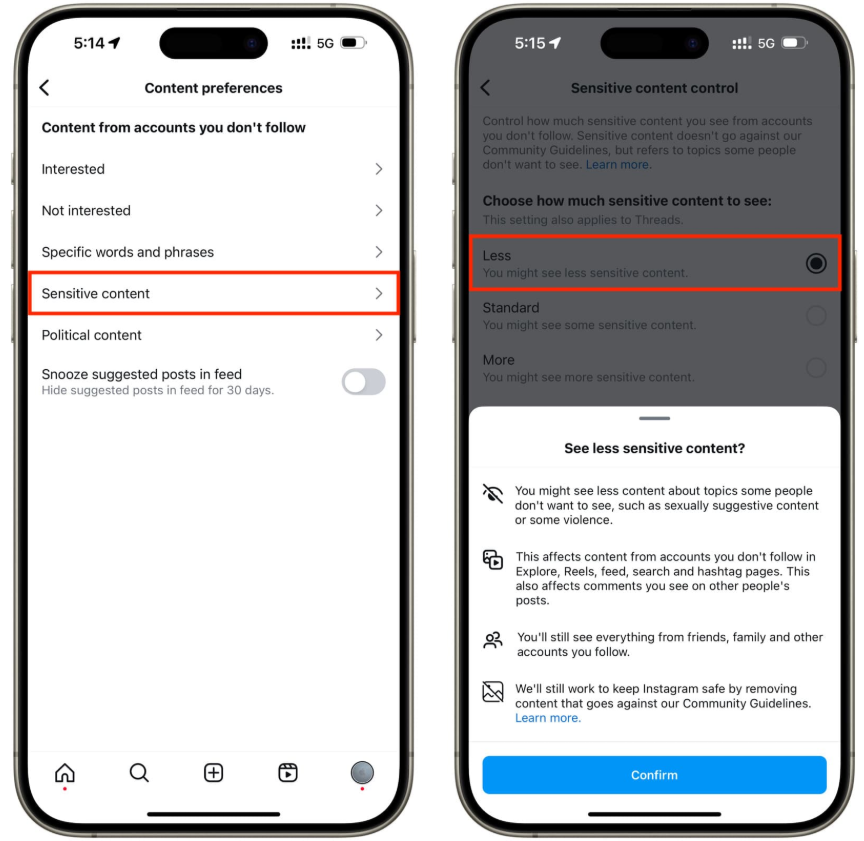
4. Inappropriate Content
Recommendations in Explore, Reels, Feed, and Stories can still expose teens to material parents consider unsuitable. Meta's default 13+ content setting is designed to reduce age-inappropriate content, but automated filters are not perfect.
What parents can do: Keep the default 13+ setting enabled or choose Limited Content for stricter controls, then review recommendations together periodically.
5. Mental Health
Filtered images, comparison culture, and visible popularity metrics can contribute to body image pressure or lower self-esteem for some teens. Effects vary by child, so changes in mood and behavior matter more than any single amount of screen time.
What parents can do: Watch for increased negative comments about appearance, and keep conversations about filtered content ongoing rather than a one-time talk.
6. Screen Addiction
Infinite scrolling, short-form video, and frequent notifications can make it difficult for teens to stop using the app on their own.
What parents can do: Use Instagram's built-in daily time limit and Sleep mode, agree on phone-free times, and review whether scrolling is affecting sleep, schoolwork, or offline relationships.
How to Make Instagram Safer
Instagram's built-in safety features: Teen Accounts apply private-account defaults, stricter messaging rules, Hidden Words, time reminders, Sleep mode, and age-appropriate content settings. Family Center supervision can show time spent, recent contacts, and selected account activity without giving parents access to message content. Meta reports that teens under 16 need parental permission to make built-in protections less strict, go Live, or turn off nudity protection in DMs. Parents can review the full list in Meta's official Teen Accounts overview.
Account Security
Before adjusting privacy settings, make sure the account itself can't be hijacked.
- Step 1. Turn on Two-Factor Authentication under Settings > Accounts Centre > Password and Security, so a login code is required in addition to the password.
- Step 2. Run Instagram's Security Checkup together to review login history, recovery email, and phone number.
- Step 3. Teach your child to never click links or enter verification codes from DMs claiming to be "Instagram Support" — legitimate support messages will not ask them to share a login code.
Privacy Settings
Recommended settings to configure together with your child:
- Step 1. Set the account to Private so only approved followers can see content.
- Step 2. Set "Who Can Message You" to People You Follow to block strangers.
- Step 3. Keep the default 13+ content setting, or select Limited Content for stricter filtering where available.
- Step 4. Turn off Activity Status so strangers can't see when your child is online.
- Step 5. For teens under 16, do not approve Instagram Live unless you have discussed privacy, audience, and location-sharing risks together.
- Step 6. Review your child's Followers List regularly.
- Step 7. Review Instagram Map and location-sharing choices together. Our Instagram Map location guide explains how location visibility works and what parents should check.
Managing Interactions
Help your child handle unwanted attention without escalating to a full block:
- Step 1. Use Restrict for uncomfortable but low-level situations — the other person won't be notified, and their comments are only visible to them.
- Step 2. Use Block for harassment or unsafe contact — this fully cuts off access but is visible to the other user.
- Step 3. Set up Hidden Words and comment filters to automatically remove offensive language from comments and DM requests.
 Note
Note
Talk before downloading, not after. Ask your child to walk you through their settings together rather than configuring everything in secret — it builds trust and helps them understand why each setting matters.
How VigilKids Helps Parents Protect Kids on Instagram
Instagram's Teen Account, content filters, restricted messaging, and Family Center provide basic protection, but they do not show parents full DM content or activity context across a child's device.
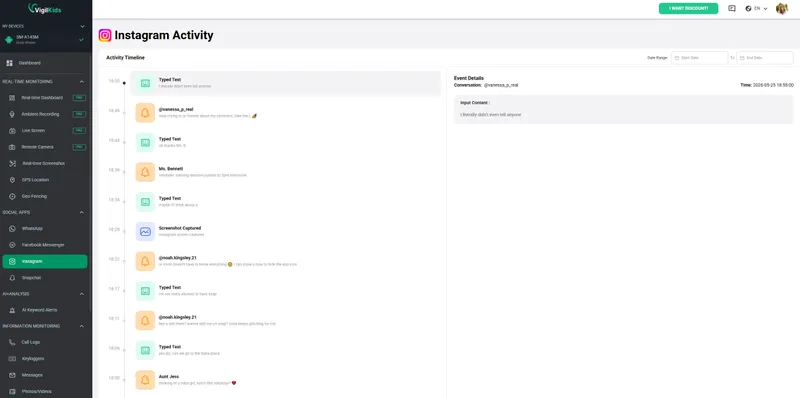
The VigilKids Instagram monitoring solution helps parents review supported Instagram activity, screen captures, app usage, and safety insights from one dashboard on an authorized child's device.
With better context, parents can identify patterns and have more informed conversations about online safety.

What VigilKids brings you more
- Instagram activity insights — review supported activity and on-screen context on an authorized child's device.
- Screen activity review — capture supported on-screen activity with the Android screen recording guide.
- Usage pattern tracking — use screen-time insights to spot unusual changes or repeated late-night Instagram use.
- One simple dashboard — keep relevant Instagram and device-safety information in one place.
- Better family conversations — turn meaningful changes into timely, nonjudgmental discussions.
How VigilKids Works:
- Step 1. Sign up and connect your child's device.
- Step 2. Customize the monitoring features that matter most to your family.
- Step 3. Receive insights into screen time, app usage, and online activity — all from one dashboard.
Warning Signs Parents Should Watch For
These signs don't always mean something is wrong, but they may be worth a conversation or closer attention.
Behavioral Warning Signs
Watch for sudden mood changes, withdrawal from family or friends, increased secrecy, or unusual behavior around phone use.
What to do: Start with a calm conversation instead of accusations. Ask open questions and show support.
Digital Warning Signs
Pay attention to sudden screen-time increases, unfamiliar contacts, disappearing messages, or hidden accounts such as a "finsta."
What to do: Review online activity together and focus on understanding patterns rather than punishment.
When to Take Action Immediately
Act quickly if there are messages from unknown adults, self-harm content, financial requests, or plans to meet online contacts in person. Save evidence, report suspicious accounts, and seek help when needed.
Frequently Asked Questions
Q1: Is Instagram safe for a 12-year-old?
No. Instagram's minimum age is 13, and a 12-year-old typically doesn't yet have the judgment to navigate stranger contact and algorithmic content safely. If they already have an account, focus on a calm conversation rather than simply deleting it without explanation.
Q2: Is Instagram safe for kids overall?
It depends on age and supervision. Instagram offers real safety tools — Teen Accounts, Family Center, content filters — but these work best when combined with active parental involvement, not used as a replacement for it.
Q3: Can parents monitor Instagram?
Partially. With supervision enabled, Family Center can show time spent, recent contacts, and selected account activity, but it does not show message content. For broader, authorized visibility across supported apps, tools like VigilKids can complement Instagram's built-in features.
Q4: Does Instagram notify screenshots?
Instagram generally does not notify users when someone screenshots a post, Story, Reel, profile, or ordinary chat. It may notify the sender when a recipient screenshots certain disappearing photos or videos sent in Direct. Because features can change, private media should never be assumed safe from being saved.
Q5: Can strangers contact my child on Instagram?
Yes, if the account is public or a follow request from a stranger is accepted. A private account combined with restricted message settings significantly reduces this risk, though it doesn't eliminate it entirely.
Conclusion
So, is Instagram safe for kids? It is not appropriate for children under 13, and it is not risk-free for teens. For many users aged 13–17, Instagram can be made safer when Teen Account protections remain enabled, privacy and location settings are reviewed, and parents stay involved through regular, nonjudgmental conversations.
Built-in controls should be the first layer. If your family needs additional context on an authorized child's device, VigilKids for Instagram can complement those settings. Use monitoring transparently, explain what will be reviewed, and treat what you learn as a reason to talk—not an automatic reason to punish.
Sources and Further Reading:
- Meta: Introducing Instagram Teen Accounts
- Meta: New 13+ Content Settings for Teen Accounts
- U.S. Surgeon General: Social Media and Youth Mental Health
Hot Topics for Monitoring
How to Monitor WhatsApp Messages Without Target Phone
Learn how to monitor WhatsApp messages without the target phone using safe, legal methods like VigilKids. Real-time tracking, setup guide, and tips.
How to Monitor Your Child's Facebook Messenger: A Parent's Guide
A parent's guide to monitoring your child's Facebook Messenger safely. Learn the real risks, how to talk to your kids, and the best tools to keep them safe.
VigilKids WhatsApp Tracker 2026: Full Review & Setup Guide
The VigilKids WhatsApp tracker captures chats, calls, media, and deleted messages from any Android device. See features, setup, and how it works in 2026.