
Quick answer: No. Instagram only sends screenshot alerts for certain disappearing photos or videos in Direct—not for regular DMs, Stories, posts, Reels, profiles, or Highlights.
For parents, that simple answer can hide a bigger worry: what is your child saving, sharing, or being asked to keep secret? If you are searching Does Instagram notify when you screenshot, you probably need more than a yes or no.
Most guides stop at the notification rules. This VigilKids guide goes further, helping you understand disappearing-message risks, recognize warning signs, and start a calm privacy conversation—without turning ordinary screenshots into accusations.
Does Instagram Notify When You Screenshot a DM, Story, or Post?
Most Instagram screenshots are private. Instagram does not notify someone when you capture a Story, post, Reel, profile, or regular chat.
Here is what happens:
- Regular DMs and saved media: No alert.
- Disappearing photos or videos: An alert may appear.
- Vanish Mode: May show an in-chat notice.
- Stories and Highlights: No alert.
- Posts, Reels, and profiles: No alert.
The key difference is temporary content. Instagram uses alerts for disappearing messages because they are meant to offer more privacy. A read receipt is different—it only shows that someone opened a message.
For parents, no alert does not mean no boundaries. Screenshots can include a face, username, location, or private chat. Remind kids to ask before sharing.
A screenshot may stay private, but sharing it without permission can still hurt someone.
When Does Instagram Send Screenshot Notifications?
Instagram connects screenshot warnings to content designed to disappear—not to the whole Direct inbox. That is why two photos in the same chat can behave differently.
Disappearing Photos and Videos in Instagram Direct
A disappearing photo or video is sent with an option such as View once or Allow replay. Instagram lets the sender check whether it was opened, replayed, or screenshotted.
If the sender chooses Keep in chat, the media is no longer treated like the same temporary item. A screenshot of ordinary media that remains in the conversation generally does not trigger an alert.
Vanish Mode and Temporary Conversations
Vanish Mode makes eligible messages disappear after they are seen and the chat is closed. If someone takes a screenshot while it is active, Instagram typically places a notice inside the conversation. The feature and wording can vary by app version, device, region, and account.
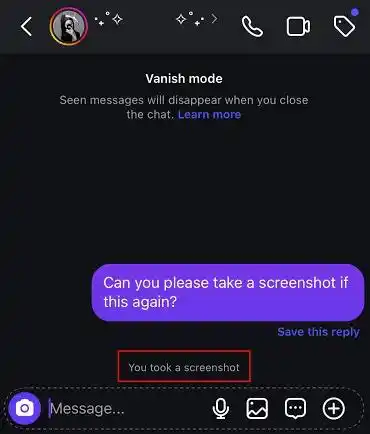
That alert is not a perfect privacy shield. Someone can photograph the screen with another phone, copy the text, or repeat what they saw. A disappearing message can still become permanent.
A disappearing photo in Direct is not the same as a Story. Stories expire after 24 hours, but screenshots of Stories do not currently create screenshot notifications.
Why Disappearing Messages Matter for Families
Children may read “disappearing” as “safe” or “gone forever.” In reality, temporary messages can still be copied, photographed, or used to pressure someone. Once an image reaches another screen, the sender no longer controls it.
Parents do not need to assume every temporary chat is dangerous. These features are often used for jokes and casual photos. They deserve a conversation when they appear alongside warning signs such as:
- An unknown contact asks a child to move into Vanish Mode.
- Someone requests a private image and promises it cannot be saved.
- A classmate uses temporary messages for bullying or threats.
- An account pressures the child to keep the conversation secret.
- Late-night messages begin affecting sleep, mood, or schoolwork.
Start with calm questions: “Do you know this person offline?” “Did anything make you uncomfortable?” and “Would you like help blocking or reporting the account?” A child who expects blame may hide the conversation you most need to understand.
Instagram’s own tools should come first. Families can review Instagram Teen Account protections, keep the profile private, limit message requests, and check followers together.
How VigilKids Helps Parents Understand Instagram Activity
Screenshot alerts do not show who contacted your child, what disappeared, or whether Instagram use is affecting sleep.
For a real safety concern, VigilKids Instagram Tracker gives parents a clearer view of supported activity on an authorized device. Connect the device once, then check the online dashboard.

What VigilKids Can Do
- Instagram activity: Review supported messages, media, contacts, and timestamps beyond Instagram’s parental controls.
- Disappearing messages: Keep supported activity captured after setup.
- Unknown contacts: Notice new or repeated interactions.
- Usage patterns: Spot late-night activity and set healthier app time limits.
- Wider context: See if a concern moves to another supported app.
Start in 3 Simple Steps
- Step 1. Create an account and choose a plan.
- Step 2. Follow the guide to connect the authorized device.
- Step 3. Open the dashboard and review supported activity.
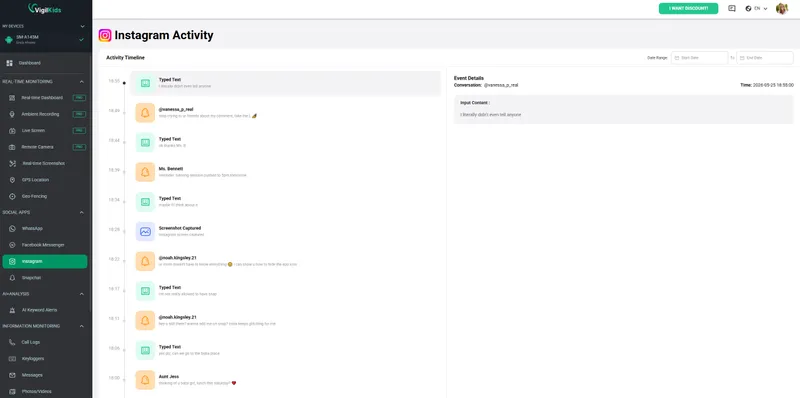
VigilKids cannot recover content that was never captured before installation and permission setup. Available information depends on the device, operating system, permissions, app version, and plan. Use it only on a device you own or are legally authorized to manage.
Instagram Privacy Tips for Parents and Teens
A screenshot alert is not a complete safety system. A better goal is to reduce risky contact, teach children that temporary content can become permanent, and make it easy to ask for help. If you are deciding how much access is appropriate, our guide Is Instagram Safe for Kids? offers a wider age-and-risk check.
- Keep the account private. Approve followers carefully and remove accounts the child does not recognize. Learn what outsiders can see in our private Instagram account guide.
- Limit message requests. Review who can add the teen to groups or send DMs.
- Treat disappearing media as permanent. Never send an image that would cause harm if copied or shared.
- Protect account access. Use a unique password and two-factor authentication, and never share a login code.
- Review location sharing. Check Instagram Map, device permissions, and location tags; our Instagram Map privacy guide walks through the risks.
- Create quiet hours. Mute overnight notifications and agree on phone-free times.
- Block and report pressure. Save evidence when it is safe, then use Instagram’s reporting tools for threats, sexual requests, scams, or bullying.
Agree in advance on what happens when your child reports a mistake. “We will help first” is a stronger safety rule than “You will lose your phone.” It keeps the door open when a temporary message becomes a real-world problem.
Instagram Screenshot Notification FAQs
Q1: Does Instagram notify someone when you screenshot a DM?
Instagram does not notify the other person when you screenshot a regular DM, including normal text and media kept in the chat. It does notify for screenshots of disappearing photos or videos, and Vanish Mode may show an in-chat alert where available.
Q2: Does Instagram notify when you screenshot messages?
Not for ordinary messages. The screenshot warning applies to specific temporary content rather than every Instagram conversation. Always check whether the media was sent as View once, Allow replay, or inside Vanish Mode.
Q3: Does Instagram notify when you screenshot a Story?
No. Instagram may show the creator that you viewed the Story, but it does not tell them that you took a screenshot or screen recording. This also applies to Story Highlights.
Q4: Can Instagram detect screenshots?
Yes, Instagram can detect and report screenshots in limited situations, especially disappearing photos or videos in Direct. That does not mean it detects every capture; another device can photograph a screen, and features can vary by version.
Q5: Can parents see their child's Instagram messages?
Instagram Family Center does not let parents read message content. It can provide supervision controls and limited interaction information. Authorized parental tools may offer additional context on supported devices, but families should check compatibility, follow local law, and communicate openly.
Conclusion
The answer to Does Instagram notify when you screenshot is simple: not for most content. Instagram does not alert users when you screenshot Stories, posts, Reels, profiles, or regular DMs. Screenshot alerts only apply to disappearing photos and videos, and sometimes Vanish Mode.
Help kids remember that online content can spread beyond the screen. Privacy settings and safety tools help, but open conversations matter most. Explore more VigilKids guides for practical tips on helping kids stay safer online.
Sources
- Instagram Help Center: See the status of a disappearing photo or video that you've sent
- Instagram Help Center: Send disappearing photos or videos in chats
- Instagram Help Center: Report a message or chat sent in Vanish Mode
- Instagram Help Center: Privacy settings and controlling your visibility
Research checked on July 27, 2026. Instagram and VigilKids features can vary by app version, region, device, operating system, permissions, and plan.
More Popular Articles
![[7 Ways] How to View a Private Instagram Account](https://cdn.vigilkids.com/vigilkids/view_private_instagram_account_b94eb9da6b.jpg)
[7 Ways] How to View a Private Instagram Account
Thinking about viewing a private Instagram account? Discover what’s possible, safe methods, risks to avoid, and important privacy tips in this guide.

Instagram Unfollowers: Who Unfollowed & Doesn’t Follow Back
Learn how to tell if someone unfollowed you on Instagram and how to check who doesn’t follow you back using safe methods and tools.

The Difference Between a Creator and Business Account on Instagram
Learn the differences between Instagram Creator and Business accounts—reach, analytics, DM filtering, audio access, and algorithm behavior.