
If you've ever wondered how to know if someone is online on WhatsApp, you're not alone. Whether you're waiting for a reply or monitoring your child's activity, understanding WhatsApp's online indicators can be very useful.
In this guide, we'll explain what “online on WhatsApp” means, the best methods to check, and introduce VigilKids for WhatsApp—a smart parental control tool to help keep kids safe.
What Does "Online" Mean on WhatsApp?
Before diving into the methods, it is essential to clarify what does online mean on WhatsApp. When you see the word "Online" under a contact's name in a chat window, it signifies two specific things:
- The App is Open: The contact has WhatsApp open in the foreground on their device (phone, tablet, or desktop).
- Internet Connection: The device is actively connected to the internet.
Crucial Note
Being "online" does not necessarily mean the person has read your specific message. They could be replying to someone else, scrolling through their Status updates, or simply have the app open without looking at the screen.
Effective Methods: How to Know If Someone Is Online on WhatsApp
If you need to verify if a contact is currently active, here are the most reliable and legitimate ways to know if someone online WhatsApp so.
1. The Direct Chat View
The simplest way to see if someone is online on WhatsApp is to open your conversation with them.
- Step 1. Open WhatsApp and tap on the contact's name.
- Step 2. Look directly under their name at the top of the screen.
- Step 3. If they are currently using the app, it will simply say "Online."
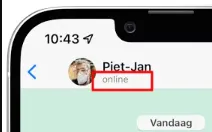
If they are not active, you may see "Last seen at [Time/Date]," depending on their privacy settings.
2. Checking the "Typing..." Status
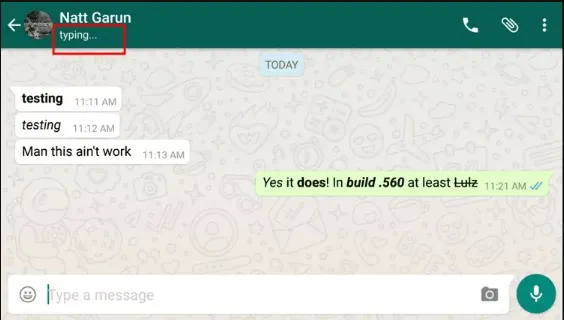
If you are wondering how to know if someone online WhatsApp is actually engaging with you, look for the typing indicator.
When a contact starts typing a reply in your chat, the "Online" status changes to "Typing..." This is a real-time confirmation of activity.
3. Monitoring WhatsApp Message Delivery and Read Receipts
While this doesn't show "Online" status directly, it provides a strong clue:
- Single Grey Tick: Message sent from your phone but not yet delivered to theirs (they are likely offline or have no signal).
- Double Grey Ticks: Message delivered. They are connected to the internet.
- Double Blue Ticks: Message read. This confirms they were online at the moment they opened your chat.
4. Group Chat Activity
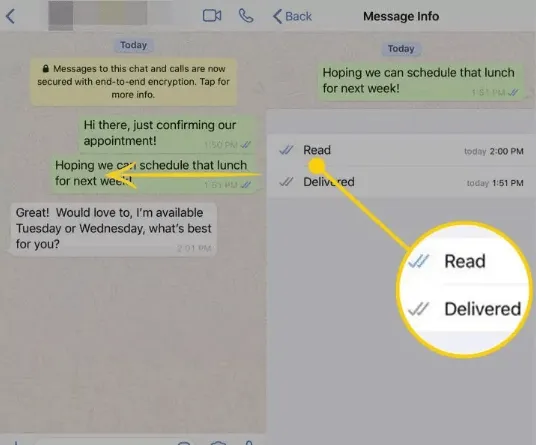
If you share a group with the person, check the "Message Info."
- Step 1. Long-press a message you sent in the group.
- Step 2. Tap "Info."
- Step 3. View "Read by" and "Delivered to" details.
If a person has recently read a group message, they were active on the platform.
Why Can't I See Someone's Online Status?
If you follow the steps above but still can't see any status, it is usually due to one of the following:
- Privacy Settings: The user has set their "Last Seen & Online" status to "Nobody" or "My Contacts" (and you aren't in their list).
- Mutual Visibility: If you have hidden your own "Last Seen" or "Online" status, WhatsApp prevents you from seeing others' statuses as well.
- Blocking: If a contact has blocked you, you will never see their online status or profile picture updates.
How to Monitor WhatsApp Activity Safely (For Parents)
While checking on a friend is one thing, parents have a much more serious responsibility. Children today spend a significant amount of time on messaging apps, often late into the night.
Understanding how to know if someone is online on WhatsApp becomes a safety requirement for parents who want to prevent cyberbullying or sleep deprivation.
VigilKids for WhatsApp Monitoring
Track online activity, monitor usage time, and protect your child from online risks with smart parental control tools.
This is where Vigilkids for WhatsApp becomes an essential companion for modern parenting.
What is Vigilkids?
Vigilkids is a specialized parental control application designed to provide insights into a child's WhatsApp usage patterns.
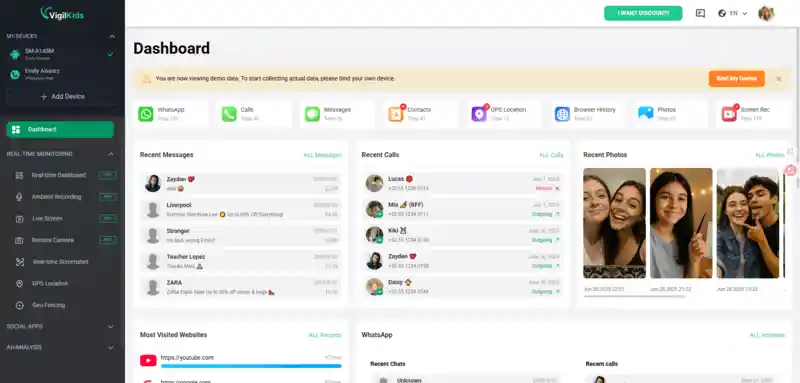
Unlike standard privacy-focused features, Vigilkids helps parents stay informed about their child's digital footprint to ensure they are safe and balanced.
Key Features of Vigilkids for WhatsApp
Feature:
- Real-Time Online Notifications: Receive instant alerts when your child goes online or offline.
- Detailed Activity Logs: Track daily usage time and identify unusual behavior patterns.
- Invisible Monitoring: Monitor activity discreetly while maintaining trust and safety.
- Cross-Reference Data: Detect suspicious interactions or late-night activity.
Why Use a Parental Control App?
The internet can be a dangerous place for minors. Between predatory behavior and the pressures of social media, having a "digital guardian" like Vigilkids allows parents to intervene early.
Helps prevent cyberbullying and online threats.
Encourages healthy screen time habits.
Supports better parent-child communication.
Frequently Asked Questions (FAQ)
Q: Can I see if someone is online if they have hidden their 'Last Seen'?
A: Generally, no. WhatsApp respects privacy settings. However, parental tools like Vigilkids can help monitor activity patterns for children.
Q: Does 'Online' mean they are reading my chat?
A: Not necessarily. It only means the app is open. They could be browsing other chats or settings.
Q: Is it legal to use a WhatsApp tracker?
A: Using parental control tools for monitoring your minor children is generally legal, but always check local regulations.
Q: How to know if someone is online on WhatsApp without opening chat?
A: You typically need to open the chat. Otherwise, you can only rely on indirect signs like message activity or status updates.
Q: Can You Get Notified When Someone Is Online?
A: No, WhatsApp does not provide official notifications when someone comes online. Some third-party tools claim to offer this feature. They may violate WhatsApp policies or pose privacy and security risks.
Conclusion
Knowing how to know if someone is online on WhatsApp is a useful skill for navigating modern communication. Features like the "Online" label and "Typing..." indicator provide helpful insights into activity.
However, for parents, these built-in features are often not enough. Using a reliable tool like Vigilkids for WhatsApp can provide deeper insights, helping monitor activity, manage screen time, and ensure children stay safe online.