
The green dot on Snapchat often raises a simple but important question: what does the green dot mean on Snapchat, and can you rely on it? Many users also wonder, does the green dot on Snapchat mean they are online right now, or is it just an estimate of recent activity?
In this complete guide, you'll learn the official meaning, how accurate the indicator really is, how long it lasts, and how to turn it off. We'll also explore privacy implications and safer alternatives for parents who need clearer insights.

Official Meaning of Green Dot on Snapchat
Snapchat's own help page is short and to the point. The green dot is called the Activity Indicator and it simply signals that a friend has been recently active on Snapchat. You can turn the indicator off in Settings under Privacy Controls → Activity Indicator, and if you disable it you will not see others' activity indicators either.
Key takeaways:
- Snapchat does NOT define exactly how long "recently active" means.
- The green dot is not a real-time status indicator.
- You can disable it, but doing so is mutual.
This vague definition is why many users keep asking what does the green dot mean on Snapchat and whether it can truly indicate live activity.

Does the Green Dot on Snapchat Mean They Are Online?
The short answer: No, not necessarily.
Many users assume that the green dot on Snapchat means someone is currently using the app. However, this is not always accurate.
- It may indicate activity from minutes ago
- It could reflect background app usage
- It may persist due to server delays
So if you're wondering does the green dot on Snapchat mean they are online, the answer is: it only suggests recent activity, not real-time presence.
How the Green Dot on Snapchat Works
You want to know does the green dot on Snapchat mean they are active and how long does the green dot stay on Snapchat. There is no official breakdown, but here are plausible technical mechanics that explain how the indicator behaves.
How the signal might be generated:
- Client heartbeat. When the app is open it may send a small "I am active" ping to Snapchat servers at regular intervals.
- Background activity. Some phones let apps run in the background for short periods. That can keep the indicator lit even when the screen is off.
- Token refresh cycles. Sessions use tokens that refresh periodically. If a token remains valid, the server may treat the account as recently active until the token expires.
- Server caching and sync. Servers often cache presence information for efficiency. Cached status can remain visible until it is refreshed.
- Push and network delays. Network lag or delayed push notifications may make an indicator appear or persist longer than real time.
- OS and app version differences. Android and iOS handle background tasks differently. Older app versions might behave differently too.
- Battery and privacy settings. Battery saver modes or strict privacy settings can stop pings and create gaps that look like sudden disappearances or reappears.

Why you see lag or lingering dots:
- A combination of cached server state, token lifetimes, and brief background pings explains why the dot sometimes lingers or vanishes suddenly.
- In short, the green dot is a hint of recent activity, not a perfect real time online indicator.
How to Turn Off the Green Dot on Snapchat
If you don't want others to see your activity, you can disable the green dot on Snapchat in just a few steps:
- Step 1. Open Snapchat
- Step 2. Tap your profile icon
- Step 3. Open Settings (gear icon)
- Step 4. Go to Privacy Controls
- Step 5. Turn off Activity Indicator
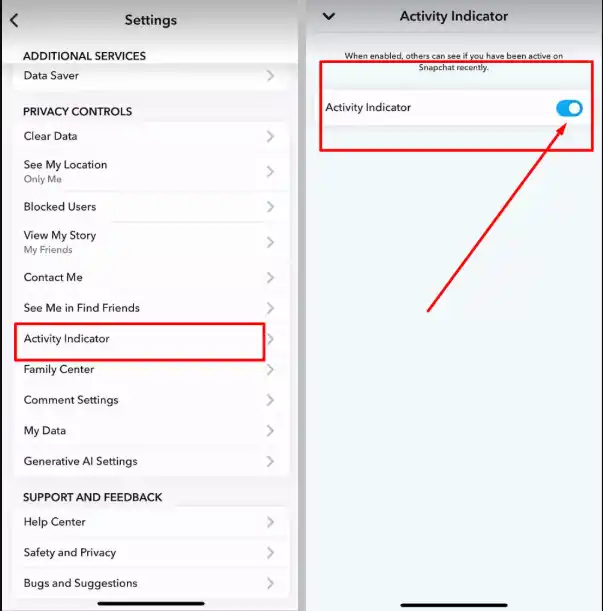
Important: Once disabled, you also won't see other users' activity indicators.
Privacy Implications & Safety Tips
The green dot on Snapchat might seem small, but it can affect privacy and behavior.
- It may create pressure to respond quickly
- It can expose usage patterns
- It may lead to misunderstandings
For parents, relying only on the green dot on Snapchat is not enough. It does not show:
- Who your child is talking to
- What messages are sent
- How long they use apps
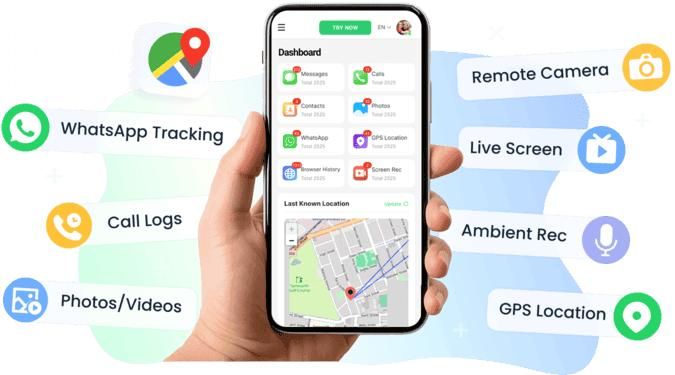
For better visibility, tools like VigilKids provide detailed insights such as app usage, location tracking, and alerts—giving you real context beyond a simple activity dot.
Why VigilKids is better than relying on the Snapchat green dot:
- Track real app usage instead of "recent activity" guesses
- View screen recordings and app behavior
- Receive alerts for risky keywords or conversations
- Monitor location and movement in real time
- Understand digital habits with detailed reports
How green dot on Snapchat compares to other platforms
You may wonder, does the green dot on Snapchat mean they are active the same way other apps show presence? Not exactly. Here is a quick, simple comparison so you know what each indicator actually tells you.
Snapchat
The green dot is an Activity Indicator that signals someone was recently active. It is meant as a hint, not a live presence marker, and you can turn it off in Privacy Controls.
Facebook Messenger
Messenger shows a green dot for people who are actively using the app or recently active, often close to real time. That makes it a stronger cue for current availability than Snapchat's vague "recently" wording.
Instagram's activity status in Direct Messages shows when someone was last active or if they are currently active, with somewhat finer granularity than Snapchat. You can also hide this status.
WhatsApp offers "WhatsApp online" and "last seen" timestamps. Those can be precise, but privacy settings let users hide last seen, which limits visibility.

Bottom line, Snapchat emphasizes a reciprocal, privacy-friendly hint of recent activity. Other platforms often provide more immediate or precise presence signals, though each app has its own privacy controls.
FAQs About the Green Dot on Snapchat
What does the green dot mean on Snapchat?
It indicates that a user was recently active on Snapchat, but not necessarily online at that exact moment.
Does the green dot on Snapchat mean they are online?
No. It usually reflects recent activity, not real-time usage.
How long does the green dot stay on Snapchat?
Snapchat does not specify, but it can range from a few minutes to several hours depending on system behavior.
Can I hide the green dot on Snapchat?
Yes, by turning off the Activity Indicator in settings.
Conclusion
The green dot on Snapchat is best understood as a recent activity signal, not a live online status. While it can give you a rough idea of when someone used the app, it should not be taken as proof they are currently online.
If you're trying to understand behavior—especially for safety reasons—it's important to rely on more than just this indicator. Instead of guessing based on a simple activity signal, tools like VigilKids provide real insights such as app usage history, screen activity, and alerts for potential risks. Used correctly, the green dot on Snapchat is helpful, but it's only one small piece of the bigger picture.