
Wondering how to see a secret conversation on Messenger? You're not alone. Messenger's Secret Conversations use end-to-end encryption, so these private chat Messenger threads hide behind a lock icon, stay off your main inbox, and never sync to other devices. That's great for privacy — but a real headache for parents who want to know their kids are chatting safely.
In this guide, we break down exactly how to view secret conversations on Messenger on both iPhone and Android, why they sometimes won't show up, how to turn the feature on, and what to do when you need to check someone else's phone.
What Are Secret Conversations on Messenger?
Secret Conversations are private one-on-one chats inside the Messenger app. They use end-to-end encryption, which means only the sender and receiver can read the secret messages on Messenger — not even Facebook can access them.
A secret conversation Messenger thread shows a small lock icon and does not appear in your regular message list. It is only visible on the phone or tablet where the conversation was started.
Here are a few things to know about how a private chat Messenger thread works:
- Secret Conversations do not work in group chats
- You cannot use them for payments, GIFs, or reactions
- The feature must be turned on in Messenger settings
- They are not visible on the Messenger website or other devices
You can also set secret messages on Messenger to disappear after being seen. For example, a message can be removed after 10 seconds or a few minutes, depending on your settings. If the chats are already gone, our guide on how to find deleted messages on Messenger walks through your recovery options.
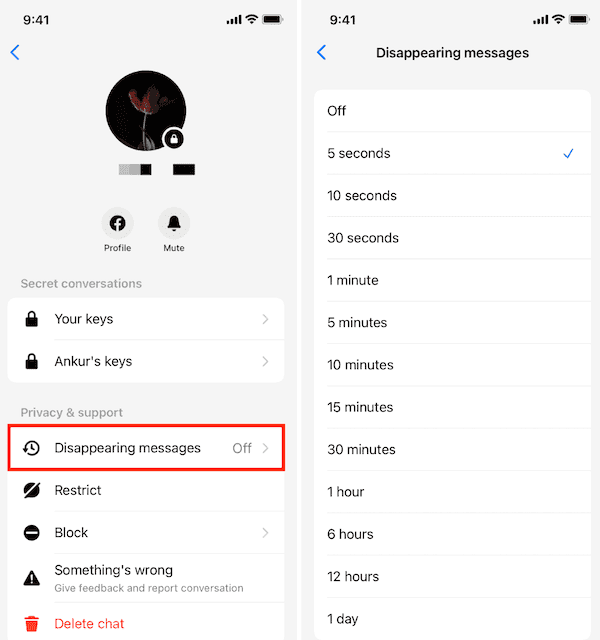
Each device involved in a secret chat holds a unique encryption key. This is why these private chat Messenger threads cannot be seen from other phones, even if you log in with the same account.
How to View Secret Conversations on Messenger on iPhone or Android?
There are two scenarios when you want to see a secret conversation on Messenger: viewing the secret chats on your own phone, or checking the ones on your child's device. Each works very differently, so let's cover both.
View Secret Conversations on Your Own iPhone or Android
If Secret Conversations are enabled on your device, you can view them directly in the Messenger app. These chats look slightly different from normal ones — they include a lock icon and only show on the device where they were created or received.
Whether you're using an iPhone or Android phone, the steps to see a secret conversation on Messenger are the same:
- Step 1. Open the Messenger app on your phone.
- Step 2. Tap the "Chats" tab at the bottom.
- Step 3. Look for conversations with a small lock icon next to the person's name.
- Step 4. Tap to open the chat and read the secret messages on Messenger.
See Your Child's Secret Conversations on Messenger with VigilKids
The method above works perfectly when the secret conversation is on your own phone. But if you're a parent trying to see a secret conversation on Messenger that's on your child's device, the built-in method won't help — these encrypted chats stay locked to the original phone. For that, you need a dedicated tool like VigilKids, one of the best parental control apps for keeping an eye on messaging activity.
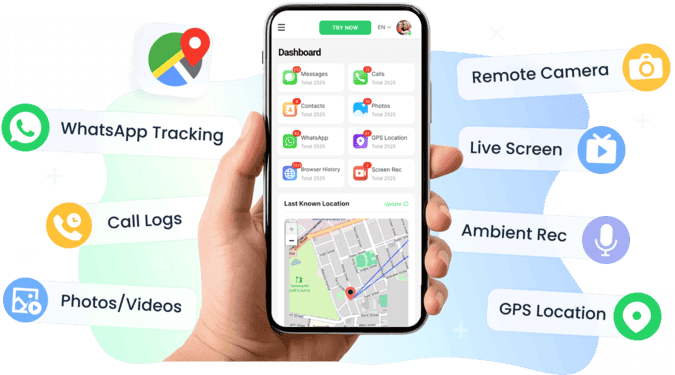
With VigilKids, parents can:
- Mirror your child's phone screen directly to your own
- View how Messenger is being used in real time
- Monitor app activity, including when and how long Messenger is active
- Get alerts when your child opens messaging apps or accesses sensitive content
This helps you spot possible signs of risky communication without needing your child's Messenger login or chat history. If you also want to keep tabs on text messages, see our guide on the best app for parents to track text messages.
How to get started:
- Step 1. Create your VigilKids account. Download and install VigilKids on both your device and your child's phone.
- Step 2. Set up the app and connect both devices using the pairing instructions.
- Step 3. Go to the Screen Monitoring tab to see live activity.
Try VigilKids Now
See how your child uses Messenger in real time and get instant alerts on risky activity — no login or chat history needed.
Why I Cannot View Messenger Secret Conversations?
If you do not see any secret conversations, here are some possible reasons:
- The feature has not been turned on yet.
- The secret chat was started on a different device.
- Messages were deleted manually.
- A disappearing message timer was set and the messages have expired.
Keep in mind that Messenger itself does not let you view these messages from a different device. So if you're wondering how to see a secret conversation on Messenger from another phone using the app's built-in features, the answer is no — these chats are encrypted and tied to the original device only.
The one exception is a dedicated monitoring tool: with VigilKids installed on the target phone, you can view that device's Messenger activity remotely from your own. The same logic applies to other apps — for example, how to monitor someone's texts also relies on a tool set up on the original phone.
Also, a secret conversation Messenger thread does not appear on the desktop version of Messenger or on messenger.com.
How to Start or Enable Secret Conversations
Before you can use a private chat Messenger feature like this, it must be turned on in the Messenger app. Once enabled, you can start a private chat with any contact who also has the feature turned on.
Here is how to enable it:
- Step 1. Open Messenger and tap your profile picture in the top left.
- Step 2. Scroll down and tap Privacy.
- Step 3. Tap Secret Conversations and make sure the feature is turned on.
Once enabled, there are two ways to start a secret chat:
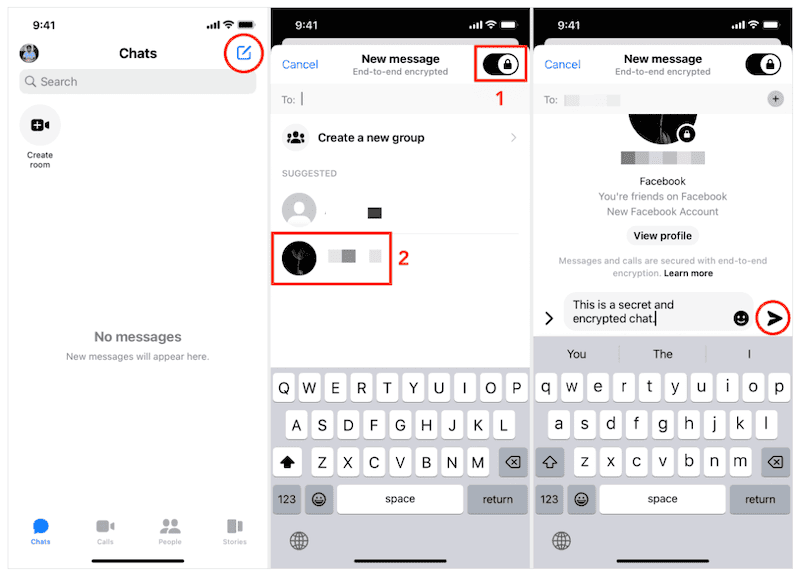
Option 1: Start from a new message
- Step 1. Tap the pencil icon to start a new message.
- Step 2. Tap the lock icon in the top right to turn on Secret Conversations.
- Step 3. Select the person you want to chat with.
- Step 4. Begin typing your message.
Option 2: Start from an existing chat
- Step 1. Open a regular chat with the person.
- Step 2. Tap their profile picture in the top left.
- Step 3. Scroll down and tap Go to secret conversation.
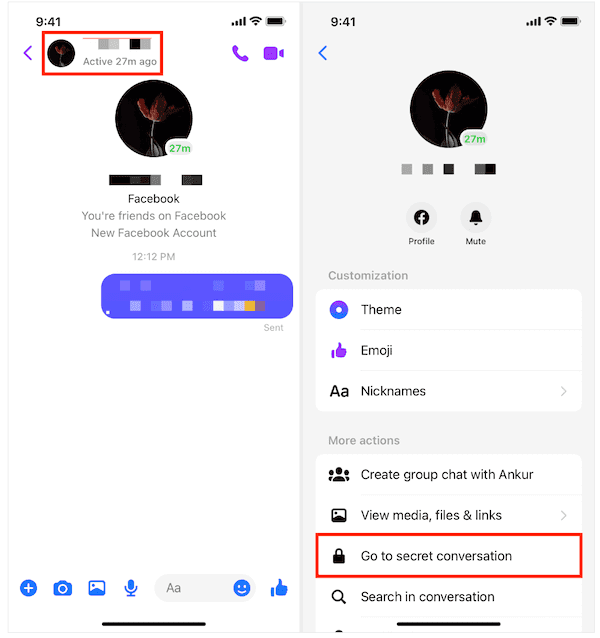
Things to note:
- You cannot start a secret conversation with someone you haven't chatted with before.
- Businesses, verified accounts, and Instagram users are not supported.
- Secret Conversations only support basic text and photos. Features like voice messages, stickers, or video calls may not be available in all versions.
If you want to send secret messages on Messenger that disappear, you can also set a timer inside a secret chat. Just tap the clock icon in the text box and choose how long messages should last after being read.
FAQ
Q1: What are hidden Facebook messages?
Hidden messages usually refer to message requests from people you're not friends with, or to secret messages on Messenger created through the Secret Conversations feature. Both are separate from your regular chat inbox.
Q2: How to see encrypted messages on Facebook?
Encrypted messages are only available through Secret Conversations in the Messenger app. Open Messenger, go to the Chats tab, and look for any private chat Messenger thread with a small lock icon.
Q3: How to see a secret conversation on Messenger iPhone?
On iPhone, open Messenger, tap the Chats tab, and look for chats marked with a lock icon. These are your secret conversations.
Q4: How to view secret conversations on Messenger Android?
The steps are the same as on iPhone. Just open Messenger, go to Chats, and tap any conversation with a lock icon to view your secret messages on Messenger.
Q5: Can I view a secret conversation Messenger thread from another phone?
No, you cannot. Secret Conversations are tied to the original device and cannot be accessed from other phones or the web version of Messenger.
Conclusion
Secret Conversations in Messenger are built for privacy and are not easy to access without direct control of the device. While the feature protects user data, it also makes it harder to see who your child is chatting with and what they are sharing in their secret messages on Messenger.
If you are trying to understand how to see a secret conversation on Messenger for safety reasons, built-in methods are limited. In this case, using a tool like VigilKids — which doubles as a reliable Android parental control solution — can give you better insight into how your child is using apps like Messenger.