
Discord parental controls now give families a useful baseline: Family Center shows seven days of account activity, lets guardians manage selected safety settings, supports spending caps and scheduled downtime, and sends weekly summaries. It still does not reveal message content. For most families, the best setup is Discord Family Center plus device-level limits and regular conversations.
This guide explains exactly what parents can see, how to connect Family Center, which 2026 settings matter most, and when an additional parental-control layer may be appropriate.
Discord Parental Controls at a Glance
Discord combines private messages, group chats, large community servers, voice channels, video calls, bots, and shared files. That makes it more complex than a single-purpose messaging app. Family Center is Discord's built-in parent tool, but it is designed as a shared activity dashboard rather than a message reader.
| Parent need | Discord Family Center | What to know |
|---|---|---|
| See recent contacts and servers | ✅ | Rolling 7-day activity view |
| Manage selected safety settings | ✅ | Includes DMs, friend requests, filters, and privacy |
| Schedule Discord downtime | ✅ | Teen is warned 15 minutes before it begins |
| Set a monthly spending cap | ✅ | Does not cover subscriptions |
| Read DMs or server messages | ❌ | Message content remains private |
| Remove friends or leave servers for the teen | ❌ | Only the account owner can do this |
| See activity from before linking | ❌ | Tracking begins after acceptance |
Family Center is enough for many teens when it is paired with clear household rules. If you need installation approval, broader screen-time rules, or app blocking, add Apple Screen Time or Google Family Link parental controls. If there is a specific, active safety concern, use an authorized device-monitoring tool transparently and in line with local law.
How to Set Up Discord Family Center
Both people need Discord accounts, and the final QR-code connection must be completed in the Discord mobile app. You can later view Family Center from desktop or browser. The link is visible to both sides and requires the teen to accept it.
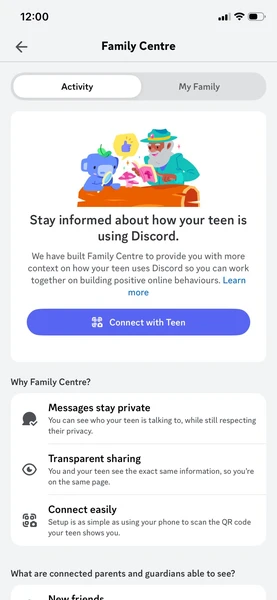
Connect the parent and teen accounts
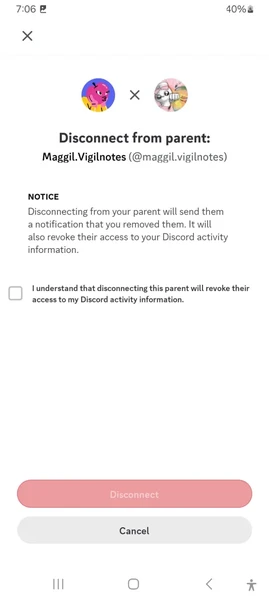
- Step 1. On the teen's account, open User Settings → Account → Family Center → My Family → Connect with Guardian.
- Step 2. Reveal the QR code and show it only to the trusted adult who will be connected.
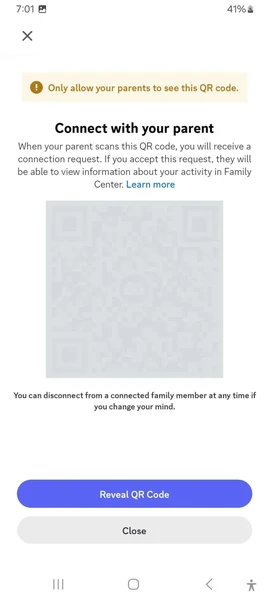
- Step 3. On the guardian's Discord mobile app, open Family Center → My Family and scan the teen's QR code.
- Step 4. Review the disclosure on both phones. The teen accepts the connection request to finish setup.
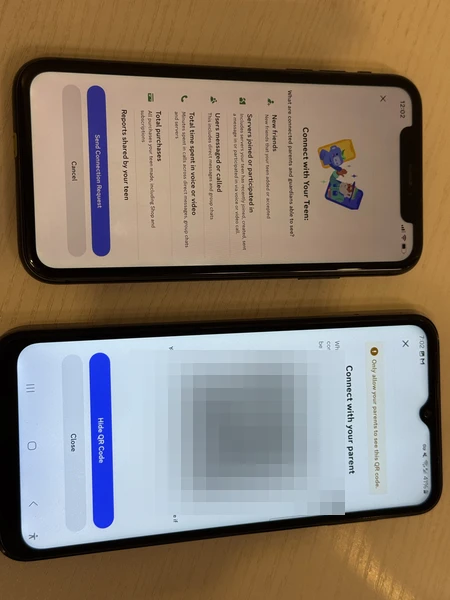
A teen can connect up to three parents or guardians. A guardian can connect to multiple teen accounts, up to Discord's current account limit. Either side can disconnect later, so explain what you intend to review before linking.
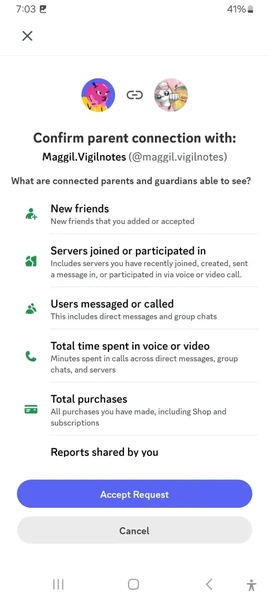
What Parents Can See and Control in Family Center
Seven-day Activity Feed
The Activity tab shows recent account-level signals, not conversations. It includes newly added friends; users messaged or called; total voice and video call minutes; the five most active users and servers; new and active servers; total purchases; and gifts received. Weekly emails provide a high-level recap.
Use the feed to start specific conversations. A newly joined six-person study server is different from an open server with thousands of members. A new contact becoming a top user is a prompt to ask who they are—not proof that something harmful happened.
Guardian-managed safety and privacy settings
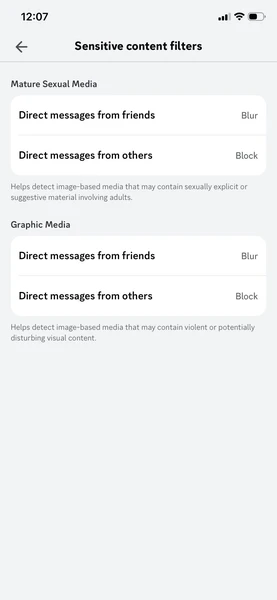
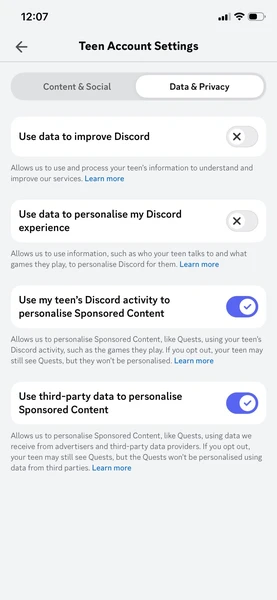
Connected guardians can review and adjust sensitive-content filters, friend-request permissions, server direct messages, Message Requests, and data/privacy preferences. Regional rules can restrict the available choices or require the guardian to be age-assured before changing some settings.
Monthly spending cap
Guardians can set a monthly cap, including $0, for eligible Discord purchases. The cap does not apply to subscriptions such as Nitro, Server Boosts, Server Subscriptions, or Premium App Subscriptions. Those subscription charges can still appear in the seven-day purchase activity when billed.
Scheduled screen downtime
Family Center can now schedule hours when the teen cannot access Discord. The teen is notified when the schedule is created and again 15 minutes before downtime begins. During the restricted period, Discord access and notifications are paused. For whole-device routines, see how to set time limits on apps.
Submitted-report notifications
When a teen reports a user or content, they can choose to notify a connected guardian. The email says that a report was submitted but does not reveal the report category or reported content. Treat it as an invitation to check in calmly.
What Discord Family Center Cannot Show
Family Center deliberately preserves message privacy. Parents cannot read DMs, group DMs, server messages, or voice/video conversations. They also cannot access activity from before the connection, change the teen's friend list, remove the teen from a server, or stop a teen from disconnecting the family link.
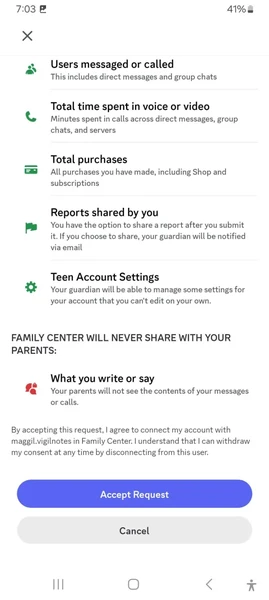
These limits are not defects for every family. They are the privacy boundary Discord chose. The key question is whether you need a shared safety dashboard, stricter device rules, or deeper context because of a documented concern. Avoid treating a new friend, private server, or late-night session as evidence by itself.
When Family Center Is Not Enough
Consider another layer when there is a concrete reason: repeated unknown contacts, a prior grooming or sextortion incident, serious bullying, self-harm concerns, or a younger teen who needs closer support while learning the platform. Monitoring should be limited to a child or managed device you are authorized to supervise, disclosed in an age-appropriate way, and scaled back as risk decreases.
VigilKids Discord Tracker adds context that Family Center intentionally omits. On a supported, authorized Android device, parents can review incoming Discord notifications with sender and timestamp context, typed activity, shared photos/videos/files captured through screen activity, automatic screenshots, app usage, and relevant device activity from a web dashboard. Capabilities depend on device permissions, Discord behavior, and what appears on the monitored phone.

VigilKids Pro
- Review Discord DMs, group activity, servers, and unfamiliar contacts
- Capture screen activity, screenshots, shared media, and typed context
- Use keyword alerts, app activity, and device-level context from one dashboard
Use deeper visibility to answer a specific safety question, not to read every ordinary conversation. For a wider feature and pricing view, compare the best parental control apps before choosing.
Safety Settings to Review Beyond Family Center
Competitor safety guides often stop at whether Discord has parental controls. A more useful review checks the settings that shape who can reach a teen and what appears by default.
Message Requests and server DMs
Keep Message Requests on so unfamiliar senders do not land directly in the main DM list. Review whether server members can send direct messages. In a large public server, “server members” may include many people the teen does not know.
Friend-request permissions
Review the options for Everyone, Friends of Friends, and Server Members. The right setting depends on how your teen uses Discord, but broad server-member requests create a larger stranger-contact surface.
Sensitive-content filters and Safety Alerts
Keep sensitive-media filtering enabled. Teen Safety Assist may also show in-chat warnings when Discord detects potentially unwanted first-time DMs. These alerts help the teen pause, block, or review safety advice; they are not a guardian notification system.
Block, ignore, report, and two-factor authentication
Show your teen how to block and report an account before a problem occurs. Ignore is a less confrontational way to hide another user's messages. Turn on two-factor authentication to reduce account-takeover risk, especially when links, game offers, or “free Nitro” messages ask for credentials.
Add Device-Level Controls on iPhone and Android
Discord Family Center manages one Discord account. Device controls manage app installation, daily time, bedtime, and access across accounts. This is the main practical lesson worth taking from broader competitor guides: control the device layer as well as the in-app layer.
iPhone and iPad
Use Apple Family Sharing with Ask to Buy to approve downloads. Screen Time can set an App Limit for Discord, schedule Downtime, and restrict app ratings. For a complete walkthrough, see how to put parental controls on iPhone.
Android
Google Family Link can require Google Play approval, block Discord, create daily limits, and schedule device downtime. It does not read Discord chats. If you only need installation and time rules, it is a sensible free starting point; for broader Android activity context, compare dedicated Android parental control tools.
A practical three-layer setup
- Discord Family Center for recent activity, safety settings, spending, and Discord downtime.
- Screen Time or Family Link for app approval and whole-device boundaries.
- Regular check-ins for context, reporting, and a clear plan when something goes wrong.
FAQ
Does Discord have parental controls?
Yes. Discord Family Center provides a seven-day Activity Feed, weekly email summaries, selected guardian-managed safety and privacy settings, a monthly spending cap, scheduled downtime, and optional notifications when a teen submits a report.
Can parents read Discord messages through Family Center?
No. Family Center shows accounts messaged or called and server activity, but it does not show the content of DMs, group DMs, server messages, or calls.
Can I link Discord Family Center without my teen knowing?
No. The teen must provide a QR code and accept the connection request. Both sides can see the connection and either side can disconnect it.
Can Family Center block a Discord server or remove a friend?
No. Guardians can adjust selected communication and privacy settings, but only the account owner can remove friends, leave servers, or modify individual conversations.
Does Discord Family Center include screen-time limits?
Yes. Guardians can schedule Discord downtime. For daily app totals or whole-device schedules, use Apple Screen Time or Google Family Link as an additional layer.
Is Discord for ages 13+ or 17+?
Discord requires users to meet the minimum age in their country and does not allow children under 13. Store ratings are separate content-suitability labels and may differ by platform or region.
Will everyone have to upload an ID or complete a face scan?
Discord says no. Most users are expected to continue without explicit verification. Additional age assurance is generally prompted for age-restricted content or changes to protected safety settings, and the broader rollout is phased.
Conclusion
Discord's 2026 controls are substantially more useful than the old setup. Start with Family Center, lock down stranger contact and sensitive-content settings, add a spending cap and downtime where needed, and pair it with Screen Time or Family Link for device-level rules.
If a specific safety concern requires more context than Family Center provides, VigilKids can help parents review Discord and device activity on an authorized Android phone. Keep the scope clear, talk with your teen, and reassess the level of oversight regularly.
Authoritative Sources
- Discord: Family Center for Parents and Guardians
- Discord: Family Center for Teens
- Discord Safety: A Safer Discord by Default
- Discord: Safety Alerts for Teens
- Discord: Teen and Child Safety Policy
Hot Topics
Top Parental Control Apps 2026: iPhone, Android, Mac & PC
The top parental control apps in 2026 for every family type — by age, by platform, by household setup. Compare 7 picks including VigilKids, Bark, and Family Link.
10 Best Free Family Tracking Apps for iPhone and Android
Compare 10 free family tracking apps for iPhone and Android by location sharing, alerts, history, privacy, and family safety features.
Instagram Parental Controls: The Complete Parent's Guide
Learn how to set up Instagram parental controls, manage Teen Accounts, and understand the monitoring gaps that many parents discover too late.