
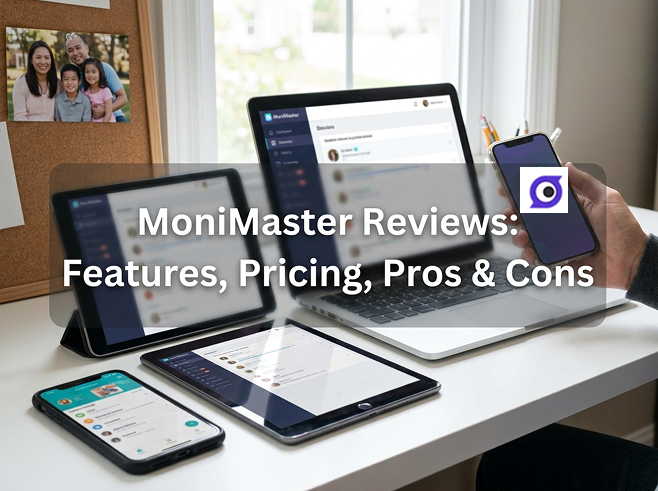
MoniMaster is one of the more well-known phone monitoring apps, promising to track calls, messages, social media, and location across Android and iPhone. But with a long feature list and mixed user reviews, is it actually the right choice for keeping your child safe? In this hands-on 2026 MoniMaster review, we break down what it does, how much it costs, its real pros and cons, and what users are saying — plus a stronger alternative, VigilKids, for parents who want real-time visibility MoniMaster can't always deliver.
Quick verdict:
MoniMaster is a feature-rich monitoring app covering calls, messages, social media, and location on Android and iOS, with no root or jailbreak needed for core features. But its drawbacks are significant: instantly deleted messages are frequently missed, shared videos can't be played from the dashboard, there's no free trial, and a large share of user reviews are negative. For parents who want reliable real-time visibility, VigilKids is the more dependable pick.
- Table Of Contents
- What Is MoniMaster?
- MoniMaster Features (and Their Limits)
- MoniMaster Pricing
- MoniMaster Pros and Cons
- What Real Users Are Saying
- A Better Alternative: VigilKids

- Final Verdict
- FAQs
What Is MoniMaster?
MoniMaster is a phone monitoring and tracking app designed for parental control, employee monitoring, and personal use. Once installed on a target device, it logs activity — calls, SMS, social media, GPS location, and browsing history — and syncs everything to a web-based dashboard you can access from any browser.
It supports both Android (6.0 and up) and iOS (9.0 and up), and most core features work without rooting or jailbreaking the device. With 25+ advertised features, MoniMaster markets itself as an all-in-one monitoring suite. As always, the real question is how it performs once it's running on an actual phone — and that's where some of its limitations show.
MoniMaster Features (and Their Limits)
MoniMaster covers a broad range of monitoring functions on paper — but several come with real-world catches. Here's what you get, and where each falls short:
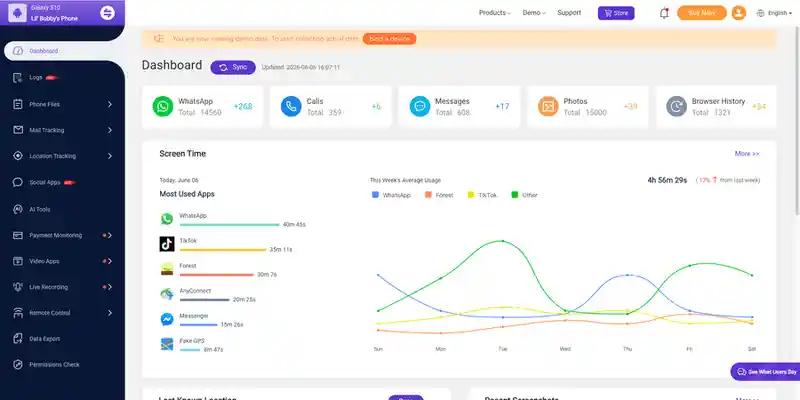
- Call and SMS tracking: Logs calls and texts with timestamps — though it lacks deeper frequency analytics.
- Social media monitoring: Tracks WhatsApp, Facebook, Instagram, and Snapchat using screenshots and keylogging — but it's not true real-time, so fast exchanges can slip by.
- GPS location and geofencing: Shows location and zone alerts, which works reasonably well.
- Call recording: Records calls without root on supported devices, though reliability varies by phone model.
- Keylogger & screenshots: Captures typed text and periodic screenshots — but instantly deleted messages are often missed entirely.
- Media & browsing: Logs websites and shared media, but videos can only be viewed as thumbnails — you can't actually play them from the dashboard.
Where MoniMaster falls short:
- Misses quickly deleted content. If your child deletes a message right after sending, MoniMaster frequently won't capture it — defeating the purpose for the very content you'd most want to see.
- No real video playback. Seeing only a thumbnail means you can't review what was actually shared in a video.
- No real-time screen view. You're reviewing logs after the fact, not watching activity as it happens, so timing-sensitive risks can pass before you notice.
- No free trial. You can't fully test it before paying — only a limited live demo is offered.
MoniMaster Pricing
MoniMaster uses tiered subscription pricing. Note that rates vary by platform and by which product edition you choose (Android, iOS, or iCloud), so always check the official site for current numbers. Typical Android pricing looks like this:
| Plan | Effective Price | Best For |
|---|---|---|
| 1-Month | ~$39.99/month | Short-term, one-off use |
| 3-Month | ~$19.99/month (billed quarterly) | Best-seller, medium term |
| 1-Year | ~$9.16/month (billed yearly) | Long-term savings |
The annual plan is reasonably priced, but the month-to-month rate is on the higher side compared with some competitors, and there's no free trial — only a live demo. Plans auto-renew, so set a reminder if you only need short-term access.
MoniMaster Pros and Cons
- Large feature set covering calls, messages, social media, and location
- Works on both Android and iOS without root/jailbreak for core features
- Call and VoIP recording without rooting
- Geofencing and Wi-Fi-based location tracking
- Instantly deleted messages are frequently missed — a major gap for child safety
- Videos show as thumbnails only; no in-dashboard playback
- Not real-time — data syncs after the fact, so you can miss the moment
- Higher monthly price with no free trial to test first
- A notably high share of negative user reviews online (around two-thirds on some sites)
The takeaway is that MoniMaster offers breadth, but not reliability where it counts most. The deleted-message gap and lack of video playback mean you can miss exactly the content that prompted you to start monitoring in the first place — and the lack of real-time visibility makes it a reactive tool rather than a proactive one. Combined with a higher price and no free trial, these are real reasons to consider a more dependable alternative.
What Real Users Are Saying
Beyond the feature sheet, it's worth knowing how MoniMaster performs for actual users. Feedback is genuinely mixed — across review sites, a sizable share of ratings are negative, with positive reviews praising the feature depth. Here's a balanced look at the recurring themes.
User Feedback
"The feature list is huge for the price on the annual plan — call logs, location, and social media tracking all worked on my son's Android, and setup didn't need rooting."
—— A parent monitoring an Android phone
User Feedback
"It captures a lot, but a few messages my daughter deleted quickly never showed up, and I couldn't play back any of the videos from the dashboard — only thumbnails."
—— A parent reviewing social media activity
User Feedback
"The monthly plan felt expensive, and there's no free trial to test first. I wish I could have tried it before committing."
—— A first-time monitoring app buyer
The pattern matches the pros and cons: users value the breadth of features and no-root setup, but the recurring frustrations — missed deleted messages, no in-dashboard video playback, and pricing without a trial — are exactly the gaps a more reliable tool can close.
A Better Alternative: VigilKids
If MoniMaster's gaps give you pause, VigilKids is the alternative worth a serious look. It's built around the two things parents value most: real-time visibility — including live screen viewing — rather than delayed captures, and a transparent, family-first experience. You can see exactly what it shows in the monitoring demo before committing.

VigilKids Pro
- Read messages, contacts, and shared media across WhatsApp, Messenger, Snapchat, and more in real time
- Mirror the live screen and capture remote screenshots as activity happens
- Captures content as it appears, so it's less likely to miss quickly deleted messages
- Track GPS location, screen time, and app usage with instant risk alerts
Here's how the two compare head to head:
| Feature | MoniMaster | VigilKids |
|---|---|---|
| Real-time screen viewing | Limited | Yes (live) |
| Catches deleted messages | Not always | More reliably |
| In-dashboard video playback | Thumbnails only | Yes |
| Free trial / demo | Demo only | Demo available |
FAQs
Q1: Is MoniMaster safe and legal to use?
MoniMaster is legal when used for legitimate purposes — a parent monitoring an underage child, or a device you own with the user's consent. Monitoring another adult's phone without permission may be illegal, so always check your local laws.
Q2: Does MoniMaster work without rooting or jailbreaking?
Most core features work on Android and iOS without root or jailbreak. A few advanced functions may have extra requirements, and you'll need physical access to install it on the target device.
Q3: How much does MoniMaster cost?
Pricing varies by platform, but a typical Android setup runs about $39.99 for one month, around $19.99/month billed quarterly, or roughly $9.16/month billed yearly. There's no free trial, only a live demo.
Q4: Can MoniMaster see deleted messages?
Often not. Messages deleted instantly are frequently missed, which is one of MoniMaster's biggest weaknesses. A real-time tool like VigilKids that captures activity as it happens is far more reliable for catching quickly deleted content.
Q5: What's the best MoniMaster alternative?
For parents who want real-time screen viewing, reliable capture of deleted messages, in-dashboard video playback, and a transparent family-first design, VigilKids is the strongest alternative while covering the same core monitoring features.
Final Verdict: Should You Use MoniMaster?
MoniMaster is a feature-packed app, and for an Android-focused parent on the annual plan who only needs basic after-the-fact logs, it can get by. But its strengths are undercut by where it matters most: it frequently misses deleted messages, won't let you play shared videos, and isn't real-time — so the moments you most want to catch are often the ones it lets slip.
If you:
- Want to reliably catch messages even when they're deleted quickly
- Need to actually watch shared videos, not just see thumbnails
- Prefer real-time visibility over delayed captures
- Want to test a tool properly before paying a higher monthly rate
…then MoniMaster's gaps are hard to overlook. For dependable, real-time monitoring with transparent, family-first design, VigilKids is our recommended alternative in 2026.
Related Topics
Hoverwatch Reviews 2026: Features, Pricing, Pros & Cons
An honest 2026 Hoverwatch review — features, pricing, pros and cons, and the best alternative. See if it fits your needs or if VigilKids is the better pick.

FlexiSpy Review 2026: Is It Worth It? Better Alternative Inside
Our hands-on FlexiSpy review tests installation, features, and reliability on Android and iOS in 2026 — plus the FlexiSpy alternative built for parents.
Best 5 Free Spy Apps for Android in 2026 (with Real User Reviews)
Explore the best Android spy apps with free trials or demos. Compare features, limits, and real user insights before choosing the right monitoring tool.