
Is Scoopz app safe for kids or teens? The short answer is no. Scoopz is an adult-oriented short-video app, and its public interactions, mature user-generated content, and limited family controls make it a poor fit for minors.
This Scoopz app review explains what the platform does, whether Scoopz is legit, how its Creator Fund works, and what parents can do if the app appears on a child's phone.
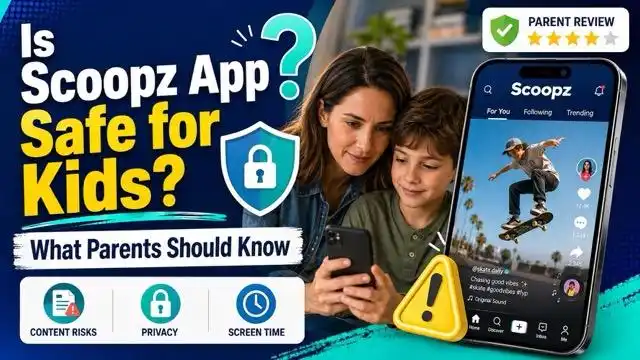
Research note: This editorial review is based on current U.S. app-store listings and Scoopz's published Community Guidelines, Privacy Policy, and Creator Video Monetization Policy, checked September 2, 2026. It does not claim hands-on account testing.
What Is the Scoopz App?
Scoopz is a short-form video app centered on "real life" content, from local news to spontaneous footage. It currently has active listings on the Apple App Store and Google Play. Store age labels can vary by region and storefront, while Scoopz's published community rules describe the service as intended for users aged 17 and above.
Key Features:
- Ad-free video feed
- TikTok-style interface: scroll, like, comment, upload
- "Real content" focus: local events, unscripted moments, raw footage
Why It's Controversial:
- Disturbing content: users report seeing real-life violence, accidents, even death
- Moderation limits: Scoopz publishes Community Guidelines and an enforcement process, but harmful user-generated content may still appear before it is reviewed or reported
- Privacy considerations: parents should review app permissions, profile information, location access, and the data practices described in the Scoopz Privacy Policy
- Limited family controls: the public resources reviewed do not document a dedicated parent-linked supervision dashboard
- Persistent sharing risk: copied or reshared media can remain outside the original account holder's control
Public reaction to Scoopz has been sharply divided. While some users are drawn to the "uncensored truth" angle, many express concern over the platform's graphic content and aggressive advertising. Reports from Reddit and Instagram describe violent, unsettling ads being shown to unsuspecting users. For many, Scoopz feels less like a TikTok rival and more like a modern-day LiveLeak—prioritizing shock value over safety or creativity.
How Does the Scoopz Creator Fund Work?
Scoopz operates a Creator Fund for eligible adults. According to its Creator Video Monetization Policy, applicants must be at least 18, submit an application, and meet the program's current eligibility and content requirements.
What the Fund Requires:
- An application from a creator who is at least 18 years old
- Original content that follows the platform's rules
- Qualified views and continued compliance with current program criteria
Main Limits:
- Rules can change: creators should check the latest policy before relying on older examples
- Acceptance is not automatic: meeting basic requirements does not guarantee approval
- Not every view is eligible: payment depends on qualified content and views under current rules
- Reused or non-compliant content may be ineligible
The published policy confirms that the program is real, but it does not guarantee acceptance, a fixed payout per view, or stable income. Creators should treat projected earnings as conditional rather than promised.
Is Scoopz Safe for Teens or Kids?
Digital safety experts strongly advise against allowing minors to use Scoopz. The platform may look like just another TikTok alternative, but its lack of basic safeguards makes it especially risky for younger users.
Key Safety Risks:
- Adult-oriented age labels that can vary by storefront and region
- No documented parent-linked supervision dashboard
- Risk of graphic user-generated content before moderation or reporting
- Location and profile exposure if permissions and settings are not reviewed
- Open social interactions that may expose younger users to strangers
For parents concerned about what their kids are exposed to online, a safety-first tool like VigilKids offers more control and peace of mind.
What Should Parents Do About Scoopz?
Because Scoopz is intended for older users, the safest response for a child is to remove access rather than depend on an in-app child mode. Start with a calm conversation so you understand what the child watched, posted, or shared and whether anyone contacted them.
- Step 1. Check the account and device. Review the profile, followers, comments, communities, location permissions, uploads, and any unknown contacts.
- Step 2. Remove or restrict access. Use these instructions to block apps on Android or configure parental controls on iPhone.
- Step 3. Add device-level supervision. Android families can use Google Family Link to manage downloads, age restrictions, and screen time.
- Step 4. Respond to harmful exposure. Save evidence of serious threats, use Scoopz's reporting tools, and follow this guide on what to do when a child watches inappropriate content.
- Step 5. Review connected social apps. Check whether conversations moved to Instagram, Snapchat, TikTok, WhatsApp, or another messaging platform.
If your child also uses mainstream social platforms, review the privacy and contact settings on Instagram and Snapchat instead of applying the same rules to every app.
How VigilKids Supports Safer Social App Use
With apps like Scoopz offering limited family controls, parents may need a clearer way to understand their children's online activity. VigilKids is a parental control solution designed to help families stay informed and respond to potential risks.
VigilKids is designed to help parents see the bigger picture—not to invade privacy, but to protect children from unsafe apps, risky chats, and harmful content. From supported social apps and messages to GPS tracking and screen activity, available data is organized in one dashboard.

Why Choose VigilKids?
- Review supported social-app and device activity through Android parental monitoring.
- Understand supported short-video activity with TikTok monitoring.
- Use screen recording and screenshots for supported Android screen activity.
- Review live position, route history, and safe-zone events with the location tracker.
Feature availability varies by device, operating system, app version, permissions, setup method, and plan. Use monitoring only on a device you own or are legally authorized to supervise.
Here's how to get started with VigilKids:
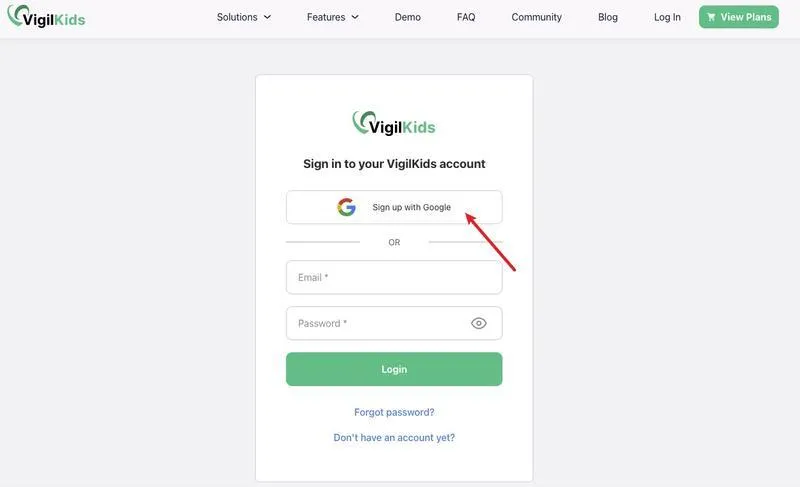
- Step 1. Sign up: Create your VigilKids account using Google or email.
- Step 2. Link your child's device: Install the VigilKids Assistant app, enter the pairing code, and grant the required permissions.
- Step 3. Start monitoring: Log in to the dashboard to review the data and alerts supported by that setup.
Frequently Asked Questions
Q1: Is Scoopz safe for kids?
No. Scoopz is designed for older users, and children may encounter mature videos, public interactions, location exposure, or contact from strangers.
Q2: Is Scoopz a 17+ or 18+ app?
The label can vary by storefront, region, and policy. Scoopz's community rules describe the service as 17+, while its Creator Fund requires participants to be at least 18. Parents should check the current local store listing.
Q3: Is Scoopz legit?
Scoopz is a real app with active store listings, published terms, a privacy policy, community rules, and a creator program. That does not make every video trustworthy or make the platform appropriate for minors.
Q4: Does Scoopz have parental controls?
The current public Scoopz resources reviewed for this article do not document a dedicated parent-linked supervision dashboard. Families should use device-level app restrictions and discuss privacy and contact rules directly.
Q5: Does the Scoopz app pay creators?
Eligible adults can apply to the Scoopz Creator Fund, but acceptance and payment depend on current program rules, qualified content, and eligible views. Participation does not guarantee earnings.
Conclusion
Is Scoopz app safe for children or teens? Based on its adult positioning, mature user-generated feed, open interactions, and limited documented family controls, it is not a suitable choice for minors.
Parents should combine honest conversations with built-in phone restrictions. On a supported Android device, VigilKids for Android can add app, screen, social, keyword, and location context where lawful and appropriate.
 Sources
Apple App Store: Scoopz — Your People, Your Video (accessed September 2, 2026)
Scoopz Community Guidelines (accessed September 2, 2026)
Scoopz Privacy Policy (updated December 31, 2024)
Scoopz Creator Video Monetization Policy (updated December 1, 2024)
Research completed September 2, 2026. Features, ratings, availability, and monitoring coverage can vary by app version, region, device, permissions, setup method, and plan.
You May Also Like

11 Safe Websites to Watch Cartoons Online Free in 2026
Discover 11 licensed websites and apps to watch cartoons online free. Compare cost, accounts, and best uses, plus practical streaming-safety tips for parents.
Is XChat Safe for Teens? A Parent's Guide to X's New Encrypted Messaging App
Hands-on parent's guide to XChat — X's new end-to-end encrypted iOS app. What it does, what audits found, what you can see, and when to allow it for teens.
Is TextNow Safe? What You Need to Know Before Using It
Not sure if TextNow is safe? Learn how it works, its privacy risks, and when to use it safely — plus a smarter way to stay protected with VigilKids.