
Need to know how to see someone's Facebook Messenger messages? Whether you're a parent watching over a child's chats or checking a device you own, there are legitimate ways to view Messenger conversations. This 2026 guide walks through the methods that actually work, when each one is appropriate, and how a monitoring tool like VigilKids lets you see sent and received messages, shared media, and contacts in real time, all within the bounds of responsible, consent-based use.

When Is It Legitimate to See Someone's Messenger Messages?
Before looking at any method, it's important to be clear about when this is acceptable. There are really only two situations where viewing another person's Messenger messages is legitimate:
- A parent protecting an underage child. Guardians have both the right and responsibility to keep kids safe online, including on Messenger, where strangers, scams, and inappropriate content are common risks. If you've ever worried because your child watches inappropriate things online, supervising their chats is a natural extension of that care.
- A device you own, used with consent. For example, a phone you provided to a family member where the user knows monitoring is in place.
Outside these cases — such as reading a partner's or another adult's private messages without permission — viewing someone's Messenger chats is both unethical and, in many places, illegal. The methods below are written with the parent-and-child use case in mind, and each one notes when it's the right tool for the job.
Method 1: See Messenger Messages in Real Time with VigilKids
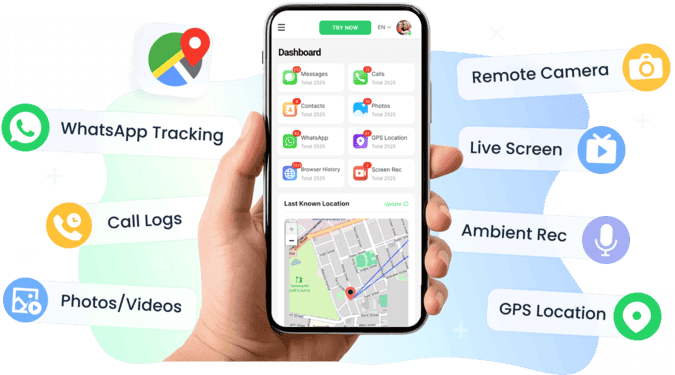
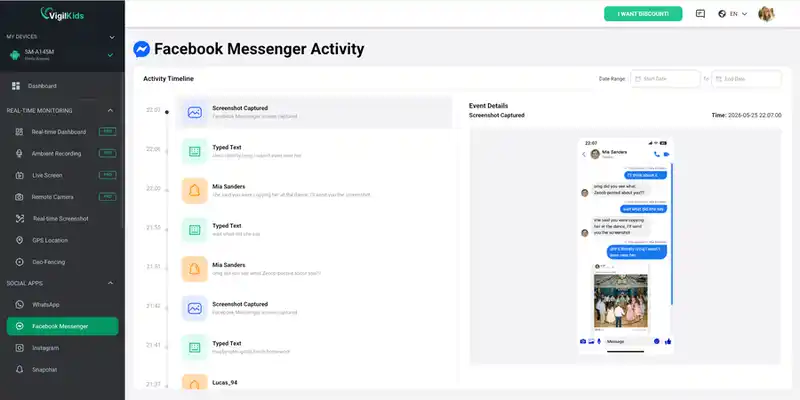
The most complete way to see someone's Messenger messages — for a parent monitoring a child — is VigilKids. Unlike methods that only show text logs after a delay, VigilKids gives you real-time visibility into Messenger activity, including the messages, media, and contacts behind each conversation. You can explore the Messenger monitoring demo to see exactly what the dashboard shows before you commit.
Best for: Parents who want ongoing, reliable visibility into a child's Messenger use — not just a one-time check — and who want to catch issues like contact from strangers or risky links as they happen.
With VigilKids you can:
- Read sent and received Messenger messages, including full conversations
- View shared photos, videos, voice notes, and call history
- See who the child is chatting with and spot unknown contacts
- Mirror the live screen and capture remote screenshots
- Get instant alerts when risky keywords appear
How to set it up:
- Step 1. Create your VigilKids account and choose a plan. You'll receive installation instructions for the child's device.
- Step 2. Install VigilKids on the child's phone, granting the required permissions (such as Accessibility and Notifications) during the setup wizard. The device then syncs to your secure dashboard.
- Step 3. Open your VigilKids dashboard from any browser and select the Messenger module. You'll see conversations, contacts, and shared media organized in one place.
- Step 4. View messages, media, and contacts in real time, and set keyword alerts so you're notified the moment something concerning appears.
- Real-time message, media, and screen visibility
- Captures content even if it's later deleted
- Works on both Android and iPhone
- Keyword and stranger-contact alerts
- Requires installation on the child's device
- Full real-time features are on paid plans
Why real-time matters:
Many monitoring tools only sync Messenger data periodically, so a message deleted shortly after it's sent — or a quick exchange with a stranger — can disappear before you ever see it. Because VigilKids captures activity as it happens, you're far less likely to miss the moments that matter most. It's also one of the broader parental control apps, covering much more than Messenger alone.
Method 2: View Messenger on a Computer (With Consent)
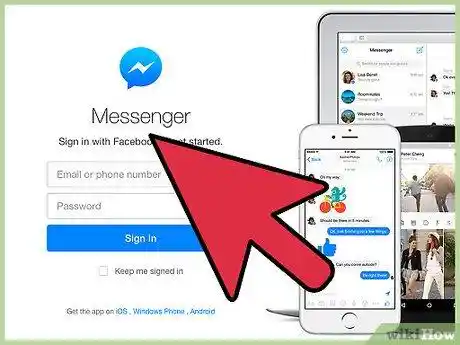
If you'd rather not install software and the person agrees to it, you can view their Messenger conversations in a web browser on a computer. Because Meta retired the standalone Messenger desktop apps for Windows and Mac at the end of 2025, the way to do this now is through Facebook in your browser. It uses the account's normal login — so it's transparent by design and only suits situations where everyone knows what's happening.
Best for: Temporary, agreed-upon supervision — for example, helping a younger teen review their chats together on a computer, with the child present and aware.
- Step 1. On a computer, open a browser and go to Facebook.com, then log in to the account (with the owner's knowledge and consent).
- Step 2. Click the Messenger icon at the top of the page, or go directly to Facebook.com/messages.
- Step 3. The account's Messenger conversations load in the browser, synced with the phone, so you can read recent chats and see contacts.
- No third-party software needed
- Uses official Facebook features — fully transparent
- Free
- Requires the account's login credentials
- Cannot be hidden; a new login may trigger a security alert
- Shows current chats, not messages already deleted
Keep in mind this needs the account's login and isn't hidden — Facebook may notify the owner of a new sign-in. For ongoing child safety rather than a one-time look, a dedicated monitoring tool is usually the better fit.
Method 3: Check a Shared or Family Device
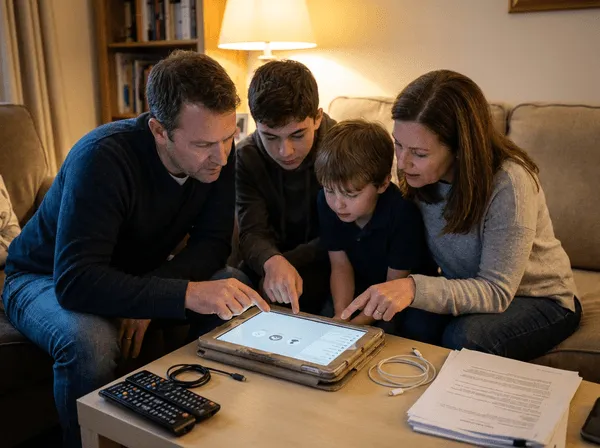
On a family tablet or a phone the child uses but you own, you may simply be able to open the Messenger app directly if they're logged in. This is the lowest-tech option and works best when done openly. Reviewing messages together — rather than secretly — turns it into a chance to talk about online safety instead of a source of conflict.
Best for: Younger children, shared household devices, and families who prefer an open, conversation-first approach to digital safety.
- Step 1. Open the Messenger app on the shared device while sitting with your child.
- Step 2. Review recent conversations, group chats, and the contact list together.
- Step 3. Tap into message requests and the "spam" folder, where messages from unknown senders often land.
- Step 4. Check whether Secret Conversations are in use — these encrypted chats stay hidden and won't appear normally.
- No software or login credentials needed
- Completely free and instant
- Encourages open, conversation-first supervision
- Only works if the child is logged in on the device
- Shows just a snapshot — anything deleted is already gone
- Secret Conversations stay hidden from a normal check
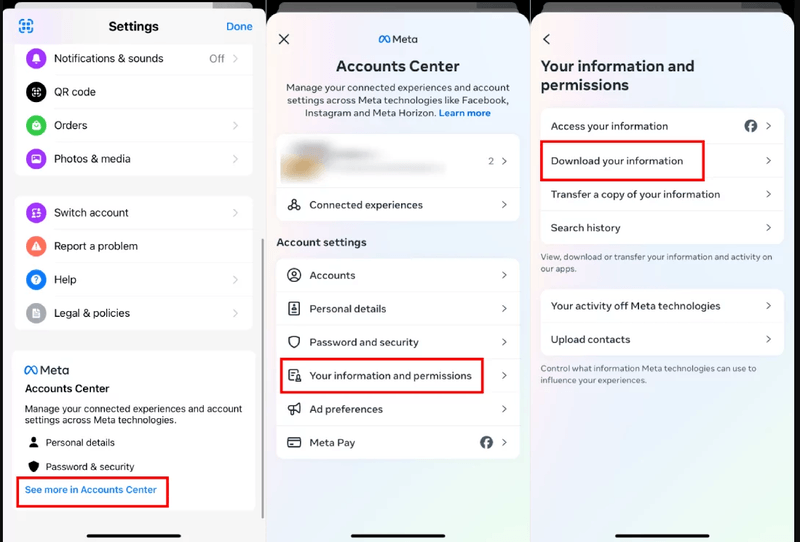
Method 4: Use the "Download Your Information" Tool
Facebook lets account holders download a full archive of their data, including Messenger conversations. On a device you manage with the user's knowledge, this is a legitimate way to get a complete, searchable copy of past messages — useful when you want the full history rather than a live view.
Best for: Getting a one-time, comprehensive record of past Messenger conversations on an account you're authorized to access — for instance, reviewing history with an older teen who has agreed to it.
- Step 1. In the Facebook account settings, go to Your information and then Download your information (or "Download profile information").
- Step 2. Select Messages as the data type, then choose the date range and file format.
- Step 3. Request the file. Facebook prepares the archive and sends a download link, which can take from a few minutes to several hours.
- Step 4. Download and open the archive to read the full conversation history offline.
- Official Facebook feature — completely legitimate
- Provides a full, searchable message history
- No extra software required
- Requires the account password and login
- Not real-time — only past data up to the request
- The archive request may be visible to the account owner
FAQs
Q1: Can I see someone's Messenger messages without their phone?
For a child you're protecting, a monitoring tool like VigilKids must first be installed on their device, after which you can view messages remotely from your own dashboard. There's no legitimate way to see an adult's private messages with no access and no consent.
Q2: Is it legal to read someone's Facebook Messenger messages?
It's legal for a parent monitoring an underage child or on a device you own with the user's consent. Reading another adult's private messages without permission may be illegal — always check your local laws.
Q3: Can I see deleted Messenger messages?
Real-time tools like VigilKids capture messages as they appear, so they can retain content even if it's deleted afterward. Tools that only sync periodically, or methods like the data download, may miss messages deleted before they were captured.
Q4: Will the person know I'm viewing their Messenger?
Legitimate monitoring apps follow platform policies that require a visible notification on the monitored device, and Linked Devices shows an active session. Being open about monitoring builds trust far better than secrecy.
Q5: Do these methods work on encrypted Secret Conversations?
Secret Conversations are end-to-end encrypted and locked to the original device. Tools that view the device's screen can still show this activity, since they read what's displayed rather than breaking encryption.
Q6: Which method is best for a parent?
For ongoing safety, a real-time monitoring tool like VigilKids is the most reliable. For an open, occasional check with a younger child, reviewing a shared device together works well. Choose based on the child's age and how much visibility you need.
Conclusion
The reliable way to see someone's Facebook Messenger messages — in the legitimate context of a parent protecting a child or a device you own with consent — is a transparent, purpose-built method. For a quick or one-time look, Linked Devices, a shared device, or Facebook's data download all work. For ongoing peace of mind, VigilKids stands out with real-time access to messages, media, contacts, and the live screen, so you can catch concerns early rather than after the fact. If you're comparing options, our roundup of the best phone monitoring apps can help. Whatever you choose, use it responsibly, keep communication open, and treat what you find as a reason to talk, not to punish.