
If your tween or teen is on TikTok, you've probably wondered how much control you actually have over what they see. The short answer: more than most parents realize — but less than most parents need. TikTok does have TikTok Parental Controls, and they’ve improved over the past few years.
But the platform is still built around an algorithm that never stops, which means content can feel endless and unpredictable. This guide breaks down what those controls actually do, how to set them up step by step, and where the gaps are — even after everything is turned on.
- Table Of Contents
- Part 1. What Are TikTok Parental Controls?
- Part 2. How to Set Up TikTok Family Pairing
- Part 3. Core TikTok Parental Control Features
- Part 4. What TikTok Parental Controls Can't Protect Against
-
Part 5. Are TikTok Parental Controls Enough for Parents?

- Part 6. Compare YouTube Shorts Parental Controls with TikTok
- FAQ
- Conclusion
What Are TikTok Parental Controls?
TikTok parental controls are a set of tools built into the app that let parents limit, monitor, and manage how their child uses TikTok. The main system is called Family Pairing — it links your TikTok account to your child's so you can adjust their settings remotely from your own phone.
Outside of Family Pairing, TikTok also includes account-level controls such as Restricted Mode, screen time limits, and privacy settings that can be locked with a passcode. Together, these features form the basic safety layer most families rely on when starting with TikTok.
But each control works differently — and each one comes with clear strengths and limitations. The table below breaks down what parents can actually do with each feature, and where the gaps still remain.
| Control Area | What TikTok Parental Controls Can Do | Key Limitation |
|---|---|---|
| Screen Time Management | Set daily limits and Downtime schedules | Teens can request extra time with passcode approval |
| Restricted Mode | Filters mature or sensitive content from the feed | Does not catch all trending or algorithm-driven content |
| Search & Discovery | Disable search for videos, hashtags, and users | Does not affect external content outside TikTok |
| Direct Messages | Control who can send messages or disable DMs completely | Age-based rules still apply (13–15 limited, 16+ flexible) |
| Account Privacy | Set account to private and approve followers manually | Does not prevent content being shared externally |
| Content Interaction (Duet / Stitch) | Restrict or disable remixing of videos | Cannot fully prevent reuploads or screen recordings |
| Account Monitoring | Adjust settings remotely via Family Pairing | No full visibility into watch history or behavior patterns |
While TikTok's parental controls help manage basic safety and screen time, they still have limitations when it comes to visibility, cross-app protection, and real-time monitoring. That is why some families choose tools like VigilKids to extend protection beyond a single app.
 Note
Note
TikTok's parental controls are a meaningful first step, but they work best as part of a broader approach — not as a standalone solution. Keep reading for what else you can do.
How to Set Up TikTok Family Pairing
Family Pairing is TikTok's core parental control system. It connects your personal TikTok account to your child's account so you can manage their experience directly from your phone — no guesswork, no asking them to show you their screen.
You'll need your own TikTok account to use it. Setup takes about five minutes.
- Step 1. Open TikTok on your phone. Tap the Profile icon in the bottom right, then tap the menu icon (≡) in the top right corner.
- Step 2. Go to Settings and Privacy → Family Pairing.
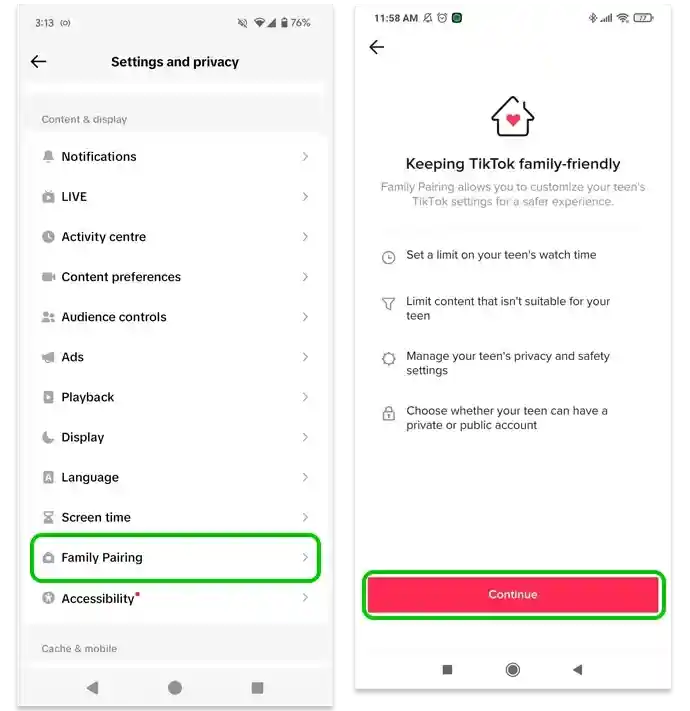
- Step 3. Select "Parent" and follow the on-screen prompt. TikTok will generate a QR code.
- Step 4. Pick up your child's phone. Open TikTok and go to the same menu. Select "Teen" and scan the QR code from your screen.
- Step 5. Confirm the pairing. You'll now be able to manage your child's TikTok settings from your own account.
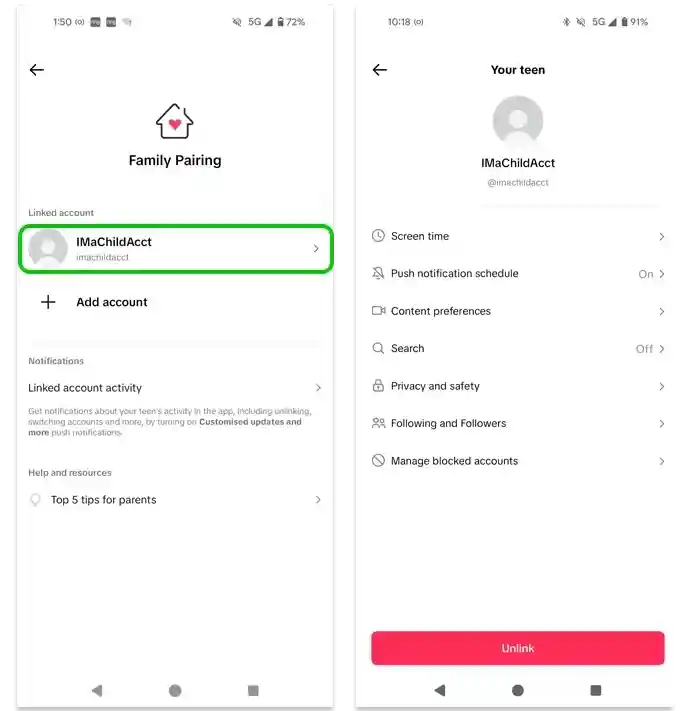
Once paired, you'll be able to adjust limits, content filters, and privacy settings without needing access to your child's device again.
 Tips
Tips
Do this with your child present, not behind their back. Framing it as a shared setup — rather than something you're doing to them — makes a real difference in how they respond to the rules.
Core TikTok Parental Control Features
Beyond Family Pairing, TikTok includes several built-in safety settings that help parents manage screen time, reduce exposure to risky content, and limit unwanted interactions. These controls focus on three key areas:
Screen Time Management
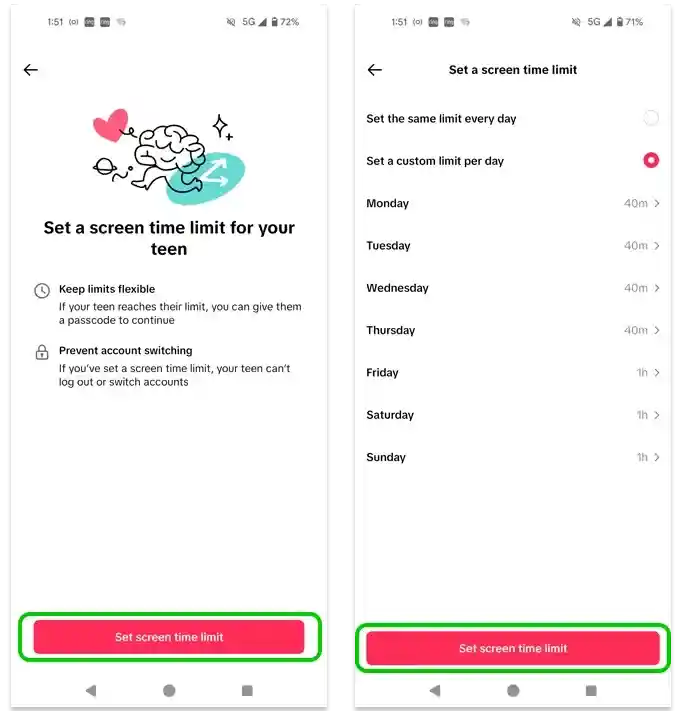
Parents can set daily screen time limits for TikTok and create a passcode that is required to continue using the app once the limit is reached. This helps reduce endless scrolling and supports healthier digital habits over time.
- Step 1. Go to Family Pairing → Screen Time.
- Step 2. Set a daily limit (40 minutes to 3 hours).
- Step 3. Enable Downtime for school nights or bedtime hours.
 Tips
Tips
For tweens (11–13), start with a lower daily limit — 45 to 60 minutes is a good baseline. For teens, 90 minutes is closer to what research suggests for healthy social media use on school days.
For a broader view of device usage beyond TikTok, you can also review how to check screen time on Android.
Restricted Mode
Restricted Mode helps reduce exposure to mature or sensitive content in the For You feed. It is not perfect, but it adds an important safety layer for younger users.
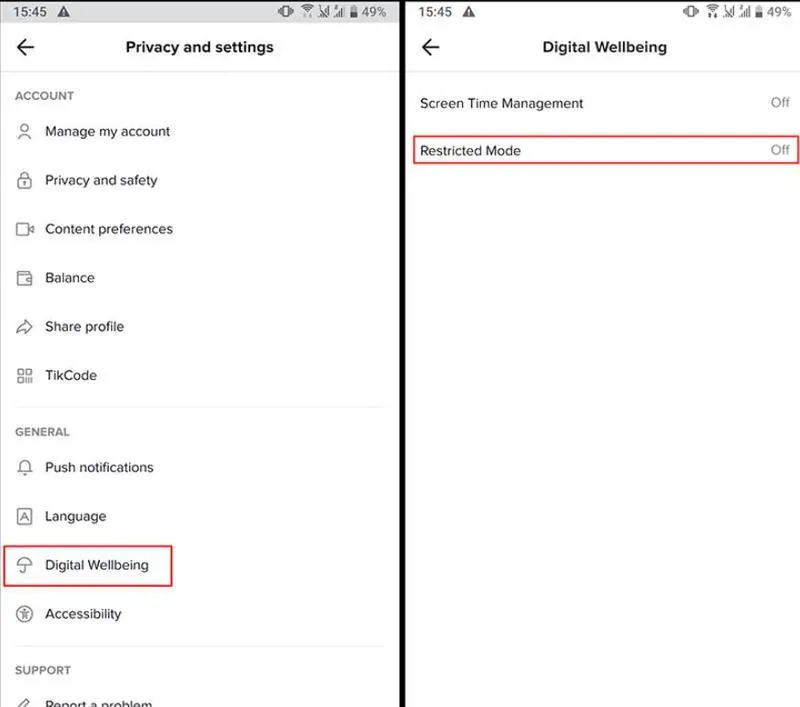
- Step 1. Go to Settings → Digital Wellbeing → Restricted Mode.
- Step 2. Turn Restricted Mode ON.
- Step 3. Set a passcode so it cannot be turned off by your child.
 Note
Note
Restricted Mode is helpful but not airtight. TikTok's content moderation can't catch every video before it reaches your child's feed. Think of Restricted Mode as a filter, not a wall.
Privacy Settings Every Parent Should Turn On
These settings live in your child's account and can be reviewed together or adjusted through Family Pairing. Go through each one and confirm it matches the recommendation below.
| Setting | Where to Find It | Recommended Setting |
|---|---|---|
| Account Privacy | Settings → Privacy → Private Account | Private (all ages under 16) |
| Direct Messages | Settings → Privacy → Direct Messages | No one |
| Duet | Settings → Privacy → Duet | Friends or No one |
| Stitch | Settings → Privacy → Stitch | Friends or No one |
| Liked Videos | Settings → Privacy → Liked Videos | Only me |
| Suggest Account to Others | Settings → Privacy → Suggest your account | Off |
Public accounts expose kids to strangers, unwanted attention, and data tracking. For children under 16, private should be the default.
What TikTok Parental Controls Can't Protect Against
Even with every setting turned on, TikTok parental controls cannot fully protect your child. Understanding these gaps is essential — because this is where real risks tend to appear.
Dangerous TikTok Challenges
TikTok challenges spread fast — sometimes faster than moderation can catch them. Some are harmless fun. Others, like the Blackout Challenge or the NyQuil Chicken trend, have caused serious harm to children and teens.
Restricted Mode doesn't reliably catch challenge-based content because it often looks like ordinary entertainment on the surface. The algorithm may actually amplify these videos because high engagement signals that the content is popular.
These trends often spread quickly through the For You feed, making them hard for parents to anticipate or filter in advance.
Addictive Scrolling and Screen Dependency
TikTok is engineered to keep people watching. Many parents notice their child intending to watch "just one video" and still scrolling 30 minutes later. The infinite scroll, the short video format, and the algorithm's ability to serve exactly what keeps your child engaged make it one of the most habit-forming apps ever designed.
Screen time limits help — but they don't address the pull the app creates. A child who hits their daily limit often feels frustrated, not satisfied. That frustration is a sign of dependency, not just preference.
Studies have linked heavy short-form video use in adolescents to reduced attention span, disrupted sleep, and higher anxiety levels. Screen time limits are a tool — conversations about why limits matter are what build lasting habits.
Strangers and Online Risks
Even with a private account and direct messages disabled, your child can still interact with strangers through comments, duets, and live streams. Predatory adults are known to use TikTok's comment section and live features to make contact before moving conversations to other platforms.
- Disable live streaming under Settings → Privacy → Live if your child isn't old enough to navigate that environment safely (requires 1,000 followers to go live, but it's worth checking)
- Remind your child never to share their real name, school, or location in their bio or videos
- Review who is following them periodically — not as surveillance, but as a safety habit
Parents concerned about messaging apps may also want to learn about WhatsApp parental monitoring, since many conversations eventually move off TikTok and onto private messaging platforms.
Age Verification Loopholes
TikTok requires users to be 13 or older, but it has no real way to verify age at sign-up. A child simply enters a false birthdate. If they list an age of 16 or older, TikTok's automatic protections for younger teens don't apply.
It's worth checking your child’s TikTok birthdate in their account settings, since it determines what safety protections are automatically applied.
Are TikTok Parental Controls Enough for Parents?
Honestly, for most families, TikTok parental controls alone are not enough to fully manage all risks. That is not a flaw in the tools — it is a limitation of how social platforms are built.
The core issue is that TikTok parental controls only apply to the linked account. They do not extend to secondary accounts, borrowed devices, or TikTok access through a browser. They also cannot show emotional context — such as whether your child felt uncomfortable, anxious, or overwhelmed by what they saw.
The most effective approach combines TikTok’s built-in controls with device-level monitoring, open communication, and broader protection across all apps.
- Cross-platform monitoring — TikTok, Snapchat safety controls, YouTube, Instagram and more.
- Real-time alerts for risky content, suspicious interactions, and unsafe behavior patterns.
- Live screen viewing — real-time monitoring with Android screen recording.
- Healthy digital habits tools to support balanced usage over time.
- Parental visibility without needing to read private messages.
How VigilKids Works:
- Step 1. Sign up for VigilKids and complete your parent account setup.
- Step 2. Install the app on your child’s device and follow the pairing instructions.
- Step 3. Start reviewing screen time, alerts, and app activity from one place.
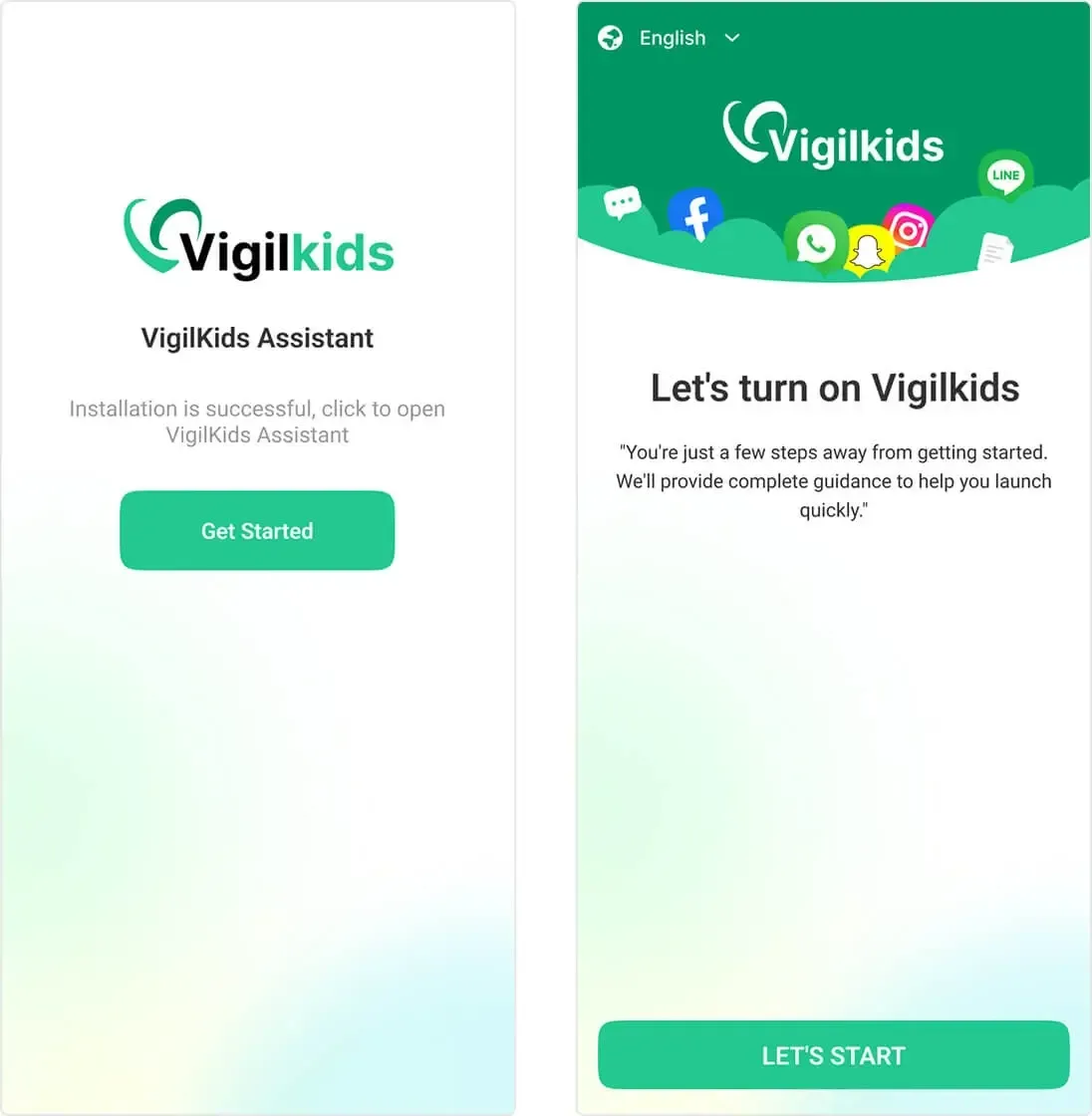
If you want a closer look at how VigilKids works, the guide page explains setup, features, and what parents can monitor across apps. That makes it easier to decide whether TikTok controls alone are enough or whether you need broader family safety coverage.
TikTok's built-in tools are a strong first step, but they only protect one app. Next, let’s compare TikTok and YouTube Shorts to see where platform-level controls stop.
Compare YouTube Shorts Parental Controls with TikTok
If you're trying to compare YouTube Shorts parental controls with TikTok, it's important to look beyond the videos themselves and focus on the safety tools available to parents. Both platforms offer parental controls, but they take different approaches to screen time management, content filtering, account supervision, and child safety.
| Feature | TikTok | YouTube Shorts |
|---|---|---|
| Dedicated parental control system | Yes (Family Pairing) | Yes (Family Link / Supervised Accounts) |
| Screen time limits | Yes — daily limits and Downtime schedules | Yes — managed through Family Link |
| Content filtering | Restricted Mode | Restricted Mode and YouTube Kids |
| Direct message controls | Yes — can be restricted or disabled | Limited (comments only) |
| Separate kids app available | TikTok for Younger Users (limited) | YouTube Kids (more comprehensive) |
| Ease of parental supervision | High | Medium |
| Protection for younger children | Limited | Strong |
| Risk of stranger interactions | Higher | Lower |
| Minimum age | 13 | 13 (Google account required) |
For children under 13, YouTube Kids is usually the safer option. For teens 13 and older, TikTok offers more hands-on parental controls, but both platforms still require active parental involvement and regular conversations about online safety.
If your child also spends time on YouTube, you may want to read our complete guide to YouTube parental controls to understand how Family Link, supervised accounts, and YouTube Kids work together.
FAQ
Q1: Does TikTok have parental controls?
Yes. TikTok's main parental control system is called Family Pairing. It links your TikTok account to your child's and lets you control screen time limits, content filters, direct messages, and search access — all from your own phone. Individual settings like Restricted Mode and private account can also be set directly on your child's account.
Q2: Can TikTok parental controls block all inappropriate content?
No. Restricted Mode can reduce exposure to mature content, but it cannot filter every video. Some harmful trends, misleading information, or age-inappropriate content may still appear in a child's feed.
Q3: Can my child turn off TikTok parental controls?
Family Pairing settings are controlled from the parent's account and cannot normally be removed by the child. However, some teens may try to create a second account or access TikTok through another device, which is why ongoing supervision is still important.
Q4: Is TikTok safe for kids under 13?
TikTok's minimum age requirement is 13. Children under 13 should use the limited TikTok experience designed for younger users or avoid the platform until they are old enough to use it safely with parental guidance.
Q5: Which is safer for kids, TikTok or YouTube Shorts?
For younger children, YouTube Kids is generally the safer option because it offers a more curated environment. For teens, both TikTok and YouTube Shorts carry risks, although TikTok provides more direct parental controls through Family Pairing.
Conclusion
TikTok parental controls are a great starting point for families. Features like Family Pairing, Restricted Mode, screen time limits, and privacy settings can help reduce risks and create healthier boundaries. But because TikTok is constantly changing, no built-in setting can catch every challenge, trend, or interaction your child may encounter online.
If your family wants a broader view beyond TikTok, VigilKids can help. It provides visibility across multiple apps and devices, helping parents spot potential concerns earlier without reading every message or constantly checking a child's phone. It's not about distrust — it's about having a safety net for the things no settings menu can catch. Explore VigilKids to see how broader family safety support works.
Hot Topics for Parental Controls
Top Parental Control Apps 2026: iPhone, Android, Mac & PC
The top parental control apps in 2026 for every family type — by age, by platform, by household setup. Compare 7 picks including VigilKids, Bark, and Family Link.
8 Best Android Parental Control Apps in 2026
The 8 best Android parental control apps for 2026 — screen time, location, app blocking, and content filtering. Free and paid options compared.
What Is the Scoopz App ? Safety Guide to “TikTok alternative”
Explore what Scoopz is, why it’s raising concerns, how its Creator Fund works, and whether it’s a safe space for teens and younger users.