
The short answer to is Character AI safe is: not completely, especially for children. Users must be at least 13, or 16 in the EEA and UK. Although Character.AI has removed open-ended chat for under-18 accounts and added safety filters, children may still encounter unsuitable responses, share private information, or become emotionally dependent. Parents should stay involved and set clear boundaries.
- Is Character AI Safe for Kids?
- What Could Your Child Reveal to Character.AI?
- Why Character.AI Can Feel Riskier Than an Ordinary App
- Warning Signs Parents Should Notice
- How to Make Character.AI Safer at Home
- How VigilKids Helps Parents Spot Risks Earlier

- Character.AI Safety FAQs
Is Character AI Safe for Kids?
Character.AI is not designed for young children. The Character AI age limit is 13, or 16 in the European Economic Area and the United Kingdom. The company has also removed open-ended Character chat from under-18 accounts, although other creative features may remain available depending on the account and region.
Character.AI says its age-assurance system evaluates signals such as login information, platform activity, and third-party signals. If an adult is incorrectly placed in the under-18 experience, third-party provider Persona may offer selfie verification and request an ID only when the selfie result is inconclusive. Parents should never help a minor bypass this process.
Those safeguards reduce some exposure, but they do not make every interaction suitable for every teen. AI-generated replies can be inaccurate, emotionally persuasive, or unexpectedly mature. A Character may sound caring and confident without understanding your child, knowing the full situation, or being accountable for its advice.
For parents, the most useful question is not simply whether the official website is technically secure. It is whether your child can recognize fiction, protect personal information, stop using the service comfortably, and bring upsetting conversations to a trusted adult.
Under the minimum age: do not allow access. For teens: confirm they are using the correct under-18 experience and set clear privacy and time boundaries. If use becomes secretive, distressing, or emotionally dependent: pause access and address the underlying concern—not just the app.
What Could Your Child Reveal to Character.AI?
A child may be more open with an AI Character than with a public social-media account. There is no visible audience, the replies arrive instantly, and the Character may appear patient and nonjudgmental. That can make the chat feel private even though it is still an online service processing user content.

- Identity details: full name, age, birthday, school, usernames, or photos that connect an online account to a real child.
- Location clues: a home area, school route, daily schedule, favorite hangout, or details visible in an uploaded image.
- Private family information: conflict at home, parents’ names, travel plans, financial circumstances, or times when the child is alone.
- Emotional vulnerabilities: loneliness, fears, sexuality, bullying, self-esteem concerns, or mental-health struggles.
- Account and financial data: passwords, recovery information, verification codes, payment details, or screenshots containing sensitive information.
The Character.AI privacy policy, effective July 1, 2026, describes collecting user-submitted content such as chat communications and shared media, along with identifiers, device information, usage activity, demographic information, and geolocation-related data. This does not mean that every chat is publicly visible or has been leaked. It does mean parents should teach children not to use an AI chat as a confidential diary.
In July 2026, Italy’s data protection authority announced findings involving Character.AI’s privacy information, safeguards for minors, and age-verification procedures. The regulator ordered additional measures, including effective age checks and private-by-default profiles for minors. This was a specific regulatory decision, not evidence that every user’s chats were leaked, but it reinforces the need for careful data-sharing rules at home.
Why Character.AI Can Feel Riskier Than an Ordinary App
Most children know that a video cannot listen back. An AI Character is different: it responds personally, remembers parts of a conversation, and can continue a story for as long as the user keeps typing. The risk comes from that combination of personalization, availability, and unpredictability.
The conversation can become personal very quickly
A roleplay may begin as harmless entertainment and move into relationships, family conflict, sexuality, violence, or emotional support. Safety filters can reduce inappropriate output, but no automated system can guarantee that every response will be suitable or accurate.
A fictional Character can still feel emotionally real
Online discussions include very different experiences. Some users describe Character.AI as casual entertainment; others report staying up late, struggling to focus, or turning to a Character when lonely. These stories do not prove that every child will become dependent. They do show why parents should notice how the service fits into the child’s life, rather than judging only the content of one chat.
This pattern is not unique to Character.AI. Our Candy AI safety review explains how another AI companion can combine intimate conversations, privacy questions, and adult-oriented features.
The AI may sound more certain than it should
A fluent response can still be false, incomplete, or inappropriate for a child’s situation. Character.AI should not be a child’s only source for medical, mental-health, legal, relationship, or emergency advice. If the topic could affect the child’s safety or wellbeing, bring a trusted adult or qualified professional into the conversation.
“Character AI unfiltered” downloads create a separate cybersecurity risk
The official Character.AI website is not the same thing as malware. The greater technical risk often appears when children search for “Character AI unfiltered,” unofficial APK files, browser extensions, or tools that promise to bypass age and content protections. These downloads may request excessive permissions, collect credentials, or lead to copycat sites. Encourage your child to use only verified app-store listings and the official domain.
If your child is actively looking for fewer content restrictions, read our guide to CrushOn AI safety, including its unfiltered chat, NSFW content, age-check, and privacy concerns.
Warning Signs Parents Should Notice
You do not need to read every conversation to notice when an online habit is affecting your child. Look for patterns, not a single awkward chat or one unusually long session.
- Your child hides the app, creates a second account, or looks for ways around age restrictions.
- Character.AI use continues late at night or regularly displaces schoolwork, exercise, meals, or sleep.
- Your child becomes unusually angry, anxious, or distressed when asked to stop.
- They describe a Character as the only one who understands them or reject help from real people.
- They repeat unsafe advice from a Character as though it came from a professional.
- They share real-world identifiers, private images, passwords, location details, or intimate information.
If you notice one sign, begin with curiosity: “What do you enjoy about this Character?” or “Has anything it said made you uncomfortable?” A calm question is more likely to reveal context than an immediate accusation. If your child mentions self-harm, abuse, exploitation, or immediate danger, stay with them and contact an appropriate qualified professional or local emergency service.
When you need a clearer picture of when the app is being used, start by learning how to check screen time on Android.
How to Make Character.AI Safer at Home
A rule works better when your child understands the reason behind it. Build a short family plan together and focus on the risks that actually apply to your child.
- Confirm the account age. Make sure your child is not using an adult birthday or adult account to reach restricted features.
- Set a no-private-data rule. Keep names, school details, live location, passwords, private photos, health records, and payment information out of AI prompts.
- Create a time boundary. Keep AI use away from bedtime, homework, and family time. Use transparent app time limits when reminders are not enough.
- Use Character.AI Parental Insights when available. Treat the weekly usage summary as a way to start a conversation, not as proof that the underlying activity was safe.
- Teach “pause, check, tell.” Pause when a reply feels sexual, threatening, secretive, manipulative, or medically serious; check the claim elsewhere; tell a trusted adult.
- Agree on a response before something happens. Let your child know they can show you a troubling message without automatically losing every device privilege.

Blocking may be reasonable when a child is below the minimum age, repeatedly enters the adult experience, shares sensitive information, or cannot stop despite harm to sleep or daily life. If needed, follow this guide to block apps on Android, explain the reason clearly, and set a date to review the decision.
How VigilKids Helps Parents Spot Character.AI Risks Earlier
Character.AI’s own safety tools are the right place to begin, but they do not always show the wider device pattern. If you are worried that your child is using AI late at night, visiting unofficial alternatives, or moving a risky conversation to another app, VigilKids can help you see more context on an authorized device and respond before a habit becomes harder to address.

How VigilKids Helps
- Check app usage: Spot repeated or late-night Character.AI sessions.
- Review screen context: Look at supported screen activity when a pattern needs explanation.
- Set app and web limits: Restrict AI services that do not fit your child’s age.
- Act on risk signals: Use available alerts and context to start a timely conversation.
- Compare wider activity: See whether the concern continues across other supported apps, then compare suitable parental control apps.
Start in 3 Simple Steps
- Step 1. Create an account and choose a plan.
- Step 2. Follow the guide to connect the device you own or are authorized to manage.
- Step 3. Open the dashboard and review supported activity together with your family rules.
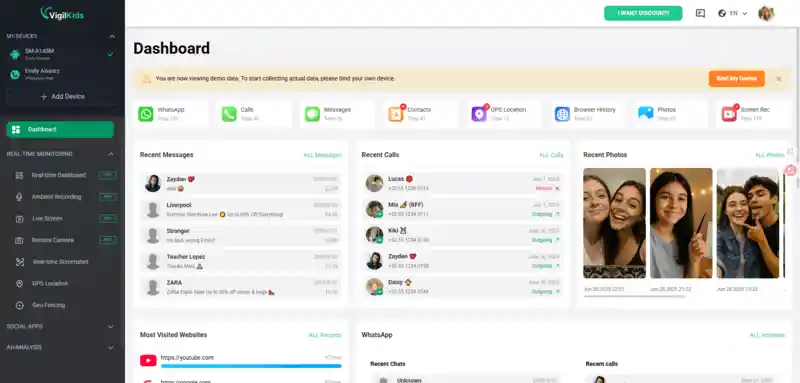
Use VigilKids only on a device you own or are authorized to manage and follow applicable laws. Available information depends on the device, operating system, app version, permissions, setup, and plan. VigilKids cannot guarantee that Character.AI is safe, display every AI interaction, or recover activity that was never captured after setup.
Character.AI Safety FAQs
No. Character.AI states that users must be at least 13, or at least 16 in the European Economic Area and United Kingdom. A 12-year-old is below the platform’s minimum age. Parents should block access and offer a more age-appropriate creative activity.
There is no basis for saying that Character.AI routinely leaks every chat. However, the privacy policy says chat communications are collected and processed as user content. Children should avoid entering identifying, intimate, financial, location, health, or account-security information.
Character.AI’s privacy policy describes collecting identifiers, device and usage data, and geolocation-related information. That is not proof that the service secretly follows a child’s precise live location. Parents should review device permissions and teach children never to type their location or routine into a prompt.
The official Character.AI site is not generally identified as malware. Greater risk comes from unofficial APKs, extensions, copycat sites, and “unfiltered” tools that promise to bypass safeguards. Use only the official domain and verified app-store listing, and do not grant unnecessary permissions.
Character.AI’s Parental Insights can provide a weekly summary of time and frequently used Characters when the feature is available and the teen initiates sharing. It does not include chat content. Parents still need open conversations and appropriate device-level boundaries.
Conclusion
So, is Character AI safe for your child? The platform has added meaningful protections, but no filter can prevent every unsuitable response or stop a child from sharing too much. The strongest approach combines honest conversations, clear privacy rules, age-appropriate access, and attention to changes in sleep or behavior. When you need more device-level context, VigilKids can help you understand patterns and step in with a calmer, better-informed conversation.
Sources
- Character.AI Safety Center — updated October 30, 2025
- Character.AI Privacy Policy — effective July 1, 2026
- Italian Data Protection Authority: Character.AI privacy and child-protection findings — July 9, 2026
Research checked on August 3, 2026. Features may vary by version, region, device, operating system, permissions, and plan.
Hot Topics for Parental Monitoring
Best Text Monitoring App for Parents | iOS & Android Guide
Discover the best text monitoring app for parents and parental control app to read text messages. Compare iOS and Android solutions, features, and safety tips.
Roblox Parental Controls: Complete Guide for Parents
Everything parents need to know about Roblox parental controls — how to set them up, what they cover, and what to do when they're not enough.
Is XChat Safe for Teens? A Parent's Guide to X's New Encrypted Messaging App
Hands-on parent's guide to XChat — X's new end-to-end encrypted iOS app. What it does, what audits found, what you can see, and when to allow it for teens.