
If you've ever wondered how to open a snap without them knowing, this guide explains which techniques still work in 2026, which ones no longer do, and the legal and ethical tradeoffs involved. You'll find practical methods — airplane mode, the peek gesture, notification previews, and using a second device — with clear step-by-step instructions for both iPhone and Android.
It also includes a concise testing checklist to try these methods safely on a spare account, plus warnings about risky third-party apps. If you're a parent or guardian, there's a recommended, lawful monitoring option that avoids hacks and protects children. Read carefully and proceed responsibly. These methods were tested and updated for 2026.
Methods at a Glance
There are a few different ways to view a snap without opening it, and each works best for a different type of content. Here's a quick comparison before the detailed steps:
| Method | Works For | Reliability |
|---|---|---|
| Airplane Mode | Images, some videos | Most reliable |
| Peek / preview gesture | Text, small previews | Medium |
| Notification preview | Text only | Medium |
| Second device / mirroring | Anything (with consent) | High |
| VigilKids (parents) | Full activity, with consent | Most reliable |
Method 1: Airplane Mode / Offline Viewing
This is the most commonly recommended technique for how to open a snap without them knowing. It works by forcing Snapchat to display content already downloaded to your device while preventing the app from communicating with its servers. Use a spare account or a consenting friend to practice before trying it on important messages.
Step 1: Preparation
- Open Snapchat and go to the chat or story list.
- Wait until the snap thumbnail fully downloads — confirm the preview is visible so the content is cached locally.
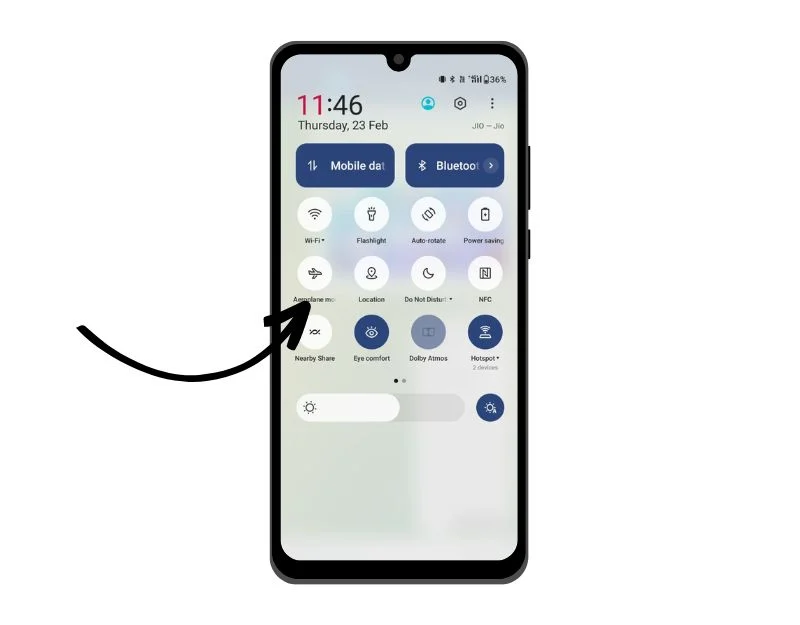
Step 2: Turn on Airplane Mode
- On iPhone, open Control Center and tap the airplane icon. On Android, enable Airplane Mode from Quick Settings.
- Make sure you're fully offline before opening the snap — any connection lets the app report the open.
Step 3: Open the snap and view it
- While offline, tap the snap to view it. Since the app can't reach Snapchat's servers, it won't register the view.
- This works for images and fully downloaded videos — the main way to open a pic on Snap without them knowing.
Step 4: Force quit the app
- After viewing, force quit Snapchat: swipe it away from recent apps (iPhone) or Force Stop via App Info (Android).
- For extra caution, log out before reconnecting so the app doesn't sync the cached view event.
Why this works
Snapchat stores some content briefly in a local cache after download. When you view a snap online, the app notifies the server and the sender sees the opened indicator. If you block network access after the content is cached, the local view doesn't reach the server until the app reconnects. That window is what this method exploits.
Important caveats and tips:
- This method isn't guaranteed — some snaps stream and may not cache, so it can fail depending on your Snapchat version. Always verify on a spare account first.
- Screenshots and screen recording can still trigger notifications to the sender. Avoid taking screenshots of other people's content without permission.
Method 2: Peek / Partial Preview Gesture
The peek gesture lets you preview a snap without fully opening it — a quick way to see a snap without opening it completely.
- On iPhone: press and hold the snap thumbnail, then slide slightly into the preview area without releasing your finger.
- On Android: long-press and gently drag to preview, though exact behavior varies by model and OS version.
The technique works best for text and small image previews. For text messages it's often the fastest way to read a Snapchat message without opening it. The main risk is an accidental full open if you apply too much pressure or lift your finger, so practice on a test account until you can control the motion reliably. Some snaps won't preview at all, so use this method cautiously.
Method 3: Notification and Lock Screen Preview
Many phones show message snippets in a notification or on the lock screen, which lets you read text without opening Snapchat at all.
- On iPhone, go to Settings > Notifications, find Snapchat, and enable Allow Notifications and Show Previews.
- On Android, open Settings > Apps (or Apps & notifications), select Snapchat, then enable Notifications and set Lock screen or Pop on lock screen to show previews.
This answers the question of how to view a snap without them knowing when the snap is text only. It won't display full images or videos, and some notifications show only a short snippet. Privacy settings, OS version, and sender options affect what appears, so test it on your device to confirm how much content you can see.
Method 4: Use a Second Device or Mirror the Screen
Another way to open a snap without them knowing is to view the message on a second device with the sender's consent, or to mirror the screen with permission.
If you and a trusted person both have access to the same Snapchat conversation on different devices, you can view the snap on one device while keeping the other untouched. Alternatively, ask the sender to forward the snap to a different account, or to show it in person while you mirror their screen to a computer for easier viewing.
This method is suitable for testing and for parental monitoring when the device is owned by the parent. Don't use it to invade another person's privacy.
Method 5: A Safer Option for Parents – VigilKids
If your goal is child safety or responsible monitoring rather than deception, choose a purpose-built parental solution instead of hacks. VigilKids is built for modern parental oversight with real-time alerts, screen-time management, app activity logs, and safe-search features. It helps parents act proactively without breaking trust or device security — and unlike the manual tricks above, it doesn't stop working every time Snapchat updates.
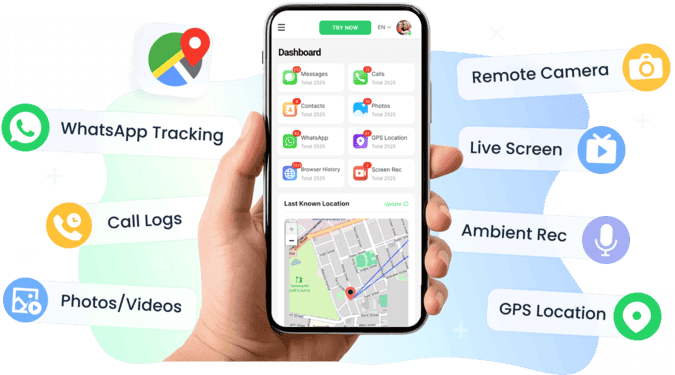
Key VigilKids features:
- View your child's Snapchat activity through real-time screenshots and screen recordings.
- Beyond Snapchat, check SMS, call logs, and WhatsApp conversations.
- Set daily screen-time limits and schedules for apps and device usage.
- Apply content and search filters to reduce exposure to risky material across apps and browsers.
- Use family-friendly dashboards and automated summaries that highlight trends and potential issues.
Why choose VigilKids over ad-hoc tricks
- Reliability: Designed for continuous monitoring, so it won't break when Snapchat updates.
- Legal and ethical compliance: Built for transparent parental oversight, not covert snooping on other adults.
- Family-first experience: The interface helps parents and children resolve issues constructively.
If you're looking into how to read a Snapchat without opening it because you're worried about a child, this is the safer route. Rather than chasing tricks that may stop working overnight, VigilKids lets you manage safety openly and responsibly. It's also one of the broader parental control apps for families.
Risks and Legal or Ethical Considerations
Before trying any trick to open a snap without them knowing, consider the risks. Viewing or saving someone's Snapchat content without their awareness can damage trust and may violate the platform's Terms of Service. Snapchat is designed for temporary sharing, and any attempt to bypass that principle can lead to account warnings or suspensions.
There are also privacy and ethical concerns. Secretly accessing messages or snaps can be viewed as surveillance or digital intrusion, especially when it involves another adult's personal content. Depending on where you live, secretly recording or accessing private communications might even be illegal. Always check local regulations before taking any action that could cross a legal boundary.
When is monitoring appropriate? Parental supervision is one defensible situation, provided the child's device is owned or managed by the parent and monitoring is done for safety rather than control. Monitoring with explicit consent from the device owner is also acceptable and transparent.
If you're a parent, consider safer and legal ways to keep your child protected online with this quick checklist:
- Communicate openly about online boundaries.
- Use tools like VigilKids to manage app usage and alerts.
- Encourage responsible sharing habits on Snapchat and beyond.
Troubleshooting and Best Practices
Testing any of these methods safely means rehearsing on a secondary account or with a consenting friend. Follow this checklist before trying on important messages:
- Create a spare Snapchat account or ask a trusted friend to send test snaps.
- Send a mix of text, images, and short videos so you can confirm which media types cache.
- For airplane mode testing, wait for the thumbnail or preview to fully appear, then switch the device fully offline before opening.
- For the peek method, practice the press-and-slide motion until you can reliably preview without fully opening.
- For notification previews, toggle the notification and lock screen preview settings to see how much text appears.
- After any offline viewing test, force quit Snapchat and don't reconnect immediately. To be extra safe, log out or reinstall before reconnecting.
Quick fixes if something goes wrong: check that your phone is truly offline, wait longer for content to download, and avoid screenshots since they may notify the sender. If a method fails, stop and re-test it on the spare account.
Version note: Snapchat updates can change app behavior. Re-test these procedures regularly, and if you're on iPhone, verify how to view a snap without opening it after each app update.
FAQs About How to Open a Snap Without Them Knowing
Q1: Can you view a snap without them knowing?
Yes, but results vary. The most reliable way is the Airplane Mode method, which lets you view cached snaps offline before the app reports the open to Snapchat's servers.
Q2: Will Airplane Mode always work?
Not always. Snapchat updates can change cache behavior, so testing is essential. Always confirm the method still works after each app update.
Q3: Can I view a Snapchat picture without opening it?
Sometimes — if the image is fully downloaded before you go offline. Streaming or large snaps may fail, so practice opening a pic on Snap without them knowing on a spare account first.
Q4: Does the peek gesture work on iPhone and Android?
Yes, though sensitivity differs. On iPhone, use gentle pressure and slide slightly to preview without triggering a full open. On Android, behavior varies by model.
Q5: Does Snapchat notify the sender if I screenshot a snap?
Yes. Snapchat alerts the sender when you screenshot or screen-record a snap or chat. The offline methods here are about viewing without registering an open — not about saving content, which can still trigger a notification.
Q6: Are third-party apps safe for viewing a snap without opening it?
Usually not. Most violate Snapchat's Terms and put your account at risk. Stick to the manual methods above. If you're a parent, a purpose-built monitoring tool like VigilKids is the safe, legitimate option.
Conclusion
Learning how to open a snap without them knowing can be useful for curiosity or testing, but it carries real risks. Always prioritize privacy, legality, and trust. The Airplane Mode method remains the most reliable manual trick, while the peek gesture and notification previews work for quick text. For parents or guardians, responsible monitoring with a tool like VigilKids is the safest path — it doesn't break when Snapchat updates and keeps everything transparent. Stay updated, test carefully, and use these methods wisely in 2026.