


XChat — X's standalone end-to-end encrypted messaging app — launched on iOS on April 24, 2026. Within days of launch it's already climbing the App Store social charts, and your teen has likely seen it mentioned somewhere on X itself. Whether to allow it, when to allow it, and what you can actually see if your teen is using it — those are the three questions parents are asking now.
This guide answers all three. We covered the immediate fake-app warning in a separate alert. This piece is the longer, calmer view: what is XChat and what XChat actually does, what we found when we tested it ourselves, what the security audits flagged, what teens find appealing about it, and what your visibility looks like as a parent.

XChat in 2026: the short version
XChat existed inside the X platform as "Encrypted Direct Messages" before April 2026 — which is why some articles talk about it dating from 2025. What launched on April 24, 2026 is the standalone iOS app, broken out of the main X platform into its own dedicated experience. Your teen would download it separately, sign in with their X account, and use it as a focused private-messaging space.
The honest first impression after a few days of testing: XChat is the X DM panel pulled out into its own app. Same encryption model, same contact graph, same disappearing-message and screenshot-blocking features that already existed inside X — now in a separate icon on the home screen. The differentiator from your teen's perspective isn't a new capability; it's the dedicated, distraction-free space.
Key facts
- iOS only. No Android version has been announced. No browser version. When you log out, all locally cached messages on that device are deleted.
- Free, no ads, no in-app purchases for core features.
- Requires iOS 26.0 or iPadOS 26.0+. Apple's February 2026 data shows only about two-thirds of active devices on iOS 26, so this requirement alone locks out many older phones.
- Requires an X account. No phone number or email verification beyond what X already requires.
- App Store rated 17+. iOS Screen Time set to 12+ or below blocks installation.
- Audited by Trail of Bits in October 2025; further independent analysis from researchers at Mysk published April 25, 2026.
- Built-in Grok AI integration — your teen can talk to xAI's chatbot inside the app.
- Group chats currently support 350 members; X has said this will rise to 500.
- X is shutting down its Communities feature; XChat groupchats are positioned as the replacement, which is likely to drive a wave of new installs over the coming weeks.
The biggest mental adjustment for parents: XChat is closer to Signal than to Snapchat. The "social network" pieces — followers, public posts, algorithmic feeds — live in the main X app. XChat is private 1:1 and group conversations only. Whether that makes it more or less concerning for your family depends on what you're worried about.
What is XChat and what XChat actually does
End-to-end encryption (the core promise)
Every message, file, image, link, and reaction in XChat is encrypted on the sender's device, stored encrypted on X's servers, and only decrypted on the recipient's device. The encryption uses per-user keypairs (generated on first use) plus per-conversation keys.
In practical terms: nobody between sender and recipient — not X Corp, not your internet provider, not the government via warrant — can read the content. This is the same security model Signal, iMessage, and WhatsApp use, although as we'll cover below, XChat's specific implementation is weaker than those competitors in some important ways.
X uses a protocol called Juicebox for key backup, which lets users recover conversations on a new device through a 4-digit PIN. The PIN is the single point of failure: forget it, lose the history. It's also been flagged by cryptographers as too low-entropy to resist a determined attacker who obtains the encrypted backup blob.
Where the privacy controls actually live
 Tips
Tips
Disappearing messages and screenshot blocking are per-conversation in XChat, not global. They're reached by tapping the contact's avatar at the top of a chat. Most launch coverage doesn't mention this — and it changes how you should ask your teen about their settings.
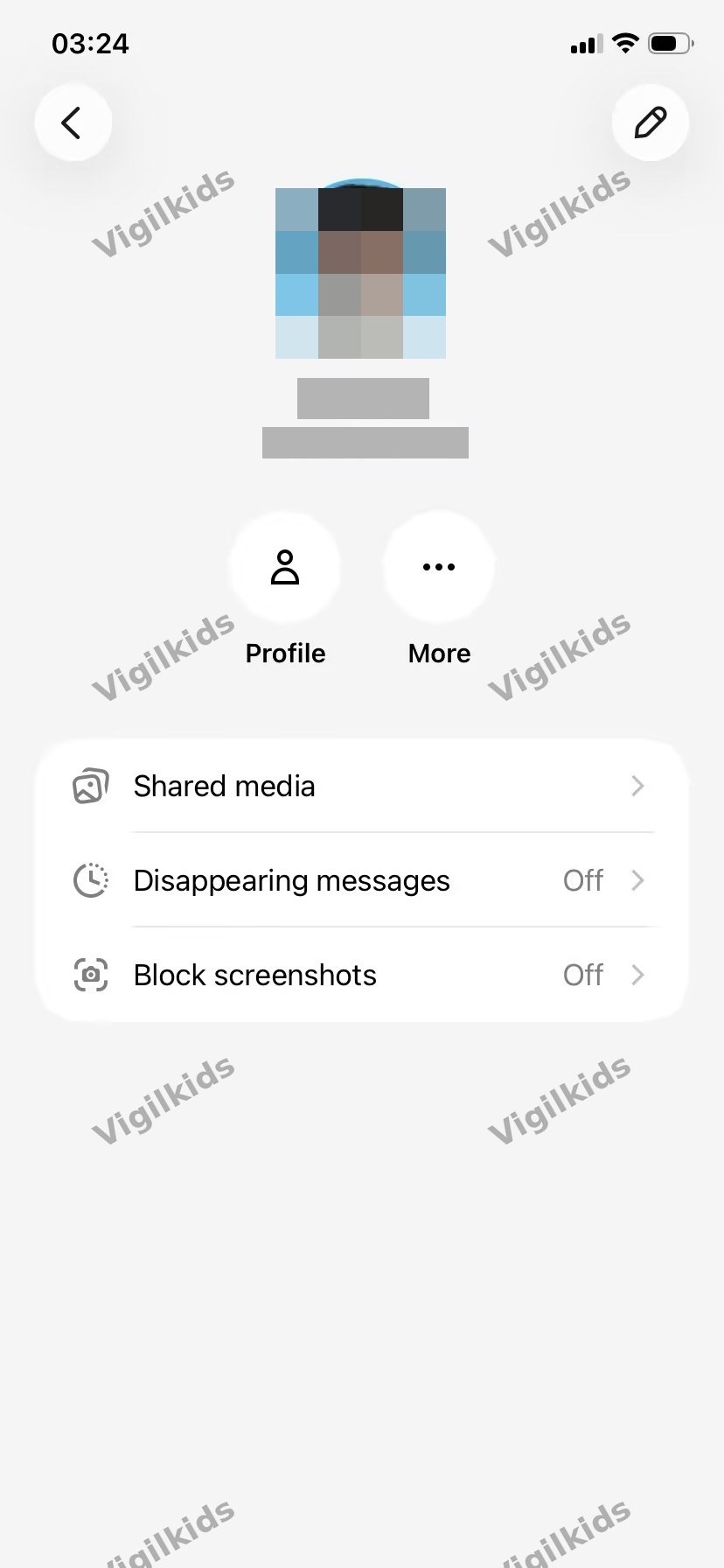
Tap the contact's avatar at the top of a chat to reach this screen. Disappearing messages and screenshot blocking are set per conversation, not globally — your teen can have these on with one person and off with another.
Why this matters:
- A teen who's used the app for a week can have very different privacy postures with different contacts. A friend they want disappearing messages with looks indistinguishable from one they don't, until you tap in.
- "Off" by default. Both disappearing messages and screenshot blocking start disabled — they only activate if the user (or the other party) deliberately turns them on for that specific conversation.
- The pattern means the most sensitive conversations are the ones most likely to have these features enabled, simply because they're the ones a user thinks to enable them in.
Disappearing messages
Messages can be set to auto-delete after a chosen interval — 5 minutes, 1 hour, 8 hours, 1 day, 1 week, or 4 weeks. Once gone, they're gone from both sides — not just from the sender's view.
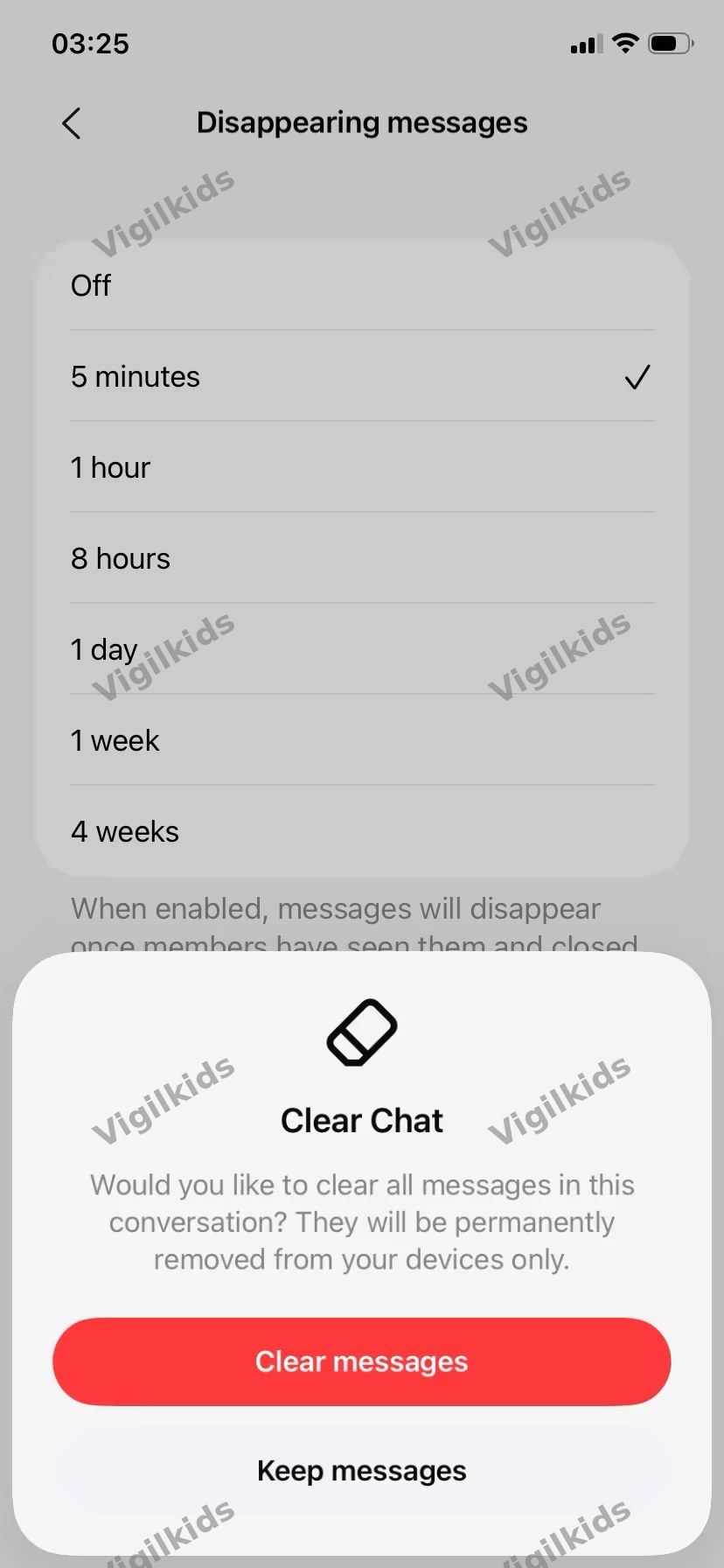
The disappearing-message intervals available in XChat. Switching the interval also prompts a separate Clear Chat action that wipes the existing history from the device.
Once you set a timer, the conversation header shows a small clock indicator next to the contact's name, and a system message records the change inside the chat:
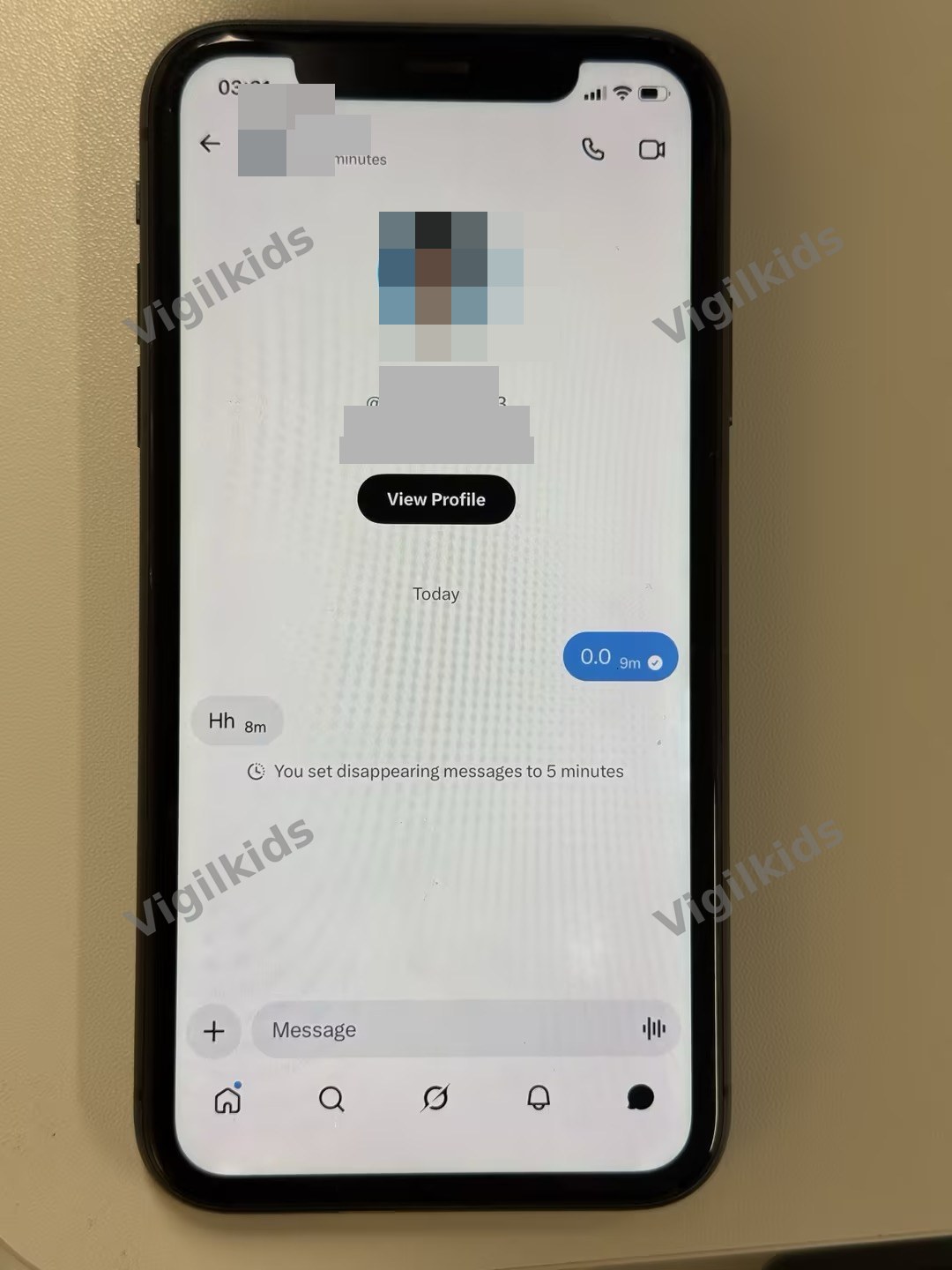
A confirmed disappearing-message timer at 5 minutes. The "5 minutes" indicator under the contact name and the system note inside the chat are the only outward signals that this conversation is now ephemeral.
Screenshot blocking — and what it actually looks like
XChat blocks screenshots within conversations. This is the feature most articles describe but few demonstrate, so it's worth showing what we observed.
When screenshot blocking is enabled for a conversation, the toggle for it lives inside the per-contact settings:
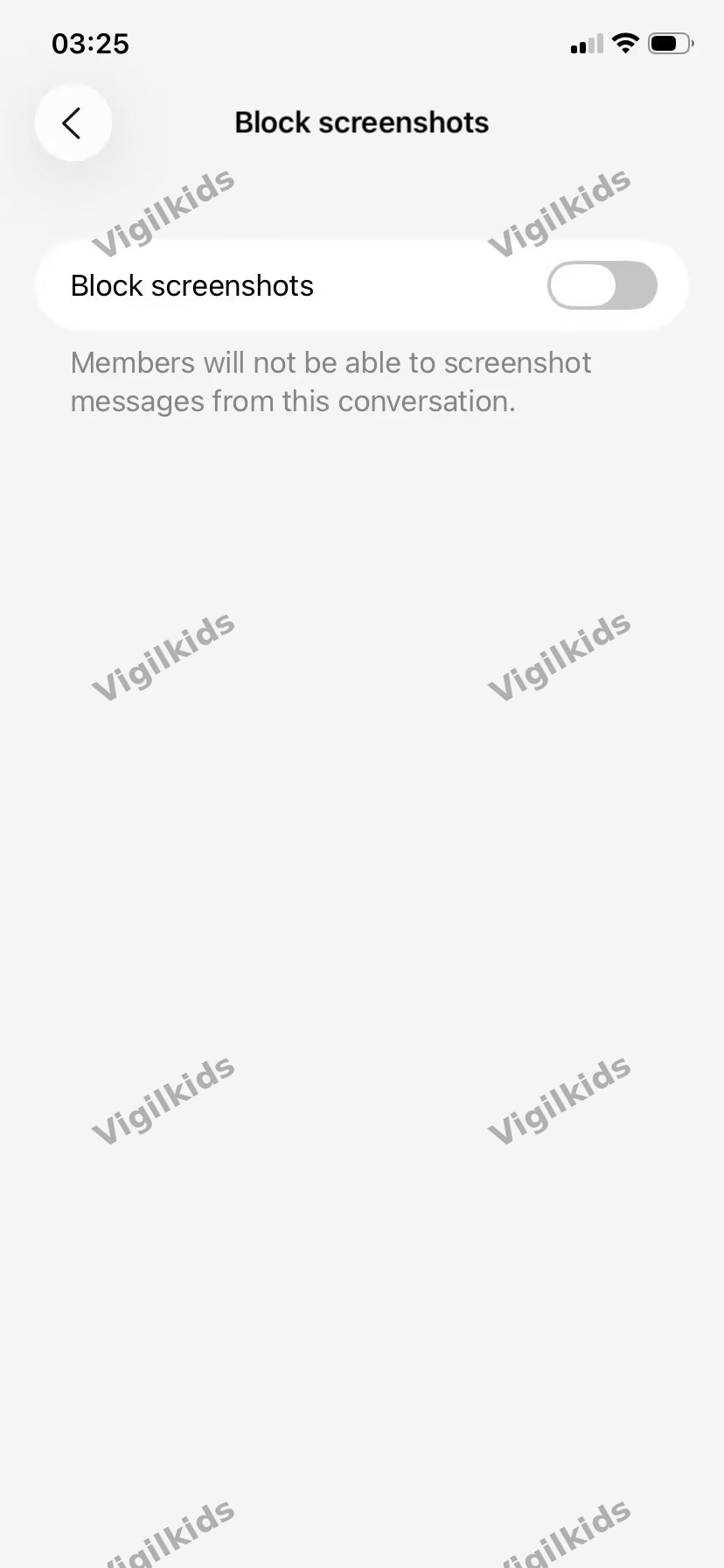
The screenshot-block toggle. Like disappearing messages, this is set per conversation, and it's "Off" by default.
Once enabled, attempting to screenshot the chat — or even view it in the iOS app switcher — surfaces a privacy guard instead of the conversation:
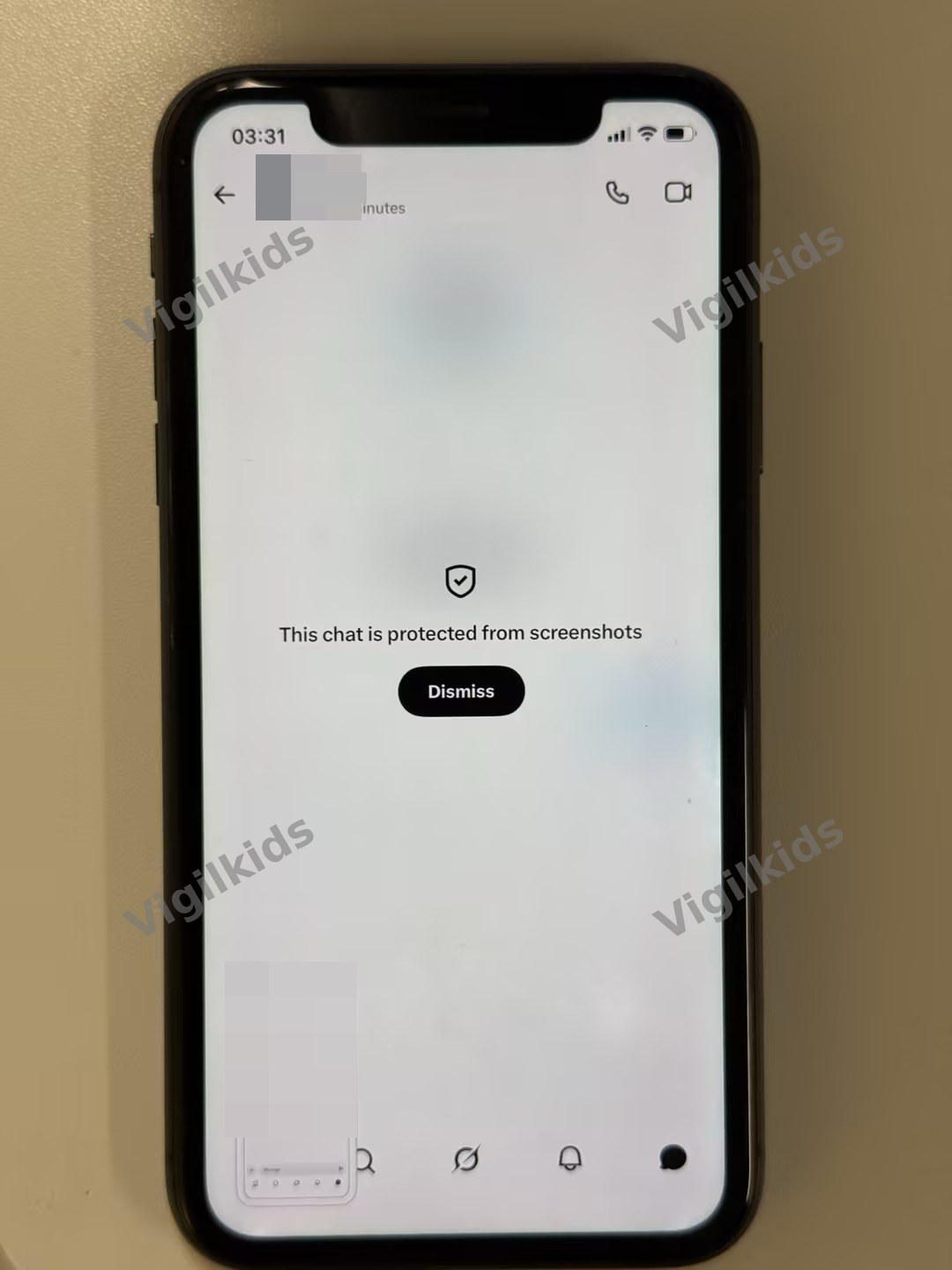
What a blocked screenshot attempt looks like. iOS's screenshot tool produces a black or guarded image; the app switcher hides the chat behind this shield. We confirmed this works as advertised.
 Note
Note
A second device with a camera defeats screenshot blocking instantly. We tested this — photographing the iPhone screen with another phone produced a perfectly readable image. This isn't a flaw, it's a physical limitation, and every "screenshot-proof" messaging app shares it. But it matters for the conversation you have with your teen, because the privacy promise of screenshot blocking is narrower than the marketing suggests.
The cut-both-ways problem: screenshot blocking also prevents teens from documenting harassment or grooming attempts to show a trusted adult later. If your teen is being targeted in XChat, the evidence they bring you is verbal, not photographic.
Voice, video, and group chats
XChat supports end-to-end encrypted voice and video calls. Unlike phone calls, these don't reveal phone numbers — just X usernames.
Encrypted group chats currently support up to 350 members (X has said this will rise to 500), encrypted file and media sharing, and the ability to edit and delete messages for everyone in a conversation. Standard for modern messaging, just with the encryption layer extending to all of it.
The Communities migration is worth flagging here: as X retires its Communities feature, those groups are being funneled into XChat groupchats, with shareable join links that admins can post directly to the timeline. For teens who were already in X Communities, the path of least resistance over the next month is to join those communities' new XChat homes.
The friction wall most users hit first
One thing that doesn't show up in launch coverage but matters for adoption: when you first open XChat, you're often blocked from messaging anyone until both you and the other party have updated to compatible message-permission settings. We hit this immediately when trying to start a conversation with a contact.
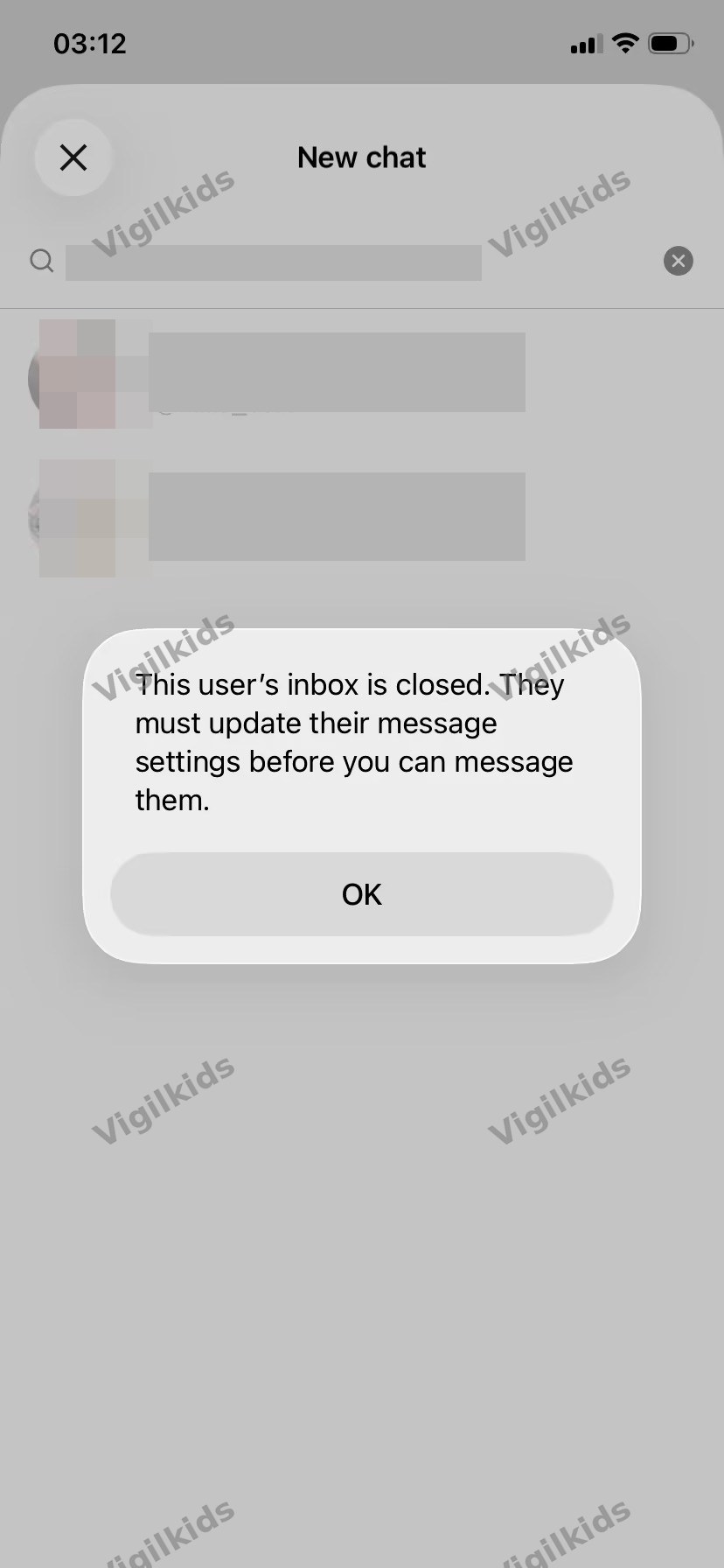
The "inbox is closed" wall. Many users hit this on first try, and a fair number bounce off and stop using the app entirely.
The fix is buried in the message-permission settings, which let you choose who can send you message requests:

Message-permission settings. The default leans restrictive, which is good for unwanted contact — but it also creates the friction described above.
The friction is genuinely useful as a soft brake on stranger contact
"No one" or "Verified users" is a reasonable setting for a teen to keep, and it's the default. Most parents would not need to change this.
Once a teen flips this to "Everyone," the funnel widens significantly
This usually happens because they got tired of the friction or someone they wanted to message couldn't reach them. The X follow graph is asymmetric, so once "Everyone" is set, anyone can follow your teen and DM them through XChat without any approval.
Tips
If your teen is using XChat, "what are your message permissions set to?" is a more useful question than most parents would think to ask. It's one of the few places where a single setting meaningfully changes risk exposure.
What the audits and security researchers actually found
Trail of Bits audit (October 2025) and Mysk follow-up (April 2026)
Trail of Bits, an independent security firm, audited the XChat encryption protocol before launch. The public report confirmed the basic encryption design holds up, but flagged several gaps. As of the standalone-app launch, those gaps remain open, and a fresh analysis published by the security researchers at Mysk on April 25, 2026 — based on inspecting the live app's network traffic — has raised additional questions about whether the end-to-end encryption holds up in practice the way the marketing claims.
Headline issues
- No forward secrecy (yet). Modern encrypted messengers — Signal, iMessage, WhatsApp — automatically rotate encryption keys for each new message session. XChat doesn't do this. X has said forward secrecy is in development, but it has not shipped as of late April 2026. Until it does, an attacker who somehow obtained encrypted message archives plus current keys could read the history.
- Low-entropy PIN protecting backups. The 4-digit PIN protecting key backups on X's servers has been flagged by cryptographer Matthew Garrett and others as too short to resist brute-force attacks under certain conditions.
- No independent key verification. Without a way to verify that the public key you're encrypting to is really your contact's key, the system is theoretically vulnerable to man-in-the-middle attacks where X (or anyone with access to X's infrastructure) could substitute its own keys.
- Metadata isn't encrypted. Who your teen is talking to, when, and conversation timing patterns are all visible to X. The content is encrypted; the relationship graph isn't.
- Privacy-label discrepancy. Despite XChat's "no tracking" marketing, Apple's App Store privacy labels for the app indicate it may collect data including location, contacts, and search history. "No ad tracking inside the app" and "the app collects no data" are different claims — but it's worth knowing.
Reporting limitations
Encrypted messages can't be reported through X's normal abuse-reporting channels because the platform itself can't read them. If your teen receives harassment or grooming attempts inside XChat, the workaround is to report the account on the main X platform rather than the specific message. This is a real limitation on what platform moderation can do for XChat users — and it's compounded by the screenshot-blocking issue described above, since teens often can't document what they're being sent.
How XChat stacks up — and what it means for teens
Now that you understand what XChat does, the next two questions parents typically have: how does it compare to other encrypted messengers your teen might already use, and which features matter most when thinking about teen safety specifically?
XChat vs. Signal, iMessage, WhatsApp
For parents weighing XChat against alternatives their teen might already use, here's a side-by-side look at the four major encrypted messengers in 2026:
| App | Encryption Strength | Forward Secrecy | Account Type | Parent Visibility |
|---|---|---|---|---|
| Signal | Strongest — open-source Signal protocol | Yes | Phone number | Low; phone number on family plan |
| iMessage | Strong on iOS-to-iOS; falls back to SMS | Yes | Apple ID | Medium; Apple Family Sharing + Screen Time |
| Strong — uses Signal protocol | Yes | Phone number | Low; phone number on family plan | |
| XChat | Solid baseline; weaker than peers | No (in development) | X account only | Effectively none |
For a teen who's going to use encrypted messaging one way or another, Signal is the more conservative recommendation purely on technical grounds. XChat's appeal isn't the encryption — it's the integration with X.
What teens find appealing — and the matching risks
Four features make XChat appealing to teens specifically. Each comes with a parallel risk worth understanding:
1. No phone number required. XChat logs in with an X account, which means a teen with an X account can start using XChat without giving anyone — including parents — a phone number or any verification beyond what's already on X. The risk: this is a step away from the visibility phone-number-based apps provide. With WhatsApp or iMessage, a parent at minimum knows the conversation flows through a phone on the family plan. With XChat, that thread doesn't exist.
2. Disappearing messages. Useful for legitimate privacy; also useful for sextortion and coercive content. The dynamic where someone sends a sensitive image trusting it'll be auto-deleted is exactly the dynamic that produces the highest-risk situations for teens. Once an image is sent, the sender has no actual control over what the recipient does with it before it expires — including, as we confirmed, photographing the screen with another device while the message is still visible.
3. Screenshot blocking. Cuts both ways for safety. Prevents casual leaks of screenshots someone shouldn't have taken. Also prevents teens from documenting harassment or grooming attempts in a way they can show a trusted adult later. And it can be defeated with a second camera, so the protection it provides is partial even at its best.
4. X social graph integration. XChat lets your teen DM anyone they're connected to on X — and depending on their message-permission setting, anyone at all. The X follow graph is asymmetric: anyone can follow your teen without permission, and that follow plus an "Everyone" message-permission setting is enough to enable an XChat DM.
XChat for teens at a glance
- Genuine end-to-end encryption baseline
- No ads or in-app tracking
- Restrictive default message permissions
- Per-conversation privacy controls
- Free with no upsells
- No forward secrecy yet
- Low-entropy 4-digit backup PIN
- Effectively zero parent visibility
- Disappearing-message dynamic raises sextortion risk
- Screenshot blocking prevents teens documenting abuse
Making the call as a parent
You understand what XChat does and how it stacks up. The remaining four questions are practical: what can you actually see, when should you allow it, how do you raise it, and what do you do if something goes wrong?
What parents can and can't see
This is the honest answer most articles dance around.
iOS Screen Time can block XChat. Block by app rating (XChat is 17+) or block the specific app directly. Both work.
Family Link on Android is moot — there's no Android version yet, so any "XChat for Android" you see online is fake.
There is no Family Center equivalent inside XChat. X doesn't currently provide guardian-supervised settings for XChat the way Discord does for Family Center. The X main app has no real parental-supervision system either.
Third-party parental tools cannot see XChat content. End-to-end encryption means the content never leaves the device in readable form. Tools that scan messages can't reach into the XChat sandbox. Some tools may detect that XChat is installed and how much time is spent in it, but not what's said.
You can see who your teen is talking to only indirectly. The metadata isn't exposed to parents through any official XChat channel. You'd see X relationships through the main X app, not through XChat specifically.
The honest summary: with XChat, parental visibility into content drops to effectively zero. What's left is conversation, time-management controls, app-installation awareness across the rest of your teen's phone, and whatever signals your teen brings you directly.

VigilKids Pro
For end-to-end encrypted apps like XChat, no parental tool can read content — including ours. Where VigilKids helps is the rest of your teen's phone: real-time monitoring on Whatsapp,Snapchat, Instagram, TikTok, and Discord, plus app-install detection so you know when XChat or anything new shows up.
Should teens use XChat? An age-by-age take
In the parent safety discussions we follow, the same concern keeps coming up: XChat does not look dangerous at first glance, but it gives teens a private space that parents can barely see into. That does not mean every teen should be blocked from using it. It does mean age and maturity matter more than the app’s marketing.
Under 13. Not eligible — X's minimum age is 13, and XChat requires an X account. Don't help them work around it.
Ages 13–15. I'd say not yet. The combination of features that appeal to this age group — no phone number, disappearing messages, screenshot blocking — overlaps almost exactly with the features that increase exploitation risk. Younger teens are also least equipped to recognize the patterns that XChat's design happens to enable. There's no urgent reason a 13-year-old needs an encrypted messaging app integrated with X.
Ages 16–17. Case by case. By this age many teens already use encrypted messaging in some form (iMessage, WhatsApp, Signal) and adding XChat to the mix isn't categorically different. Conditions worth setting:
- 2FA enabled on the X account
- Message permissions kept at "No one" or "Verified users" rather than "Everyone"
- An explicit conversation about the disappearing-message dynamic for sensitive images
- Agreement on what you'd want to know if anything goes wrong
18+. Their decision.
These are guidelines, not rules. A mature 14-year-old whose social life is mostly on X may have a more reasonable case for XChat than an impulsive 17-year-old who's been targeted in scams before. Use judgment.
How to talk to your teen about XChat
If they haven't asked yet, you don't need to bring it up — overemphasizing a new app sometimes accelerates interest in it. If they have asked, or you've seen XChat installed on their device, here are starters that work better than the standard "be careful":
- Step 1. Ask what they want to use it for. "What does XChat do that your other messaging doesn't?" The answer reveals what they actually want — privacy from parents, integration with X friends, novelty. Each one suggests a different conversation.
- Step 2. Talk about disappearing messages specifically. The trust assumption built into them — that what's sent will actually be gone — is the single most important misunderstanding to head off. The recipient can photograph with another device (we verified this works), screenshot via workarounds, or simply remember and use what they saw later. The image only disappears from the app, not from the relationship.
- Step 3. Ask about their message-permission setting. "Is your XChat inbox open to everyone, or just people you follow?" is a question most parents wouldn't think to ask, and it's one of the few places where a single setting meaningfully changes risk exposure.
- Step 4. Agree on what you'd want to know. The same red-flag list that applies to any messaging app: someone trying to move conversations elsewhere, anyone asking for photos, anyone who tells them not to tell their parents, any threats around shared content.
- Step 5. Acknowledge the visibility gap honestly. "I won't be able to see what you send in this app. That means you're going to have to bring me things if they happen, because I literally can't see them." Teens generally respond to honesty about tradeoffs better than to surveillance theater.
Where to get help
If your teen experiences harassment, sextortion, grooming, or has shared images being used against them — in XChat or any other encrypted messenger:
- NCMEC CyberTipline — report.cybertip.org — handles online child exploitation reports, runs Take It Down for minor-image removal across major platforms.
- FBI IC3 — ic3.gov — sextortion cases, especially the financial variant climbing sharply since 2023.
- Take It Down — takeitdown.ncmec.org — image hashing and removal request service.
- Report the X account — even if the encrypted message itself can't be reported, the account can be reported through the main X app.
The encryption that prevents X from helping with content also prevents law enforcement from getting content directly from X. They can get metadata (who messaged whom, when) with appropriate legal process, which is often enough to support an investigation.
FAQ
Q1: Is XChat free?
A: Yes, no in-app purchases for core features. Anyone charging for XChat is running a scam — see our fake apps warning.
Q2: Can my teen use XChat without an X account?
A: No. An X account is required to sign in to XChat — there's no separate XChat-only account option.
Q3: Will there be an Android version?
A: X Corp has not announced one as of late April 2026. Don't trust any "Android XChat" you find online — it's a fake. Sideloaded APKs claiming to be XChat are a known scam vector.
Q4: Is XChat safer than Snapchat?
A: Different threat models. XChat has stronger encryption; Snapchat has more parent-visibility tools (Family Center). Whether one is "safer" depends on what you're protecting against — content leakage versus stranger contact versus parental oversight.
Q5: Can I monitor what my teen sends in XChat?
A: No, not through any current parental control tool — including ours. End-to-end encryption blocks third-party visibility into message content. iOS Screen Time can block the app or limit usage time, but it cannot see inside it.
Q6: What happens if my teen forgets their XChat PIN?
A: They lose their conversation history. The 4-digit PIN is required to recover encrypted messages on a new device or after a reinstall, and there's no recovery path if it's forgotten.
Q7: Does XChat have age verification?
A: Not at sign-up. The 13+ minimum is enforced through the X account itself, which uses self-reported birthdate — a weak control that's easily bypassed.
Q8: My teen has been using Encrypted DMs in the X app. Does that move to the new XChat app?
A: Yes. Existing encrypted conversations sync to the standalone XChat app when they log in. The standalone app is functionally the same encrypted system in a dedicated app.
Q9: Can XChat work on Wi-Fi only?
A: Yes, no cellular service required for messaging. The app uses internet over either Wi-Fi or cellular.
Q10: My teen got an "inbox is closed" error trying to message someone. What does that mean?
A: The other party hasn't yet updated their XChat message-permission settings to allow incoming requests. There's no fix from your teen's side — the other person has to change their setting. This friction is one of the more common reasons new XChat users bounce off the app in the first week.
Q11: How big can XChat group chats be?
A: Currently 350 members; X has said this will rise to 500. With X retiring its Communities feature, expect groupchats to absorb more of that activity over the coming weeks.