

Looking for reliable GPS tracking software for Android or a track and trace app that actually works? In 2025, location tracking isn’t just about finding a lost phone — it’s about staying connected, keeping your family safe, and maintaining control over your data.
Over the past few months, I’ve tested both mainstream and self-hosted solutions—from family favorites like Life360 to open-source tools such as Traccar and OwnTracks. In this post, I’ll break down what actually works in 2025, what protects your privacy, and which apps are worth your time.
- Table Of Contents
- PART 1. Complete Comparison: GPS Tracking Apps for Android
- PART 2. Best GPS Tracking Apps Explained
-
1. VigilKids (Recommended)

- 2. Life360
- 3. GeoZilla
- 4. Find My Kids
- 5. iSharingSoft
- 6. Google Family Link
- 7. Apple Find My (Find My iPhone)
- 8. Google Maps (Location Sharing)
- 9. WhatsApp Live Location
- 10. Glympse
- Part 3. Self-Hosted GPS Tracking Solutions
PART 1. Complete Comparison: GPS Tracking Apps for Android
Broadly speaking, GPS tracking apps fall into two categories: family-friendly apps (with alerts, history, and cross-platform support) and self-hosted tools (designed for privacy and control on your own server). To help you quickly understand the landscape, here’s a comparison table with the key features—and our top recommendation, VigilKids, highlighted:
1.Family-Oriented / Ready-to-Use Apps
| App / Tool | Platform | Key Features | Best For |
|---|---|---|---|
| VigilKids (Recommended) | Android & iOS | AI alerts, real-time GPS, location history, screen & app monitoring, keyword detection | Parents who want all-in-one child safety with smart monitoring |
| Life360 | Android & iOS | Real-time tracking, location history, battery alerts, geofencing | Mainstream family tracking, full-featured |
| GeoZilla | Android & iOS | Location history, family safety alerts | A lighter alternative to Life360 |
| Find My Kids | Android & iOS | SOS button, child-focused tracking, location history | Families with younger children |
| iSharingSoft | Android & iOS | Lightweight, simple family sharing | Users looking for a simpler Life360-style app |
| Google Family Link | Android (limited iOS) | Parental controls, app management, device usage tracking | Parents managing device usage, not real-time tracking |
| Apple Find My (Find My iPhone) | iOS (web access for others) | Locate Apple devices, lost mode support | Families already in the Apple ecosystem |
| Google Maps Location Sharing | Android & iOS | Temporary or continuous location sharing, simple to use | Quick, short-term sharing |
| WhatsApp Live Location | Android & iOS | Instant live location (15 min–8 hrs) | Kids walking home, temporary visibility |
| Glympse | Android & iOS | Short-term real-time sharing | Travel or meet-ups, not long-term tracking |
2.Self-Hosted / DIY Solutions (NAS & Server Setups):
| App / Tool | Platform | Key Features | Best For |
|---|---|---|---|
| Home Assistant + Companion App | Android & iOS | Self-hosted, privacy-focused, location reporting | Users already running Home Assistant |
| Nextcloud PhoneTrack | Android & iOS | Periodic location uploads, detailed history | Nextcloud users |
| OwnTracks | Android & iOS | Open-source, lightweight, server integration | Privacy-conscious DIY users |
| Traccar | Android & iOS | Powerful GPS tracking, vehicle/phone support, alerts, history | NAS/server enthusiasts, fleet management |
| Dawarich | Android & iOS | New self-hosted project, simpler deployment | Techies wanting to try something new |
PART 2. Best GPS Tracking Apps Explained
Now that you’ve seen the overall comparison, let’s break down each GPS tracking app in more detail. Below, we review the top options one by one—covering their key features, pros and cons, and practical tips—so you can decide which solution best fits your family’s needs.
1. VigilKids (Recommended)
Editor’s Rating: ⭐⭐⭐⭐⭐
VigilKids stands out as a next-generation GPS tracker with built-in AI safety features. It goes beyond location history and real-time maps by giving parents keyword alerts, app usage insights, and geofencing notifications. Unlike the lighter apps discussed on Reddit, VigilKids focuses on both physical safety (GPS) and digital safety (online activity), making it an all-in-one solution.
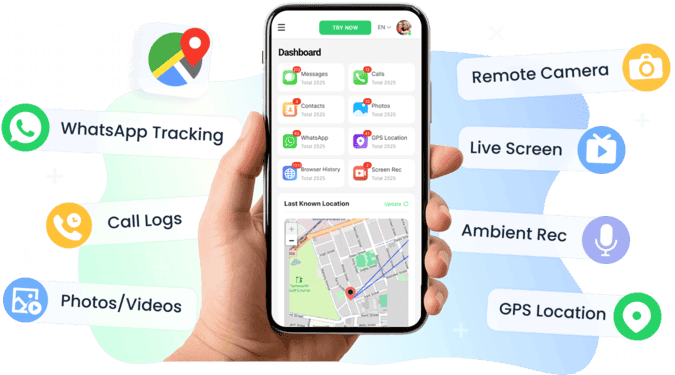
- 1. Accurate real-time location and movement history
- 2. Monitors WhatsApp messages, including texts, media, and voice notes
- 3. Tracks SMS and call history for complete communication visibility
- 4. Geofencing that actually works reliably (a common complaint about lighter apps on Reddit)
- Requires subscription for full feature set
- May feel “too advanced” for parents only wanting casual location sharing
Tips:
- Use VigilKids’ geofencing to get notified the moment your child arrives at school or home, without needing to check the app constantly.
2. Life360
Editor’s Rating: ⭐⭐⭐⭐☆
Life360 is the most frequently mentioned family tracker on Reddit. Parents appreciate its ease of setup, driving safety reports, and battery status alerts. Several Reddit users say it “works great for the whole family,” but others complain about constant notifications and the sense of being overly monitored.
- Widely trusted; multiple Reddit users confirm stable long-term use
- Driving safety reports and crash detection (praised by families with teens)
- Battery status visibility across devices
- Smooth cross-platform support (Android + iOS)
- “Too many alerts” was a repeated complaint on Reddit
- Some kids dislike it, calling it “stalkerish” in posts
- Premium safety features require paid plan
Tips:
- Adjust notification frequency—Reddit users recommend limiting alerts to only school/home zones to avoid overwhelming the family.
3. GeoZilla
Editor’s Rating: ⭐⭐⭐⭐☆
GeoZilla came up as a lighter alternative to Life360. Reddit users describe it as “similar but less intrusive,” with fewer notifications and a cleaner interface. It tracks real-time location, keeps a history log, and supports family safety alerts, though it lacks the advanced driving insights Life360 provides.
- Simple, user-friendly interface praised on Reddit
- Provides history logs without feeling overbearing
- Cross-platform, easy to invite family members
- Lighter and less notification-heavy than Life360
- Limited driving reports (unlike Life360)
- Some Reddit users noted the free plan is restrictive
- Smaller community means fewer shared tips/resources
Tips:
- Use GeoZilla’s “check-in” feature (highlighted by Reddit parents) to quickly confirm your child’s safety instead of monitoring them constantly.
4. Find My Kids
Editor’s Rating: ⭐⭐⭐⭐☆
Find My Kids is purpose-built for younger children. Reddit discussions point out its SOS button and child-friendly interface as key advantages. Parents like that it pairs well with kids’ smartwatches, making it more practical for elementary school–age children.
- SOS button for emergencies (often mentioned positively on Reddit)
- Designed with child safety as the main priority
- Location history + app monitoring features
- Works across Android & iOS, and supports smartwatches
- Some features require the child to cooperate (kids can ignore notifications)
- Subscription required for advanced tools
- Older kids may find it restrictive
Tips:
- Pair with a child smartwatch (common Reddit recommendation) for more reliable GPS updates when kids forget their phones.
5. iSharingSoft
Editor’s Rating: ⭐⭐⭐⭐☆
iSharingSoft was recommended by Redditors as a lightweight alternative to Life360. Users liked its smoother performance and simpler design compared to feature-heavy apps. It supports real-time location sharing and customizable alerts, though it doesn’t have extras like driving reports or keyword monitoring.
- Described on Reddit as “smooth and lightweight”
- Real-time GPS tracking that “just works”
- Customizable location alerts without overwhelming notifications
- Easier learning curve than Life360
- Fewer advanced features (no driving safety, no app monitoring)
- Smaller user base compared to Life360
- Free version has limitations
Tips:
- Set geofences for only the most important places (school, home) to keep it simple—this was a common Reddit strategy to avoid unnecessary alerts.
6. Google Family Link
Editor’s Rating: ⭐⭐⭐⭐☆
Google Family Link is Google’s official parental control app for Android. Reddit users often mention it as a solid choice for managing app usage and screen time, though its GPS tracking is not as strong as dedicated apps. Some parents like that it’s free and built-in, while others complain it doesn’t fully support iPhones.
- Free and official Google solution
- Useful for app management and screen time control (highlighted in Reddit threads)
- GPS tracking available, though not as advanced
- Strong Android integration
- Limited support for iOS—Reddit users noted it can’t fully manage iPhones
- No advanced driving or geofencing reports
- Location tracking less accurate than Life360/Find My Kids
Tips:
- Best used for younger kids with Android phones where parents want both GPS + app control.
7. Apple Find My (Find My iPhone)
Editor’s Rating: ⭐⭐⭐⭐☆
Apple’s Find My service is excellent for locating lost iPhones and sharing real-time location within the Apple ecosystem. Reddit users point out it’s reliable, but only convenient if the whole family uses iOS. Parents with Android devices may struggle, since they must log in via iCloud’s website.
- Built-in for iPhone users, no setup needed
- Accurate GPS and lost mode
- Trusted within the Apple ecosystem
- Can be accessed via iCloud.com
- Reddit parents note it’s awkward for Android users
- Not designed for family tracking across platforms
- Lacks extras like geofencing notifications
Tips:
- Works best when both child and parents use Apple devices—otherwise combine with another cross-platform app.
8. Google Maps (Location Sharing)
Editor’s Rating: ⭐⭐⭐⭐⭐
Redditors often recommend Google Maps’ location sharing as the simplest cross-platform solution. It allows temporary or continuous live location sharing, and users appreciate that it’s free and already installed. Parents mention it’s great for short-term scenarios, like when a child is walking home, but it doesn’t offer history logs or geofencing.
- Free, built-in on Android and iOS
- Temporary or ongoing live location sharing
- Intuitive interface; strong navigation features
- Shows battery level while sharing (praised in Reddit posts)
- No location history or parental alerts
- ETA can be inaccurate in heavy traffic
- Kids can easily disable sharing
Tips:
- For reliability, Reddit users recommend enabling high-accuracy GPS mode to keep updates consistent.
9. WhatsApp Live Location
Editor’s Rating: ⭐⭐⭐⭐☆
WhatsApp Live Location is a lightweight option mentioned by Reddit users as useful for temporary check-ins. A child can share their location for 15 minutes, 1 hour, or up to 8 hours. Parents appreciate that it’s simple and transparent, since kids control the sharing. However, it lacks history tracking and can’t be automated.
- Built into WhatsApp, no extra apps required
- Temporary sharing is flexible (15 min–8 hrs)
- Cross-platform (Android & iOS)
- Reddit parents liked it for walking-home scenarios
- No history logs or geofencing
- Kids can stop sharing anytime
- Requires trust and cooperation
Tips:
- Encourage your child to set sharing before leaving school—Reddit parents found this works well for peace of mind without over-monitoring.
10. Glympse
Editor’s Rating: ⭐⭐⭐⭐☆
Glympse is another short-term GPS sharing tool highlighted on Reddit. It’s designed for temporary location sharing, often used for meetups or travel. Parents note it’s easy to send a Glympse link to track someone’s trip in real-time, but it doesn’t offer family-oriented features like alerts or history.
- Quick, no-login-needed location sharing
- Works via link—recipients don’t need the app
- Great for short trips or events
- Clean, simple interface
- No history, alerts, or advanced tracking
- Reddit users say it’s not suitable for long-term family monitoring
- Relies on child remembering to share link
Tips:
- Use Glympse for occasional travel check-ins (e.g., sports events, field trips) rather than daily tracking.
Part 3. Self-Hosted GPS Tracking Solutions
While family apps like Life360 or Google Maps are quick to set up, many Reddit users mentioned they prefer self-hosted tools for privacy and control. These DIY solutions can run on a NAS, server, or even a Raspberry Pi, letting you own your data while still tracking devices in real time. If you’re comfortable with technical setups, these options may be more appealing.
11. Home Assistant + Companion App
Editor’s Rating: ⭐⭐⭐⭐☆
Home Assistant is an open-source smart home platform, and with its companion app, it can also report GPS locations. Reddit users noted it works well once integrated but requires effort to set up. Families already running Home Assistant praised it for combining GPS with home automations.
- Self-hosted and private
- Integrates GPS with smart home routines
- Stable once configured (per Reddit feedback)
- Free and open-source
- Setup complexity is high for beginners
- Requires running Home Assistant 24/7
- Occasional location reporting bugs
Tips:
- Use GPS data to trigger home automations—e.g., unlocking doors or turning on lights when your child arrives.
12. Nextcloud PhoneTrack
Editor’s Rating: ⭐⭐⭐⭐☆
Nextcloud PhoneTrack adds GPS logging to the Nextcloud ecosystem. Redditors mentioned that even if they only use this feature, it’s “worth setting up” for precise history logging and timed reporting.
- Detailed history tracking
- Works with apps like OwnTracks
- Integrates with Nextcloud storage/collaboration
- Praised on Reddit as “exactly how tracking should work”
- Full Nextcloud setup required
- Overkill if you only need GPS
- Installation may challenge non-technical users
Tips:
- Best for families already using Nextcloud, so GPS integrates with their private cloud services.
13. OwnTracks
Editor’s Rating: ⭐⭐⭐⭐☆
OwnTracks is a lightweight, open-source GPS app often described on Reddit as “simple and just works.” It gives you control by letting you share locations through your own server or an MQTT broker.
- Lightweight and stable
- Open-source and privacy-first
- Works on Android & iOS
- Can integrate with Traccar or Nextcloud
- Needs server setup for best results
- Lacks built-in family features (no SOS, alerts)
- Interface is basic compared to Life360
Tips:
- Pair with Traccar for a more complete solution—many Reddit users recommend this combo.
14. Traccar
Editor’s Rating: ⭐⭐⭐⭐⭐
Traccar is a powerful open-source GPS tracking platform. Redditors said it works well for both vehicles and phones, though one user noted at first they could only see live position until history logging was configured.
- Supports many devices and protocols
- Detailed history logs and alerts
- Runs on NAS, VPS, or home server
- Described as “very stable” on Reddit
- Complex setup compared to OwnTracks
- Overkill for casual family use
- Needs configuration for full history features
Tips:
- Use if you want enterprise-level tracking for multiple devices and don’t mind server setup.
15. Dawarich
Editor’s Rating: ⭐⭐⭐☆
Dawarich is a newer self-hosted project mentioned on Reddit as still being in development. Users said it already “does the job,” but it lacks the maturity of Traccar or OwnTracks. Its main appeal is simpler deployment.
- Easier setup than Traccar/Nextcloud
- Promising open-source design
- Confirmed on Reddit to be functional
- Lightweight for home use
- Early-stage project; missing features
- Smaller community, limited docs
- May not be reliable for critical use
Tips:
- Good for experimenting—choose Dawarich if you want a lightweight test project, but not for mission-critical tracking.
Conclusion
Choosing the right GPS tracking app depends on what matters most to you. If you want all-around protection, VigilKids is a solid choice, combining GPS tracking with AI alerts and app monitoring. For simpler needs, Google Maps or Life360 work great. Ultimately, the best tracker is the one that keeps your family connected and safe—without sacrificing trust or privacy.