
Let’s be honest — YouTube on TV isn’t what it used to be. Not long ago, you could find little tricks to dodge those long ad breaks. Maybe pressing the settings button on your remote, maybe reloading the video — and poof, the ad would disappear. But in 2025, things feel different. For many viewers, unskippable 50–90 second ads are now the norm, and those "About this ad" options don’t really help anymore.
If you’ve noticed ads popping up every 10–12 minutes in long videos, almost like traditional cable TV, you’re not alone. Reddit threads are full of frustrated users sharing their pain: Xbox players stuck watching multiple unskippable breaks, Samsung TV owners hunting for workarounds, and even TCL users realizing the old "return button" trick doesn’t always work.
Many are now asking the same question: why can’t I skip ads on YouTube TV anymore? It’s become one of the most searched frustrations among users this year — a clear sign that YouTube’s ad system on smart TVs has evolved to make skipping harder than ever. So why exactly has YouTube made skipping ads tougher, and is there still any way around it in 2025?
Part 1. What Changed in 2025 — And Why YouTube Is Doing This
The simple truth? It’s all about money.
YouTube is technically "free," but ads are what keep the platform running. And when it comes to TVs, those ads are even more valuable. A bigger screen means more attention, and advertisers are willing to pay a premium to reach viewers relaxing on the couch rather than scrolling on their phones.
At the same time, YouTube is pushing Premium subscriptions harder than ever. By making ads longer and harder to skip, the platform creates extra pressure for frustrated viewers to upgrade. This isn’t only about Google’s bottom line — creators also share ad revenue, so YouTube benefits on both sides.
From a technical standpoint, the TV app has turned into a testing ground for stricter ad enforcement.
-
The familiar "Stop seeing this ad" or "Block ad" options have disappeared in many regions, leaving only a simple "Report" button.
-
YouTube now uses server-side ad insertion (SSAI), which bakes ads directly into the video stream. That makes quick tricks — like reloading the video or hitting a remote shortcut — almost useless.
-
On top of that, tighter account and device tracking ensures that once ads are scheduled, they’re nearly impossible to avoid.
In short, the casual hacks that once worked are being shut down one by one.
Part 2. Why Skipping Ads Feels Impossible in 2025
For years, TV viewers shared little tricks to get around YouTube ads. Some of them worked — at least for a while. But in 2025, most of these methods have either been patched or become too unreliable.
Old Workarounds That Don’t Work Anymore
- Settings menu trick (TCL and some Android TVs): Pressing the settings button → opening "All Settings" → hitting return used to clear ads. Now it’s mostly patched, working only on rare older versions.
- Exit and reload: Leaving a video and re-entering sometimes skipped ads, but with server-side ad insertion this no longer helps.
- Domain hacks (like using "yout-ube" instead of "youtube"): Occasionally useful on browsers, but on TV apps they’re ineffective.
What Viewers Are Seeing Now
- Longer ads: Unskippable 50–90 second spots are common, sometimes back-to-back.
- Frequent breaks: Long videos often get an ad block every 10–12 minutes, making it feel like cable TV.
- Mismatch with promises: Messages like "fewer ad breaks" don’t line up with reality.
- Fewer controls: Options like "Stop seeing this ad" or "Block ad" have disappeared, leaving only "Report."
The Core Issue
On TV apps, YouTube has far tighter control:
- Ads are inserted server-side, baked directly into the video stream
- Account and device tracking is stricter
- Client-side loopholes that once worked are now shut down
The bottom line: old tricks don’t hold up, and the ad experience on TV in 2025 is tougher than ever to escape.
Part 3. How to Skip YouTube TV Ads on Different Devices (2025 Guide)
Not every TV runs the same operating system, which means the tools and workarounds vary. Here’s what users are reporting across the most common platforms:
Android TV / Google TV / Fire TV
-
SmartTube / SmartTubeNext: A popular third-party YouTube client with built-in ad blocking and SponsorBlock support.
-
APK sideloading: Installation is straightforward for those familiar with sideloading apps, but it does carry account and security risks.
-
User verdict: Still the most effective option if you’re in the Android ecosystem.
Samsung Tizen (Samsung Smart TVs)
-
Community patches: Tools like TizenBrew exist, but they’re complicated to install and often break after updates.
-
Reliability: Limited and frustrating; requires patience and technical know-how.
LG webOS
-
Sideloading possible but not user-friendly.
-
Major drawback: Many apps need to be re-installed every time you reboot, making it impractical for daily use.
Roku
-
No native ad-blocking support.
-
Workaround: Some users rely on VPNs to connect through regions with fewer ads.
-
Limitations: Not a stable or long-term fix.
Xbox / PlayStation
-
Native YouTube apps: Ads are unavoidable.
-
Alternative: Use built-in browsers (Edge, Firefox, Brave) to open YouTube’s web version.
-
Trade-off: Fewer ads, but clunky navigation and occasional compatibility issues.
Part 4. Best YouTube TV Ad-Skipping Alternatives in 2025
Even though skipping ads is tougher than ever, viewers still try different methods to cut down interruptions. Below are the most common alternatives people use, along with their strengths and drawbacks.
Third-Party Clients (SmartTube / SmartTubeNext)
These apps are built as unofficial replacements for the YouTube TV app.
- Can completely block ads
- Includes SponsorBlock to skip in-video sponsorships
- Interface looks and feels close to the official app
- Not officially supported and may break YouTube’s terms of service
- Logging into your account involves some privacy and security risks
Browsers (Brave / Firefox / Edge)
Instead of the YouTube TV app, some users switch to browsers to watch.
- On desktop, ad-block extensions make browsing nearly ad-free
- On consoles or smart TVs, ad load is often lighter than on the native app
- Navigation with a remote or game controller is clunky
- Occasional playback glitches and slower performance
VPN or Region Switching
Another popular approach is changing your location virtually.
- Certain regions naturally serve fewer or no ads
- Works across devices since it filters at the network level
- Results are inconsistent and can change overnight
- May affect recommendations, region-locked content, or video quality
- Falls into a legal or policy gray zone depending on the provider
Network-Level Blocking (e.g., Pi-hole)
Some tech-savvy users block ads across their home network.
- Stops many ad domains on multiple devices at once
- Limited impact on YouTube TV since ads are server-side
- Works better for websites than smart TV apps
Overall, SmartTube remains the strongest workaround for Android-based systems, while browsers and VPNs serve as partial fixes on other platforms. Each option has trade-offs, so it’s about choosing the one that best fits your setup.
Part 5. Family Solution: Block YouTube Ads for Your Kids
For parents, the problem isn’t just about annoying ads — it’s about what kids might be exposed to on YouTube. Ads can be distracting, push unwanted products, or even lead to inappropriate content. That’s where VigilKids comes in.
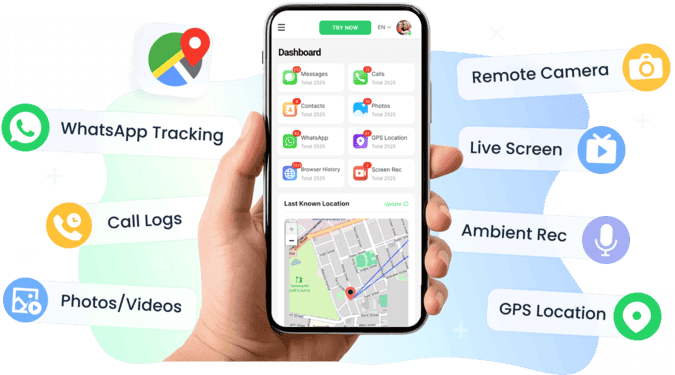
With VigilKids, you can:
- Block the YouTube app or website entirely on your child’s device, removing both ads and harmful videos in one step.
- Receive alerts when your child tries to access risky or age-inappropriate content.
- Stay informed, not intrusive — the app is designed to give parents peace of mind without constant over-monitoring.
In other words, while most solutions focus on skipping ads, VigilKids helps parents go one step further: making sure kids don’t even run into the ads or unsafe videos in the first place.
YouTube TV Ads 2025 — Frequently Asked Questions
Even with all the changes, people still have the same burning questions about YouTube ads on TV. Here are the most common ones answered.
Q1: Why are ads on YouTube TV longer and more frequent now?
A: Because YouTube shifted to server-side ad insertion (SSAI), ads are baked directly into the video stream. This makes them harder to skip and allows for longer unskippable breaks. TV ads also generate higher revenue, so YouTube has every reason to increase exposure.
Q2: Can I block ads on Xbox or PlayStation?
A: Not reliably. The native YouTube apps on consoles don’t support ad-blocking. The only workaround is to open YouTube through the built-in browser (Edge, Firefox, Brave), which may show fewer ads — but navigation is clunky.
Q3: Is SmartTube safe to use?
A: SmartTube and SmartTubeNext are popular, but they are unofficial apps. Many users report no issues, but logging into your Google account always carries some risk. If you use it, do so with caution and understand it may break YouTube’s terms of service.
Q4: Do Brave or Firefox really help with YouTube ads?
A: Yes, but mostly outside the TV app. On desktop, ad-block extensions paired with Brave or Firefox work almost flawlessly. On smart TVs or consoles, using the browser may reduce ads compared to the native app, but the experience isn’t as smooth.
Q5: Does using a VPN actually remove YouTube ads?
A: Sometimes. Connecting through regions with fewer ads (like Albania, according to user reports) can reduce ad load. But it’s inconsistent, may affect video recommendations, and can change without notice.
Q6: Does the "settings menu trick" still work?
A: Not really. It was briefly effective on some TCL and Android TVs, but most users report it has been patched. At best, it works occasionally on older firmware, but you shouldn’t count on it.
Conclusion: Living With YouTube TV Ads in 2025
Ads on YouTube TV are here to stay — and likely to get stricter over time. But with the right mix of third-party apps, browser workarounds, or parental control tools, you can still take back a little control over how you and your family experience YouTube on the big screen.